A little question... [comma or dot]
-
Hello, I apologize if this is not the right place to send a request, but my english in not so good to understand all the posts of the forum.
I have a little question about SU: when I enter a quote for a line, rectangle etc. I might use the comma key in the keyboard. It's possible to use the point key in the numeric keypad instead the comma? (like this... 10.5 instead 10,5)
I hope that some moderator (thanks in advance....) will put in the right place this post and that you understand my language.... Thanks to all.... -
@icoff said:
when I enter a quote for a line, rectangle etc. I might use the comma key in the keyboard. It's possible to use the point key in the numeric keypad instead the comma? (like this... 10.5 instead 10,5)
I hope that some moderator (thanks in advance....) will put in the right place this post and that you understand my language.... Thanks to all....sort of confused as dave is but since you mentioned rectangle, i'm going to assume you're talking about the comma which separates the two dimensions... in which case, no, you have to use the comma..
the decimal point is used for dimensions
otherwise, 15.25.5 could mean a few different things (15 1/4 x 5.. or 15 x 25 1/2) etc..
-
I think that Federico meant that in SU us italians (europeans?) have to type in the vcb the comma in dimensions, angle or, for example, the semicolon to separate the two dimensions of a rectangle. In autocad is always a dot instead.
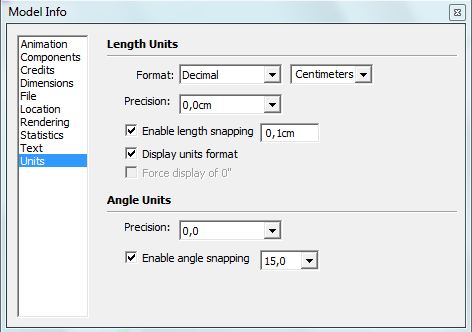
He asked if it's possible to use the dot for dimensions instead of the comma.
Well you can't change it in SU, but since some plugins allow you to use both dot or comma (i.e Fredo's tools on surface) for dimensions maybe it's feasible with some ruby. -
Indeed the VCB ("Measurement box") input is OS specific. For languages (of the OS) where the decimal separator is the comma, you must use that and (in native) SU, there is no way to change that behaviour. And to separate two measurements, you need to use the semicolon instead of the comma.
A rectangle on an English OS would be 4.5,6.7 but on other OS's (like my Hungarian) it is 4,5;6,7
-
For one time English OS is in the right decimal way!

In Windows System (PC) you can choose is you want Decimal Point as a "." or as a "," !

See Regional Options Parameter -
Thank to all for the replies...
It seems that is not possible to change this option. To specify better my question this is a picture of what I want....
when I enter a dimension, in this case 10,8 I must use the comma as decimal separator...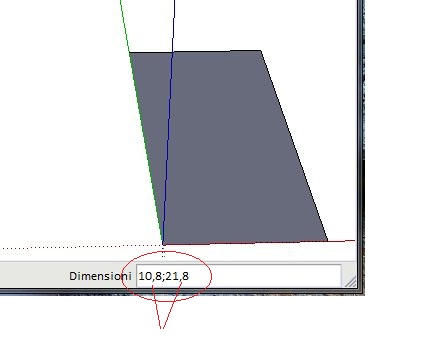
I' don't know for you but for me it woult be more easy to use the point in the numeric keypad....No problem... I keep on in this way....

-
The numeric keypad prints a comma for me. I know this is s constant issue as Jean Lemire (our French moderator - and also a beta tester of SU) constantly keeps reporting a bug when his keyboard puts a dot instead of a comma when using the numeric keypad...
Well, anyways... i really seems to be something on the OS side...
-
I have found a solution for my problem....

Searching in Internet I have found a little program that change the dot with comma!!!!
Realy simply!!! Now I can enter my dimension from the numeric keypad.....
If there is someone interested I can put the link where this program is available for free... -
@gaieus said:
on other OS's (like my Hungarian) it is 4,5;6,7
ugh.. that'd be enough to make me quit using sketchup

@icoff, in case you missed this, the english version of sketchup doesn't act this way and will let you enter the numbers in the manner you're asking.. so, you seem to read/write english well enough -- maybe switch to that version ?

[edit] oh.. i see you've found a solution… does that change take effect system wide? that could be a problem too i think..
-
@unknownuser said:
the english version of sketchup doesn't act this way and will let you enter the numbers in the manner you're asking..
Well Jeff, it's OS (language) related not SU's version (language) related. I have an english version of SU and I have to use comma and semicolon.
-
@massimo said:
Well Jeff, it's OS related not SU's version related. I have an english version of SU and I have to use comma and semicolon.
Indeed. The OS "decides". And it is buggy as hell - and no matter that in each new beta all non-English users we try to get them to do something; they never change anything.
An example of the glitch why it is completely unusable:
You try to move something entering 3D coordinates as per the method posted here:
http://support.google.com/sketchup/bin/answer.py?hl=en&answer=94863Now for me to move an entity to the origin, I would need to enter these values to the VCB:
[0;0;0]But to enter either the
[]brackets or the semicolon;I need to press Ctrl+Alt - and Ctrl for Move means to copy (and clears all the entry I have entered so far) so I am there get f#&@@ked and cannot use the tool which should be something basic. -
@massimo said:
Well Jeff, it's OS (language) related not SU's version (language) related. I have an english version of SU and I have to use comma and semicolon.
ouch!
i've seen these topics before (the comma topics) but never engaged or read enough to get the details..
now that i have, i guess all i can do is say "I feel bad for you lot!" -
@gaieus said:
@massimo said:
An example of the glitch why it is completely unusable:
You try to move something entering 3D coordinates as per the method posted here:
http://support.google.com/sketchup/bin/answer.py?hl=en&answer=94863Now for me to move an entity to the origin, I would need to enter these values to the VCB:
[0;0;0]But to enter either the
[]brackets or the semicolon;I need to press Ctrl+Alt - and Ctrl for Move means to copy (and clears all the entry I have entered so far) so I am there get f#&@@ked and cannot use the tool which should be something basic.ok then.. i guess i'll say "I feel bad for you… AND… hahahahahah "
-
@unknownuser said:
="Jeff Hammond@icoff, in case you missed this, the english version of sketchup doesn't act this way and will let you enter the numbers in the manner you're asking.. so, you seem to read/write english well enough -- maybe switch to that version ?
[edit] oh.. i see you've found a solution… does that change take effect system wide? that could be a problem too i think..
Hi Jeff, I know that the english version probably work like I wish, but my english is not so good to work with a program like SU..... and secondly, as Gaieus said, is a ploblem of SO. Indeed I can change in the preferences if I want the comma of the dot as decimal separator but don't change the key in the keypad....
With this little program I have changed only this key. I try all the other letters and simbols and all works fine....
-
@unknownuser said:
@gaieus said:
@massimo said:
An example of the glitch why it is completely unusable:
You try to move something entering 3D coordinates as per the method posted here:
http://support.google.com/sketchup/bin/answer.py?hl=en&answer=94863Now for me to move an entity to the origin, I would need to enter these values to the VCB:
[0;0;0]But to enter either the
[]brackets or the semicolon;I need to press Ctrl+Alt - and Ctrl for Move means to copy (and clears all the entry I have entered so far) so I am there get f#&@@ked and cannot use the tool which should be something basic.ok then.. i guess i'll say "I feel bad for you… AND… hahahahahah "
Not a big deal if you get used. Btw if you were European your signature would be "commacommacomma"?

-
@massimo said:
Not a big deal if you get used. Btw if you were European your signature would be "commacommacomma"?
^ LOL
(and yeah.. I'm just being whiney about the comma thing on purpose.. (maybe venting some fiberglass frustration here).. i'm sure i'd get used to it and be just fine with it))
-
commacommacomma chameleon....he comes and goes.... everybody now....
-
The only solution i could find until now ia a simple freeware key-mapper http://www.inchwest.com/mapkeyboard.htm
It solved my point to komma problem on the num-pad in Sketchup ,but also in Google spreadsheet.Bep
-
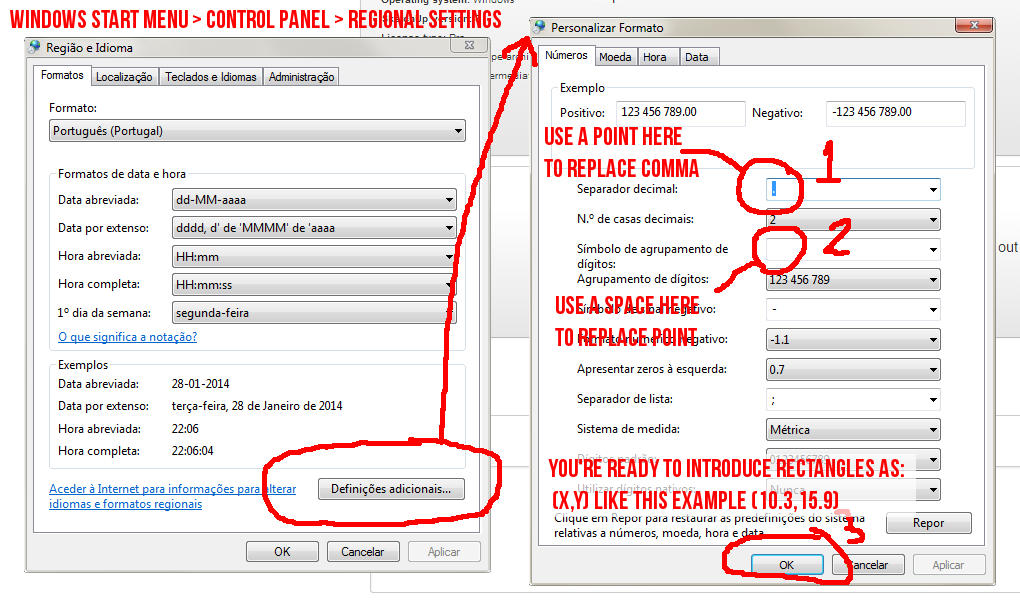
Guys manipulate your windows the way it wants to manipulate you. You can also do this on macs.
Sorry for Portuguese control panel, it happens I was born in a comma/dot+comma world.








Hello! It looks like you're interested in this conversation, but you don't have an account yet.
Getting fed up of having to scroll through the same posts each visit? When you register for an account, you'll always come back to exactly where you were before, and choose to be notified of new replies (either via email, or push notification). You'll also be able to save bookmarks and upvote posts to show your appreciation to other community members.
With your input, this post could be even better 💗
Register Login


Advertisement