sketchucation logo sketchucation
    • 登入
    Oops, your profile's looking a bit empty! To help us tailor your experience, please fill in key details like your SketchUp version, skill level, operating system, and more. Update and save your info on your profile page today!
    🔌 Smart Spline | Fluid way to handle splines for furniture design and complex structures. Download

    Disappearing toolbar under OSX?

    已排程 已置頂 已鎖定 已移動 SketchUp Discussions
    sketchup
    36 貼文 6 Posters 1.5k 瀏覽 6 Watching
    正在載入更多貼文
    • 從舊到新
    • 從新到舊
    • 最多點贊
    回覆
    • 在新貼文中回覆
    登入後回覆
    此主題已被刪除。只有擁有主題管理權限的使用者可以查看。
    • thomthomT 離線
      thomthom
      最後由 編輯

      I have a user that cannot find the toolbar for my plugin any more. It was been working and visible until a couple of days ago.

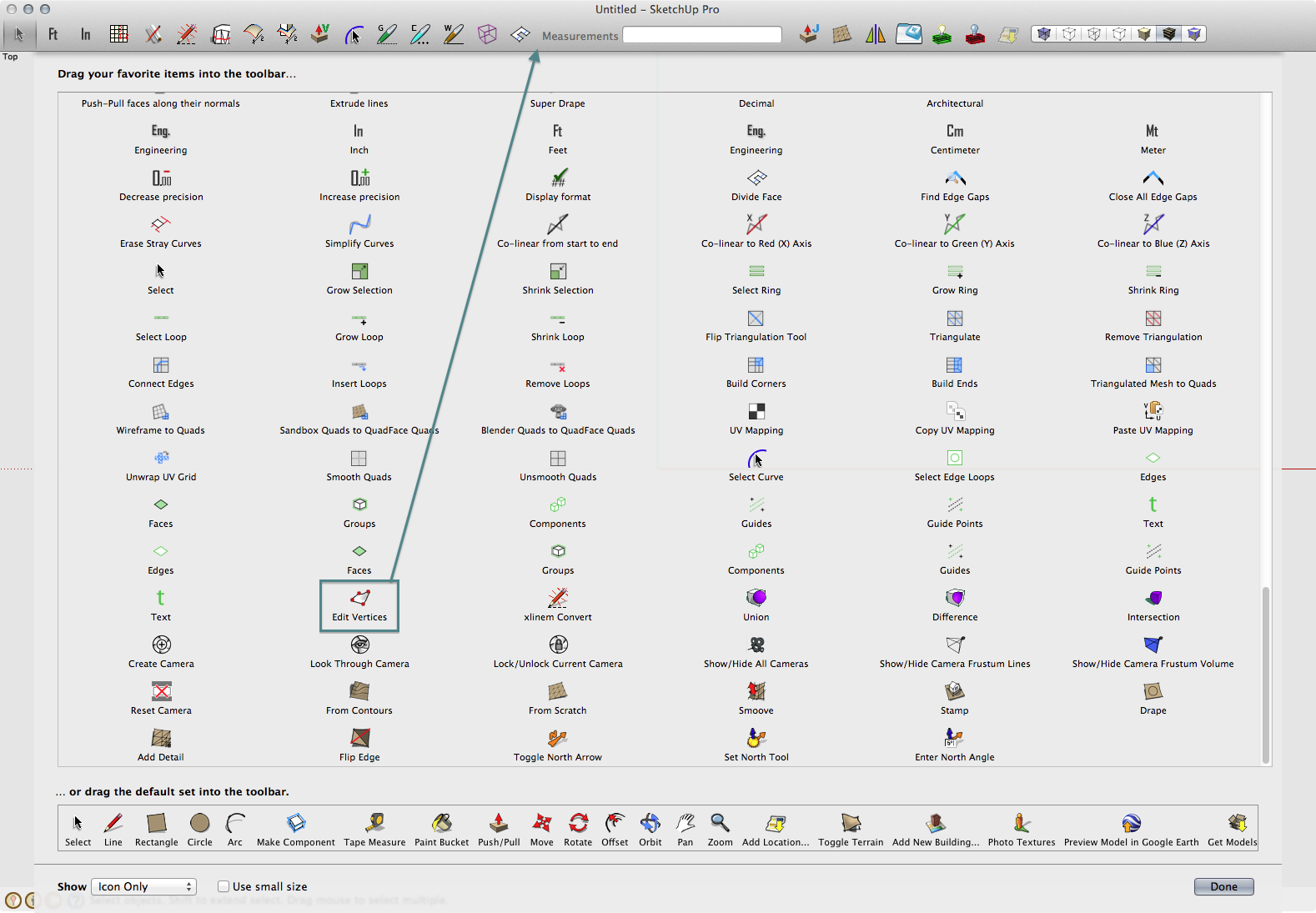
      All the menus to the plugin works and the plugin itself it working. The toolbar is listed under Tools Palettes - but apparently not visible at all. :s

      
      ===== Vertex Tools Debug Info =====
      
      PLUGIN_NAME; Vertex Tools
      PLUGIN_VERSION; 1.1.4
      PLUGIN_BUILD_DATE; 2012-24-09
      
      SketchUp; 8.0.15157 
      
      RUBY_VERSION; 1.8.5
      RUBY_RELEASE_DATE; 2006-08-25
      RUBY_PLATFORM; i686-darwin8.10.1
      
      __FILE__;       /Library/Application Support/Google SketchUp 8/SketchUp/Plugins/tt_vertex.rb
      PROXY_LOADER;   /Library/Application Support/Google SketchUp 8/SketchUp/Plugins/TT_Vertex/loader.rb
      
      ROOT_PATH;      /Library/Application Support/Google SketchUp 8/SketchUp/Plugins
      PATH;           /Library/Application Support/Google SketchUp 8/SketchUp/Plugins/TT_Vertex
      CEXT_PATH;      /Library/Application Support/Google SketchUp 8/SketchUp/Plugins/TT_Vertex/CExt/osx
      CURSOR_PATH;    /Library/Application Support/Google SketchUp 8/SketchUp/Plugins/TT_Vertex/Cursors
      ICONS_PATH;     /Library/Application Support/Google SketchUp 8/SketchUp/Plugins/TT_Vertex/Icons
      L10N_PATH;      /Library/Application Support/Google SketchUp 8/SketchUp/Plugins/TT_Vertex/Localisation
      WEBDIALOG_PATH; /Library/Application Support/Google SketchUp 8/SketchUp/Plugins/TT_Vertex/webdialog
      
      CEXT_VERSION; 2.0.40
      __________


      It all appear to be installed correctly. It appear to be a SketchUp glitch - not one of the plugin.

      Under Windows I've experienced disappearing toolbars as well - then I could toggle it on and off a few times and it'd re-appear. But I've got no experience with OSX. Anyone got any idea?
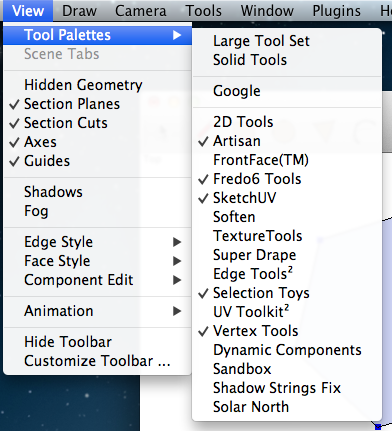

      Vertex Tools toolbar is lissted and checked - but the toolbar is not visible on screen.

      Thomas Thomassen — SketchUp Monkey & Coding addict
      List of my plugins and link to the CookieWare fund

      1 條回覆 最後回覆 回覆 引用 0
      • GaieusG 離線
        Gaieus
        最後由 編輯

        I don't have experience with Mac toolbars either but is there any chance it's floating somewhere either behind the SU window or off-screen?

        Gai...

        1 條回覆 最後回覆 回覆 引用 0
        • thomthomT 離線
          thomthom
          最後由 編輯

          @gaieus said:

          I don't have experience with Mac toolbars either but is there any chance it's floating somewhere either behind the SU window or off-screen?

          That's what I thought as well. I suggested resetting the workspace - but the user did one better and reinstalled SketchUp.

          ...maybe there was the settings left that made it prevail...

          I'll ask the user to reset the workspace.

          Thomas Thomassen — SketchUp Monkey & Coding addict
          List of my plugins and link to the CookieWare fund

          1 條回覆 最後回覆 回覆 引用 0
          • GaieusG 離線
            Gaieus
            最後由 編輯

            Reset workspace only helps with dialogs/windows (from the Window menu). I do not think it resets the toolbars, too.

            This has happened to me on windows. In case something is behind the SU window, try to move the window around (minimizing it will minimize all toolbars off, too) and if it is off-screen somehow, he can try to make the resolution of the sceen bigger temporarily (if this is possible on Macs) to catch it.

            Gai...

            1 條回覆 最後回覆 回覆 引用 0
            • wind-borneW 離線
              wind-borne
              最後由 編輯

              Are we talking about the single button to activate tool?
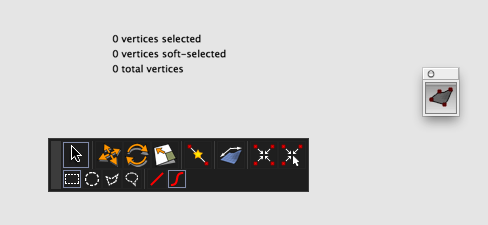
              Screen Shot 2012-11-23 at 5.56.19 AM.png

              Is the icon visible in customizable toolbar?
              If so, might be more convenient to drag icon(if visible) into customizable toolbar as those single button floating toolbars are annoying anyway… 😉

              Shortcut is my preferred method.


              Screen Shot 2012-11-23 at 5.45.35 AM.png

              "To read between the lines was easier than to follow the text."OSX 10.11.6

              %(#BF80BF)[SU 8 pro

              1 條回覆 最後回覆 回覆 引用 0
              • D 離線
                driven
                最後由 編輯

                you could check the 'defaults' position or just set a new one
                for position-
                defaults write ~/Library/Preferences/com.google.sketchuppro8.plist ALToolPalette_Vertex Tools_frame '150 797 36 304 0 0 1920 1178'``
                or what ever your toolbar is actually called.
                for visibility it's the Sketchup version to give
                <key>SketchUp.Toolbars.Vertex Tools.Visible</key>
                <string>1</string>
                should show up on restart...
                john

                learn from the mistakes of others, you may not live long enough to make them all yourself...

                1 條回覆 最後回覆 回覆 引用 0
                • thomthomT 離線
                  thomthom
                  最後由 編輯

                  @wind-borne said:

                  Are we talking about the single button to activate tool?

                  Yes. I'll point the user to these screenshots and see what he makes out of it.

                  Thomas Thomassen — SketchUp Monkey & Coding addict
                  List of my plugins and link to the CookieWare fund

                  1 條回覆 最後回覆 回覆 引用 0
                  • G 離線
                    gt5
                    最後由 編輯

                    @gaieus said:

                    I don't have experience with Mac toolbars either but is there any chance it's floating somewhere either behind the SU window or off-screen?

                    Hi, I'm the one with the problem. I've eliminated the possibility of it floating behind the SU window. I'll have to think about the off-screen possibility.

                    @wind-borne said:

                    Are we talking about the single button to activate tool?
                    .

                    Nope, the single button is there. It's the long toolbar that appears after one clicks the button that as wondered off.

                    @thomthom said:

                    @wind-borne said:

                    Are we talking about the single button to activate tool?

                    Yes. I'll point the user to these screenshots and see what he makes out of it.

                    No, it's the toolbar not the activate button.

                    1 條回覆 最後回覆 回覆 引用 0
                    • wind-borneW 離線
                      wind-borne
                      最後由 編輯

                      @gt5 said:

                      Nope, the single button is there. It's the long toolbar that appears after one clicks the button that as wondered off.

                      @thomthom said:

                      @wind-borne said:

                      Are we talking about the single button to activate tool?

                      Yes. I'll point the user to these screenshots and see what he makes out of it.

                      No, it's the toolbar not the activate button.

                      That toolbar does occasionally disappear for me also, usually when editing a group.
                      If I close and reopen group the toolbar reappears in the same space as before when Vertex Tools is reactivated, never had toolbar move.
                      I've gotten used to doing that without giving much thought.

                      "To read between the lines was easier than to follow the text."OSX 10.11.6

                      %(#BF80BF)[SU 8 pro

                      1 條回覆 最後回覆 回覆 引用 0
                      • G 離線
                        gt5
                        最後由 編輯

                        @wind-borne said:

                        That toolbar does occasionally disappear for me also, usually when editing a group.
                        If I close and reopen group the toolbar reappears in the same space as before when Vertex Tools is reactivated, never had toolbar move.
                        I've gotten used to doing that without giving much thought.

                        I've even tried a new window, 2 quads, no toolbar.

                        1 條回覆 最後回覆 回覆 引用 0
                        • G 離線
                          gt5
                          最後由 編輯

                          @driven said:

                          you could check the 'defaults' position or just set a new one
                          for position-
                          defaults write ~/Library/Preferences/com.google.sketchuppro8.plist ALToolPalette_Vertex Tools_frame '150 797 36 304 0 0 1920 1178'``
                          or what ever your toolbar is actually called.
                          for visibility it's the Sketchup version to give
                          <key>SketchUp.Toolbars.Vertex Tools.Visible</key>
                          <string>1</string>
                          should show up on restart...
                          john

                          good idea, didn't work

                          1 條回覆 最後回覆 回覆 引用 0
                          • thomthomT 離線
                            thomthom
                            最後由 編輯

                            @wind-borne said:

                            That toolbar does occasionally disappear for me also, usually when editing a group.

                            Really? And only with Vertex Tools? 😲 😕

                            Thomas Thomassen — SketchUp Monkey & Coding addict
                            List of my plugins and link to the CookieWare fund

                            1 條回覆 最後回覆 回覆 引用 0
                            • thomthomT 離線
                              thomthom
                              最後由 編輯

                              Try this - from Windows > Ruby Console: (Type each command and see what the results are)

                              t=UI.toolbar('Vertex Tools')

                              t.visible?

                              t.get_last_state

                              t.show

                              Thomas Thomassen — SketchUp Monkey & Coding addict
                              List of my plugins and link to the CookieWare fund

                              1 條回覆 最後回覆 回覆 引用 0
                              • G 離線
                                gt5
                                最後由 編輯

                                @thomthom said:

                                Try this...

                                t=UI.toolbar('Vertex Tools')
                                #UI::Toolbar:0x165b4e04
                                t.visible?
                                true
                                t.get_last_state
                                1
                                t.show
                                nil

                                1 條回覆 最後回覆 回覆 引用 0
                                • wind-borneW 離線
                                  wind-borne
                                  最後由 編輯

                                  @thomthom said:

                                  @wind-borne said:

                                  That toolbar does occasionally disappear for me also, usually when editing a group.

                                  Really? And only with Vertex Tools? 😲 😕

                                  Now we have established gt5's problem is not the button but the toolbar inside of Vertex Tools that is missing.

                                  The main toolbar and information panel within Vertex Tools have at times disappeared when editing inside of a group. Vertices will be highlighted blue as if waiting to be selected, no toolbar and nothing can be selected in Vertex Tools until I exit group and reenter group edit mode and open Vertex tools again. Then all functions normal. Select freehand initial tool. Of course I couldn't recreate today 😆
                                  I use a different color for selections in SU, that blue only shows up inside of Vertex Tools.

                                  I rely on 'edit vertices' shortcut to activate tool so I never have that initial toolbar button visible if that is what you are asking about.

                                  "To read between the lines was easier than to follow the text."OSX 10.11.6

                                  %(#BF80BF)[SU 8 pro

                                  1 條回覆 最後回覆 回覆 引用 0
                                  • thomthomT 離線
                                    thomthom
                                    最後由 編輯

                                    @gt5 said:

                                    @wind-borne said:

                                    Are we talking about the single button to activate tool?
                                    .

                                    Nope, the single button is there. It's the long toolbar that appears after one clicks the button that as wondered off.

                                    Ah! I completely missed this! 😳 Sorry - now I'm with you!

                                    Ok - lets debug that toolbar:

                                    Can you please type:
                                    TT_Vertex.settings

                                    Thomas Thomassen — SketchUp Monkey & Coding addict
                                    List of my plugins and link to the CookieWare fund

                                    1 條回覆 最後回覆 回覆 引用 0
                                    • thomthomT 離線
                                      thomthom
                                      最後由 編輯

                                      @wind-borne said:

                                      The main toolbar and information panel within Vertex Tools have at times disappeared when editing inside of a group. Vertices will be highlighted blue as if waiting to be selected, no toolbar and nothing can be selected in Vertex Tools until I exit group and reenter group edit mode and open Vertex tools again. Then all functions normal. Select freehand initial tool. Of course I couldn't recreate today 😆

                                      When this happens, can you please open the Ruby Console and see if you're getting any error messages?

                                      Thomas Thomassen — SketchUp Monkey & Coding addict
                                      List of my plugins and link to the CookieWare fund

                                      1 條回覆 最後回覆 回覆 引用 0
                                      • G 離線
                                        gt5
                                        最後由 編輯

                                        @thomthom said:

                                        Ok - lets debug that toolbar:

                                        Can you please type:
                                        TT_Vertex.settings

                                        TT_Vertex.settings
                                        #<TT_Vertex::Settings:0x169d16f4 @section="TT_Vertex", @cache={:remember_uv=>true, :view_normals=>true, :context_menu=>true, :radius=>0.0, :vertexinfo_x=>615, :axis_lock=>false, :normal_size=>20, :vertexinfo_y=>234, :gizmo_visible=>true, :l10n=>"en", :vertex_size=>6, :merge_tolerance=>0.393700787401575, :last_select_tool=>:rect, :last_tool=>"T_Select_Rectangle", :toolbar_x=>1133, :axis=>:local, :auto_smooth=>true, :ss_cos=>false, :toolbar_y=>202, :initial_tool=>"T_Select"}>

                                        1 條回覆 最後回覆 回覆 引用 0
                                        • thomthomT 離線
                                          thomthom
                                          最後由 編輯

                                          hm... And your monitor resolution is larger than 1133px wide? Or, is your viewport that wide?

                                          Sketchup.active_model.active_view.vpwidth

                                          And if you have the Ruby Console open while you use Vertex Tools, do you see any error messages appearing?

                                          Thomas Thomassen — SketchUp Monkey & Coding addict
                                          List of my plugins and link to the CookieWare fund

                                          1 條回覆 最後回覆 回覆 引用 0
                                          • G 離線
                                            gt5
                                            最後由 編輯

                                            @thomthom said:

                                            hm... And your monitor resolution is larger than 1133px wide? Or, is your viewport that wide?

                                            Sketchup.active_model.active_view.vpwidth

                                            And if you have the Ruby Console open while you use Vertex Tools, do you see any error messages appearing?

                                            Sketchup.active_model.active_view.vpwidth
                                            1766

                                            no errors in console

                                            1 條回覆 最後回覆 回覆 引用 0
                                            • 1
                                            • 2
                                            • 1 / 2
                                            • 第一個貼文
                                              最後的貼文
                                            Buy SketchPlus
                                            Buy SUbD
                                            Buy WrapR
                                            Buy eBook
                                            Buy Modelur
                                            Buy Vertex Tools
                                            Buy SketchCuisine
                                            Buy FormFonts

                                            Advertisement