sketchucation logo sketchucation
    • 登入
    Oops, your profile's looking a bit empty! To help us tailor your experience, please fill in key details like your SketchUp version, skill level, operating system, and more. Update and save your info on your profile page today!
    ⚠️ Important | Libfredo 15.6b introduces important bugfixes for Fredo's Extensions Update

    [Plugin] Snapshot – (1.0.1) — updated 09.10.2012

    已排程 已置頂 已鎖定 已移動 Plugins
    74 貼文 12 Posters 56.2k 瀏覽 12 Watching
    正在載入更多貼文
    • 從舊到新
    • 從新到舊
    • 最多點贊
    回覆
    • 在新貼文中回覆
    登入後回覆
    此主題已被刪除。只有擁有主題管理權限的使用者可以查看。
    • G 離線
      glro
      最後由 編輯

      @aerilius said:

      @driven said:

      @glro said:

      is it possible to create a shortcut to a file using ruby?

      That might be a the easiest solution! I'll try it!

      i added some code to yours at the end of "self.save_as(filepath)" method

      
      filepath2 = (filepath.split("/")[0..-2]).join("/")
      nom_model = m.title
      # name of the text file to put the shortcut in
      nom_bat = filepath2 + "/" + nom_model + ".bat"
      	
      #open this file
      aFile = File.new(nom_bat,"w")
      
      pathmodel = m.path
      
      #write the file shortcut
      aFile.puts("call "+pathmodel)
      aFile.puts("end")
      aFile.close


      a black cmd window is opened... must be closed manually, unless you embed the .bat file in a .js file...
      it is basic but it works...

      1 條回覆 最後回覆 回覆 引用 0
      • simon le bonS 離線
        simon le bon
        最後由 編輯

        Sorry to disturb the coding discussion 😕

        Ae_Snapshot tested with Su7 : love this plug 👍 👍
        (Png transparent background option still don't work - - )

        simonlebon

        1 條回覆 最後回覆 回覆 引用 0
        • A 離線
          Aerilius
          最後由 編輯

          I forgot to mention: the transparent png option has only been added to SketchUp 8.
          I'm working on a new version!

          1 條回覆 最後回覆 回覆 引用 0
          • G 離線
            glro
            最後由 編輯

            @glro said:

            @aerilius said:

            @driven said:

            @glro said:

            is it possible to create a shortcut to a file using ruby?

            That might be a the easiest solution! I'll try it!

            i added some code to yours at the end of "self.save_as(filepath)" method

            
            > filepath2 = (filepath.split("/")[0..-2]).join("/")
            > nom_model = m.title
            > # name of the text file to put the shortcut in
            > nom_bat = filepath2 + "/" + nom_model + ".bat"
            > 	
            > #open this file
            > aFile = File.new(nom_bat,"w")
            > 
            > pathmodel = m.path
            > 
            > #write the file shortcut
            > aFile.puts("call "+pathmodel)
            > aFile.puts("end")
            > aFile.close
            > 
            

            a black cmd window is opened... must be closed manually, unless you embed the .bat file in a .js file...
            it is basic but it works...

            Doesn't work if there is a white space in the file address

            additional code is needed

            
            nom_bat2 = nom_bat.to_s
            
            if nom_bat2.count(nom_bat2, " ") != 0
            UI.messagebox("no white space in the file address")
            fail
            end
            
            1 條回覆 最後回覆 回覆 引用 0
            • A 離線
              Aerilius
              最後由 編輯

              I updated the plugin. I think it will now fit all your needs because you can now make your own buttons 😉
              @glro, can you test if the shortcuts work as expected?

              1 條回覆 最後回覆 回覆 引用 0
              • G 離線
                glro
                最後由 編輯

                @aerilius said:

                I updated the plugin. I think it will now fit all your needs because you can now make your own buttons 😉
                @glro, can you test if the shortcuts work as expected?

                i tested, but there might be a problem

                no box is opened on my scree when i check "ae snapshot" in the menu

                it might come from the html file

                in the pop up windows you show in the first message of this thread, i read "create a shortcut"

                but when i click on the html file in "ae_snapshot" folder, i don't see the same things
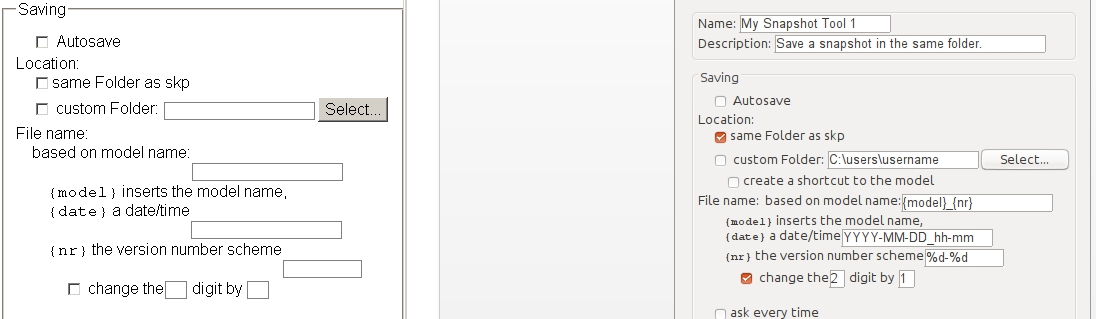

                html settings differences

                1 條回覆 最後回覆 回覆 引用 0
                • A 離線
                  Aerilius
                  最後由 編輯

                  I first thought it might have to do with upgrading the settings (because the previous version is much different). But I just tested it from 0.1.1 to 0.3.0 and it works for me.

                  You mean the settings dialog does not appear when you click the gear icon on the toolbar (there is no ae snapshot menu). Can you open the Ruby Console, click the gear button and give me the error messages if there are any.
                  Then copy&paste " AE::Snapshot.options={}" into the console and press the gear button again. Does it then work?

                  1 條回覆 最後回覆 回覆 引用 0
                  • G 離線
                    glro
                    最後由 編輯

                    @aerilius said:

                    I first thought it might have to do with upgrading the settings (because the previous version is much different). But I just tested it from 0.1.1 to 0.3.0 and it works for me.

                    You mean the settings dialog does not appear when you click the gear icon on the toolbar (there is no ae snapshot menu). Can you open the Ruby Console, click the gear button and give me the error messages if there are any.
                    Then copy&paste " AE::Snapshot.options={}" into the console and press the gear button again. Does it then work?

                    yes, the setting dialog does not appear;
                    the gear icon does'nt appear either...
                    just a small reactangle where i cannot click ...

                    how do you explain the differences between the setting dialog window i get when i double click directly on the file "settings_dialog.htm" and the one you pasted in you message?

                    my guess is that it is linked to the problem


                    snapshot icon

                    1 條回覆 最後回覆 回覆 引用 0
                    • srxS 離線
                      srx
                      最後由 編輯

                      Very useful! Thank you very much.

                      www.saurus.rs

                      1 條回覆 最後回覆 回覆 引用 0
                      • A 離線
                        Aerilius
                        最後由 編輯

                        @glro: Does " Sketchup.write_default("Plugins_ae", "Snapshot", "{}")" on the Ruby Console and restarting help?
                        (There are no relevant differences in the htm file.)
                        (By the way, you don't need quote the message, I know it's on the same page one above 😉 )

                        1 條回覆 最後回覆 回覆 引用 0
                        • G 離線
                          glro
                          最後由 編輯

                          OK

                          yes it helps

                          when i close and open sketchup again, the icon and snapshot settings windows appear on the screen

                          but i cannot save the parameters (clicking on "OK" doesnt change anything)

                          i notice the lines you added to create a file shortcut; since this is the only option i am interested in, i'll try to add them to the previous version, that worked perfectly on my computer

                          thank you

                          1 條回覆 最後回覆 回覆 引用 0
                          • A 離線
                            Aerilius
                            最後由 編輯

                            @glro said:

                            yes it helps

                            That is good!

                            @glro said:

                            clicking on "OK" doesnt change anything

                            Toolbar changes can only take effect after restarting SketchUp. (Maybe that's not so obviously written.)

                            1 條回覆 最後回覆 回覆 引用 0
                            • G 離線
                              glro
                              最後由 編輯

                              when i launch sketchup again, i get "wrong number of arguments (0 for 1)"

                              The plugin does take a shot when i click on the button

                              but i cannot get the snapshot settings windows on the screen anymore

                              it may be because of my computer, if i am the only one to have this problem...

                              1 條回覆 最後回覆 回覆 引用 0
                              • A 離線
                                Aerilius
                                最後由 編輯

                                I am very sure it's not your computer. I couldn't find anything on my own.

                                @unknownuser said:

                                "wrong number of arguments (0 for 1)"

                                This error was on the Ruby Console? Can you tell me what was before or after that? There should be a line number and a line number is very much helpful!

                                1 條回覆 最後回覆 回覆 引用 0
                                • G 離線
                                  glro
                                  最後由 編輯

                                  no, nothing in the ruby console

                                  it is an error message when sketchup loads all the plugins

                                  no numbers
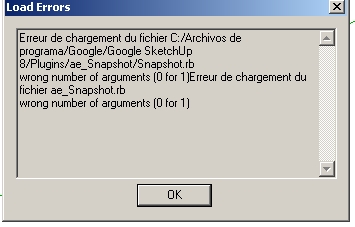

                                  erreur chargement

                                  1 條回覆 最後回覆 回覆 引用 0
                                  • A 離線
                                    Aerilius
                                    最後由 編輯

                                    Ok, SketchUp does not tell us much about load errors. In such a case we need to reload the plugin manually in the Ruby Console to see more details. Can you do:
                                    load "ae_Snapshot/Snapshot.rb"

                                    1 條回覆 最後回覆 回覆 引用 0
                                    • G 離線
                                      glro
                                      最後由 編輯

                                      Here is what i get when i type 'load "ae_Snapshot/Snapshot.rb" 'in the ruby console

                                      load "ae_Snapshot/Snapshot.rb"
                                      Error: #<ArgumentError: C:/Archivos de programa/Google/Google SketchUp 8/Plugins/ae_Snapshot/Snapshot.rb:309:in `initialize': wrong number of arguments (0 for 1)>

                                      1 條回覆 最後回覆 回覆 引用 0
                                      • A 離線
                                        Aerilius
                                        最後由 編輯

                                        Thanks!!!
                                        I found and fixed the issues!

                                        1 條回覆 最後回覆 回覆 引用 0
                                        • G 離線
                                          glro
                                          最後由 編輯

                                          sorry to write that i still have an error message
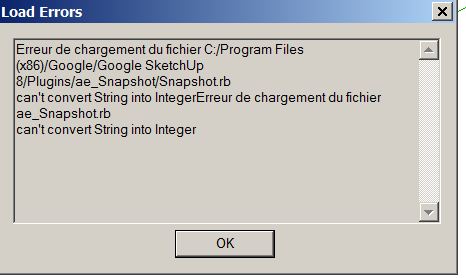

                                          string to integer error

                                          1 條回覆 最後回覆 回覆 引用 0
                                          • A 離線
                                            Aerilius
                                            最後由 編輯

                                            I'm not sure if I found it (line 187?). Can you post the error with line number that the Ruby Console gives?
                                            load "ae_Snapshot/Snapshot.rb"

                                            1 條回覆 最後回覆 回覆 引用 0
                                            • 1
                                            • 2
                                            • 3
                                            • 4
                                            • 1 / 4
                                            • 第一個貼文
                                              最後的貼文
                                            Buy SketchPlus
                                            Buy SUbD
                                            Buy WrapR
                                            Buy eBook
                                            Buy Modelur
                                            Buy Vertex Tools
                                            Buy SketchCuisine
                                            Buy FormFonts

                                            Advertisement
