sketchucation logo sketchucation
    • Login
    Oops, your profile's looking a bit empty! To help us tailor your experience, please fill in key details like your SketchUp version, skill level, operating system, and more. Update and save your info on your profile page today!
    ⚠️ Important | Libfredo 15.6b introduces important bugfixes for Fredo's Extensions Update

    Little headache [resolved] +...

    Scheduled Pinned Locked Moved SketchUp Discussions
    sketchup
    25 Posts 6 Posters 627 Views 6 Watching
    Loading More Posts
    • Oldest to Newest
    • Newest to Oldest
    • Most Votes
    Reply
    • Reply as topic
    Log in to reply
    This topic has been deleted. Only users with topic management privileges can see it.
    • Rich O BrienR Online
      Rich O Brien Moderator
      last edited by

      To kill you must pay.

      Or Artisan Brush select. Set radius to inner ring. Click and kill.

      Only the great plugins are $

      Download the free D'oh Book for SketchUp πŸ“–

      1 Reply Last reply Reply Quote 0
      • R Offline
        Roger
        last edited by

        Or swipe the erase tool through that mess a couple times while holding down the "ALT" key.

        http://www.azcreative.com

        1 Reply Last reply Reply Quote 0
        • pilouP Offline
          pilou
          last edited by

          In fact I just find! 😍
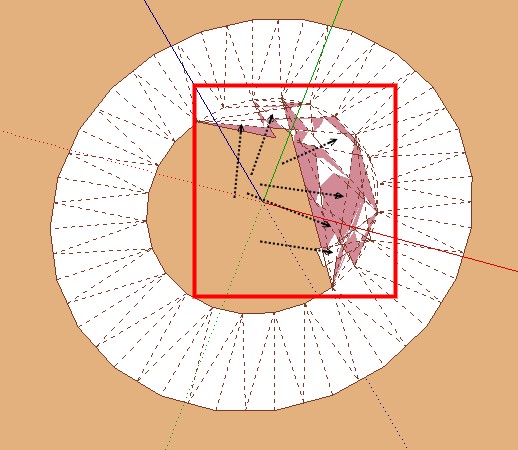
          A simple box selection from left to right with a good first point clicked! (up left on the disc) 😳 πŸ’­

          It's the Pbacot answer that I don't understand who gives me the key πŸ˜„
          Many Thx to him πŸ‘

          I had tested numerous solutions except this simple one! πŸ˜’ πŸ’š

          little_headacheok.jpg

          Frenchy Pilou
          Is beautiful that please without concept!
          My Little site :)

          1 Reply Last reply Reply Quote 0
          • pbacotP Offline
            pbacot
            last edited by

            @rich o brien said:

            Circular Selection tool in Vertex Tools

            Top View > Paralell

            Select

            Kill

            I don't see how this works. All you can select is vertices and you loose the outer ring.

            Make it harder.
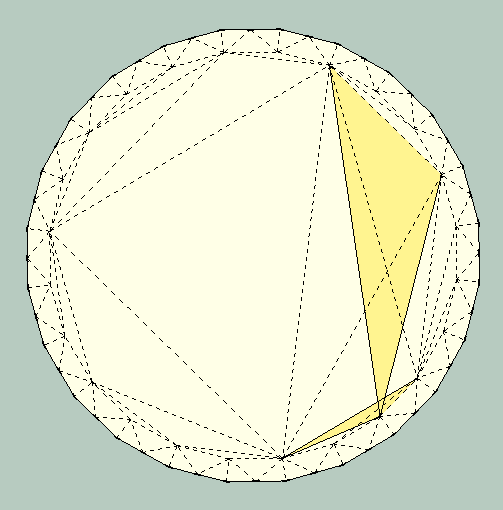

            ring.png


            another headache.skp

            MacOSX MojaveSketchUp Pro v19 Twilight v2 Thea v3 PowerCADD

            1 Reply Last reply Reply Quote 0
            • pbacotP Offline
              pbacot
              last edited by

              I'm trying to learn video recording but by the time I manage one, you'll have figured it out.

              MacOSX MojaveSketchUp Pro v19 Twilight v2 Thea v3 PowerCADD

              1 Reply Last reply Reply Quote 0
              • Rich O BrienR Online
                Rich O Brien Moderator
                last edited by

                @pbacot said:

                I don't see how this works. All you can select is vertices and you loose the outer ring. Make it harder.

                302 Found

                favicon

                (www.screenr.com)

                Works for me. But I did leave out some info

                If you wanna do a quick screen capture with audio or without try screenr.com

                Download the free D'oh Book for SketchUp πŸ“–

                1 Reply Last reply Reply Quote 0
                • pilouP Offline
                  pilou
                  last edited by

                  @ Roger: Valuable on a little surface and with many zoom! πŸ˜„

                  Frenchy Pilou
                  Is beautiful that please without concept!
                  My Little site :)

                  1 Reply Last reply Reply Quote 0
                  • pbacotP Offline
                    pbacot
                    last edited by

                    Turn off hidden geometry. By double clicking face to select face and outer edges, then shift-click (deselect) face, you choose only outer edges. Offset tool. Offset outer edges to inner ring (SU snaps to hidden edge). May have to do this twice to get a hard inner ring edge. Select all. Shift and double click outer face to deselect. Erase. Native tools.

                    You don't have to buy tool (but it's REALLY worth it).

                    OK Rich I see, exit the tool. Thanks, Peter

                    MacOSX MojaveSketchUp Pro v19 Twilight v2 Thea v3 PowerCADD

                    1 Reply Last reply Reply Quote 0
                    • pilouP Offline
                      pilou
                      last edited by

                      16 seconds : that's a task πŸ˜‰ πŸ‘

                      Frenchy Pilou
                      Is beautiful that please without concept!
                      My Little site :)

                      1 Reply Last reply Reply Quote 0
                      • pilouP Offline
                        pilou
                        last edited by

                        Your last solution gives me another one πŸ˜‰
                        because your Offset tool seems don't snap on Outer "Vertext" or middle of segment circle! 😲 bug ?
                        just snap on the inner circle at the end 😲
                        So difficult to fit the 2 circles πŸ˜‰

                        So Top View
                        Turn off Hidden geometry
                        draw a circle from the Center to the inner cirle (you must know the number of sides circle of course πŸ˜‰
                        Double click on the disk between inner and outer circle
                        Invert selection (By TIG)
                        Erase πŸ˜„

                        Frenchy Pilou
                        Is beautiful that please without concept!
                        My Little site :)

                        1 Reply Last reply Reply Quote 0
                        • pbacotP Offline
                          pbacot
                          last edited by

                          @unknownuser said:

                          Your last solution gives me another one πŸ˜‰
                          because your Offset tool seems don't snap on Outer "Vertext" or middle of segment circle! 😲 bug ?
                          just snap on the inner circle at the end 😲
                          So difficult to fit the 2 circles πŸ˜‰

                          So Top View
                          Turn off Hidden geometry
                          draw a circle from the Center to the inner cirle (you must know the number of sides circle of course πŸ˜‰
                          Double click on the disk between inner and outer circle
                          Invert selection (By TIG)
                          Erase πŸ˜„

                          Works OK for me to use the offset tool--but this is if the original ring is an exact offset. I don't try to snap anything. Just move in and it finds the snap. For some reason I had to do it twice sometimes.

                          Rich, Maybe I'll try Screenr-- it starts out by requiring me to update system software because it doesn't recognize my java. So it'll be hours.

                          OK I figured the screencast out. Not that great because I should have given audio. But my first screencast! Thanks Rich!
                          http://www.screenr.com/Hh38

                          MacOSX MojaveSketchUp Pro v19 Twilight v2 Thea v3 PowerCADD

                          1 Reply Last reply Reply Quote 0
                          • Rich O BrienR Online
                            Rich O Brien Moderator
                            last edited by

                            @unknownuser said:

                            16 seconds : that's a task πŸ˜‰ πŸ‘

                            I went slow to see the action 😎

                            Download the free D'oh Book for SketchUp πŸ“–

                            1 Reply Last reply Reply Quote 0
                            • D Offline
                              driven
                              last edited by

                              I always use 'cut' >> 'paste in place' for this type of selection.

                              Select 'contours' >> 'Sanbox' from contours >> Select 'contours' [not new group] >> 'Cut' >> 'Edit' group >> 'Paste in Place' >> Select 'surface' between contours >> 'Cut' >> 'Select All' >> 'Delete' >> 'Paste in Place'.... Done

                              john

                              learn from the mistakes of others, you may not live long enough to make them all yourself...

                              1 Reply Last reply Reply Quote 0
                              • pilouP Offline
                                pilou
                                last edited by

                                @unknownuser said:

                                I always use 'cut' >> 'paste in place' for this type of selection.

                                A little tricky but works like a charm! πŸ‘
                                😎

                                Frenchy Pilou
                                Is beautiful that please without concept!
                                My Little site :)

                                1 Reply Last reply Reply Quote 0
                                • P Offline
                                  Panga
                                  last edited by

                                  Something a bit like what driven said..

                                  Select contours...Copy it...use sand box tool...edit created terrain...paste in place contours and then delete unwanted faces is really easy as all edges are soften except the contours you pasted in place...(make sure hidden geometry not visible of course !).

                                  Cheers.

                                  1 Reply Last reply Reply Quote 0
                                  • pilouP Offline
                                    pilou
                                    last edited by

                                    Seems with this last solution the erase don't works in one click! 😲
                                    Some little faces stay so you must make some clicks more πŸ˜„

                                    Frenchy Pilou
                                    Is beautiful that please without concept!
                                    My Little site :)

                                    1 Reply Last reply Reply Quote 0
                                    • D Offline
                                      driven
                                      last edited by

                                      Variation.....

                                      Select 'contours' >> 'COPY' >> 'Sanbox' from contours >> 'Edit' group >> 'Paste in Place' >> Select 'surface' between contours >> 'Cut' >> 'Undo' >> 'Undo' >> 'Undo' >> 'Paste in Place'.... Done

                                      use Undo to remove unwanted.

                                      learn from the mistakes of others, you may not live long enough to make them all yourself...

                                      1 Reply Last reply Reply Quote 0
                                      • P Offline
                                        Panga
                                        last edited by

                                        @driven said:

                                        Variation.....

                                        Select 'contours' >> 'COPY' >> 'Sanbox' from contours >> 'Edit' group >> 'Paste in Place' >> Select 'surface' between contours >> 'Cut' >> 'Undo' >> 'Undo' >> 'Undo' >> 'Paste in Place'.... Done

                                        use Undo to remove unwanted.

                                        +1 Using undo and paste in place is often the better solution !

                                        1 Reply Last reply Reply Quote 0
                                        • pbacotP Offline
                                          pbacot
                                          last edited by

                                          This was first made by Sandbox from Contours. If you just save the circle contours in the first place and paste into the skinned group, you have a defined outer ring face to select separately. So don't throw away the contours in the first place.

                                          Another way to work with the problem is to select the outer edges by drawing a rectangle around the whole thing so you can double click the outer face of that. Once you have the outer ring alone selected you can lift it up so that the center section can be isolated-- right/left click and delete.

                                          MacOSX MojaveSketchUp Pro v19 Twilight v2 Thea v3 PowerCADD

                                          1 Reply Last reply Reply Quote 0
                                          • pbacotP Offline
                                            pbacot
                                            last edited by

                                            @panga said:

                                            @driven said:

                                            Variation.....

                                            Select 'contours' >> 'COPY' >> 'Sanbox' from contours >> 'Edit' group >> 'Paste in Place' >> Select 'surface' between contours >> 'Cut' >> 'Undo' >> 'Undo' >> 'Undo' >> 'Paste in Place'.... Done

                                            use Undo to remove unwanted.

                                            +1 Using undo and paste in place is often the better solution !

                                            Why not just select the surface between contours, copy, close group and erase, paste in place? why the undo's? Just take what you wanted and throw the rest away.

                                            MacOSX MojaveSketchUp Pro v19 Twilight v2 Thea v3 PowerCADD

                                            1 Reply Last reply Reply Quote 0
                                            • 1
                                            • 2
                                            • 1 / 2
                                            • First post
                                              Last post
                                            Buy SketchPlus
                                            Buy SUbD
                                            Buy WrapR
                                            Buy eBook
                                            Buy Modelur
                                            Buy Vertex Tools
                                            Buy SketchCuisine
                                            Buy FormFonts

                                            Advertisement