sketchucation logo sketchucation
    • Login
    Oops, your profile's looking a bit empty! To help us tailor your experience, please fill in key details like your SketchUp version, skill level, operating system, and more. Update and save your info on your profile page today!
    Mac User? | Join the Rayscaper Beta for Mac Learn More

    How to make it pls

    Scheduled Pinned Locked Moved Newbie Forum
    sketchup
    28 Posts 6 Posters 1.6k Views 6 Watching
    Loading More Posts
    • Oldest to Newest
    • Newest to Oldest
    • Most Votes
    Reply
    • Reply as topic
    Log in to reply
    This topic has been deleted. Only users with topic management privileges can see it.
    • Dave RD
      Dave R
      last edited by

      Excellent!

      The thing your blue arrow is pointing at is the profile and the circle is the path for Follow Me.


      http://farm9.staticflickr.com/8146/7566939162_3a11ff9a69.jpg

      I started out with a rectangle on which to draw the profile.
      I deleted the unneeded parts of the rectangle, selected the edge of the circle, got Follow Me and clicked on the profile.

      It's sort of the reverse of making a section cut from the shape. Draw the section cut and make a shape.

      Etaoin Shrdlu

      %

      (THERE'S NO PLACE LIKE)

      G28 X0.0 Y0.0 Z0.0

      M30

      %

      1 Reply Last reply
      Reply Quote 0
      • E
        erzane
        last edited by

        WOW! is it so easy !!??
        it makes it automaticly ?
        pls wait a moment , I will try it

        1 Reply Last reply
        Reply Quote 0
        • Dave RD
          Dave R
          last edited by

          It is that easy, indeed!

          And all done with the native tools. No plugins to install. 😉

          Etaoin Shrdlu

          %

          (THERE'S NO PLACE LIKE)

          G28 X0.0 Y0.0 Z0.0

          M30

          %

          1 Reply Last reply
          Reply Quote 0
          • Mike LuceyM
            Mike Lucey
            last edited by

            Well done Dave ..... 'up there for thinking and down there for dancing!' 👍

            Support us so we can support you! Upgrade to Premium Membership!

            1 Reply Last reply
            Reply Quote 0
            • E
              erzane
              last edited by

              so, I made the basis but I didn't succeed to use the follow me tool
              the truth is that I didn't understood your explanations well lol

              http://img513.imageshack.us/img513/9172/capture01fa.jpg

              1 Reply Last reply
              Reply Quote 0
              • Dave RD
                Dave R
                last edited by

                The profile needs to be aligned on the radius of the circular path.
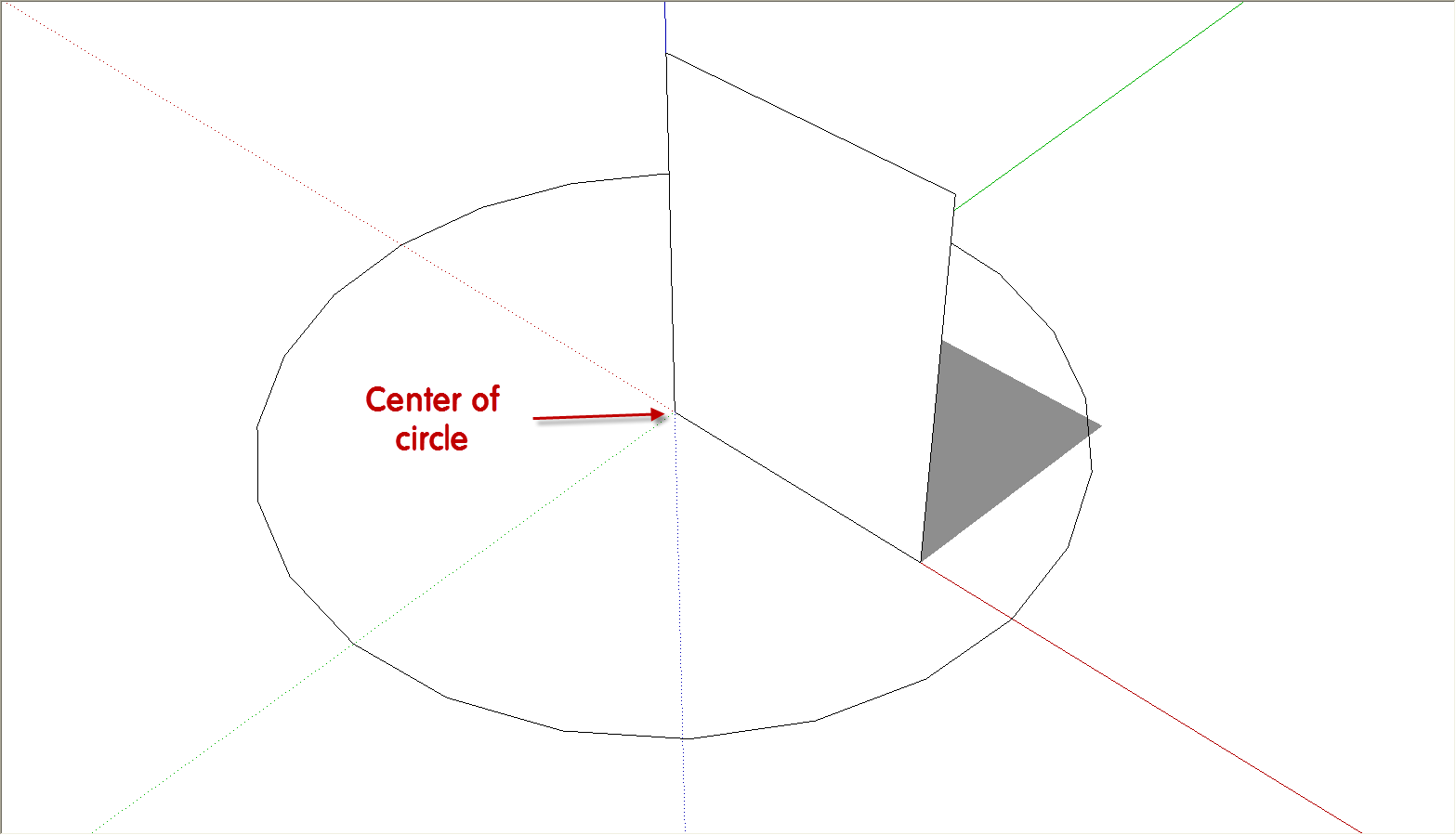
                FM.png
                Start with the circular path centered on the origin and the rectangular face on a radius of the circle. I delete the face of the circle before running Follow Me because if you don't, there'll be no face created on the bottom of the extrusion.

                Thanks, Mike.

                Etaoin Shrdlu

                %

                (THERE'S NO PLACE LIKE)

                G28 X0.0 Y0.0 Z0.0

                M30

                %

                1 Reply Last reply
                Reply Quote 0
                • E
                  erzane
                  last edited by

                  I succeeded it
                  but I didn't needed to erase the basis circle
                  I just choosed the follow me tool and pushed ''Alt''

                  http://img708.imageshack.us/img708/1589/capture01oy.jpg

                  thanks for your help 😉

                  1 Reply Last reply
                  Reply Quote 0
                  • Dave RD
                    Dave R
                    last edited by

                    Glad you got it to work.

                    Now correct the face orientation so the back faces (blue) are inside and delete the circle for the path and you're finished.

                    Etaoin Shrdlu

                    %

                    (THERE'S NO PLACE LIKE)

                    G28 X0.0 Y0.0 Z0.0

                    M30

                    %

                    1 Reply Last reply
                    Reply Quote 0
                    • E
                      erzane
                      last edited by

                      done
                      now I would like to place it on the center of the circle but I dont know how to center it..

                      http://img824.imageshack.us/img824/2113/capture01qi.jpg

                      1 Reply Last reply
                      Reply Quote 0
                      • Dave RD
                        Dave R
                        last edited by

                        Probably the easiest way would be to add some temporary cross hairs at the bottom center of the thing. Then grab the thing at the center with the Move tool and move it to the center of that other circle. It would be best if you make that shape a component and change its axes so they are centered at its bottom center. then bring the component in from the Component browser. See this for reference.

                        Etaoin Shrdlu

                        %

                        (THERE'S NO PLACE LIKE)

                        G28 X0.0 Y0.0 Z0.0

                        M30

                        %

                        1 Reply Last reply
                        Reply Quote 0
                        • E
                          erzane
                          last edited by

                          ok I see, this is the famous glue I learned last year
                          I forget all about what I learned last year, it's terrific lol
                          anyway during your reply I do it like this
                          I erased the circle and created a new one from the basis with the offset tool

                          http://img805.imageshack.us/img805/773/capture01r.jpg

                          1 Reply Last reply
                          Reply Quote 0
                          • Dave RD
                            Dave R
                            last edited by

                            Good. Now correct the face orientation. Don't be sloppy in your modeling. 😉

                            Etaoin Shrdlu

                            %

                            (THERE'S NO PLACE LIKE)

                            G28 X0.0 Y0.0 Z0.0

                            M30

                            %

                            1 Reply Last reply
                            Reply Quote 0
                            • pilouP
                              pilou
                              last edited by

                              @unknownuser said:

                              Where did you read that, Pilou? I don't see that anywhere in his original post.

                              You right for the text 😉
                              I had interpreted the images! And was right! 😉
                              And sure your method is more speedy than the FredoScale when you start from the beginning! 😉
                              But when you have yet the object, that is an another story! 😄

                              Frenchy Pilou
                              Is beautiful that please without concept!
                              My Little site :)

                              1 Reply Last reply
                              Reply Quote 0

                              Hello! It looks like you're interested in this conversation, but you don't have an account yet.

                              Getting fed up of having to scroll through the same posts each visit? When you register for an account, you'll always come back to exactly where you were before, and choose to be notified of new replies (either via email, or push notification). You'll also be able to save bookmarks and upvote posts to show your appreciation to other community members.

                              With your input, this post could be even better 💗

                              Register Login
                              • 1
                              • 2
                              • 2 / 2
                              • First post
                                Last post
                              Buy SketchPlus
                              Buy SUbD
                              Buy WrapR
                              Buy eBook
                              Buy Modelur
                              Buy Vertex Tools
                              Buy SketchCuisine
                              Buy FormFonts

                              Advertisement