sketchucation logo sketchucation
    • 登入
    Oops, your profile's looking a bit empty! To help us tailor your experience, please fill in key details like your SketchUp version, skill level, operating system, and more. Update and save your info on your profile page today!
    🔌 Smart Spline | Fluid way to handle splines for furniture design and complex structures. Download

    [Plugin] Ruby Console+ (3.0.2) – updated 30.10.2017

    已排程 已置頂 已鎖定 已移動 Plugins
    61 貼文 18 Posters 39.3k 瀏覽 17 Watching
    正在載入更多貼文
    • 從舊到新
    • 從新到舊
    • 最多點贊
    回覆
    • 在新貼文中回覆
    登入後回覆
    此主題已被刪除。只有擁有主題管理權限的使用者可以查看。
    • rami_lpmR 離線
      rami_lpm
      最後由 編輯

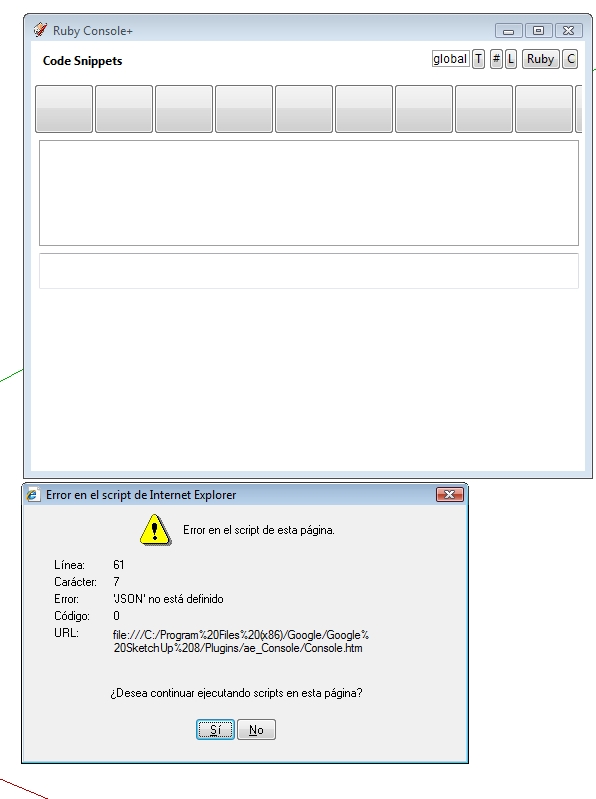
      All I'm getting is this.
      screenshot.jpg
      Win Vista Business 64
      Java 7 update 7
      IE 7 <--- is this a problem?

      1 條回覆 最後回覆 回覆 引用 0
      • A 離線
        Aerilius
        最後由 編輯

        That might be the problem.

        @unknownuser said:

        Requirements:
        for now, it works only in the Windows version of SketchUp (IE8, IE9)

        (Does Internet Explorer 7 run on Vista??)

        1 條回覆 最後回覆 回覆 引用 0
        • rami_lpmR 離線
          rami_lpm
          最後由 編輯

          Was that 'requirements' line there all the time?
          Yes, IE7 was installed with my spanish version.

          I upgraded and it works fine.

          1 條回覆 最後回覆 回覆 引用 0
          • A 離線
            Anton_S
            最後由 編輯

            I had the same problem as in the posts before. To resolve the problem you must delete the registry of original Ruby Console +: (Windows 7)

            [list:2x1uqeh5][:2x1uqeh5]Go to start menu and search, and open regedit.exe.[/Ⓜ2x1uqeh5]
            [:2x1uqeh5]Locate registry path: Computer\HKEY_CURRENT_USER\Software\Google\SketchUp[n][/Ⓜ2x1uqeh5]
            [:2x1uqeh5]Delete the following folders and registry:
            .\Extensions\Ruby Console+[ver

            • .\Plugins_ae\Console
            • .\WebDialog_AE_Console[/list⭕2x1uqeh5]]

            After delete, it must work!
            On other windows versions, the registry might be in similiar named locations.

            1 條回覆 最後回覆 回覆 引用 0
            • A 離線
              Anton_S
              最後由 編輯

              Other than the registry the ruby console is outstanding! 😍
              Highligh entities, beatiful script highlightings, fast processing, and much more. 👍

              I only had to go to Plugins\ae_Console\jQuery\jquery-console-extensions.js and comment out all the DEBUG "puts" sections -- It disturbed me posting "resizing", and "finish resizing".

              Now the wish! Is there a way to add a "clear history" button, so it clears all the console history input queue? To clear, i can go to registry and clear it out manually, although it would be nice to have a button.

              1 條回覆 最後回覆 回覆 引用 0
              • Chris FullmerC 離線
                Chris Fullmer
                最後由 編輯

                I'm so glad you explained how to remove all the resizing puts statements. I just installed this and I was already ready to never use it again until that was fixed.

                Otherwise pretty cool. Thanks!

                Chris

                Lately you've been tan, suspicious for the winter.
                All my Plugins I've written

                1 條回覆 最後回覆 回覆 引用 0
                • rami_lpmR 離線
                  rami_lpm
                  最後由 編輯

                  Thanks Anton, this was bothering me too.

                  1 條回覆 最後回覆 回覆 引用 0
                  • A 離線
                    Aerilius
                    最後由 編輯

                    Sorry for that mistake, I fixed it!

                    1 條回覆 最後回覆 回覆 引用 0
                    • A 離線
                      Aerilius
                      最後由 編輯

                      Minor update (1.0.9):

                      • added icon
                      1 條回覆 最後回覆 回覆 引用 0
                      • A 離線
                        Aerilius
                        最後由 編輯

                        I added improvements for higher dpi settings.

                        1 條回覆 最後回覆 回覆 引用 0
                        • A 離線
                          Aerilius
                          最後由 編輯

                          A new version has been uploaded!
                          Ruby Console+ 2.0 is more robust, more powerful and more beautiful!

                          1 條回覆 最後回覆 回覆 引用 0
                          • renderizaR 離線
                            renderiza
                            最後由 編輯

                            The perfect companion for testing code thanks!

                            [url=https://www.sketchupcode.com/:z3kqsidd]My Extensions ...[/url:z3kqsidd]

                            1 條回覆 最後回覆 回覆 引用 0
                            • A 離線
                              Anton_S
                              最後由 編輯

                              Wow!!! 😍

                              Aerilius, you're so amazing!!!

                              Variety of style templates, bigger input zone, that's just amazing

                              1 條回覆 最後回覆 回覆 引用 0
                              • A 離線
                                Aerilius
                                最後由 編輯

                                An update is ready!
                                By replacing ace editor 1.1.0 by version 1.1.2, we now have auto-completion (ctrl+space) and code snippets support. I connected the autocompleter to Ruby so that it displays only completions (methods etc.) that are available in the current context.

                                http://sketchucation.com/forums/download/file.php?id=115857

                                Apart from that, modified scripts are now reloaded automatically.

                                1 條回覆 最後回覆 回覆 引用 0
                                • A 離線
                                  Anton_S
                                  最後由 編輯

                                  Amazing update! 👍

                                  I can't wait to check it, since I'm not at my home computer now.

                                  1 條回覆 最後回覆 回覆 引用 0
                                  • M 離線
                                    matt.gordon320
                                    最後由 編輯

                                    Hello!

                                    I'm getting this error. I'm using Fredo's Additional Plugin Folders script to control who in our firm has access to which plugins, just for reference. Any thoughts on what it might be?

                                    Thanks!
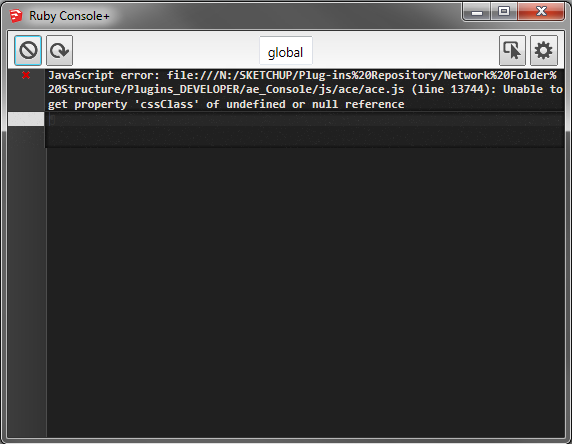

                                    AE-Console Error.png

                                    1 條回覆 最後回覆 回覆 引用 0
                                    • A 離線
                                      Aerilius
                                      最後由 編輯

                                      That is a Javascript error caused by something in ace.js (you're not getting a popup error because I redirect such errors into the console). When I integrated ace into the webdialog there were a couple of incompatibilities with IE, that I tried to patch. It seems I didn't get that one. I'll try to work-around it. Thanks for reporting!

                                      1 條回覆 最後回覆 回覆 引用 0
                                      • jolranJ 離線
                                        jolran
                                        最後由 編輯

                                        Thank you Aerilius. This one will be used a lot! Very useful.

                                        I also got that JS error at first launch. Did not hinder me to use the dialog though, so it was surpressed.
                                        This morning I did not get that error.
                                        Another thing, I have to launch the plugin twice to get dialog showing. Persistantly. Tried relaunching SU 3 times, all the same. Not a big deal, but someone impatient 😄 might Think the plugin doesent work.

                                        1 條回覆 最後回覆 回覆 引用 0
                                        • A 離線
                                          Aerilius
                                          最後由 編輯

                                          The JavaScript error should be supressed in version 2.1.1.

                                          jolran, I can't reproduce it. When you open the Ruby Console+ for the first time (where it doesn't open), does something appear in the native Ruby Console?

                                          1 條回覆 最後回覆 回覆 引用 0
                                          • Rich O BrienR 離線
                                            Rich O Brien Moderator
                                            最後由 編輯

                                            Is it in the PluginStore? I see no update listed

                                            Download the free D'oh Book for SketchUp 📖

                                            1 條回覆 最後回覆 回覆 引用 0
                                            • 1
                                            • 2
                                            • 3
                                            • 4
                                            • 2 / 4
                                            • 第一個貼文
                                              最後的貼文
                                            Buy SketchPlus
                                            Buy SUbD
                                            Buy WrapR
                                            Buy eBook
                                            Buy Modelur
                                            Buy Vertex Tools
                                            Buy SketchCuisine
                                            Buy FormFonts

                                            Advertisement