sketchucation logo sketchucation
    • 登入
    Oops, your profile's looking a bit empty! To help us tailor your experience, please fill in key details like your SketchUp version, skill level, operating system, and more. Update and save your info on your profile page today!
    ⚠️ Important | Libfredo 15.6b introduces important bugfixes for Fredo's Extensions Update

    I quit sketchup because of follow me.

    已排程 已置頂 已鎖定 已移動 Newbie Forum
    sketchup
    29 貼文 14 Posters 5.5k 瀏覽 14 Watching
    正在載入更多貼文
    • 從舊到新
    • 從新到舊
    • 最多點贊
    回覆
    • 在新貼文中回覆
    登入後回覆
    此主題已被刪除。只有擁有主題管理權限的使用者可以查看。
    • GaieusG 離線
      Gaieus
      最後由 編輯

      The follow me tool will "project" the face that you use as a profile perpendicular to the path (in this case the arc segments) and will extrude the shape that way. What you show is a typical "feature" of the follow me tool when making half domes. Briefly speaking; the tools works as advertised and works correctly - but in certain cases it creates results that are not what we like.

      For this scenario, there are two workarounds:

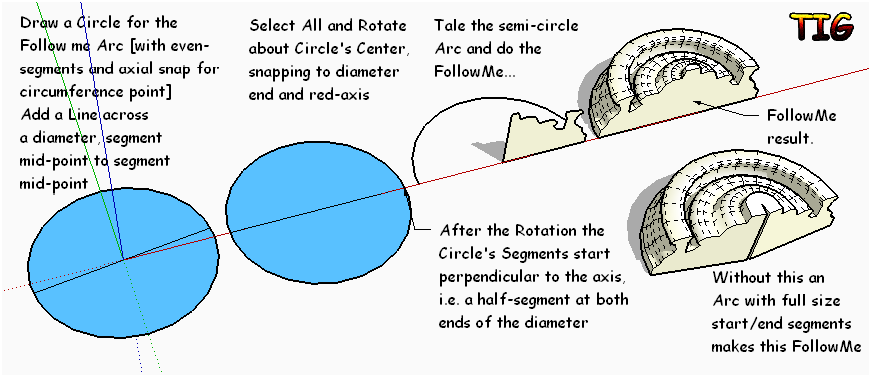
      1. One is (as pointed out above) to draw the arc with an odd number of segments (or rotate a circle in a way that it's end segments are perpendicular to the diameter cutting edge if you wish)
      2. The other one is to do a full dome, turn on hidden geometry and delete half of it.

      Gai...

      1 條回覆 最後回覆 回覆 引用 0
      • Jean LemireJ 離線
        Jean Lemire
        最後由 編輯

        Hi folks.

        @gaieus said:

        The follow me tool will "project" the face that you use as a profile perpendicular to the path (in this case the arc segments) and will extrude the shape that way. What you show is a typical "feature" of the follow me tool when making half domes. Briefly speaking; the tools works as advertised and works correctly - but in certain cases it creates results that are not what we like.

        For this scenario, there are two workarounds:

        1. One is (as pointed out above) to draw the arc with an odd number of segments (or rotate a circle in a way that it's end segments are perpendicular to the diameter cutting edge if you wish)
        1. The other one is to do a full dome, turn on hidden geometry and delete half of it.

        Personnaly, I always use the second method. Its is faster and less prone to error.

        I use it a lot for piping elbows, for example. I create a full torus and then keep only 1/4 of it as a 90° elbow or 1/8 for a 45° elbow.

        Just ideas.

        Jean (Johnny) Lemire from Repentigny, Quebec, Canada.

        1 條回覆 最後回覆 回覆 引用 0
        • brookefoxB 離線
          brookefox
          最後由 編輯

          Anyway, mICHAEL, yes, I, and I'm going to go way out on this one, everyone else is often/occasionally frustrated by follow me and/or other quirks/unknown ways of SU. Working in isolation with no work-arounds, one might be inclined to quit. But we need not work that way; we can ask others who share our dilemmas. Sometimes, usually, they will help. Sometimes they are slow to take the bait, do our bidding, agree wholeheartedly, and this too we have to live with. Sometimes they snipe a little too quickly. There's not much to do about that; they are more likely to help, and help a lot.

          Me, not so much.

          That the face must be perpendicular to the circle might easily get lost (perp to a circle?), but as we see it is critical and in the help on the tool's use.

          @unknownuser said:

          You can use the Follow Me tool to create full lathed shapes using circular paths. To create a lathed shape:

          Draw a circle whose edge will represent the path.
          Draw a face perpendicular to the circle. The face does not have to be on or even touch the circle's path.
          

          ~ Brooke

          1 條回覆 最後回覆 回覆 引用 0
          • brookefoxB 離線
            brookefox
            最後由 編輯

            So Pilou's example shows it is completely understandable to be frustrated by this tool: his face is in no reasonable way perpendicular to his circle?

            ~ Brooke

            1 條回覆 最後回覆 回覆 引用 0
            • pilouP 離線
              pilou
              最後由 編輯

              Hum hum 😉
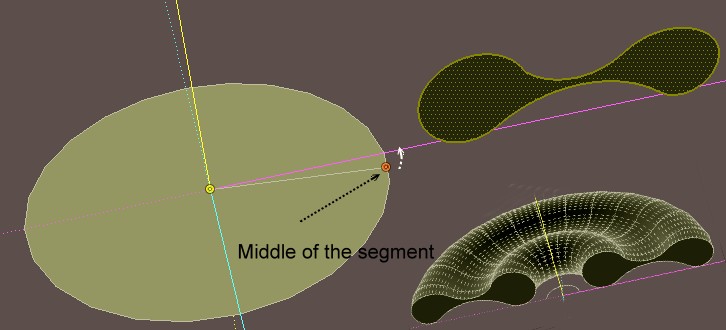
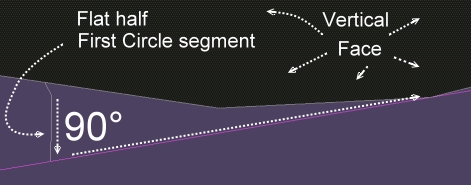
              The circle is on the flat ground, the face of the profile form is vertical!
              So they are perpendicular!
              rotatecircle1.jpg

              Frenchy Pilou
              Is beautiful that please without concept!
              My Little site :)

              1 條回覆 最後回覆 回覆 引用 0
              • brookefoxB 離線
                brookefox
                最後由 編輯

                I would say that the face is perpendicular to the ground and to the plane of the circle, but not to the circle itself. But I accept yours as an explanation of why it works for your case. 😉

                Still, I say not so tight as is implied by 'understand and abide by the rules as stated and all will be revealed.' 😐

                Unless, perhaps, the usage were clarified to

                @unknownuser said:

                Draw a circle whose edge will represent the path.
                Draw a face perpendicular to (the circle or to) the plane of the circle. The face does not have to be on or even touch the circle's path.

                ~ Brooke

                1 條回覆 最後回覆 回覆 引用 0
                • BoxB 線上
                  Box
                  最後由 編輯

                  Utter Gibberish.

                  1 條回覆 最後回覆 回覆 引用 0
                  • pilouP 離線
                    pilou
                    最後由 編輯

                    You can cut the circle after its rotation for keep the segments perpendicular 😄
                    rotatecircle.jpg

                    Frenchy Pilou
                    Is beautiful that please without concept!
                    My Little site :)

                    1 條回覆 最後回覆 回覆 引用 0
                    • pilouP 離線
                      pilou
                      最後由 編輯

                      @unknownuser said:

                      to draw the arc with an odd number of segments

                      I am affraid that the segments of extremity will be not perpendicular! 😉
                      Arc of 25 segments 93.6°
                      (Arc of 24 segments 93.7°)
                      Arc of 23 segments 93.9°

                      Frenchy Pilou
                      Is beautiful that please without concept!
                      My Little site :)

                      1 條回覆 最後回覆 回覆 引用 0
                      • pbacotP 離線
                        pbacot
                        最後由 編輯

                        Partly this issue is due to follow me requirements (answer: get Profile Builder). Partly it's about working with SU arcs. True arcs would not give the problem in OP's setup.

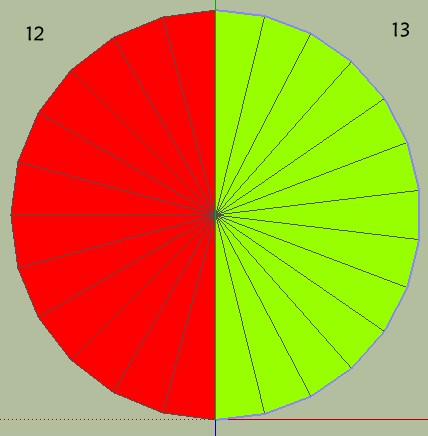
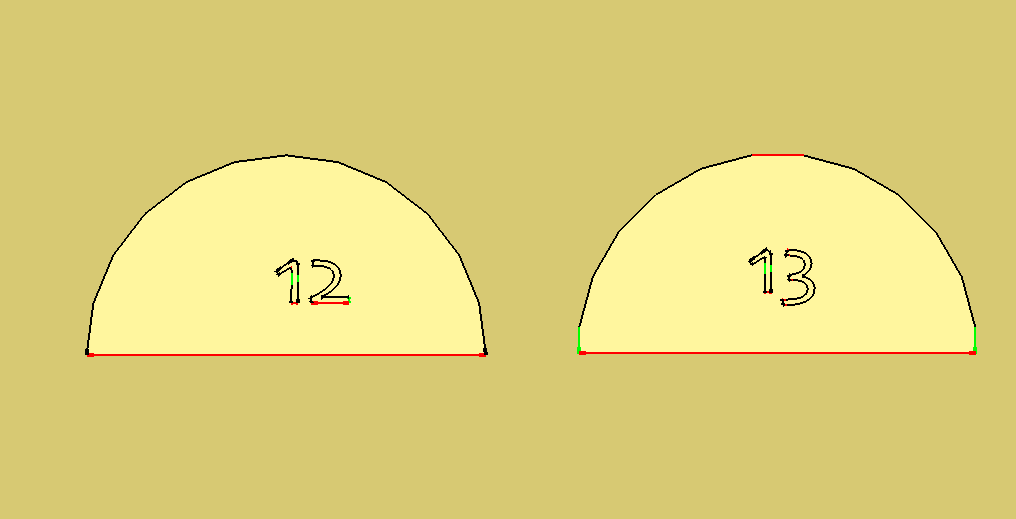
                        I wonder in regards to half arcs and quarter arcs, and even in respect to the cardinal points of circles why does SU draw them one way (Noted 12 in picture) and not the other (noted 13)? I know that segments of equal length are given for arcs. But is that really any use?

                        Both arcs are from the same circle, or (for SU) represent the same half circle.

                        What if every arc started with half a segment. Or an alternate (hold option key down) provided this feature? I think the arc marked 13 gives a better shape and can be more usable in drawing, if those were the issues. Would it break some rule of logic, geometry, or SU?

                        arcs tyes.png

                        MacOSX MojaveSketchUp Pro v19 Twilight v2 Thea v3 PowerCADD

                        1 條回覆 最後回覆 回覆 引用 0
                        • T 離線
                          Trogluddite
                          最後由 編輯

                          Assuming that the baseline is the same length, those two arcs do not share the same radius - the 'across the flats' version is slightly larger. This is because SU always takes the radius from centre to an apex - the standard arc has lines slightly within the drawn diameter, and No.13 extends slightly beyond.
                          Whether this matters probably depends on what you're modelling and what the purpose of the model is - but I think there does need to be a consistent method of determining the 'nominal' radius, for those folks who need to dimension their drawings.
                          A quick way to draw the alternative would sure be handy though.

                          1 條回覆 最後回覆 回覆 引用 0
                          • pbacotP 離線
                            pbacot
                            最後由 編輯

                            Actually they are from the same circle, so the base lines are not the same. So I see, the way SU defines the radius this would mean arc #13 would have other problems and an arch drawn with it would not dimension properly. I keep wanting to put "circle" and "arc" in quotes. The same issue we beat to death here, but not quite, regarding finding points that would easily be defined by a true arc.

                            MacOSX MojaveSketchUp Pro v19 Twilight v2 Thea v3 PowerCADD

                            1 條回覆 最後回覆 回覆 引用 0
                            • Rich O BrienR 離線
                              Rich O Brien Moderator
                              最後由 編輯

                              @Pilou

                              Doesn't TIG have some plugin that draws arc in this way?

                              Download the free D'oh Book for SketchUp 📖

                              1 條回覆 最後回覆 回覆 引用 0
                              • pilouP 離線
                                pilou
                                最後由 編輯

                                Sorry I must miss something! 😳
                                How do you draw the "13" arc for have perpendicular segments without a rotation?
                                If you make a rotation, what is advantage to have odd number except kabalistic 😄
                                I have not that! 😳
                                (view top)
                                12-13.jpg


                                12-13.skp

                                Frenchy Pilou
                                Is beautiful that please without concept!
                                My Little site :)

                                1 條回覆 最後回覆 回覆 引用 0
                                • pilouP 離線
                                  pilou
                                  最後由 編輯

                                  Maybe Tig True Tangent ?

                                  Arc curve set ? by Tig

                                  Arc by tools by TIG ☀

                                  Frenchy Pilou
                                  Is beautiful that please without concept!
                                  My Little site :)

                                  1 條回覆 最後回覆 回覆 引用 0
                                  • TIGT 線上
                                    TIG Moderator
                                    最後由 編輯

                                    Capture.PNG

                                    TIG

                                    1 條回覆 最後回覆 回覆 引用 0
                                    • pilouP 離線
                                      pilou
                                      最後由 編輯

                                      It's my previous method above ☀

                                      http://forums.sketchucation.com/download/file.php?id=89720&t=1

                                      Frenchy Pilou
                                      Is beautiful that please without concept!
                                      My Little site :)

                                      1 條回覆 最後回覆 回覆 引用 0
                                      • Dave RD 離線
                                        Dave R
                                        最後由 編輯

                                        I did that but you showed it in more detail. Thank you.

                                        Although it would be nice if SketchUP did real circles without vertices, we have to live with what it does do. It's not that difficult to set up the Follow Me path and the profile perpendicular to each other.

                                        Etaoin Shrdlu

                                        %

                                        (THERE'S NO PLACE LIKE)

                                        G28 X0.0 Y0.0 Z0.0

                                        M30

                                        %

                                        1 條回覆 最後回覆 回覆 引用 0
                                        • Rich O BrienR 離線
                                          Rich O Brien Moderator
                                          最後由 編輯

                                          I wonder if the OP has quit?

                                          Lot's of great answers here but so far silence from Anarchist86ed.

                                          Download the free D'oh Book for SketchUp 📖

                                          1 條回覆 最後回覆 回覆 引用 0
                                          • pbacotP 離線
                                            pbacot
                                            最後由 編輯

                                            @unknownuser said:

                                            Sorry I must miss something! 😳
                                            How do you draw the "13" arc for have perpendicular segments without a rotation?
                                            If you make a rotation, what is advantage to have odd number except kabalistic 😄
                                            I have not that! 😳
                                            (view top)
                                            [attachment=1:nfr6v75i]<!-- ia1 -->12-13.jpg<!-- ia1 -->[/attachment:nfr6v75i]

                                            That's how you do it.

                                            I would think the answer to the second question was obvious, the point of our conversation.

                                            I will continue to wonder about other ways of doing things and try to understand what is the reasoning.

                                            MacOSX MojaveSketchUp Pro v19 Twilight v2 Thea v3 PowerCADD

                                            1 條回覆 最後回覆 回覆 引用 0
                                            • 1
                                            • 2
                                            • 2 / 2
                                            • 第一個貼文
                                              最後的貼文
                                            Buy SketchPlus
                                            Buy SUbD
                                            Buy WrapR
                                            Buy eBook
                                            Buy Modelur
                                            Buy Vertex Tools
                                            Buy SketchCuisine
                                            Buy FormFonts

                                            Advertisement