sketchucation logo sketchucation
    • 登入
    Oops, your profile's looking a bit empty! To help us tailor your experience, please fill in key details like your SketchUp version, skill level, operating system, and more. Update and save your info on your profile page today!
    🔌 Smart Spline | Fluid way to handle splines for furniture design and complex structures. Download

    Mini-challenge

    已排程 已置頂 已鎖定 已移動 SketchUp Discussions
    sketchup
    328 貼文 26 Posters 38.1k 瀏覽 26 Watching
    正在載入更多貼文
    • 從舊到新
    • 從新到舊
    • 最多點贊
    回覆
    • 在新貼文中回覆
    登入後回覆
    此主題已被刪除。只有擁有主題管理權限的使用者可以查看。
    • thomthomT 離線
      thomthom
      最後由 編輯

      @jason_maranto said:

      This is really easy with the native tools -- here's a short tut file: [attachment=0:3gkxsinp]<!-- ia0 -->challenge.skp<!-- ia0 -->[/attachment:3gkxsinp]

      Best,
      Jason.

      How do you place the horizontal guides such that you get the fixed width of the diagonal board?

      Thomas Thomassen — SketchUp Monkey & Coding addict
      List of my plugins and link to the CookieWare fund

      1 條回覆 最後回覆 回覆 引用 0
      • thomthomT 離線
        thomthom
        最後由 編輯

        Looking at it, it's just as if you skewed a 0,50m board - which is not correct.

        Thomas Thomassen — SketchUp Monkey & Coding addict
        List of my plugins and link to the CookieWare fund

        1 條回覆 最後回覆 回覆 引用 0
        • jason_marantoJ 離線
          jason_maranto
          最後由 編輯

          This is really easy with the native tools -- here's a short tut file: challenge.skp

          Oh, I see why this might be a challenge -- you want a specific width to the crossboard... give me a sec.

          Best,
          Jason.

          I create video tutorial series about several 2D & 3D graphics programs.

          1 條回覆 最後回覆 回覆 引用 0
          • andybotA 離線
            andybot
            最後由 編輯

            Too funny Jeff. I do this all the time in AutoCAD with a circle guide, but stupid sketchup segmented circles, I really don't see any way. Thanks for the brain melt... 😆

            http://charlottesvillearchitecturalrendering.com/

            1 條回覆 最後回覆 回覆 引用 0
            • thomthomT 離線
              thomthom
              最後由 編輯

              @andybot said:

              Too funny Jeff. I do this all the time in AutoCAD with a circle guide, but stupid sketchup segmented circles, I really don't see any way. Thanks for the brain melt... 😆

              Until today I have never been too bothered about SketchUp's segmented arcs and circles - I've always found a way around it. But this... arrrrhh!!!

              And - I noticed if you have a circle, make a pie segment where one line snaps from centre til vertex and the other from centre to mid-segment - SketchUp will claim the segment is an Arc. But it's not! 😲 I was thinking that if I adjusted the segments with the Entity Info the arc would readjust the two ends to be true to it's original circle - but instead it result in two different length radius.

              Thomas Thomassen — SketchUp Monkey & Coding addict
              List of my plugins and link to the CookieWare fund

              1 條回覆 最後回覆 回覆 引用 0
              • andybotA 離線
                andybot
                最後由 編輯

                ... thus - for best accuracy, draw it in ACAD and import into sketchup 😒

                http://charlottesvillearchitecturalrendering.com/

                1 條回覆 最後回覆 回覆 引用 0
                • pilouP 離線
                  pilou
                  最後由 編輯

                  Have you the files in V6 ? 😉 (save as V6)

                  Frenchy Pilou
                  Is beautiful that please without concept!
                  My Little site :)

                  1 條回覆 最後回覆 回覆 引用 0
                  • E 離線
                    Ecuadorian
                    最後由 編輯

                    @andybot said:

                    ... thus - for best accuracy, draw it in ACAD and import into sketchup 😒

                    Amen. Trimble, if you're reading this, we need actual arcs and curves in SketchUp.

                    -Miguel Lescano
                    Subscribe to my house plans YouTube channel! (30K+ subs)

                    1 條回覆 最後回覆 回覆 引用 0
                    • Dave RD 離線
                      Dave R
                      最後由 編輯

                      Jason, that not quite the same as the original challenge, though. Make it so the diagonal board's ends are mitered with vertical cuts, not horizontal ones.

                      Etaoin Shrdlu

                      %

                      (THERE'S NO PLACE LIKE)

                      G28 X0.0 Y0.0 Z0.0

                      M30

                      %

                      1 條回覆 最後回覆 回覆 引用 0
                      • jason_marantoJ 離線
                        jason_maranto
                        最後由 編輯

                        I cleaned it up, streamlined the process a bit (removed a few unnecessary steps) and saved for version 6: challenge_final.skp

                        I was looking at the very first image in the thread, is that not what we are shooting for here?

                        Best,
                        Jason.

                        I create video tutorial series about several 2D & 3D graphics programs.

                        1 條回覆 最後回覆 回覆 引用 0
                        • fredo6F 離線
                          fredo6
                          最後由 編輯

                          Jeff,

                          Not sure plugins are allowed in this challenge, and unless I am wrong, this could be done with the but normally Planar Shearing can be performed with FredoScale
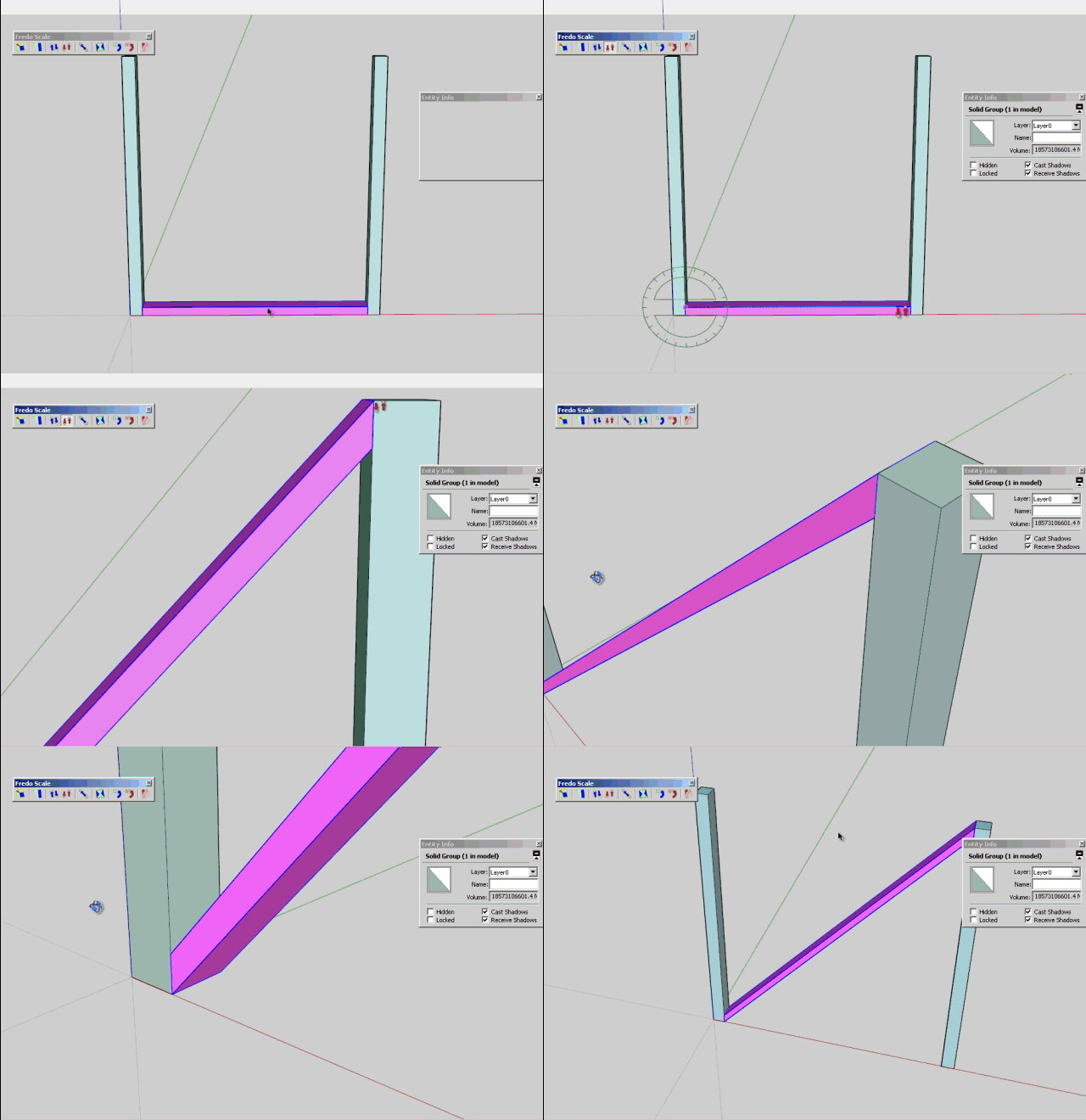
                          Jeff Challenge.gif

                          Fredo

                          1 條回覆 最後回覆 回覆 引用 0
                          • Rich O BrienR 離線
                            Rich O Brien Moderator
                            最後由 編輯

                            @Fredo

                            Is your frame changing thickness? It does for me

                            Download the free D'oh Book for SketchUp 📖

                            1 條回覆 最後回覆 回覆 引用 0
                            • jason_marantoJ 離線
                              jason_maranto
                              最後由 編輯

                              I got it accurate just using basic tools, but you have to do some contorting to get it done:(see this post for the file http://forums.sketchucation.com/viewtopic.php?p=401904#p401904)

                              I misread the beginning of the thread and initially thought the dimensions were not important... which is why the first version did not achieve victory 👊

                              Best,
                              Jason.

                              I create video tutorial series about several 2D & 3D graphics programs.

                              1 條回覆 最後回覆 回覆 引用 0
                              • pilouP 離線
                                pilou
                                最後由 編輯

                                A little light in my deseperation? 😄

                                Frenchy Pilou
                                Is beautiful that please without concept!
                                My Little site :)

                                1 條回覆 最後回覆 回覆 引用 0
                                • pbacotP 離線
                                  pbacot
                                  最後由 編輯

                                  [off:19rh2vop]
                                  @unknownuser said:

                                  The thing absolutly crazzy is that the Rotation tool
                                  seems accept just the base alignement as only good alignement! 😲 😲 😲
                                  I am totally depited! 😮

                                  I love this word![/off:19rh2vop]

                                  Yes if heights are not a given... Push pull the posts to the diagonal 💚

                                  MacOSX MojaveSketchUp Pro v19 Twilight v2 Thea v3 PowerCADD

                                  1 條回覆 最後回覆 回覆 引用 0
                                  • Dave RD 離線
                                    Dave R
                                    最後由 編輯

                                    Jason, how do you determine the where the diagonals hit the sides of the posts?

                                    Fredo's example does result in a narrower board. It could also be achieved with native tools by selecting one end of the board and moving that end up.

                                    Etaoin Shrdlu

                                    %

                                    (THERE'S NO PLACE LIKE)

                                    G28 X0.0 Y0.0 Z0.0

                                    M30

                                    %

                                    1 條回覆 最後回覆 回覆 引用 0
                                    • Dave RD 離線
                                      Dave R
                                      最後由 編輯

                                      If you measure .5m up and down the verticals, the board is not going to be .5m thick.

                                      Etaoin Shrdlu

                                      %

                                      (THERE'S NO PLACE LIKE)

                                      G28 X0.0 Y0.0 Z0.0

                                      M30

                                      %

                                      1 條回覆 最後回覆 回覆 引用 0
                                      • jason_marantoJ 離線
                                        jason_maranto
                                        最後由 編輯

                                        The desired thickness is .5 meters -- so the first guides are each measured out to .5 meters from the main diagonal (the only one that is obvious and never changes).

                                        So the next Diagonal can be found at intersections at .5 m guide up on the left post and .5 m guide down on the right post -- from there you delete the original guides and connect the diagonals with the line tool.

                                        After that you pull off new guides to .5m from the bottom and top -- which again will give the corrected diagonal at the intersections on the left post and right post... the other diagonal has been known since the beginning(doesn't ever change).

                                        All I used was the line tool, tape measure tool, and push pull.

                                        Best,
                                        Jason.

                                        I create video tutorial series about several 2D & 3D graphics programs.

                                        1 條回覆 最後回覆 回覆 引用 0
                                        • fredo6F 離線
                                          fredo6
                                          最後由 編輯

                                          @unknownuser said:

                                          @Fredo

                                          Is your frame changing thickness? It does for me

                                          Ooops. I should have read the thread in details.
                                          Then, it just need a dedicated plugin, this won't be a conform transformation

                                          Fredo

                                          1 條回覆 最後回覆 回覆 引用 0
                                          • jason_marantoJ 離線
                                            jason_maranto
                                            最後由 編輯

                                            It is as I show in the updated file.
                                            challenge_final.jpg
                                            Best,
                                            Jason.

                                            I create video tutorial series about several 2D & 3D graphics programs.

                                            1 條回覆 最後回覆 回覆 引用 0
                                            • 1
                                            • 2
                                            • 13
                                            • 14
                                            • 15
                                            • 16
                                            • 17
                                            • 16 / 17
                                            • 第一個貼文
                                              最後的貼文
                                            Buy SketchPlus
                                            Buy SUbD
                                            Buy WrapR
                                            Buy eBook
                                            Buy Modelur
                                            Buy Vertex Tools
                                            Buy SketchCuisine
                                            Buy FormFonts

                                            Advertisement