sketchucation logo sketchucation
    • 登入
    Oops, your profile's looking a bit empty! To help us tailor your experience, please fill in key details like your SketchUp version, skill level, operating system, and more. Update and save your info on your profile page today!
    🔌 Smart Spline | Fluid way to handle splines for furniture design and complex structures. Download

    Mini-challenge

    已排程 已置頂 已鎖定 已移動 SketchUp Discussions
    sketchup
    328 貼文 26 Posters 38.2k 瀏覽 26 Watching
    正在載入更多貼文
    • 從舊到新
    • 從新到舊
    • 最多點贊
    回覆
    • 在新貼文中回覆
    登入後回覆
    此主題已被刪除。只有擁有主題管理權限的使用者可以查看。
    • gillesG 離線
      gilles
      最後由 編輯

      I 've found a tricky way.


      Mini-challenge.skp

      " c'est curieux chez les marins ce besoin de faire des phrases "

      1 條回覆 最後回覆 回覆 引用 0
      • jeff hammondJ 離線
        jeff hammond
        最後由 編輯

        @dave r said:

        That stuck with me, too. I can't remember who I took to prom, though.

        😆

        (I don't think I even went to prom.. maybe)

        dotdotdot

        1 條回覆 最後回覆 回覆 引用 0
        • jeff hammondJ 離線
          jeff hammond
          最後由 編輯

          @gilles said:

          I 've found a tricky way.

          really? sweet!
          I'm on a phone now so I can't see it but the suspense is killing me 😄

          can anyone verify?

          dotdotdot

          1 條回覆 最後回覆 回覆 引用 0
          • jason_marantoJ 離線
            jason_maranto
            最後由 編輯

            Wow, that is tricky... I never would have approached it that way.

            What gave you the answer?

            Best,
            Jason.

            I create video tutorial series about several 2D & 3D graphics programs.

            1 條回覆 最後回覆 回覆 引用 0
            • andybotA 離線
              andybot
              最後由 編輯

              Nice one! works for me!

              http://charlottesvillearchitecturalrendering.com/

              1 條回覆 最後回覆 回覆 引用 0
              • gillesG 離線
                gilles
                最後由 編輯

                I dont even know, just an intuition.
                So do I won something? 💚

                " c'est curieux chez les marins ce besoin de faire des phrases "

                1 條回覆 最後回覆 回覆 引用 0
                • thomthomT 離線
                  thomthom
                  最後由 編輯

                  @gilles said:

                  So do I won something? 💚

                  Yes - the honor of authoring the next challenge! 😄

                  Thomas Thomassen — SketchUp Monkey & Coding addict
                  List of my plugins and link to the CookieWare fund

                  1 條回覆 最後回覆 回覆 引用 0
                  • thomthomT 離線
                    thomthom
                    最後由 編輯

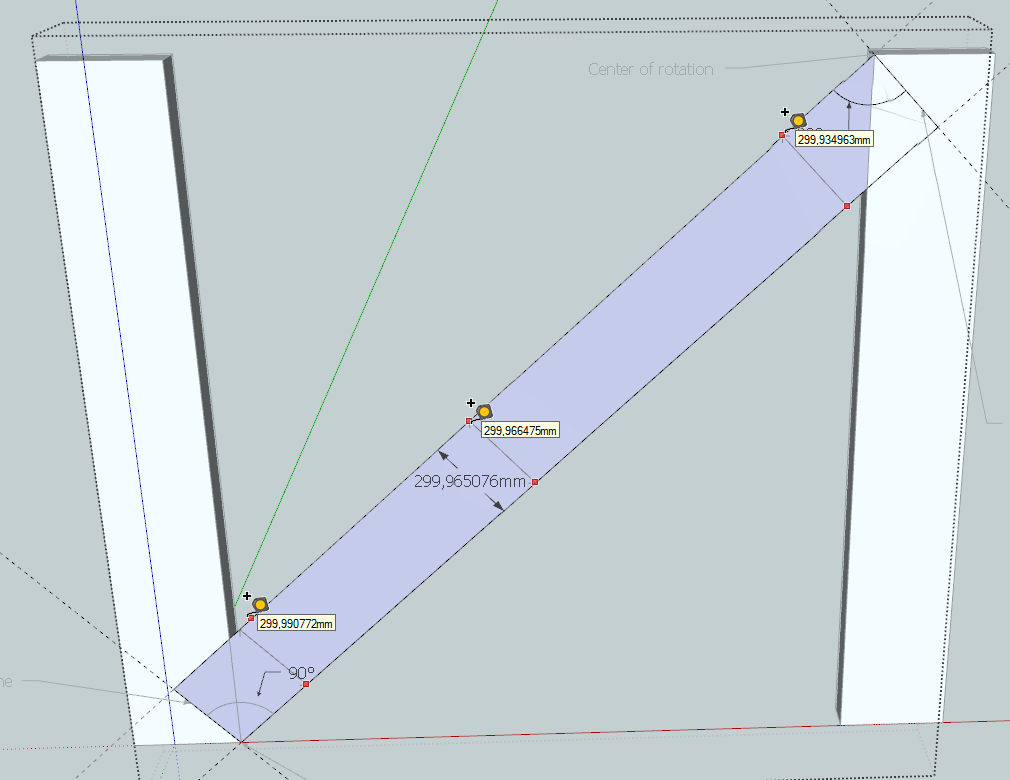
                    Unfortunately - the lines are not parallel:
                    Accuracy.png

                    Thomas Thomassen — SketchUp Monkey & Coding addict
                    List of my plugins and link to the CookieWare fund

                    1 條回覆 最後回覆 回覆 引用 0
                    • jeff hammondJ 離線
                      jeff hammond
                      最後由 編輯

                      @thomthom said:

                      Unfortunately - the lines are not parallel:
                      [attachment=0:1xhfujx7]<!-- ia0 -->Accuracy.png<!-- ia0 -->[/attachment:1xhfujx7]

                      bah!
                      I was hoping gilles nailed it

                      dotdotdot

                      1 條回覆 最後回覆 回覆 引用 0
                      • andybotA 離線
                        andybot
                        最後由 編輯

                        @thomthom said:

                        Unfortunately - the lines are not parallel:

                        What's missing? I redid it from scratch. I would suggest drawing a guide-line inferenced perpendicular to the new diagonal lines. (I group the newly drawn diagonals so I can rotate exactly to the perpendicular.)


                        diagonal1.skp

                        http://charlottesvillearchitecturalrendering.com/

                        1 條回覆 最後回覆 回覆 引用 0
                        • TIGT 離線
                          TIG Moderator
                          最後由 編輯

                          My solution - many posts back - using my True-Tangents script's 'True Intersections' - finds the correct point to be used...
                          It also uses "trigonometry" to calculate the values for the point - like the DC...
                          It's as accurate as you can get.

                          My subsequent "plugin-free" approach does it by say three rotate/scale combos until the accuracy is so tiny it could be ignored...

                          TIG

                          1 條回覆 最後回覆 回覆 引用 0
                          • jason_marantoJ 離線
                            jason_maranto
                            最後由 編輯

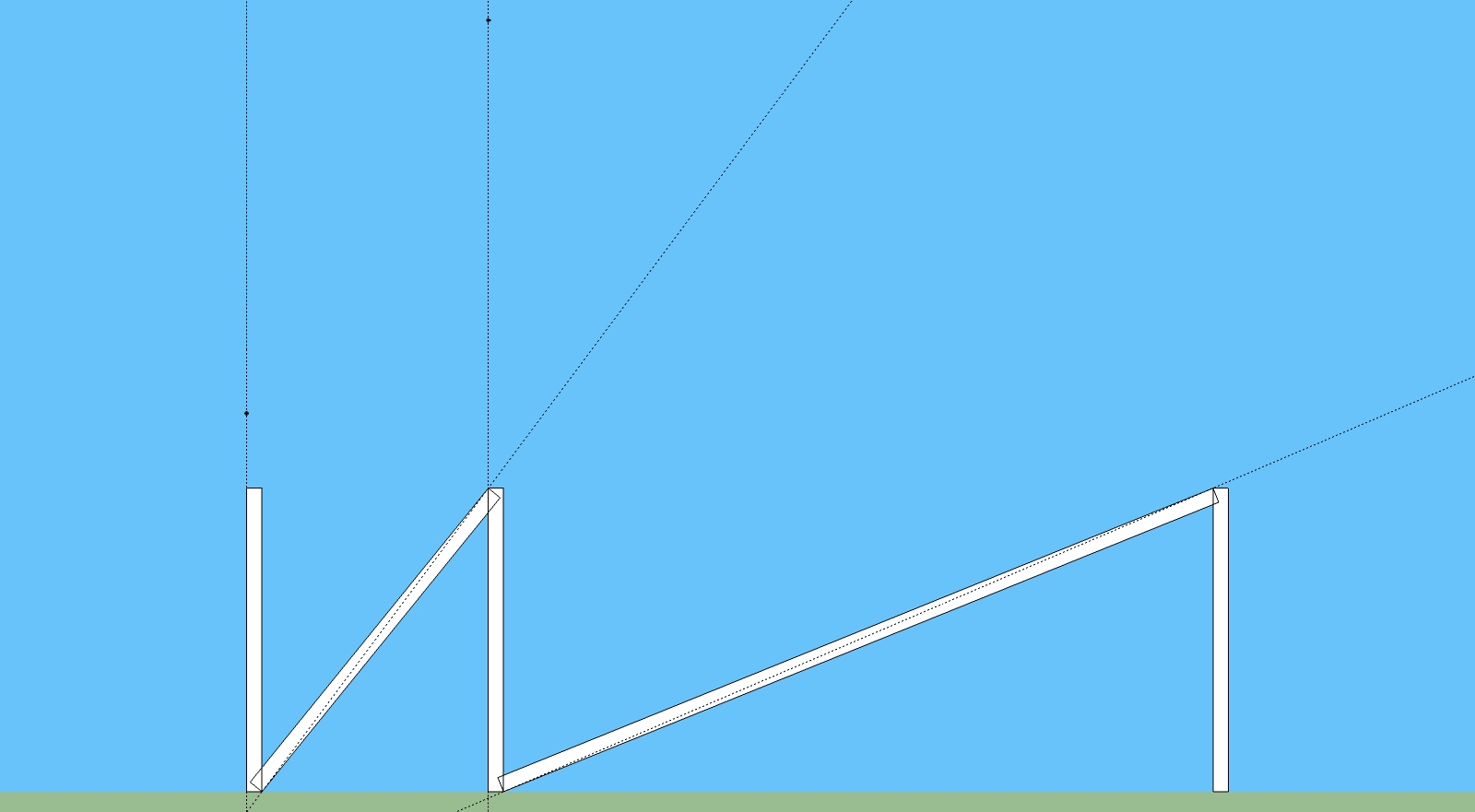
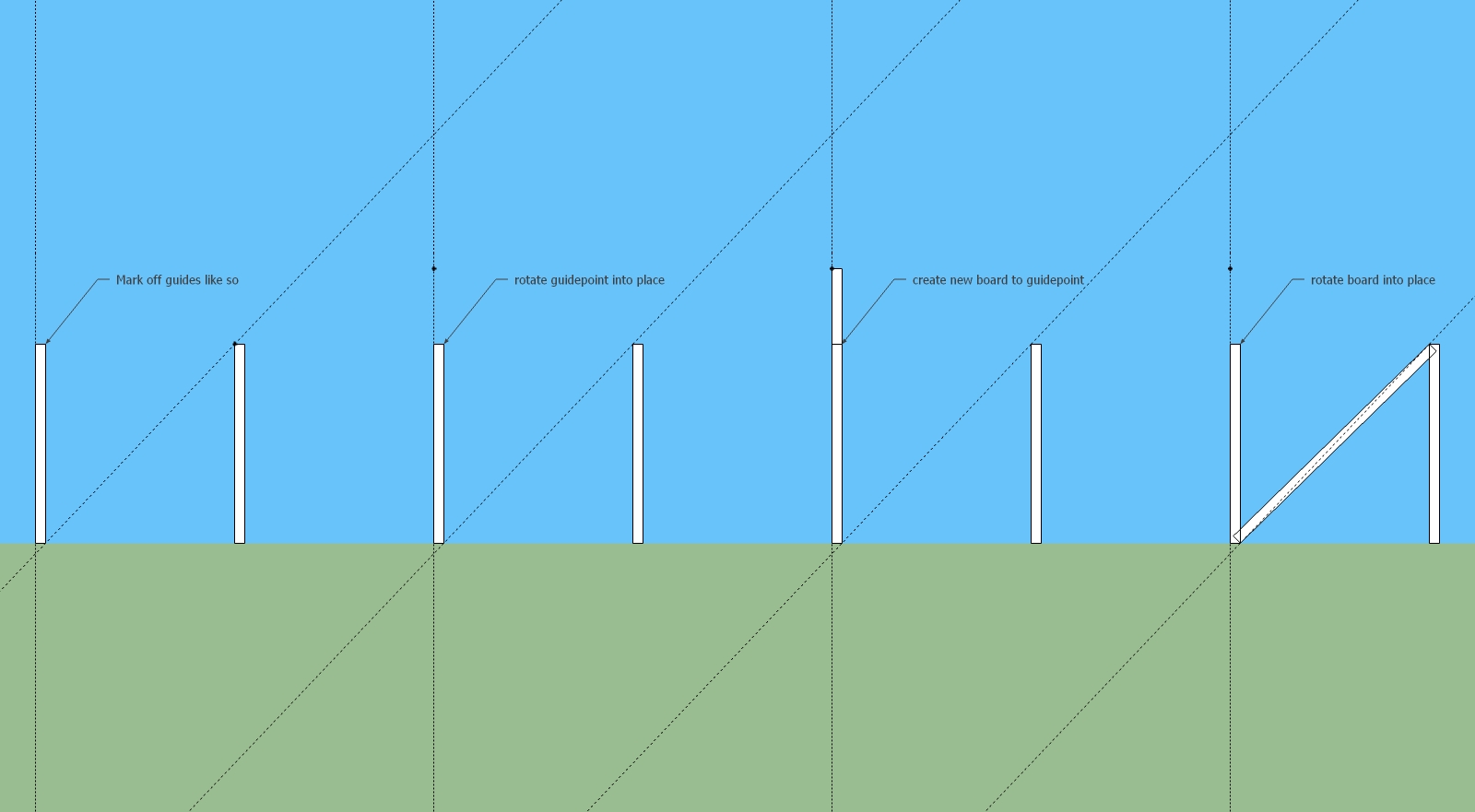
                            I'm also still adamant that the previous approach I showed will work fine -- the only sticky thing about this approach is you may have to manually enter the rotation as the rotate tool will not allow for fine enough control of placing the construction point. The width of the beam stays absolutely perfect -- and the only precision issue is the height of the beam before rotation (as set by the construction point).
                            challenge_alt4.jpg

                            Bonus here -- no maths 😍

                            Best,
                            Jason.

                            I create video tutorial series about several 2D & 3D graphics programs.

                            1 條回覆 最後回覆 回覆 引用 0
                            • andybotA 離線
                              andybot
                              最後由 編輯

                              @tig said:

                              My solution - many posts back - using my True-Tangents script's 'True Intersections' - finds the correct point to be used...
                              It also uses "trigonometry" to calculate the values for the point - like the DC...
                              It's as accurate as you can get.

                              Nice, yes, that method gets the intersection point correctly as not relying on the segmented SU cricle for the intersection. Thanks for pointing out your tangents tool. I still will use ACAD when it comes to using arcs and circles. 😕

                              http://charlottesvillearchitecturalrendering.com/

                              1 條回覆 最後回覆 回覆 引用 0
                              • andybotA 離線
                                andybot
                                最後由 編輯

                                @jason_maranto said:

                                I'm also still adamant that the previous approach I showed will work fine --

                                but fine is not exact... that's the whole point isn't it.

                                http://charlottesvillearchitecturalrendering.com/

                                1 條回覆 最後回覆 回覆 引用 0
                                • jason_marantoJ 離線
                                  jason_maranto
                                  最後由 編輯

                                  Yes, but I am getting down into 1000ths of a degree on that rotation -- I'm not sure how much more precise it can be without being fully automated... we humans tend to fudge it, but computers can go much more precise in practice -- regardless, you will never build something with wood that will be more precise than what we are doing here. So I think any of these are decent enough for most users... after all this isn't meant to be an engineering program.

                                  Let me put it to you another way, when I do a solid operation (unite/outer shell) there is no gap or extra faces -- it's perfect -- and I think that is about as good of a precision as you are going to get from SketchUp.

                                  Here's the file check for yourself: challenge_altfinal.skp

                                  How I got there: challenge_alt2.jpg
                                  Best,
                                  Jason.

                                  I create video tutorial series about several 2D & 3D graphics programs.

                                  1 條回覆 最後回覆 回覆 引用 0
                                  • jeff hammondJ 離線
                                    jeff hammond
                                    最後由 編輯

                                    @jason_maranto said:

                                    Yes, but I am getting down into 1000ths of a degree on that rotation --

                                    that's fine and as i said earlier, there are plenty of ways to get it 'close enough' for construction purposes..

                                    the challenge though, at least for this thread, is to get it 100% perfect..

                                    and if you give up at 'close enough' then you'll quit exploring ways to make it precise 😉

                                    so while a 100% solution to this challenge isn't totally necessary for me to get a dimension for a cut-list, a 100% solution is necessary to relax the 🤓 in some people..

                                    dotdotdot

                                    1 條回覆 最後回覆 回覆 引用 0
                                    • pbacotP 離線
                                      pbacot
                                      最後由 編輯

                                      Jason may have a point about the precision. The idea is that in doing work that requires this precision (such as survey), where close can give results further out that are way off-- would you EVER be using SU anyway?

                                      Jason you mention entering the rotation manually. Where do you get the angle from? I guess, on the other hand, I think a failsafe technique was sought rather than a function of someone's eyeball ability and time available (which we seem to have ample between us... 😕 )

                                      MacOSX MojaveSketchUp Pro v19 Twilight v2 Thea v3 PowerCADD

                                      1 條回覆 最後回覆 回覆 引用 0
                                      • thomthomT 離線
                                        thomthom
                                        最後由 編輯

                                        Problem is that tiny fractions of inaccuracy can very easily cascade into the rest of the model where you start getting issues. Ever so often when I import DWG files I end up with lots of issues where things are nearly square, nearly perpendicular etc. Initially SU treats them as "good enough" bug eventually this inaccuracy creeps over to the point where SU doesn't treat them as square and parallel. In worst scenarios I get models where splitting faces creates duplicate overlapping faces. That's why I don't like settling for "good enough"...

                                        Thomas Thomassen — SketchUp Monkey & Coding addict
                                        List of my plugins and link to the CookieWare fund

                                        1 條回覆 最後回覆 回覆 引用 0
                                        • andybotA 離線
                                          andybot
                                          最後由 編輯

                                          Jason, I think the issue is that you are manually placing an inference where it doesn't exist in SU. Like thomthom says, that can lead to inaccuracy down the road.

                                          http://charlottesvillearchitecturalrendering.com/

                                          1 條回覆 最後回覆 回覆 引用 0
                                          • jason_marantoJ 離線
                                            jason_maranto
                                            最後由 編輯

                                            I got it as close the the guideline as I can (with the tolerance of the rotate tool maxed out) and then adjust using the VCB to fine tune (if needed)... I'm not very experienced with advanced math (calc and trig) so I try to keep it simple.

                                            I'm sure there is some math that could explain why this works and how to setup the construction point absolutely perfectly without rotating it into place -- but I'm far to math illiterate to figure that out.

                                            But like I say, all the dimensions in the file I just posted are completely accurate as far as SketchUp can measure -- there's no flaw that SketchUp can find (it doesn't mean one doesn't exist).

                                            Also for clarity, this is just my version of the same technique somebody else posted here earlier -- It's not my solution, just one that seems to work really well.

                                            Best,
                                            Jason.

                                            I create video tutorial series about several 2D & 3D graphics programs.

                                            1 條回覆 最後回覆 回覆 引用 0
                                            • 1
                                            • 2
                                            • 7
                                            • 8
                                            • 9
                                            • 10
                                            • 11
                                            • 16
                                            • 17
                                            • 9 / 17
                                            • 第一個貼文
                                              最後的貼文
                                            Buy SketchPlus
                                            Buy SUbD
                                            Buy WrapR
                                            Buy eBook
                                            Buy Modelur
                                            Buy Vertex Tools
                                            Buy SketchCuisine
                                            Buy FormFonts

                                            Advertisement




