sketchucation logo sketchucation
    • Login
    Oops, your profile's looking a bit empty! To help us tailor your experience, please fill in key details like your SketchUp version, skill level, operating system, and more. Update and save your info on your profile page today!
    Mac User? | Join the Rayscaper Beta for Mac Learn More

    Diameter instead of radius

    Scheduled Pinned Locked Moved Newbie Forum
    sketchup
    19 Posts 12 Posters 6.1k Views 12 Watching
    Loading More Posts
    • Oldest to Newest
    • Newest to Oldest
    • Most Votes
    Reply
    • Reply as topic
    Log in to reply
    This topic has been deleted. Only users with topic management privileges can see it.
    • A
      ArCAD-UK
      last edited by

      @gaieus said:

      So you can always enter diameter/2 into the Measurement box...
      Therefore no need for any plugin at all... πŸ˜‰

      Thought I was having a Doh moment but this only seems to work with the division operator. I was beginning to think we had a discrete calculator available πŸ˜’

      1 Reply Last reply
      Reply Quote 0
      • GaieusG
        Gaieus
        last edited by

        Yes, Pilou, but that was not the question on one hand and again, we are in the Newbie forum on the other so let's keep it simple at the beginning...
        πŸ˜‰

        Gai...

        1 Reply Last reply
        Reply Quote 0
        • pilouP
          pilou
          last edited by

          @unknownuser said:

          Therefore no need for any plugin at all

          Yes but how you draw a circle between 2 objects ? (in the easy case horizontal or vertical)
          You must first draw a line for have the middle of them and then the center! πŸ˜‰

          And the best will be a plug for that!
          Because even the Circle by Diameter don't work in this case!
          Just 2 points to click

          http://forums.sketchucation.com/download/file.php?id=68678

          else you must without plug make some tricky align views/ axes etc... πŸ˜„
          The more easy seams to draw a line between the corners, then a rectangle
          then the circle
          Then kill line, rectangle
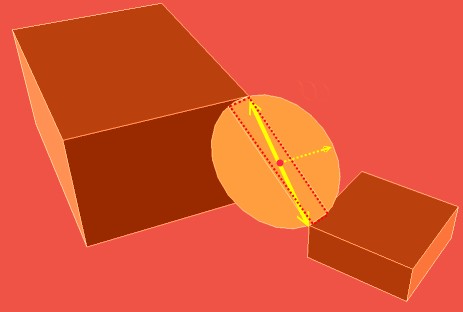
          circle.jpg
          πŸ˜„

          Frenchy Pilou
          Is beautiful that please without concept!
          My Little site :)

          1 Reply Last reply
          Reply Quote 0
          • pilouP
            pilou
            last edited by

            What's no more simple to draw a circle ? πŸ˜‰
            It's like that i have understood the question of the first post! πŸ˜„

            Frenchy Pilou
            Is beautiful that please without concept!
            My Little site :)

            1 Reply Last reply
            Reply Quote 0
            • Jean LemireJ
              Jean Lemire
              last edited by

              Hi Pilou, hi folks.

              There is an infinite number of circles between two points since there is an infinite number of planes around a line (the diameter).

              Just ideas.

              Jean (Johnny) Lemire from Repentigny, Quebec, Canada.

              1 Reply Last reply
              Reply Quote 0
              • pilouP
                pilou
                last edited by

                In the case of the inclined circle above

                @unknownuser said:

                an infinite number of planes around a line

                But only one with a diameter // to the ground ! πŸ˜‰ (i believe that will be a tricky plug πŸ˜‰
                (in fact 2 if your circle has a color different recto verso πŸ˜„

                Frenchy Pilou
                Is beautiful that please without concept!
                My Little site :)

                1 Reply Last reply
                Reply Quote 0
                • ipsketchpiI
                  ipsketchpi
                  last edited by

                  Cool, I like that 100/2 option. Exactly what I am looking for when I am too lazy to divide D to get R πŸ˜„

                  Thanks!

                  /IP

                  1 Reply Last reply
                  Reply Quote 0
                  • N
                    namuh1
                    last edited by

                    Silly question: Why does Layout let you set a circle by diameter... namely typing for exampe: 5" d in the toolbar to get a 5" diameter circle and Sketchup itself does not?

                    1 Reply Last reply
                    Reply Quote 0
                    • Dave RD
                      Dave R
                      last edited by

                      @namuh1 said:

                      Silly question: Why does Layout let you set a circle by diameter... namely typing for exampe: 5" d in the toolbar to get a 5" diameter circle and Sketchup itself does not?

                      Two different programs.

                      Etaoin Shrdlu

                      %

                      (THERE'S NO PLACE LIKE)

                      G28 X0.0 Y0.0 Z0.0

                      M30

                      %

                      1 Reply Last reply
                      Reply Quote 0
                      • GaieusG
                        Gaieus
                        last edited by

                        It does allow - with a bit of basic calculation input - except when you also want to use the unit (it seems). I use a (centi)metric template and I can enter (say) 100/2 and it will draw a circle with an 50cm radius (i.e. 100cm dia).

                        I guess this does not help much with architectural imperial template for instance...

                        Gai...

                        1 Reply Last reply
                        Reply Quote 0
                        • C
                          chmedly
                          last edited by

                          I too would like this. It takes too much time to switch to a separate calculator to figure out a complex circle's radius. I thought the /2 idea would work but it doesn't I have a Sketchup model that is set to decimal inches. I keep trying to draw a circle with a 1.25" diameter. If I type 1.25/2 in the box I get a circle with a radius of 1.25. I've tried a number of different ways of typing this to no avail.

                          1 Reply Last reply
                          Reply Quote 0
                          • F
                            Futurepast
                            last edited by

                            I use the scale tool. I draw the circle, use the scale tool by clicking on corner holding cntl key. Start the move and type in 2 or .5 to double or halve the circle

                            1 Reply Last reply
                            Reply Quote 0
                            • Dave RD
                              Dave R
                              last edited by

                              I've just practiced doing the math in my head. I must say I've gotten faster at it with practice. It really isn't a big problem for me.

                              I would find scaling a circle after I've drawn it kind of a pain especially if it is drawn on something else in a location where the larger circle would have to cross other geometry.

                              Etaoin Shrdlu

                              %

                              (THERE'S NO PLACE LIKE)

                              G28 X0.0 Y0.0 Z0.0

                              M30

                              %

                              1 Reply Last reply
                              Reply Quote 0
                              • M
                                mm0063
                                last edited by

                                @chmedly said:

                                If I type 1.25/2 in the box I get a circle with a radius of 1.25. I've tried a number of different ways of typing this to no avail.

                                So try 125/200 instead of 1.25/2 . 😎
                                See https://www.youtube.com/watch?v=crY8SVypzMQ

                                1 Reply Last reply
                                Reply Quote 0
                                • S
                                  slbaumgartner
                                  last edited by

                                  The technique of entering n/m works only because SketchUp's measurements box accepts fractions, not because it implements a divide operator as such. In a fraction both n and m must be integers. Any other type does not get treated as a numerator or denominator of a fraction.

                                  1 Reply Last reply
                                  Reply Quote 0

                                  Hello! It looks like you're interested in this conversation, but you don't have an account yet.

                                  Getting fed up of having to scroll through the same posts each visit? When you register for an account, you'll always come back to exactly where you were before, and choose to be notified of new replies (either via email, or push notification). You'll also be able to save bookmarks and upvote posts to show your appreciation to other community members.

                                  With your input, this post could be even better πŸ’—

                                  Register Login
                                  • 1 / 1
                                  • First post
                                    Last post
                                  Buy SketchPlus
                                  Buy SUbD
                                  Buy WrapR
                                  Buy eBook
                                  Buy Modelur
                                  Buy Vertex Tools
                                  Buy SketchCuisine
                                  Buy FormFonts

                                  Advertisement