sketchucation logo sketchucation
    • Login
    Oops, your profile's looking a bit empty! To help us tailor your experience, please fill in key details like your SketchUp version, skill level, operating system, and more. Update and save your info on your profile page today!
    Mac User? | Join the Rayscaper Beta for Mac Learn More

    Help! How to make a spiral like a paper?

    Scheduled Pinned Locked Moved Newbie Forum
    sketchup
    29 Posts 12 Posters 2.5k Views 12 Watching
    Loading More Posts
    • Oldest to Newest
    • Newest to Oldest
    • Most Votes
    Reply
    • Reply as topic
    Log in to reply
    This topic has been deleted. Only users with topic management privileges can see it.
    • brookefoxB
      brookefox
      last edited by

      @gilles said:

      It's a dog.

      I'm confused. I see what might be a tail, an organ, and an orifice but at that point my imagination can't hack it.

                     **EDIT:** Now I get it. Before, I could not hear the splashing.
      

      Great tips on the model, folks. First I'm going to try Pilou's 5 second method. Be back in the morning sometime when I finish.

      I'm back but for me the use of TIG's tool is not intuitive. I don't doubt that that is more a reflection of my limitations but one might need reminding that TIG's tool needs curves for the rails, as Pilou mentioned. So you need to draw even a straight edge as multiple sections or divide it and then weld it into a curve.
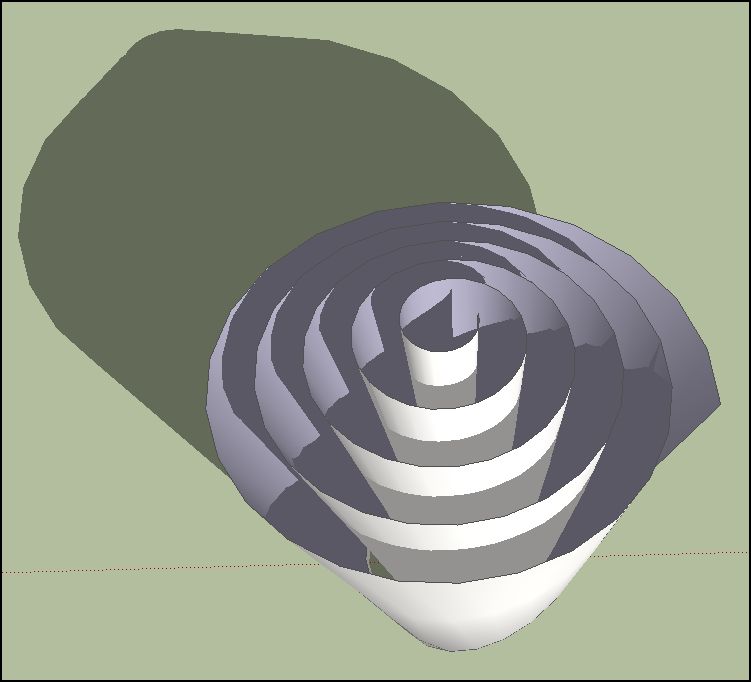

      paper spiral.JPG

      ~ Brooke

      1 Reply Last reply
      Reply Quote 0
      • gillesG
        gilles
        last edited by

        Definitely Shape Bender:


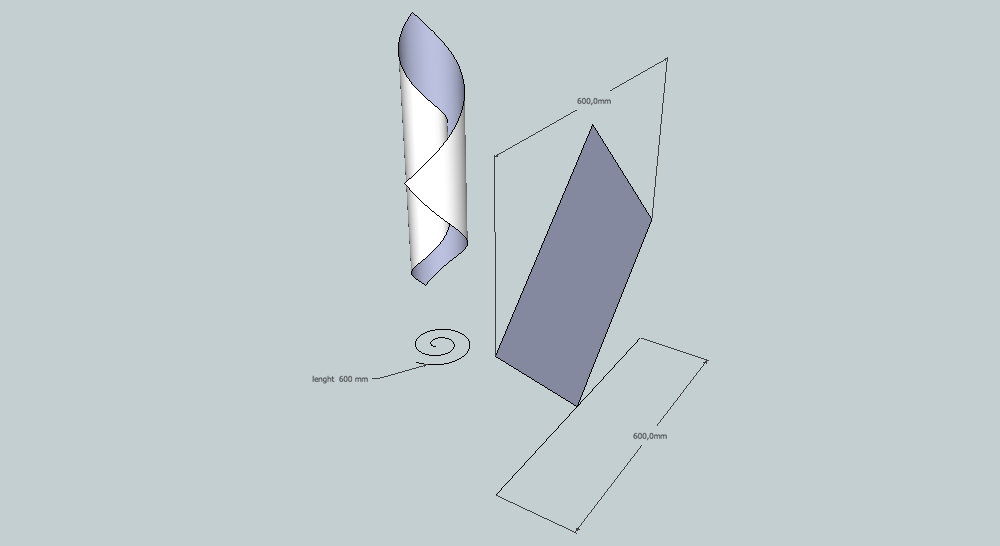
        #paper.png

        " c'est curieux chez les marins ce besoin de faire des phrases "

        1 Reply Last reply
        Reply Quote 0
        • pbacotP
          pbacot
          last edited by

          @gilles said:

          Definitely Shape Bender:

          We never listen.

          MacOSX MojaveSketchUp Pro v19 Twilight v2 Thea v3 PowerCADD

          1 Reply Last reply
          Reply Quote 0
          • J
            Jim
            last edited by

            @gilles said:

            @pbacot said:

            OK gilles I have to ask, what IS that avatar supposed to be?

            It's a dog.

            [off:116hequd]Oh. Can not be unseen.[/off:116hequd]

            Hi

            1 Reply Last reply
            Reply Quote 0
            • TIGT
              TIG Moderator
              last edited by

              [off:25v2rhb7]Un chien mâle qui pisse, vu de derrière 😲[/off:25v2rhb7]

              TIG

              1 Reply Last reply
              Reply Quote 0
              • pilouP
                pilou
                last edited by

                Very conceptual avatar! 💚

                Frenchy Pilou
                Is beautiful that please without concept!
                My Little site :)

                1 Reply Last reply
                Reply Quote 0
                • brookefoxB
                  brookefox
                  last edited by

                  Thanks for learnin' me a little, after which, for me, extrude edges by rails works best, simply because I could not make the length of the helix and the diagonal to match so shape bender had an annoying error (the little projecting tab). How to make these equal? Note also the disagreement about the length of the scaled helix curve info=112', label=245'. I assume the scaling threw a wrench in the works?
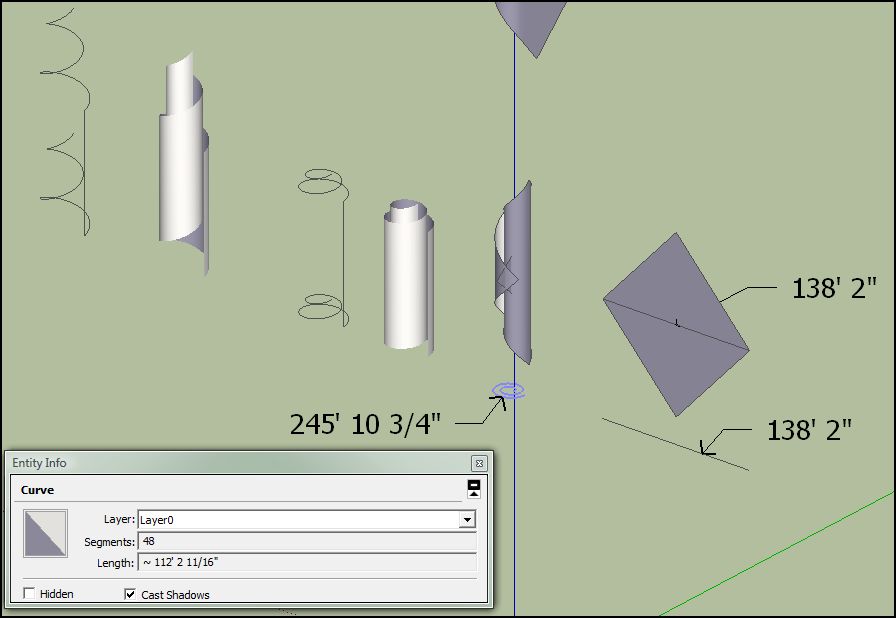

                  paper spiral-1.JPG

                  ~ Brooke

                  1 Reply Last reply
                  Reply Quote 0
                  • gillesG
                    gilles
                    last edited by

                    #1 draw the path ( helix )
                    #2 select it, open entity info to get the length
                    #3 draw the line the same length
                    #4 draw the diagonal sheet the same length
                    #5 draw the sheet with circle tool set to 4 segments ( if you want a square sheet )
                    #6 erase the diagonal
                    #7 group the sheet
                    #8 run shape bender.....wait....
                    #9 resize the model with tape tool. done

                    it takes five minutes.

                    " c'est curieux chez les marins ce besoin de faire des phrases "

                    1 Reply Last reply
                    Reply Quote 0
                    • brookefoxB
                      brookefox
                      last edited by

                      Thanks for that.

                      Sly:
                      @unknownuser said:

                      #5 draw the sheet with circle tool set to 4 segments ( if you want a square sheet )

                      Perhaps that method it is more accurate than 'extrude edges by rails' even if a little slower.

                      ~ Brooke

                      1 Reply Last reply
                      Reply Quote 0
                      • gillesG
                        gilles
                        last edited by

                        If your paper is square it's fast as you already have the diagonal.
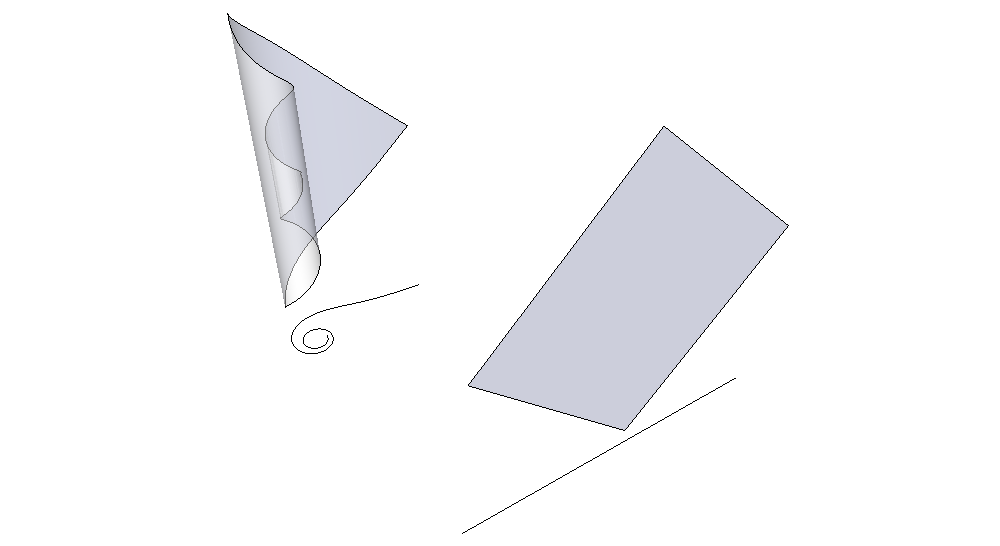

                        spiral-paper.png

                        " c'est curieux chez les marins ce besoin de faire des phrases "

                        1 Reply Last reply
                        Reply Quote 0
                        • mitcorbM
                          mitcorb
                          last edited by

                          Anybody tried Spirix on this? I am not sure if it can be applied here. Some more info, I think is in a thread back about 4months. As far as I know, the author doesn't post here.

                          I take the slow, deliberate approach in my aimless wandering.

                          1 Reply Last reply
                          Reply Quote 0
                          • brookefoxB
                            brookefox
                            last edited by

                            Heck, man. That thing looks real nifty.

                            Error 404 (Not Found)!!1

                            favicon

                            (sites.google.com)

                            ~ Brooke

                            1 Reply Last reply
                            Reply Quote 0
                            • brookefoxB
                              brookefox
                              last edited by

                              I like your way because it has the rotated sheet (corner up). I cannot do it faster than EEbyR, though.
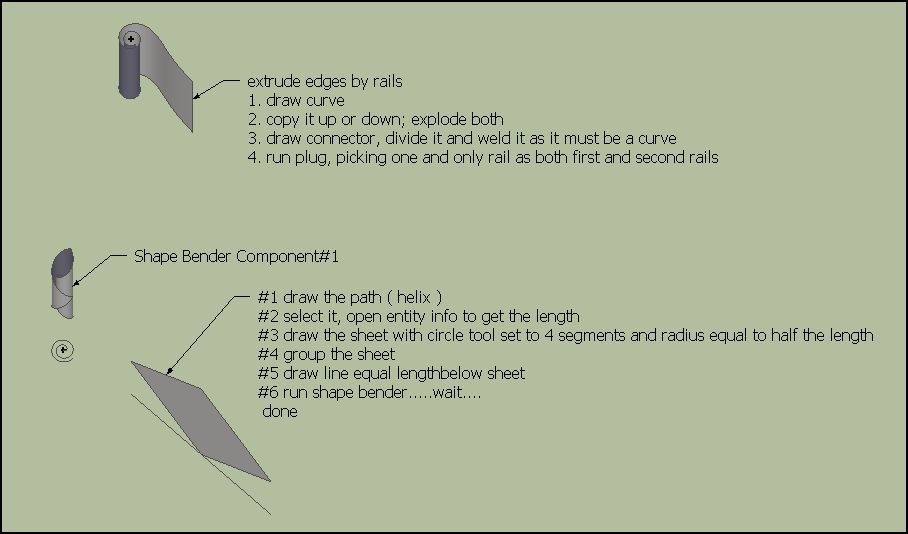


                              sheet rolled-1.JPG

                              ~ Brooke

                              1 Reply Last reply
                              Reply Quote 0

                              Hello! It looks like you're interested in this conversation, but you don't have an account yet.

                              Getting fed up of having to scroll through the same posts each visit? When you register for an account, you'll always come back to exactly where you were before, and choose to be notified of new replies (either via email, or push notification). You'll also be able to save bookmarks and upvote posts to show your appreciation to other community members.

                              With your input, this post could be even better 💗

                              Register Login
                              • 1
                              • 2
                              • 2 / 2
                              • First post
                                Last post
                              Buy SketchPlus
                              Buy SUbD
                              Buy WrapR
                              Buy eBook
                              Buy Modelur
                              Buy Vertex Tools
                              Buy SketchCuisine
                              Buy FormFonts

                              Advertisement