sketchucation logo sketchucation
    • 登入
    Oops, your profile's looking a bit empty! To help us tailor your experience, please fill in key details like your SketchUp version, skill level, operating system, and more. Update and save your info on your profile page today!
    🔌 Smart Spline | Fluid way to handle splines for furniture design and complex structures. Download

    [Plugin] FredoTools::ThruPaint - v1.3a - 20 Oct 16

    已排程 已置頂 已鎖定 已移動 Plugins
    331 貼文 102 Posters 526.1k 瀏覽 102 Watching
    正在載入更多貼文
    • 從舊到新
    • 從新到舊
    • 最多點贊
    回覆
    • 在新貼文中回覆
    登入後回覆
    此主題已被刪除。只有擁有主題管理權限的使用者可以查看。
    • D 離線
      dmorong
      最後由 編輯

      Nothing shows up in the Ruby Console when running the Extension.

      David

      Macbook Pro 16" (M1)
      Mac 12.1
      Sketchup 22.0.353

      1 條回覆 最後回覆 回覆 引用 0
      • fredo6F 離線
        fredo6
        最後由 編輯

        David,

        When you hover over the painted surface, could you type Enter. This also goes into the Edition mode.

        Fredo

        1 條回覆 最後回覆 回覆 引用 0
        • D 離線
          dmorong
          最後由 編輯

          Yes, anytime you hover over the surface, as long as you see the small postit that indicates the mapping (Front Quadmesh, Natural, or Projected) you can hit enter and the adjustment gizmo will come up and stay so it can be manipulated. Thanks for pointing out that key command. That solves the problem

          David

          Macbook Pro 16" (M1)
          Mac 12.1
          Sketchup 22.0.353

          1 條回覆 最後回覆 回覆 引用 0
          • pbacotP 離線
            pbacot
            最後由 編輯

            I didn't realize it but that non-uniform scaling function does not work in the "natural" UV setting (it's "non-deforming")

            MacOSX MojaveSketchUp Pro v19 Twilight v2 Thea v3 PowerCADD

            1 條回覆 最後回覆 回覆 引用 0
            • pep75P 離線
              pep75
              最後由 編輯

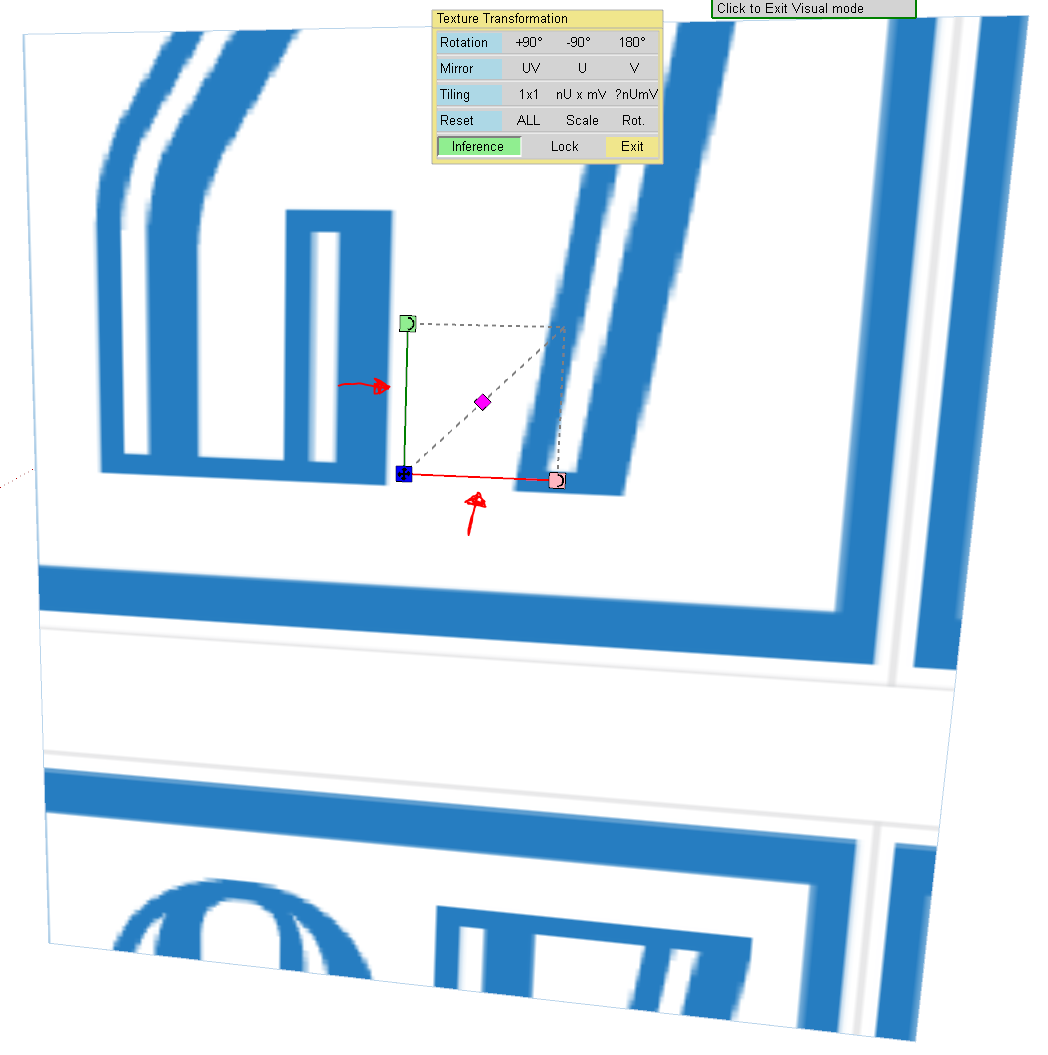
              I was wondering if someone can tell me where the sliders are on the visual tool in ThruPaint? I used to scale(non uniform) textures in U and V direction seperately but cannot right now. What am I doing wrong?

              Thanks in advance!

              Fredo_ThruPaint.PNG

              1 條回覆 最後回覆 回覆 引用 0
              • pep75P 離線
                pep75
                最後由 編輯

                Thanks Pbacot! 😄

                1 條回覆 最後回覆 回覆 引用 0
                • fredo6F 離線
                  fredo6
                  最後由 編輯

                  @pbacot said:

                  I didn't realize it but that non-uniform scaling function does not work in the "natural" UV setting (it's "non-deforming")

                  This is correct. In Natural mode, the textures are never deformed, because the UV mapping is computed by propagation in all direction (so no real geometric reference to rely on, unlike the Projected or Quad modes)

                  Fredo

                  1 條回覆 最後回覆 回覆 引用 0
                  • pep75P 離線
                    pep75
                    最後由 編輯

                    Thanks a lot Fredo!

                    1 條回覆 最後回覆 回覆 引用 0
                    • R 離線
                      rv1974
                      最後由 編輯

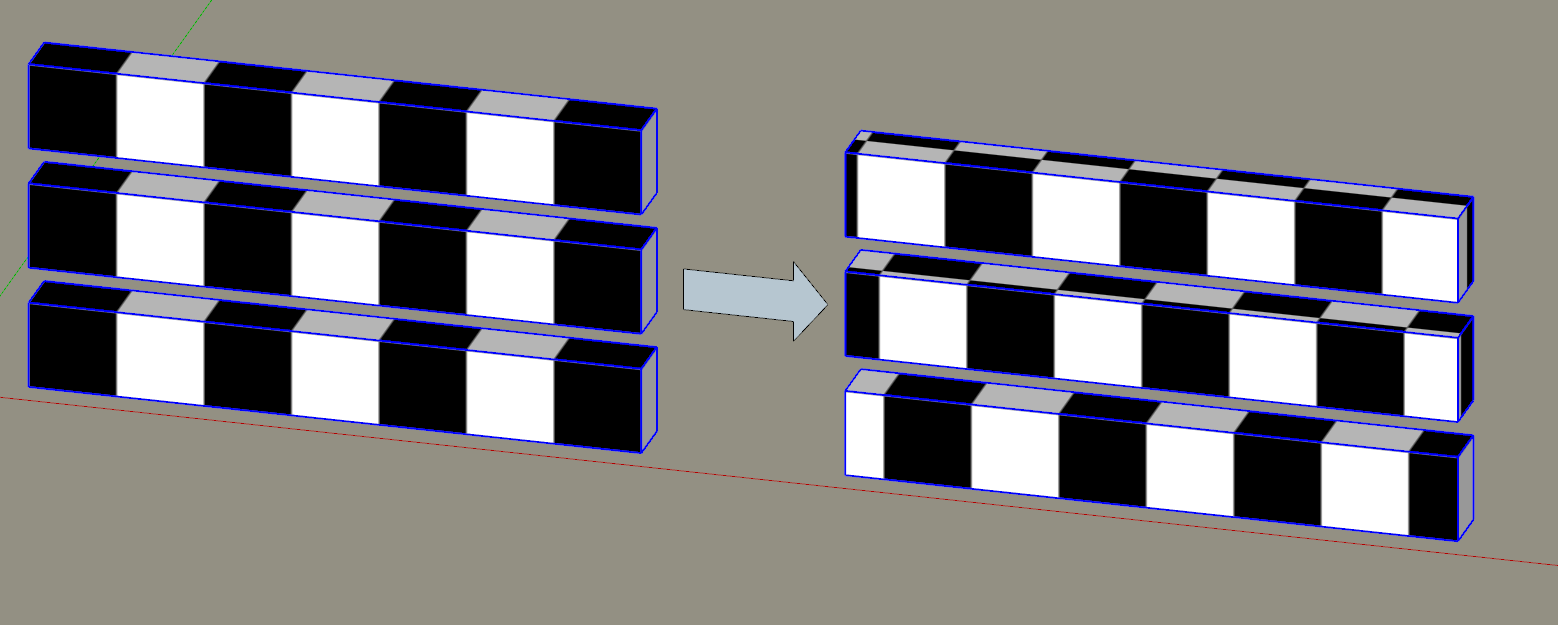
                      Hi Fredo, recently I was fantasizing about extra feature for Pantthru. Please take a look at attached. The idea is to jitter the UVW's of multiple objects according to user input (in %% for each dimention). And it should work regardless the context (as ThruPaint does).
                      In attached picture UVW's of 3 instances of one component were jittered in U/V dimention.

                      Capture.PNG

                      1 條回覆 最後回覆 回覆 引用 0
                      • E 離線
                        Einstein
                        最後由 編輯

                        Hi!

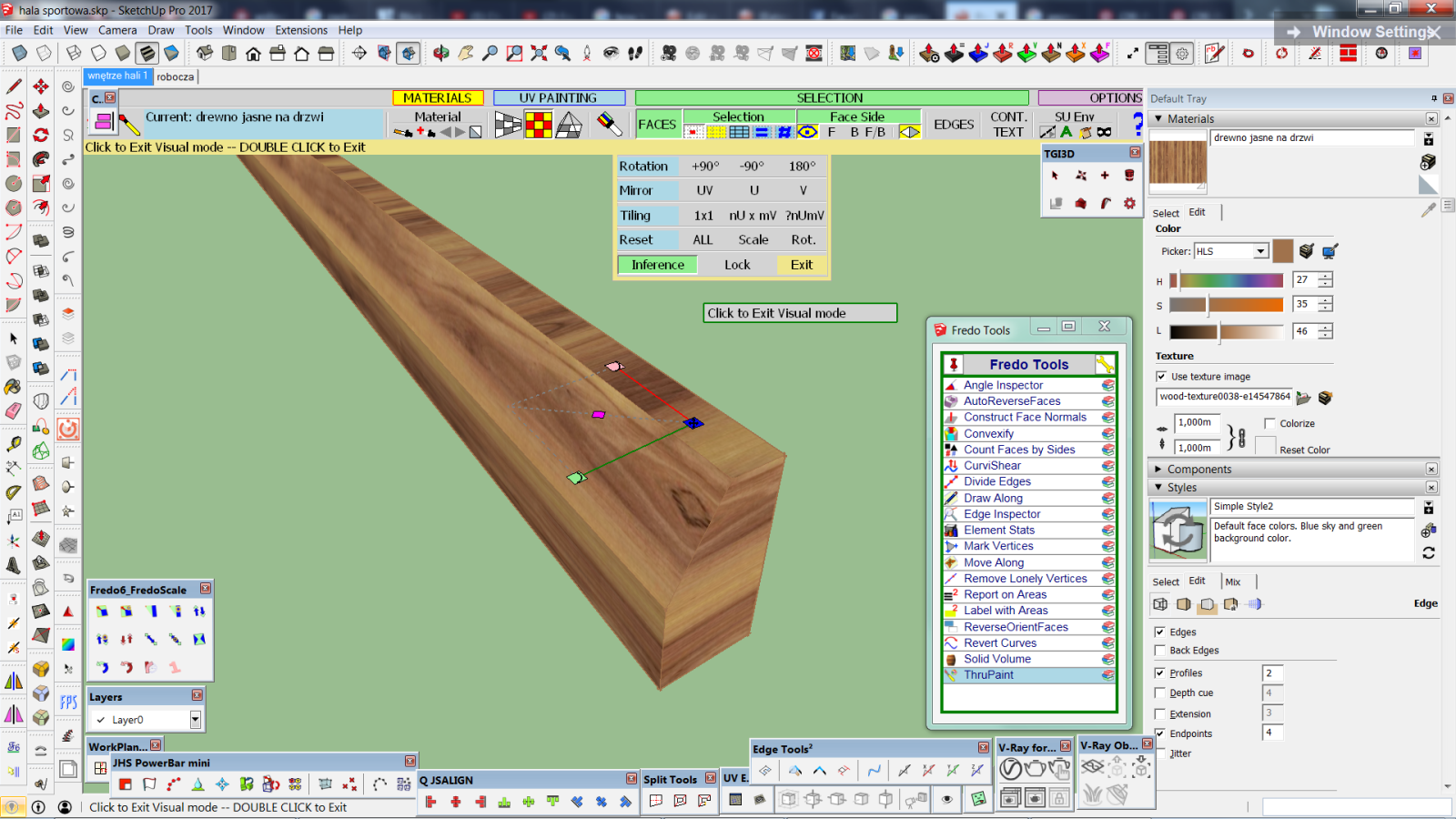
                        Is it possible to perform a single-face texture transformation (move, rotate, scale) after the texture was distributed onto a group of faces?

                        I applied a texture to a whole group, containing several faces. Then I changed Selection mode from "All faces" to "Face by Face" cuz I want to rotate texture on one particular face only. But this way it seems to impossible as I have already used "All faces" mode.

                        In this case the native tool "Texture > Position" is not preset in drop-down menu. Otherwise I would use it.

                        single face transformation.png

                        1 條回覆 最後回覆 回覆 引用 0
                        • fredo6F 離線
                          fredo6
                          最後由 編輯

                          @einstein said:

                          Hi!

                          Is it possible to perform a single-face texture transformation (move, rotate, scale) after the texture was distributed onto a group of faces?

                          ThruPaint precisely keeps track of face grouping, whatever is the original mode of selection.

                          So, you need to re-apply the same texture to the single face, and then you can freely transform around the texture on this single face.

                          Fredo

                          1 條回覆 最後回覆 回覆 引用 0
                          • E 離線
                            Einstein
                            最後由 編輯

                            Right, that's simple. I didn't think about it at the beginning, thank you.

                            1 條回覆 最後回覆 回覆 引用 0
                            • E 離線
                              Einstein
                              最後由 編輯

                              There's another problem now. I have a model which always crashes when I try to use Thru Paint. I click at the icon in Fredo Tools toolbar and boom! Bugsplat. Any other model won't do it (even more complex), only this particular one. The model had to be fixed once by SketchUp but now it doesn't call for fixing.

                              It hasn't been like this at the beginning. Thru Paint was working fine, then I did something, don't know what, and it started triggering bugsplats. Perhaps it was that automatic fix?

                              The material I'm trying to use is a texture that comes from In Model library, so it was already used in my model.

                              What's more, if I copy any group or compo from this model and paste it to a new model, the same thing happens. I'm very sad about that 😞

                              Could somebody take a look if it also happens with their computer?

                              /Win 7 64bit, SU 17


                              hala sportowa wyciąg.skp

                              1 條回覆 最後回覆 回覆 引用 0
                              • J 離線
                                jkoll66
                                最後由 編輯

                                Hi! Great plugin! I am having issues with Sketchup hanging when I use the Thrupaint plugin. Especially, with large or complex models. Any suggestions? Thanks in advance!

                                1 條回覆 最後回覆 回覆 引用 0
                                • A 離線
                                  amirmiked12
                                  最後由 編輯

                                  i textured my model using one texture .but when i try to export it i have 145 textures exported.i think it exported textures for everyface
                                  how can i fix it?somebody plz help

                                  1 條回覆 最後回覆 回覆 引用 0
                                  • fredo6F 離線
                                    fredo6
                                    最後由 編輯

                                    @einstein said:

                                    Hi!
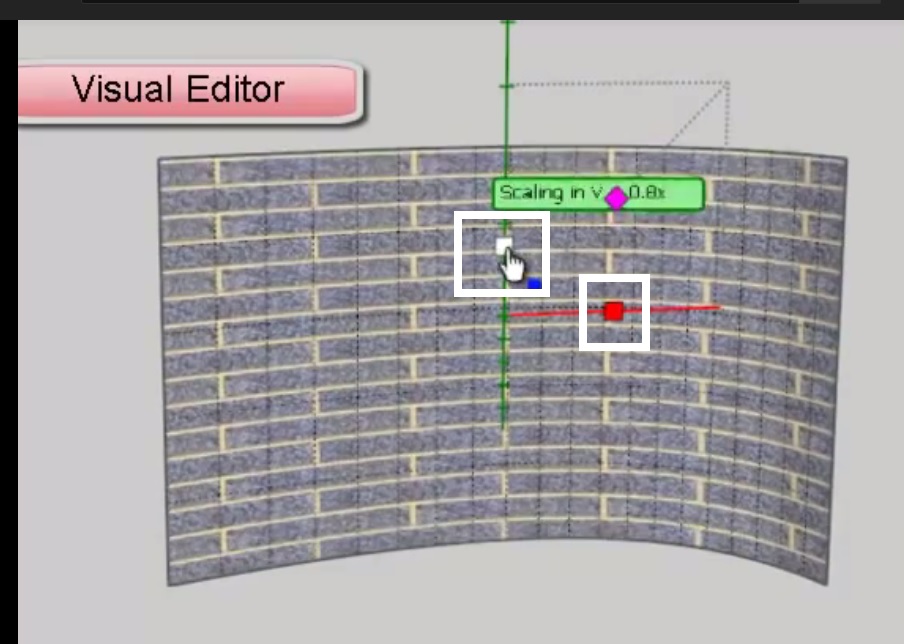
                                    Don't know why but I don't have these handles for non-uniform scaling. This is the screenshot of tutorial. I marked them with two white rectangles. I have just lines in this place.

                                    In Natural UV mode, only the uniform scaling can be supported. So use Projected UV or QuadMesh UV instead.

                                    Fredo

                                    1 條回覆 最後回覆 回覆 引用 0
                                    • E 離線
                                      Einstein
                                      最後由 編輯

                                      Hi!
                                      Don't know why but I don't have these handles for non-uniform scaling. This is the screenshot of tutorial. I marked them with two white rectangles. I have just lines in this place.

                                      Edit: SketchUp spalts again. I'm crying, dying, trying to paint anything...

                                      Bez tytułu.jpg

                                      1 條回覆 最後回覆 回覆 引用 0
                                      • E 離線
                                        Einstein
                                        最後由 編輯

                                        Oh, true, thanks!

                                        1 條回覆 最後回覆 回覆 引用 0
                                        • T 離線
                                          tomaszdrgas
                                          最後由 編輯

                                          I guess it was a deliberate choice but still will mention it.. Unlike native sKetchup paint tool ThruPaint treats faces separated by a "hidden" lines as one surface. So if I will cut a face on 3 and then hide cutting lines sKetchup would paint it in 3 clicks and ThruPaint in just one..
                                          It is not big bother but it is a different behaviour and after using thruPaint few years still sometimes (today) makes me confiused..
                                          Is there an option somewhere in the settings to change it.. deeply hidden..

                                          Tomasz

                                          1 條回覆 最後回覆 回覆 引用 0
                                          • fredo6F 離線
                                            fredo6
                                            最後由 編輯

                                            @tomaszdrgas said:

                                            I guess it was a deliberate choice but still will mention it.. Unlike native sKetchup paint tool ThruPaint treats faces separated by a "hidden" lines as one surface. So if I will cut a face on 3 and then hide cutting lines sKetchup would paint it in 3 clicks and ThruPaint in just one..
                                            It is not big bother but it is a different behaviour and after using thruPaint few years still sometimes (today) makes me confiused..
                                            Is there an option somewhere in the settings to change it.. deeply hidden..

                                            Tomasz

                                            In the button palette, you have several options for selecting faces, among which "single Face"

                                            Fredo

                                            1 條回覆 最後回覆 回覆 引用 0
                                            • 1
                                            • 2
                                            • 10
                                            • 11
                                            • 12
                                            • 13
                                            • 14
                                            • 15
                                            • 16
                                            • 17
                                            • 12 / 17
                                            • 第一個貼文
                                              最後的貼文
                                            Buy SketchPlus
                                            Buy SUbD
                                            Buy WrapR
                                            Buy eBook
                                            Buy Modelur
                                            Buy Vertex Tools
                                            Buy SketchCuisine
                                            Buy FormFonts

                                            Advertisement