sketchucation logo sketchucation
    • Login
    Oops, your profile's looking a bit empty! To help us tailor your experience, please fill in key details like your SketchUp version, skill level, operating system, and more. Update and save your info on your profile page today!
    Mac User? | Join the Rayscaper Beta for Mac Learn More

    [Plugin] SketchUV - now free

    Scheduled Pinned Locked Moved Plugins
    176 Posts 62 Posters 175.8k Views 62 Watching
    Loading More Posts
    • Oldest to Newest
    • Newest to Oldest
    • Most Votes
    Reply
    • Reply as topic
    Log in to reply
    This topic has been deleted. Only users with topic management privileges can see it.
    • W
      Whaat
      last edited by

      @stpauljason said:

      I just bought the plugin, and am very happy with it. I read the user manual as well, and have a question using the path select tool. Is it possible to weld a piece back after it has been cut, like in most UV mapping software. I sometimes accidentally double click on the wrong line, and I hate to have to start the whole line cut again on a large model.

      I tried holding the Alt, Shift, and Ctrl Keys separately hoping they would activate the opposite of cut, but they did not.

      Thanks
      Jason

      Hi Jason,
      If I understand you correctly, all you have to do is select the edges you want to 'weld' and then right-click on them and select 'soften'. You can also use the soften edges dialog in SketchUp by going to Window->Soften Edges

      When you 'cut' all you are doing is unsoftening the edge.

      Hope this helps.

      SketchUp Plugins for Professionals

      1 Reply Last reply
      Reply Quote 0
      • P
        Pherim
        last edited by

        This completes my Sketchup. Have not tried every function but it seems the cylindrical mapping is exactly what I was looking for! Thank you so much this is worth paying for!

        1 Reply Last reply
        Reply Quote 0
        • ely862meE
          ely862me
          last edited by

          Hi, Dale
          I am using SketchUV mostly for it's selecting features, and I was wondering if you could add a new function to the Path Select Tool. What I need and I think it would be welcome is to be able to select more than one path by pressing the CTRL key as in the native Select tool.
          For example I have two exploded circles(or two random contours) and I want to connect those, I use the Path select on one contour, then I press CTRL key and select the next one, then I use Curviloft and "Voila!".
          In the actual case we are not able to select more than one path.Or there is a way that I am not aware of ?

          Thanks !

          Elisei (sketchupper)


          Before no life was done on Earth it was THE LIFE ITSELF...GOD
          Come and See EliseiDesign

          1 Reply Last reply
          Reply Quote 0
          • W
            Whaat
            last edited by

            @ely862me said:

            Hi, Dale
            I am using SketchUV mostly for it's selecting features, and I was wondering if you could add a new function to the Path Select Tool. What I need and I think it would be welcome is to be able to select more than one path by pressing the CTRL key as in the native Select tool.
            For example I have two exploded circles(or two random contours) and I want to connect those, I use the Path select on one contour, then I press CTRL key and select the next one, then I use Curviloft and "Voila!".
            In the actual case we are not able to select more than one path.Or there is a way that I am not aware of ?

            Thanks !

            Maybe if you weld the paths with the Weld plugin, you might be able to do this. I have not used Curviloft so I am not sure...

            Someday, I would like to release the Path Select Tool as a standalone plugin. Maybe then, I could add that feature, too.

            Thanks.

            SketchUp Plugins for Professionals

            1 Reply Last reply
            Reply Quote 0
            • ely862meE
              ely862me
              last edited by

              I am sorry I have not explained myself better .
              By connecting the paths I meant to create a surface between them.
              The impediment is that after you select one path you can't select another one. In this case I select one path with the Path Select tool then I hold CTRL and take the Select tool from Sketchup and select the segments one by one(which is very hard and time consuming).
              Long story short : Take Path Select Tool and select a path then hold CTRL and select as many paths as you want !(This is what I think it will be very useful!)

              Thank you!

              Elisei (sketchupper)


              Before no life was done on Earth it was THE LIFE ITSELF...GOD
              Come and See EliseiDesign

              1 Reply Last reply
              Reply Quote 0
              • charly2008C
                charly2008
                last edited by

                Hello,

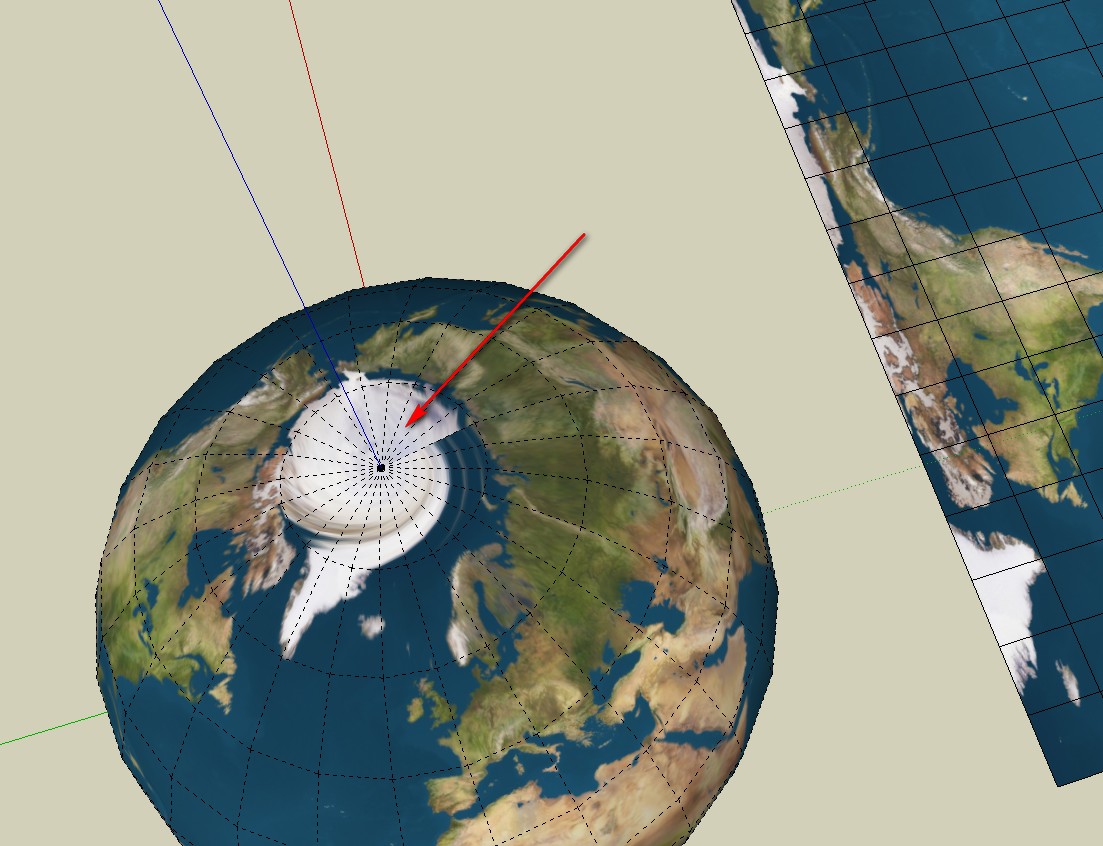
                Is there a way to correct the distortion shown below tool with a UV tool or is the error in the map projection?

                Thanks for any help.

                Untitled.skp


                2013-12-17_130017.jpg

                He who makes no mistakes, makes nothing

                1 Reply Last reply
                Reply Quote 0
                • FrederikF
                  Frederik
                  last edited by

                  It looks like it's the map, which isn't good enough... 😐

                  Here's my attempt with a map from JHT's Planetary Pixel Emporium...


                  Earth-model.skp

                  Cheers
                  Kim Frederik

                  1 Reply Last reply
                  Reply Quote 0
                  • charly2008C
                    charly2008
                    last edited by

                    Hi Kim,

                    thank you for your help and your effort. Also thanks for this link.

                    Charly

                    He who makes no mistakes, makes nothing

                    1 Reply Last reply
                    Reply Quote 0
                    • SwissmountainS
                      Swissmountain
                      last edited by

                      Hello and thank you for this much needed plugin.

                      I am rendering in Modo and need to export my models.

                      I notice that each polygon gets assigned its own material, creating hundreds of materials and making the export near impossible.

                      Is this how the plugin is intended to work?

                      Cogito ergo dum-di-dum

                      1 Reply Last reply
                      Reply Quote 0
                      • W
                        Whaat
                        last edited by

                        @swissmountain said:

                        Hello and thank you for this much needed plugin.

                        I am rendering in Modo and need to export my models.

                        I notice that each polygon gets assigned its own material, creating hundreds of materials and making the export near impossible.

                        Is this how the plugin is intended to work?

                        Sorry for the late reply.
                        You need to use the Triangulate feature in SketchUV prior to exporting in order to reduce the number of exported materials. This is explained in the SketchUV tutorials.

                        Dale

                        SketchUp Plugins for Professionals

                        1 Reply Last reply
                        Reply Quote 0
                        • cottyC
                          cotty
                          last edited by

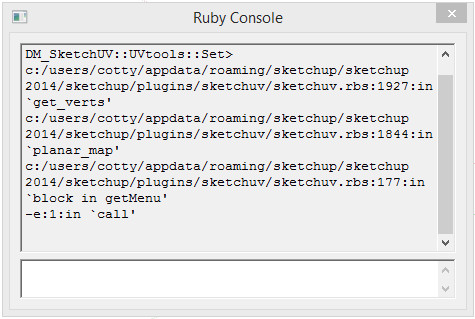
                          Does anyone have problems with this plugin and SU14?

                          sketchuvrubyconsole.jpg

                          my SketchUp gallery

                          1 Reply Last reply
                          Reply Quote 0
                          • E
                            Extractor
                            last edited by

                            Yes, for example errors in the Ruby Console when using a spherical map. I wrote an e-mail to D. Martens and he replied that there will be an update in a few weeks.

                            1 Reply Last reply
                            Reply Quote 0
                            • soloS
                              solo
                              last edited by

                              @cotty said:

                              Does anyone have problems with this plugin and SU14?

                              Me, I was looking for an updated version.

                              I need this tool to work with SU 2014

                              http://www.solos-art.com

                              If you see a toilet in your dreams do not use it.

                              1 Reply Last reply
                              Reply Quote 0
                              • cottyC
                                cotty
                                last edited by

                                As Extractor wrote a solution seems to be on the way...

                                my SketchUp gallery

                                1 Reply Last reply
                                Reply Quote 0
                                • W
                                  Whaat
                                  last edited by

                                  @cotty said:

                                  As Extractor wrote a solution seems to be on the way...

                                  Updated version available on Extension Warehouse.

                                  ERROR: The request could not be satisfied

                                  favicon

                                  (extensions.sketchup.com)

                                  SketchUp Plugins for Professionals

                                  1 Reply Last reply
                                  Reply Quote 0
                                  • soloS
                                    solo
                                    last edited by

                                    👍 😄

                                    http://www.solos-art.com

                                    If you see a toilet in your dreams do not use it.

                                    1 Reply Last reply
                                    Reply Quote 0
                                    • cottyC
                                      cotty
                                      last edited by

                                      🎉 👍

                                      my SketchUp gallery

                                      1 Reply Last reply
                                      Reply Quote 0
                                      • FrederikF
                                        Frederik
                                        last edited by

                                        😄 👍
                                        Respect, Dale...

                                        Cheers
                                        Kim Frederik

                                        1 Reply Last reply
                                        Reply Quote 0
                                        • thomthomT
                                          thomthom
                                          last edited by

                                          Got a donation link Dale? This plugin well deserves donations!

                                          Thomas Thomassen — SketchUp Monkey & Coding addict
                                          List of my plugins and link to the CookieWare fund

                                          1 Reply Last reply
                                          Reply Quote 0
                                          • romboutR
                                            rombout
                                            last edited by

                                            I got a lot of erros when i export a model to blender and than back. Most of the times i get errors on faces which cant be mapped. The model is kind of a mess, triangles and quads together. Do i need to fix all of this first?


                                            1 Reply Last reply
                                            Reply Quote 0

                                            Hello! It looks like you're interested in this conversation, but you don't have an account yet.

                                            Getting fed up of having to scroll through the same posts each visit? When you register for an account, you'll always come back to exactly where you were before, and choose to be notified of new replies (either via email, or push notification). You'll also be able to save bookmarks and upvote posts to show your appreciation to other community members.

                                            With your input, this post could be even better 💗

                                            Register Login
                                            • 1
                                            • 2
                                            • 3
                                            • 4
                                            • 5
                                            • 6
                                            • 7
                                            • 8
                                            • 9
                                            • 5 / 9
                                            • First post
                                              Last post
                                            Buy SketchPlus
                                            Buy SUbD
                                            Buy WrapR
                                            Buy eBook
                                            Buy Modelur
                                            Buy Vertex Tools
                                            Buy SketchCuisine
                                            Buy FormFonts

                                            Advertisement