[Plugin] Arc_Offset_True
-
TIG (c) 2012 - 2022
All Rights Reserved.
THIS SOFTWARE IS PROVIDED "AS IS" AND WITHOUT ANY EXPRESS OR IMPLIED
WARRANTIES,INCLUDING,WITHOUT LIMITATION,THE IMPLIED WARRANTIES OF
MERCHANTABILITY AND FITNESS FOR A PARTICULAR PURPOSE.Arc-offset_true.rb
Usage:
Adds a new 'Tool' menu item 'Arc_Offset_True'.
Adds a new context-menu item 'Arc_Offset_True' if a single Arc is selected.
Enter the required +ve/-ve offset distance in the dialog.
Enter the required number of copies [if it's -ve and would zero/flip the
copies its curtailed and a closing dialog tells you].
It works on Arcs or Circles.
Unlike the native Offset tool all offset-arcs are always made as 'Arcs' -
whether they are faced/not-faced, or intersect with other geometry.Version:
1.0 20120403 First issue.
1.1 20120403 Now accommodates trimmed first/last segments properly, also
traps for -ve offsets that would 'zero' or 'flip' the offset-arc, the
selection now passes to the new offset-arc.
1.2 20120403 Now has optional 'Number' in dialog to make arrayed offsets.
Context-menu option added.
1.3 20120403 Multiple offsets will now intersect with other geometry only
AFTER they have ALL been formed.
The native Offset tool's offset-arcs that are intersected become Curves,
but this tool will make them as Arcs [albeit 'split'].
Offset-arcs made from an Arc that bounds a face will become Curves in the
native Offset tool; this tool produces similar results.
1.4 20120403 With the native Offset tool offset-arcs made from an Arc that
bounds a face will become Curves; however, this tool makes them as Arcs.
1.5 20120402 Minor code tweak [you'd probably not notice - I will].
1.6 20220619 Selection of new arc on completion fixed for newer Sketchup versions.
SketchUp Plugins | PluginStore | SketchUcation
SketchUp Plugin and Extension Store by SketchUcation provides free downloads of hundreds of SketchUp extensions and plugins
(sketchucation.com)
-
Version v1.1 http://forums.sketchucation.com/viewtopic.php?p=395769#p395769 now correctly mimics the original Arc's start/end segments if they were 'trimmed', it also stops you offsetting with a negative distance to 'zero' or beyond...
-
Tried it TIG,
 thanks.
(I won't "complain" that the entered distance isn't the same as reflected by the distance between segments. And Jeff will be pleased)
If I may suggest, maybe an arraynr._inputfield could be added to the dialog box, to do multiple offsets at once?
And is it possible/safe to add the tool to the right click context menu? -
Here's v1.2 http://forums.sketchucation.com/viewtopic.php?p=395769#p395769
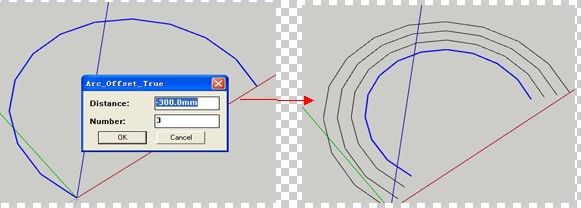
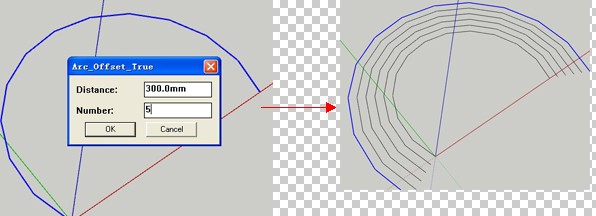
It now has an optional 'Number' in the dialog [which defaults to 1] to make arrayed offsets.
A context-menu option has been added. -
@tig said:
It now has an optional 'Number' in the dialog [which defaults to 1] to make arrayed offsets.
A context-menu option has been added.Great! I notice that no faces are create from new geometry. Not that it is an issue. But an original face is an obstacle!
From experimenting with/without faces where the original arc is part of the boundary of the face, I notic that whenever a face is involved, the array operation stops at one and splits up the new arc into as many edges as there would be segments. (thus causing the array offset to stop at one, I guess) -
Great!
-
Works a treat, thanks TIG.

-
Thank you, TIG:
I estimate that you did this in about 4 hours judging from your last post in the "Inacurrate" thread until you came out with the first version. This is sorta Herculean
-
@wo3dan said:
@tig said:
It now has an optional 'Number' in the dialog [which defaults to 1] to make arrayed offsets.
A context-menu option has been added.Great! I notice that no faces are create from new geometry. Not that it is an issue. But an original face is an obstacle!
From experimenting with/without faces where the original arc is part of the boundary of the face, I notic that whenever a face is involved, the array operation stops at one and splits up the new arc into as many edges as there would be segments. (thus causing the array offset to stop at one, I guess)
At the moment it offsets the arc and continues using the last one, if that's intersected you get a split result... I'll look at a fix. -
Thank you, TIG.
Your attention to 'right' wrongs not right, even if right, if not without a fight, make no one uptight, and we appreciate it, a lot.
-
thanks TIG. I haven't tried it yet but have confidence it will be the answer to one of my SU-wish list items
-
Tig's plug don't give the same result than the Multiple Offests of Sdmitch
Each plug has it's own utility -
Here's v1.3 http://forums.sketchucation.com/viewtopic.php?p=395769#p395769
Multiple offsets will now intersect with other geometry only AFTER they have ALL been formed.
The native Offset tool's offset-arcs that are intersected become Curves, but this tool will make them as Arcs [albeit 'split'].
Offset-arcs made from an Arc that bounds a face will become Curves in the native Offset tool; this tool produces similar results.
I think that now addresses the various issues... -
excellent plugin.
a query.
is possible to make the plugin more interactive? not to use dialog. Use vcv Viewer?thank you very much
-
Here's v1.4 http://forums.sketchucation.com/viewtopic.php?p=395769#p395769
The final pieces of the jigsaw are hopefully in place...Unlike the native Offset tool, all offset-arcs are now always made as 'Arcs' - whether they are faced/not-faced, or intersect with other geometry.
-
Here's v1.5 http://forums.sketchucation.com/viewtopic.php?p=395769#p395769
Includes a needed a minor code tweak... you'd probably not notice, but I will
-
ha! awesome.. this one immediately went to a shortcut assignment
the next challenge, if it's even possible, would be to allow us to select a string(?) of lines/curves/arcs then offset them.. say i had a straight line, then a tangent arc, then another straight line.. select all three and you could offset them at once.. only since there's an arc in there, your offset_true will recognize it and deal with it accordingly
(as this is a scenario where vanilla offset will really flounder) -
@tig said:
..Multiple offsets will now intersect with other geometry only AFTER they have ALL been formed....
Thanks TIG, for all the changes you made with the speed of lightning.
I used "isolate the problematic arc in a group" before multiple offsets. Then explode the result again.
Out of curiosity, is this how you work around the intersect problem in the newest version?
Thanks again. -
@wo3dan said:
@tig said:
..Multiple offsets will now intersect with other geometry only AFTER they have ALL been formed....
Thanks TIG, for all the changes you made with the speed of lightning.
I used "isolate the problematic arc in a group" before multiple offsets. Then explode the result again.
Out of curiosity, is this how you work around the intersect problem in the newest version?
Thanks again.
I now group the original arc [as a copy] and then scale it multiple times about its origin, then explode all of them when I'm done; that way, they only 'intersect' with everything else when it's all done...
The way it gets around the issue of offsetting an arc that is bounding a face [that manifests itself as a new curve with the native tool] is to group the original arc AND all of its connected faces, then erase all of the edges in the group that are not part of the original arc. Then we have a grouped arc that can be scaled/exploded etc...
Thus all 'true' offsets of an arc now always result in new arcs [unless of course it's a -ve offset, when some will not get made at all, if the inwards offset is <= arc.radius]

-
Some errors in console when you run tool...
offset_true.rb;130;in `new'
C;/Users/Da Beast 2022/AppData/Roaming/SketchUp/SketchUp 2022/SketchUp/Plugins/Arc-offset_true.rb;48;in `block (2 levels) in <module;Arc_Offset_True>'
Error; #<TypeError; wrong argument type (expected Sketchup;;Entity or Array of Sketchup;;Entity)>
C;/Users/Da Beast 2022/AppData/Roaming/SketchUp/SketchUp 2022/SketchUp/Plugins/Arc-offset_true.rb;130;in `add'
C;/Users/Da Beast 2022/AppData/Roaming/SketchUp/SketchUp 2022/SketchUp/Plugins/Arc-offset_true.rb;130;in `new'
C;/Users/Da Beast 2022/AppData/Roaming/SketchUp/SketchUp 2022/SketchUp/Plugins/Arc-offset_true.rb;48;in `block (2 levels) in <module;Arc_Offset_True>'










Advertisement