Sketchup is Inacurrate???
-
a couple of decades ago solar energy had a bad reputation in brasil as being inefficient. it turned out it did not work because the people who introduced it to us had no idea as to how to make it work: panels very seldom faced the correct direction and the height relationship among the parts was wrong. as soon as cleverer people started dealing in it solar energy become known for what it is.
could something similar happen at times with sketchup users? I remember hearing a colleague at my university say it was a pity sketchup could not be used to produce precise models...

-
I imagine these naysayers negativity comes from a possible perception that 'free' can never be 'good'. On the other hand I've yet to read a negative SketchUp assessment from a knowledgeable source. I think those are the ONLY sources that we should be listening to, not the, I'm sorry to call them, SketchUp ignorant begrudgers
-
Sure it is : a circle is not a circle, it's a polygon!

But we love it anyway!
-
But when you think about what a 'circle' really is, it can only be a polygon, all be it, in some programs, one with extremely short 'line' segments, a position beside a position, so to speak.
But of course, anyone that knows about CNC work also knows that SU is not the app for this. But I imagine certain commentators have grasped this idiosyncrasy of SU and jumped on the old band wagon

-
sometimes it's innacurrate.. the vast majority of the times-- it's fully accurate.
knowing what the sometimes are and how to avoid them is key.
[for instance-- draw an arc at 90° and try offsetting it]
-
@mike lucey said:
But when you think about what a 'circle' really is, it can only be a polygon, all be it, in some programs, one with extremely short 'line' segments, a position beside a position, so to speak.
But of course, anyone that knows about CNC work also knows that SU is not the app for this. But I imagine certain commentators have grasped this idiosyncrasy of SU and jumped on the old band wagon
I'm not sold on that. I work directly with a contractor with both a CNC and robotic plasma cutter with my sketchup modeling, and we make some pretty complex structural knife plates for wood to wood and wood to concrete joinery. The end result has been pretty cool.
-
A good assessment Howard and good advice

-
This is all true with curves (segments) but I would not call it inaccuracy but a limitation of SU (and as a matter of fact, any polygon modellers that use segments to approximate curves). SU accurately reports the volume of that multi-sided prism (not the ideal cylinder).
This is not only true for volumes but also this is the reason of that "offsetting quirk".
-
If I may rephrase the question to: is SU accurate ?
IMHO....
Mostly YES, but sometimes NO (strictly speaking).
..........
Straight lines / Orthogonal Shapes / and any Geometry, Volumes etc created from them, no problem.
SU will be as accurate as the user wants to model / level of detail required.
Typically this will be limited by any source informatiom (site measurements, original drawings you may be working from, your original design etc) and the modeller's skill with SU (eg care with the snaps / inferencing)
..........
Circles, Curves, Arcs and any Geometry or Volumes derived from them - strictly speaking NO.
I consider this a limitation of SU and not an inaccuracy. Provided you are aware of this, its usually not a problem either.
................
For example, circles in SU - the corners of these many sided polygons (~circles) will be coincident with a true circle eg as if you'd just drawn it in Autocad etc, but the lines between the corners are not accurate.It follows from this that if you derive a Volume and calculate a Mass eg of Concrete or Steelwork of any shape containing curves, arcs etc, then this will also be slightly out.
However, I've found that for most practical purposes the difference is negligible and can be worked around eg bump up the number of sides of any circle from say 24 to 64 etc if required.
..................
Some Top Tips I'd Recommend for Circles, Curves etc...- When drawing circles, pull the circle out in either the red, green or blue direction (as opposed to some random direction).
- Use a number of sides that neatly divides up your Circle or Arc. By default, a circle in SU has 24 Sides. This is good as 360/24 = 15 degrees. Adjust number of sides as required. Any setting-out on Circles, Arcs etc will typically be every 15 degrees, 30 degrees etc. The setting-out points will now be true as they will coincide with the corners of your SU "Circle".
...................
Hope this Helps
Howard L'
-
@gaieus said:
This is all true with curves (segments) but I would not call it inaccuracy but a limitation of SU (and as a matter of fact, any polygon modellers that use segments to approximate curves). SU accurately reports the volume of that multi-sided prism (not the ideal cylinder).
This is not only true for volumes but also this is the reason of that "offsetting quirk".
i'm not quite sure i'd call this a limitation.. (well yeah, it's a limitation but it's preventable imo)..
the 'offsetting quirk' happens over and over again throughout sketchup.. it's just easiest to see it with the offset tool..
another notorious tool is follow-me..both the offset tool and follow me tool should only be used on straight lines/corners (such as a hipped roof etc.).. any attempt at using either of these tools on curves will result in an inaccurate model..
the problem, as i see it, is that even tough sketchup recognizes an arc or circle (it will give accurate arc lengths for instance instead of simply giving a sum of it's segments), it seems to ignore the fact that you're dealing with an arc prior to doing anything with it and treats it as a collection of individual segments.. (in fact, su will explode an arc if it's part of a follow me path etc..)
this (again, imo) is a fault of the program/programmers and it is preventable.. if you have a circle, arc, or even curve then sketchup should make the proper calculations and draw properly/accurately with them.. i haven't tested this out on other polygon modelers but i assume modo and the like can accurately deal with these situations..
here is an example file showing some of the problems with using the follow me tool..
it also shows the desired results / workaround using tig's lathe tool..
i'll repeat this though -- never use offset, follow me, or even rubies that are simply tying in to sketchup's core functionality (shapebender etc.) for accurate work using curved lines or surfaces..
-
@unknownuser said:
i assume modo and the like can accurately deal with these situations..
Not sure of that

-
@edson said:
a couple of decades ago solar energy had a bad reputation in brasil as being inefficient. it turned out it did not work because the people who introduced it to us had no idea as to how to make it work: panels very seldom faced the correct direction and the height relationship among the parts was wrong. as soon as cleverer people started dealing in it solar energy become known for what it is.
could something similar happen at times with sketchup users? I remember hearing a colleague at my university say it was a pity sketchup could not be used to produce precise models...
It was well known back then of the geometery relations the real issue was the efficiency of the cells . Look at the helio stat array
-
SketchUp's internal precision when it comes to lengths is 1/1000th of an inch. You can see that in the Ruby Console:
` 1.0.to_l == 1.001.to_l
=> true
1.0.to_l == 1.002.to_l
=> false
1.0.to_l == 1.0011.to_l
=> false
1.0.to_l == 1.00101.to_l
=> false`
If the difference is less than 0.001 then it is considered equal. This kind of comparisons is normal and required when doing floating point comparisons. The difficult part is picking the actual precision - in SketchUp isn't 1/1000th of an inch (0,0254mm). Other applications might have a variables precision, configurable by the user, but SketchUp's is hard-coded.
I assume SketchUp's precision was picked with architecture in mind where 1/1000th of an inch would be more than enough precision. -
Sure but when you build the Channel Tunnel (50.5 km) you can have 128.27 mm of error !
-
You can get a pick-axe and hammer that small difference off. The trains can slow down in such a turn easily.
-
I get given cad drawings by 'CAD Engineers' all the time. These drawings look great when printed but very few of the lines actually join. They don't use snap tools, their attitude is if it looks good at 1:100 then its fine.
How hard is it to use the snap to end point or even 'nearest'?
-
I guess this thread illustrates how making such a general sweeping statement "sketchup is inaccurate" doesn't really do much good..
there are quite a few interpretations shown in this thread of what inaccurate actually means..
I guess whoever said that in the first place might of had an actual/specific gripe but we'll never know if it's user error (most probable) or a shortcoming of sketchup itself.
carry on
-
What happen with this ?
A circle is simulated or not ?
-
@unknownuser said:
What happen with this ?
A circle is simulated or not ?I don't really think it matters how accurate sketchup is for that type work (archviz).. as long as the picture looks good or conveys an idea properly, nothing else really matters.
accuracy mostly comes into play when you have to actually build what's being drawn.
-
Displaying objects:
Accuracy and precision: Accuracy 999,999 to 0.000001 by factor of the units and the zooming changes the slue range of precision.
Sketchup can view the very small object with no limits: ?
Setting length to mm you can measurement to 1 nano-meter 10^-9 or you may change to another units scale.
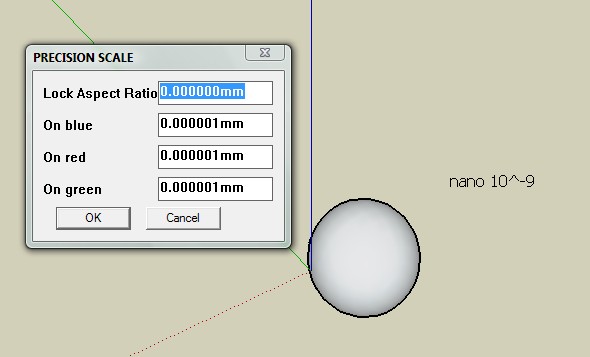
You can square and resize sketchup objects by the scale tool
I use the meshtab to read measure unit onlyNow if I wanted to show smaller units of measurement I would turn off the display unit format and then write-in the new units of measurement
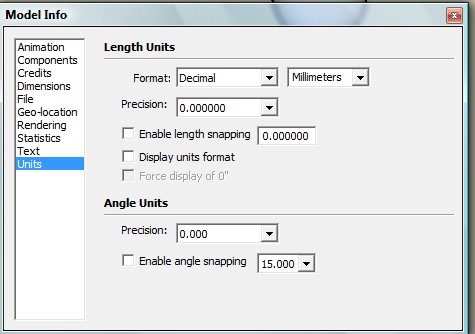
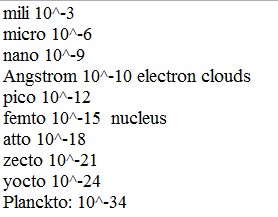
Examples
.3 to 3 Angstrom
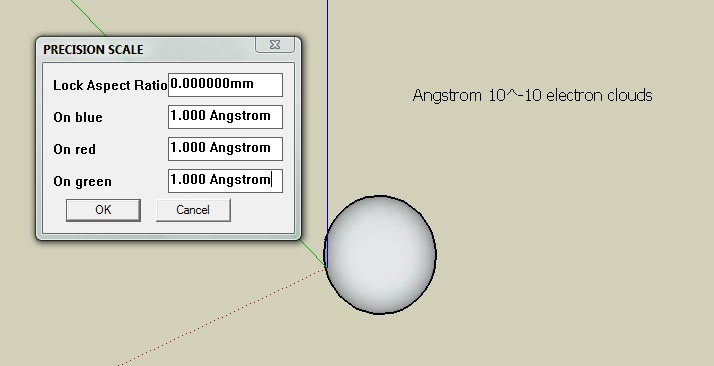
1,75 to 15 femto meters
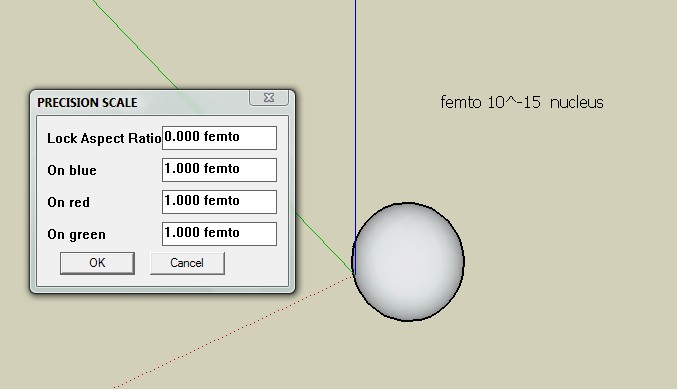
and keep going to dx
Sketchup can view the very large object with no limits too: to infinity: AlsoNow the bad new:
Inaccuratcy-
Sketchup with more then one objects in a model must follow this rule: Smallest and biggest objects has to be with in a trillion of each other or they won't be format to GUI.
trillion = 1,000,000 x 1,000,000 -
Plugin and tools will margin the range of precision in their process so wactch out.
Have a nice day
-










Advertisement