Sketchup is Inacurrate???
-
@thomthom said:
@unknownuser said:
like my last post was getting at.. it doesn't address the real problem at all
Real problem being Follow Me? Or how SketchUp doesn't handle arcs by their true geometric nature in general?
If Offset and Follow Me offset using the real nature of arcs (while still generating a segmented representation) would the problem then be solved?
solved? no.. better? yes (and if this functionality was coming from within the app itself, then it would be better yet.. i could then use, say, shapebender on an arc and get the same results i would get from follow-me (which is what happens now.. but followme and shapebender at the present time both give the same exact results and they're both wrong)
but really, this is where the can of worms starts opening up.. yesterday in this thread i wrote:
@unknownuser said:
and i do understand that this isn't a simple fix.. on the surface it is but i think once you examine a bit further, many facets of the core app are linked in to this behavior.. not just the offset tool and follow me tool.. but the whole brain.. we just see it come out in certain tools but the behavior is underlying..
a simple example i can think of which will give an 'oh.. wait a minute
 ' moment.. (if i type offset!.. that means we're assuming we're using a new&improved offset tool which properly deals with arcs)
draw a 90º arc then mirror it to form a 1/2 circle
weld the 2 arcs together as a single curve
now what??when i offset! that 'curve', i'd actually expect it to give me the same results as individually offsetting! each individual arc.. and that's what it should do.. so even at this point, the offset! tool is still not working properly because in the above scenario combined with the discussion/fixes mentioned up to this point, that 2_arc_'curve' is going to be offset! improperly..
[EDIT] unless there's a way to make su continue to see the arc as an arc even after joining two together? i.e.- once an arc - always an arc until the user explicitly says it's no longer an arc or deforms it in such a way that it breaks the arc like properties ??

[/EDit]realistically, the only time the offset tool should work as it currently does is when all of the segments are individual edge entities.. anytime there's a 'curve' (not just 'arc') in the mix, the offsetting should calculate separately..
if i want to offset a bezier curve, it needs a new behavior too in order to really get to the bottom of this issue.. that would require sketchup to begin recognizing a relationship between each segment of a 'curve' instead of viewing it as a collection of edges..
so eventually, the devs would have to draw a line as to where this behavior stops and reverts to it's current behavior.. the only way i see preventing that would be to turn sketchup into a fully functioning nurbs app and that's definitely not the solution (might be cool though
 )… but as i see it now, the devs have decided to draw that line in the wrong place.. at the very least, any arc entity should (and could) function as an arc in all situations.. they're almost there now except they drew the line very close to the finish line (the wrong side of the finish line)
again, it's not an easy fix and there's no clear cut solution and it's up to the developers to make the decision on how far to go with it.. but come on, let us know something..
is this problem going to be addressed in any way or do we need to just accept the behavior for what it is? If you do foresee some real changes being made in this area, what can we expect to see? that type of stuff.. -
@unknownuser said:
[EDIT] unless there's a way to make su continue to see the arc as an arc even after joining two together? i.e.- once an arc - always an arc until the user explicitly says it's no longer an arc or deforms it in such a way that it breaks the arc like properties ??
[/EDit]You'd think it should be able to do that. It nearly does that.
If you draw a Circle - Entity Info says Circle, 24 segments.
Draw a line between two vertices of that circle and you get two arcs with 12 segmetns each.
Erase the edge between them and SketchUp merges the two arcs into a single Arc with 24 segments. Now here's the little extra head scratcher - save, close and reopen the file. Select the curve and notice that Entity Info once again says Circle. o_OSame thing happens when I do what you describe. Take a 90 degree Arc and copy and paste it together into an circle. All though, immediately they appear as four arcs. But if I draw temp edges at the arc ends and erase them SketchUp will merge the arcs together. Again I get an 24 segment arc, which when the model is reopened, becomes a Circle.
I even tried with Vertex Tools to run Heal Vertices on the four arcs forming the apparent circle and that also yielded the same result.
So SketchUp nearly does what you describe - but the healing function needs to be teased.
While the nature of SketchUp isn't to present true arcs in the viewport it sure is room for improvements -
@thomthom said:
You'd think it should be able to do that. It nearly does that.
If you draw a Circle - Entity Info says Circle, 24 segments.
Draw a line between two vertices of that circle and you get two arcs with 12 segmetns each.
Erase the edge between them and SketchUp merges the two arcs into a single Arc with 24 segments. Now here's the little extra head scratcher - save, close and reopen the file. Select the curve and notice that Entity Info once again says Circle. o_Ohaha.. nice find.. o_O indeed!
-
@thomthom said:
If you draw a Circle - Entity Info says Circle, 24 segments.
Draw a line between two vertices of that circle and you get two arcs with 12 segmetns each.
Erase the edge between them and SketchUp merges the two arcs into a single Arc with 24 segments. Now here's the little extra head scratcher - save, close and reopen the file. Select the curve and notice that Entity Info once again says Circle. o_OI'm not seeing that. I still get an arc of 24 segments...exactly as when closed.
However, if I get to the stage of creating an arc of 24 segments and then copy either the face or the edge (or both) I get a new circle of 24 segments that is recognised as such. Seemingly the simple act of copying recreates a circle entity. -
@alan fraser said:
I'm not seeing that. I still get an arc of 24 segments...exactly as when closed.
Can you post the file? I'm curious to whether I can find the difference between our attempts. Ruby might help me.
-
-
Strange! I just did it again in a fresh file and now I get a circle...but still with the correct entity info. Maybe the FormFonts layer is the magic ingredient.

I am on V. 8.0.16846. I assume you two are as well.
-
"but still with the correct entity info"? As it says Circle after merged?
For me it said Arc until I reopened the file, then it said Circle. Your model opens with a "Circle". -
another quick point along these lines..
@thomthom said:
You'd think it should be able to do that. It nearly does that.
aside from the ability for an arc to always remain an arc, an offset arc should create a new arc.. for one, it makes too much sense for an offset of an arc to be an arc but it will also further tighten up a consistent behavior throughout sketchup..
if we draw a surface whose perimeters contain an arc(s) then push/pull the surface, the newly created edges will also be arcs..
so that should happen as well in an offset. -
I was wondering if the core problem with arches and the resulting shortcoming geometry is in fact what is keeping, or has kept, the developers from creating tools for curved surfaces?
Like e.g the in ability to provide any mapping for curved surfaces or the native lack of the push pull tool to perform an extrusion on a curved surface?@ TIG Out of an architectural standpoint, this is what I expect of how it needs to be.
The respective pieces of my arch need to be consistent and not perpendicular. Be it round or segmented same thing.

-
Well, in theory we can create ourselves what SketchUp doesn't provide. Except some fundamental things such that we cannot introduce true curves - we cannot introduce new entity types. We can create abstractions. Like, in order to map curves surfaces and create ring and loop selections I wrote QuadFace Tools - which tries to build a toolkit that will let you create and manage non-planar quads. Similarly I'm developing BezierSurface, which allows you to create and manipulate (and UV map) quad-bezier-patches.
However, since there is no way to hook into the native tools to make them understand these new abstractions I'm doing, I need to write a complete set of tools for everything.
Mind you, aside from SketchUp's way of dealing with arcs, I find it's lack of the "quad" concept the most limiting. Everything becomes so much easier of surfaces are built up on units of quads. Mapping and traversing becomes logical and rational in terms of a computer - which doesn't have the insight to understand what the whole mesh really represent, only understanding the geometry on a the most naive level of vertices, edges and faces.
-
Just a basic, try to draw 3 tangent circles with native tools and tell me how much time you spend.
Of course they must intersect.
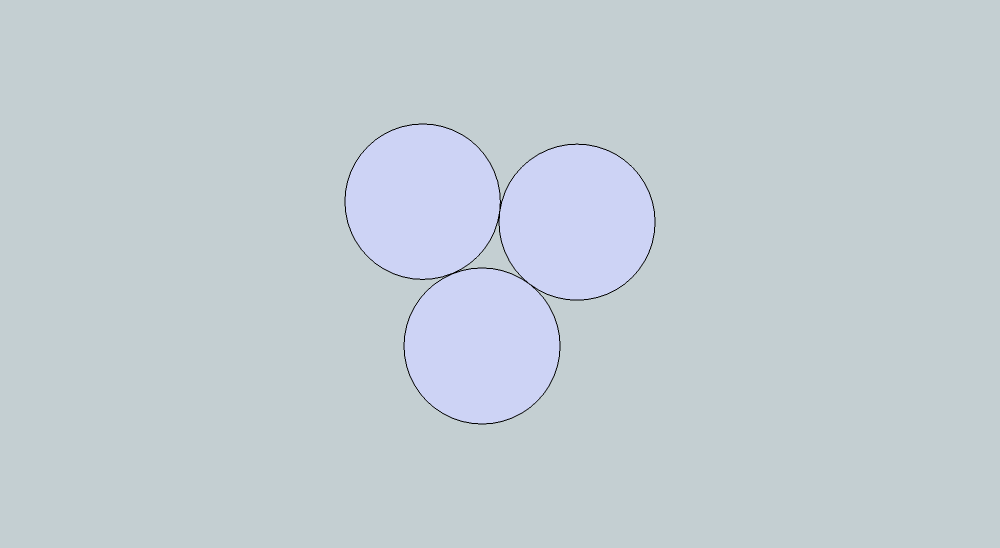
-
@desertraven said:
I was wondering if the core problem with arches and the resulting shortcoming geometry is in fact what is keeping, or has kept, the developers from creating tools for curved surfaces?
hm... you where perhaps talking about the developers of SketchUp instead of plugin developers?
-
@gilles said:
Just a basic, try to draw 3 tangent circles with native tools and tell me how much time you spend.
Of course they must intersect.
haha
olav.. we need a better challenge .. i did that in 10 seconds using only the circle tool..
oops.. gilles posted that example..
%(#FFFFFF)[• using only the circle tool ---
• draw a 3 sided circle
• using each of the 3 vertices as center points, draw circles whose radii span to the midpoints of the triangle..] -
@thomthom said:
Well, in theory we can create ourselves what SketchUp doesn't provide. Except some fundamental things such that we cannot introduce true curves - we cannot introduce new entity types. We can create abstractions. Like, in order to map curves surfaces and create ring and loop selections I wrote QuadFace Tools - which tries to build a toolkit that will let you create and manage non-planar quads. Similarly I'm developing BezierSurface, which allows you to create and manipulate (and UV map) quad-bezier-patches.
However, since there is no way to hook into the native tools to make them understand these new abstractions I'm doing, I need to write a complete set of tools for everything.
Mind you, aside from SketchUp's way of dealing with arcs, I find it's lack of the "quad" concept the most limiting. Everything becomes so much easier of surfaces are built up on units of quads. Mapping and traversing becomes logical and rational in terms of a computer - which doesn't have the insight to understand what the whole mesh really represent, only understanding the geometry on a the most naive level of vertices, edges and faces.
I agree, there is alack of SU to create clean usable geometry. I used your quad tools and also some of TIG's tools to save the day.
I had a thought that I would like to convey to you guys, and that is SU has a tape measure tool, a protractor tool, to draw straight construction lines, BUT it does not have a compass tool.
Such a compass tool could help to snap on centers of any round geometry or it could help finding accurate intersections.Anyone who works in architecture and has ever measured a house "as is" knows that you have to make diagonal measurements to verify a floor-plans squareness or to measure a floor-plan accurately that is at any given angel.
Maybe that would be a do-able plug in? just a circular construction line consisting of a dotted line like the straight construction line with the maximum accuracy that SU can give? With a radius as parameter and that is able to intersect lines and construction lines?
-
@thomthom said:
@desertraven said:
I was wondering if the core problem with arches and the resulting shortcoming geometry is in fact what is keeping, or has kept, the developers from creating tools for curved surfaces?
hm... you where perhaps talking about the developers of SketchUp instead of plugin developers?
Yes the SU developers. You guy's are doing a great job
-
@gilles said:
Just a basic, try to draw 3 tangent circles with native tools and tell me how much time you spend.
Of course they must intersect.
10 sec?
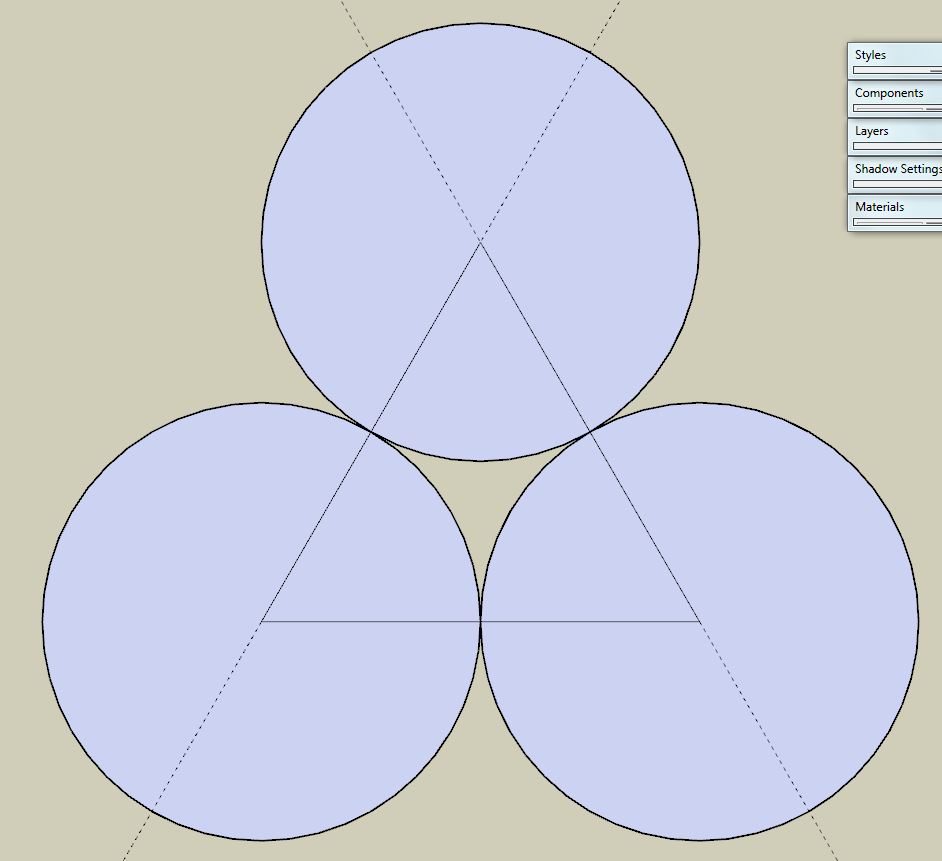
-
-
Indeed.

-
@massimo said:
@gilles said:
Just a basic, try to draw 3 tangent circles with native tools and tell me how much time you spend.
Of course they must intersect.
10 sec?
If they are the same diameter, it's quite easy, draw a 3 sided polygon, make it a component, then draw a circle with e.g. 24 segments from each corner to the mid of each side of the polygon, voila!








Advertisement