sketchucation logo sketchucation
    • 登入
    Oops, your profile's looking a bit empty! To help us tailor your experience, please fill in key details like your SketchUp version, skill level, operating system, and more. Update and save your info on your profile page today!
    🔌 Smart Spline | Fluid way to handle splines for furniture design and complex structures. Download

    [Plugin] FullScreen v5.1.3 (25 April 2024)

    已排程 已置頂 已鎖定 已移動 Plugins
    285 貼文 79 Posters 411.4k 瀏覽 80 Watching
    正在載入更多貼文
    • 從舊到新
    • 從新到舊
    • 最多點贊
    回覆
    • 在新貼文中回覆
    登入後回覆
    此主題已被刪除。只有擁有主題管理權限的使用者可以查看。
    • V 離線
      Vicspa
      最後由 編輯

      Yeah, that'd be great, thanks

      1 條回覆 最後回覆 回覆 引用 0
      • A 離線
        Anton_S
        最後由 編輯

        @gaieus said:

        There is already a menu item under Window > "Hide dialogs/Show dialogs" - so your "Child windows" option here is a redundant duplicate.

        No, its not. The "hide dialogs" hides windows such as entity info, model info, soften smooth edges, but doesn't hides ruby console, photo textures, component options, and other child windows with a certain class that could be hidden.

        @gaieus said:

        Would there be a possibility to (instead of having a separate menu item to show and display the different elements) toggle them on/off? This would also allow to assign a single shortcut instead of two, different ones.

        It depends. Lets, say we have a "status_bar" option toggled. Checked: visible and Unchecked: hidden. And something happens: The user hides the status_bar using the other script. How would "status_bar" option know whatever it should be checked or unchecked? - Well, use set_validation_proc and let it ask every frame whatever the status_bar is hidden or not. I could make it like that, thought it will slow down sketchup:
        @dan said:

        Menu.set_validation_proc
        Arguments:

        menu_id: The id of a menu item on this menu. (The id is returned from the add_item method.)
        block_proc: a block or proc object that will be invoked by Sketchup went it redraws the UI. (Complex conditionals and calling many other methods can slow down Sketchup!)

        I could make it toggable, but its ur option: yes or no 😄

        1 條回覆 最後回覆 回覆 引用 0
        • GaieusG 離線
          Gaieus
          最後由 編輯

          @anton_s said:

          No, its not. The "hide dialogs" hides windows such as entity info, model info, soften smooth edges, but doesn't hides ruby console, photo textures, component options, and other child windows with a certain class that could be hidden.

          Okay, point taken (and I do understand this).

          @anton_s said:

          It depends. Lets, say we have a "status_bar" option toggled. Checked: visible and Unchecked: hidden. And something happens: The user hides the status_bar using the other script. How would "status_bar" option know whatever it should be checked or unchecked? - Well, use set_validation_proc and let it ask every frame whatever the status_bar is hidden or not. I could make it like that, thought it will slow down sketchup:

          Point also taken (although I do not understand this)
          😄

          Anyway, great plugin. Thanks a lot again! 👍

          I (mainly) use it to hide my "control bars" - although from now on, I may also have some (less frequently used) toolbars also open (or hidden this way).

          And of course for my 64 bit, Win 7 laptop, the (hopefully easily) updated version will also be welcome! 😄

          Gai...

          1 條回覆 最後回覆 回覆 引用 0
          • A 離線
            Aerilius
            最後由 編輯

            I've been waiting to hide the menu bar (no joke). Thank you!

            1 條回覆 最後回覆 回覆 引用 0
            • A 離線
              Anton_S
              最後由 編輯

              @anton_s said:

              use set_validation_proc and let it ask every frame whatever the status_bar is hidden or not. I could make it like that, thought it will slow down sketchup

              Have to take my thought back. I thought that set_validation_proc updates every frame, but it only updates once you entered the submenu that contains that item. So, yes I'll modify it to be toggled, including make it work on windows 7 64 bit.

              Thankyou for your replies!! They make me 😄

              1 條回覆 最後回覆 回覆 引用 0
              • dereiD 離線
                derei
                最後由 編輯

                What exactly this plugin does? From Rich O'Brien's post (http://forums.sketchucation.com/download/file.php?id=81834&mode=view) I understand that it doesn't work... so let me rephrase: what this plugin SHOULD do?
                Thank you very much.

                P.S. - when posting plugins, it would be nice to add a image/animated GIF/movie to visually exemplify what the plugin does, if possible. Some users are already doing this, but I think it should be implemented as a "must" rule, for everybody.

                DESIGNER AND ARTIST DEREI.UK

                1 條回覆 最後回覆 回覆 引用 0
                • thomthomT 離線
                  thomthom
                  最後由 編輯

                  @unknownuser said:

                  I understand that it doesn't work...
                  ...on his system. For Gaieus it worked.

                  Thomas Thomassen — SketchUp Monkey & Coding addict
                  List of my plugins and link to the CookieWare fund

                  1 條回覆 最後回覆 回覆 引用 0
                  • A 離線
                    Aerilius
                    最後由 編輯

                    This plugin allows to turn off (or on) certain elements of the SketchUp interface. Something that wasn't possible before. For example someone has no need for a statusbar, or to make SketchUp fullscreen for a presentation. Maybe Anton can make a little gif animation for the first post (or I could do one).

                    1 條回覆 最後回覆 回覆 引用 0
                    • Rich O BrienR 離線
                      Rich O Brien Moderator
                      最後由 編輯

                      Please do. One of us can add it to Anton's OP for those that want to visualise its use.

                      Download the free D'oh Book for SketchUp 📖

                      1 條回覆 最後回覆 回覆 引用 0
                      • A 離線
                        Aerilius
                        最後由 編輯

                        I've created an animated gif of how it looks:
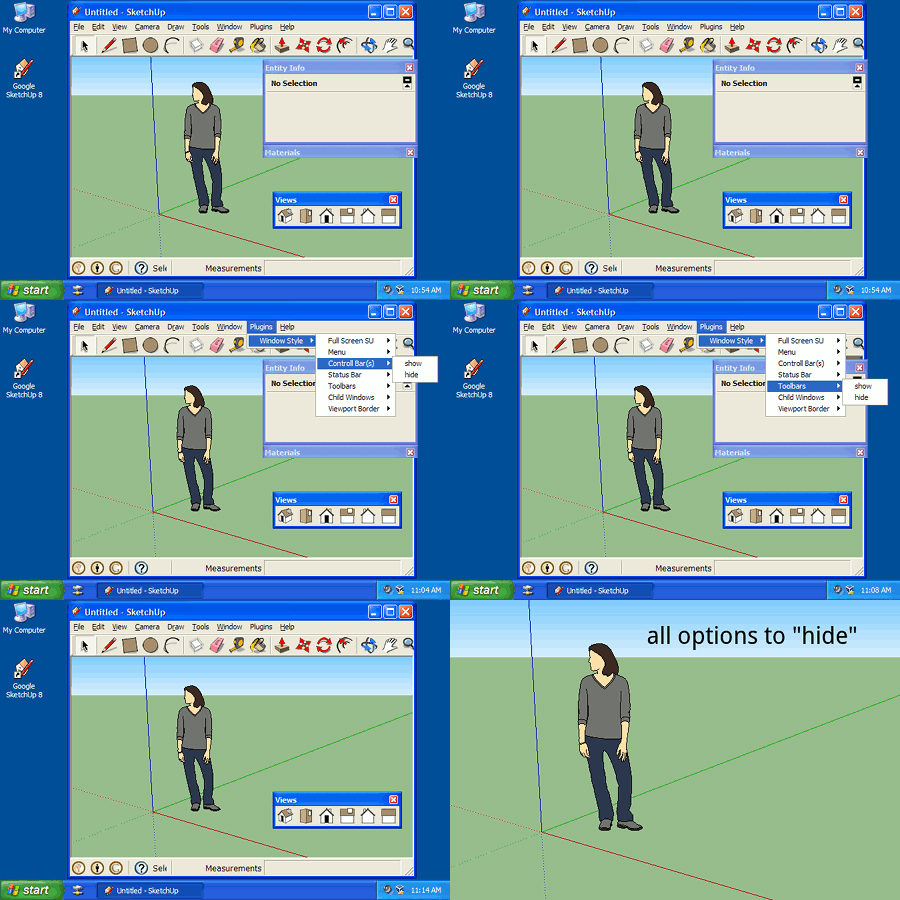
                        window styles.gif

                        1 條回覆 最後回覆 回覆 引用 0
                        • A 離線
                          Anton_S
                          最後由 編輯

                          @aerilius said:

                          I've created an animated gif of how it looks:
                          [attachment=0:1u31tebe]<!-- ia0 -->window styles.gif<!-- ia0 -->[/attachment:1u31tebe]

                          Aerilius, thankyou really much!!! 😄 I'm just too lazy to add description myself.

                          1 條回覆 最後回覆 回覆 引用 0
                          • Rich O BrienR 離線
                            Rich O Brien Moderator
                            最後由 編輯

                            I wanna play 😞

                            Download the free D'oh Book for SketchUp 📖

                            1 條回覆 最後回覆 回覆 引用 0
                            • guanjinG 離線
                              guanjin
                              最後由 編輯

                              Great, my Windows XP
                              There is a problem, set the shortcut key to display the menu bar is invalid 😒 😒
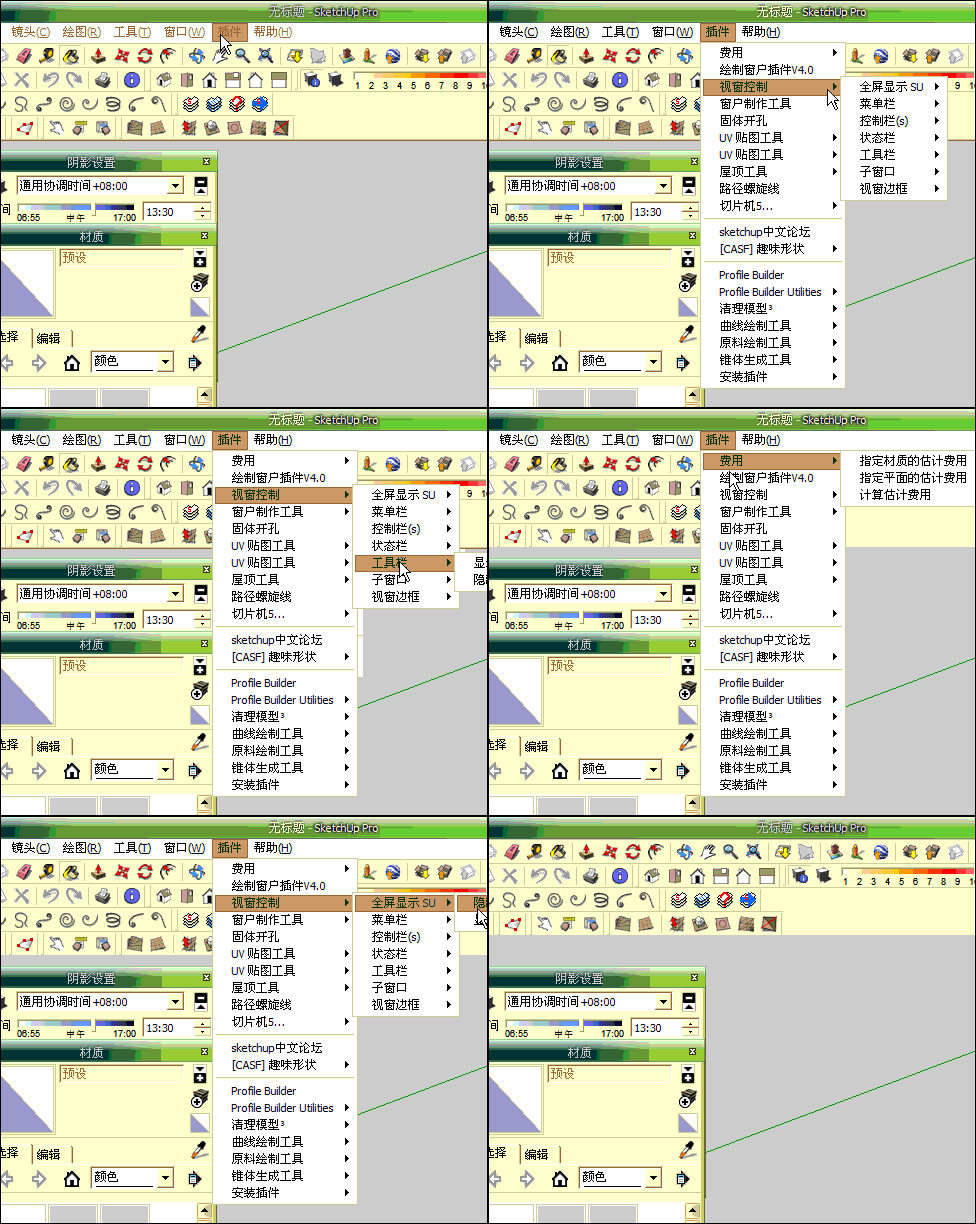
                              66666666666666.gif

                              I come from China, is to learn

                              1 條回覆 最後回覆 回覆 引用 0
                              • A 離線
                                Anton_S
                                最後由 編輯

                                @guanjin said:

                                Great, my Windows XP
                                There is a problem, set the shortcut key to display the menu bar is invalid 😒 😒
                                [attachment=0:28de3p4w]<!-- ia0 -->66666666666666.gif<!-- ia0 -->[/attachment:28de3p4w]

                                Yes, it should be invalid!!! Wanna know why? Well, I explained it a bit on first post. Its just the way of how shortcut pereferences works. Shortcut Pereferences script tends to select the menu bar items once the shortcut key is pressed. But, When the menu it self is no more there, Sketchup can no longer select the items. What's weird is that once u hide the menu bar other shortcuts that were set by sketchup (Ex: "s" - scale, "p" - push) work, but once u click the shortcut that belong to "show menu bar," all shortcuts stop working. Show/hide menu bar was just for fun, so yeah don't use it. Though, I'll try to fix that issue too.

                                1 條回覆 最後回覆 回覆 引用 0
                                • guanjinG 離線
                                  guanjin
                                  最後由 編輯

                                  @unknownuser said:

                                  Yes, it should be invalid!!! Wanna know why? Well, I explained it a bit on first post. Its just the way of how shortcut pereferences works. Shortcut Pereferences script tends to select the menu bar items once the shortcut key is pressed. But, When the menu it self is no more there, Sketchup can no longer select the items. What's weird is that once u hide the menu bar other shortcuts that were set by sketchup (Ex: "s" - scale, "p" - push) work, but once u click the shortcut that belong to "show menu bar," all shortcuts stop working. Show/hide menu bar was just for fun, so yeah don't use it. Though, I'll try to fix that issue too.

                                  Thank you! Can not be restored, the canceled, resulting in unnecessary trouble 😒

                                  I come from China, is to learn

                                  1 條回覆 最後回覆 回覆 引用 0
                                  • U 離線
                                    unclex
                                    最後由 編輯

                                    only fullscreen can work

                                    and
                                    suggest to change the plugin menu from “Plugins” to “Window"

                                    1 條回覆 最後回覆 回覆 引用 0
                                    • A 離線
                                      Anton_S
                                      最後由 編輯

                                      @unclex said:

                                      only fullscreen can work"

                                      Is that about the updated or the first version?

                                      1 條回覆 最後回覆 回覆 引用 0
                                      • U 離線
                                        unclex
                                        最後由 編輯

                                        updated
                                        @ SU8.0.11
                                        @ win7 pro patched 4GB

                                        1 條回覆 最後回覆 回覆 引用 0
                                        • A 離線
                                          Anton_S
                                          最後由 編輯

                                          @unclex said:

                                          updated
                                          @ SU8.0.11
                                          @ win7 pro patched 4GB

                                          Is it 32 or 64 bit processor?

                                          1 條回覆 最後回覆 回覆 引用 0
                                          • U 離線
                                            unclex
                                            最後由 編輯

                                            WellDone

                                            Win7X86Pro
                                            Su8.0.11Pro

                                            except Toolbar, all worked

                                            and i can not dare try the Menu Option, if i close it, how reopen it ??

                                            1 條回覆 最後回覆 回覆 引用 0
                                            • 1
                                            • 2
                                            • 3
                                            • 4
                                            • 5
                                            • 6
                                            • 7
                                            • 14
                                            • 15
                                            • 5 / 15
                                            • 第一個貼文
                                              最後的貼文
                                            Buy SketchPlus
                                            Buy SUbD
                                            Buy WrapR
                                            Buy eBook
                                            Buy Modelur
                                            Buy Vertex Tools
                                            Buy SketchCuisine
                                            Buy FormFonts

                                            Advertisement


