sketchucation logo sketchucation
    • Login
    Oops, your profile's looking a bit empty! To help us tailor your experience, please fill in key details like your SketchUp version, skill level, operating system, and more. Update and save your info on your profile page today!
    Mac User? | Join the Rayscaper Beta for Mac Learn More

    [Plugin] FullScreen v5.1.3 (25 April 2024)

    Scheduled Pinned Locked Moved Plugins
    285 Posts 79 Posters 463.1k Views 80 Watching
    Loading More Posts
    • Oldest to Newest
    • Newest to Oldest
    • Most Votes
    Reply
    • Reply as topic
    Log in to reply
    This topic has been deleted. Only users with topic management privileges can see it.
    • H
      HirokaMatsuiko
      last edited by

      this is wonderful plugin

      my shortcut is almost full

      request if can future updates
      add Full Screen Button toggle on / off for toolbar

      thank you again

      1 Reply Last reply
      Reply Quote 0
      • A
        Anton_S
        last edited by

        @hirokamatsuiko said:

        add Full Screen Button toggle on / off for toolbar

        Added!. ๐Ÿ‘

        1 Reply Last reply
        Reply Quote 0
        • J
          Jim
          last edited by

          Really nice plugin, Anton. Thank you.

          Hi

          1 Reply Last reply
          Reply Quote 0
          • W
            whiteanne
            last edited by

            I have a proble when running this plugin(latest version) on sketchup pro 2014,it shows like the photo below. Can anyone tell me what should I do to fix it??? it would helps,thats really a useful plugin.
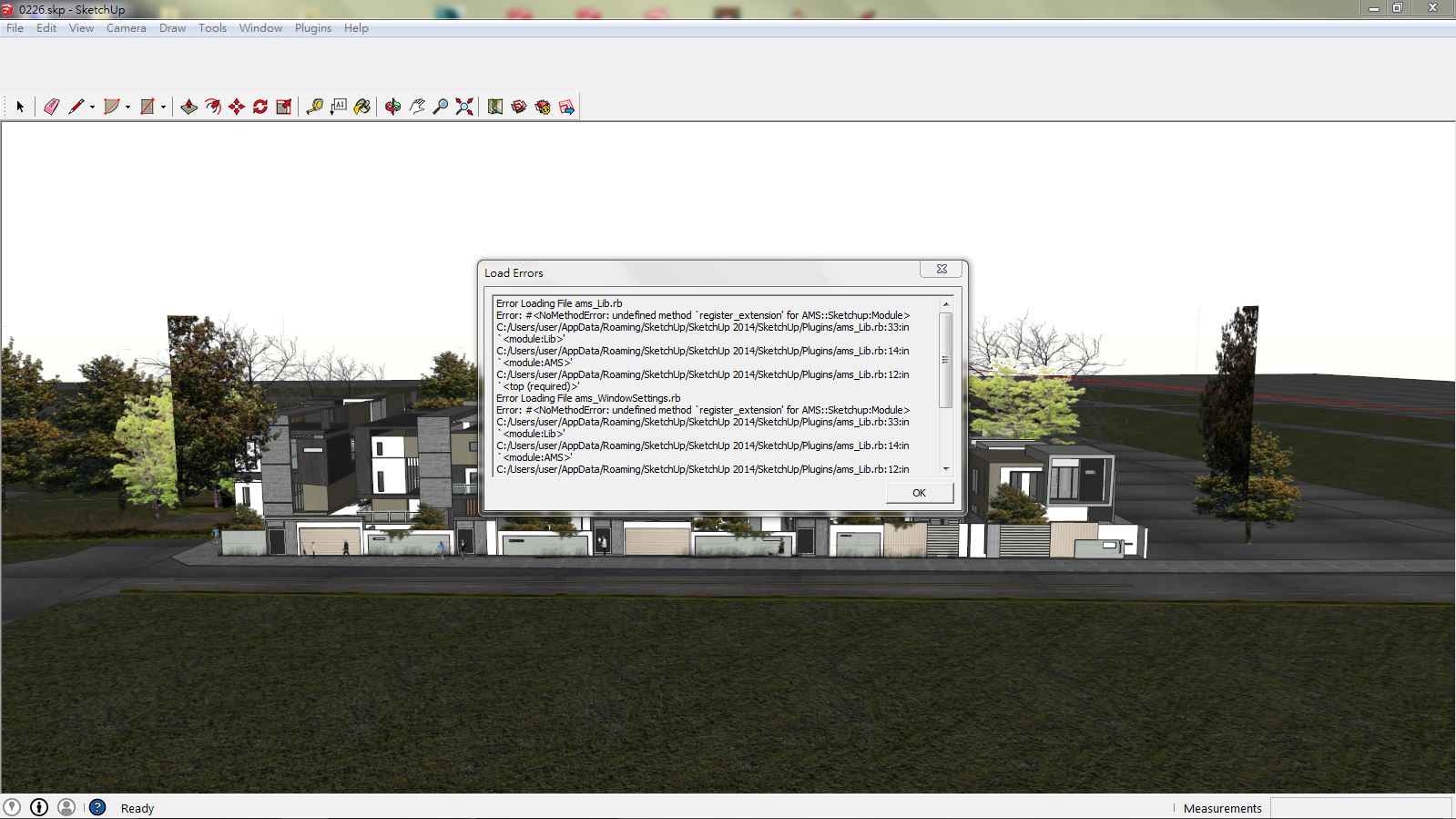

            BrCNe4C.jpg

            1 Reply Last reply
            Reply Quote 0
            • A
              Anton_S
              last edited by

              It seems Sketchup.register_extension is undefined. Scroll down to line 33 and add :: in from of the word Sketchup, save, and test.
              It should look like this:
              ::Sketchup.register_extension @extension, true

              If it doesn't work then your SU was modified, or some files were deleted. Try re-installing SketchUp and see what happens.

              1 Reply Last reply
              Reply Quote 0
              • ArchieAA
                ArchieA
                last edited by

                Windows 8, SU 2014. There's no Plugins folder to unzip ams_Lib_1.0.8.zip so I extracted the files to the folder Tools.

                Fullscreen still doesn't work.

                How to I get rid of the annoying popup stating, Download ams_Lib? Or remove the plugin?

                Thanks in advance.

                1 Reply Last reply
                Reply Quote 0
                • A
                  Anton_S
                  last edited by

                  @archieA The plugins folder is located in %appdata%\Roaming\SketchUp\SketchUp 2014\SketchUp\Plugins

                  This plugin is not a standalone plugin. It requires AMS Library. Here is the link: http://sketchucation.com/forums/viewtopic.php?t=55067#p499835 Extract AMS Library in the plugins folder as well.

                  1 Reply Last reply
                  Reply Quote 0
                  • ArchieAA
                    ArchieA
                    last edited by

                    @anton_s said:

                    @archieA The plugins folder is located in %appdata%\Roaming\SketchUp\SketchUp 2014\SketchUp\Plugins

                    This plugin is not a standalone plugin. It requires AMS Library. Here is the link: http://sketchucation.com/forums/viewtopic.php?t=55067#p499835 Extract AMS Library in the plugins folder as well.

                    Thank you. I got it working on SU 2014 on Windows 8. Easy enough when it's clear. I've started using it using F12 to toggle. Great plugin!

                    1 Reply Last reply
                    Reply Quote 0
                    • chriC
                      chri
                      last edited by

                      Hi Anton

                      You have done a great job ๐Ÿ‘

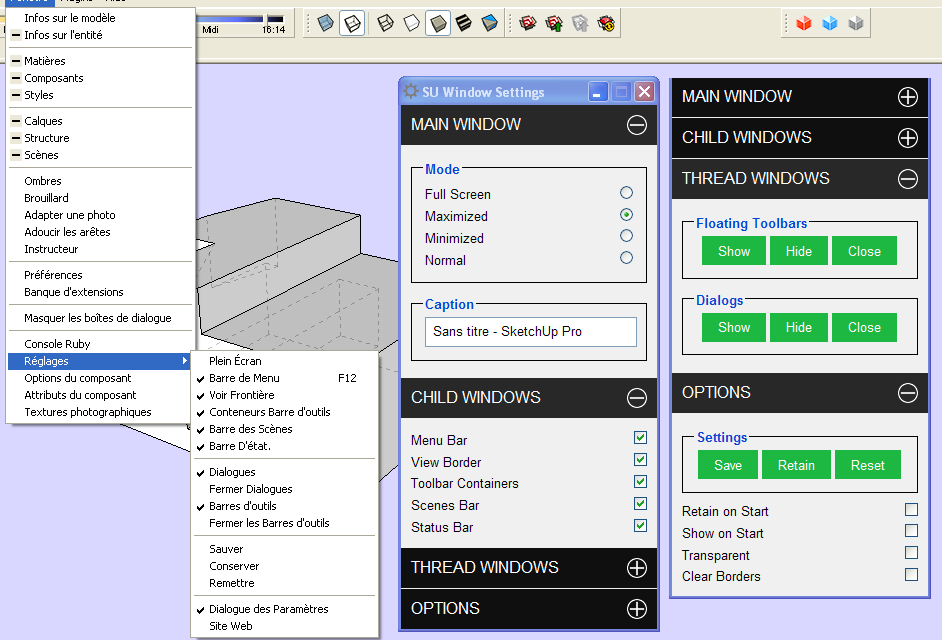
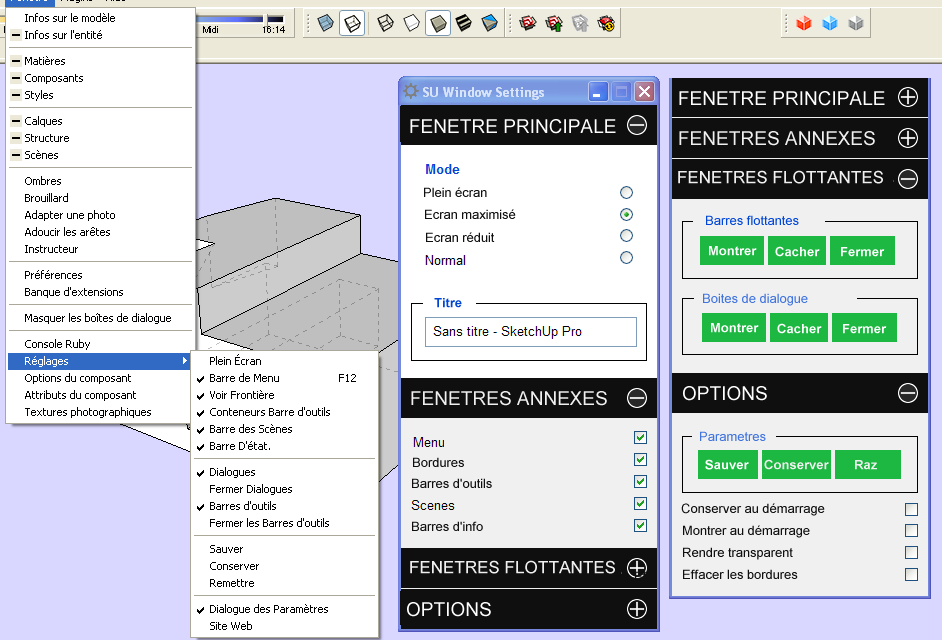
                      Is-it difficult to create a file ( rb for example ) to change the commands language ?
                      I have done a french example of what i mean on the next pictures .

                      Bye
                      Chri


                      FULL SCREEN.png


                      PLEIN ECRAN.png

                      1 Reply Last reply
                      Reply Quote 0
                      • A
                        Anton_S
                        last edited by

                        @archiea said:

                        Thank you. I got it working on SU 2014 on Windows 8. Easy enough when it's clear. I've started using it using F12 to toggle. Great plugin!

                        Very well, I'll add the description to first post. ๐Ÿ˜„

                        @chri said:

                        Is-it difficult to create a file ( rb for example ) to change the commands language ?

                        Yeah, its quite difficult to translate webdialogs.

                        I heard Aerilius created a method, that could translate the Webdialog, so we'll see.

                        Thanks for request.

                        1 Reply Last reply
                        Reply Quote 0
                        • JQLJ
                          JQL
                          last edited by

                          Hi Anton,

                          I don't think this plugin is 2015 ready or is it?

                          www.casca.pt
                          Visit us on facebook!

                          1 Reply Last reply
                          Reply Quote 0
                          • P
                            Pherim
                            last edited by

                            It's not, because AMS library isn't.

                            1 Reply Last reply
                            Reply Quote 0
                            • CadFatherC
                              CadFather
                              last edited by

                              Thank you Master Anton!
                              (can't believe i was even few weeks without WS!)

                              laptop is smiling again. ๐Ÿ˜„ ๐Ÿ˜Ž

                              1 Reply Last reply
                              Reply Quote 0
                              • Rich O BrienR
                                Rich O Brien Moderator
                                last edited by

                                @max

                                That laptop is unique.

                                Treasure it

                                Download the free D'oh Book for SketchUp ๐Ÿ“–

                                1 Reply Last reply
                                Reply Quote 0
                                • CadFatherC
                                  CadFather
                                  last edited by

                                  true... ๐Ÿ˜† and you should see it now!

                                  PS. easy with your psychic powers.... (i sold it today) ๐Ÿ˜ฎ

                                  1 Reply Last reply
                                  Reply Quote 0
                                  • Rich O BrienR
                                    Rich O Brien Moderator
                                    last edited by

                                    They say there's one born every minute.

                                    Download the free D'oh Book for SketchUp ๐Ÿ“–

                                    1 Reply Last reply
                                    Reply Quote 0
                                    • CadFatherC
                                      CadFather
                                      last edited by

                                      hahaha... not at all mister, this is a beast which should last plenty (unless you jinx it!) ๐Ÿ˜†

                                      1 Reply Last reply
                                      Reply Quote 0
                                      • CadFatherC
                                        CadFather
                                        last edited by

                                        only strange thing i found, the green settings window always pops up on start, even if i uncheck the option. not sure it's supposed to be that way.

                                        1 Reply Last reply
                                        Reply Quote 0
                                        • A
                                          Anton_S
                                          last edited by

                                          @cadfather said:

                                          only strange thing i found, the green settings window always pops up on start, even if i uncheck the option. not sure it's supposed to be that way.

                                          It shouldn't show up if you uncheck the "Show on Start" option. I tested it on my Windows 7, SU8, 13, 14, and 15 64bit. Can you give give me your system background, such as OS and SU version?

                                          1 Reply Last reply
                                          Reply Quote 0
                                          • CadFatherC
                                            CadFather
                                            last edited by

                                            ok, so that's strange, it happens on all my versions (8, 2014, 2015-x64).

                                            i guess you may want to wait if anyone else has the same problem while i investigate further for conflicts etc. win7 64bit.

                                            Thanks Anton

                                            1 Reply Last reply
                                            Reply Quote 0

                                            Hello! It looks like you're interested in this conversation, but you don't have an account yet.

                                            Getting fed up of having to scroll through the same posts each visit? When you register for an account, you'll always come back to exactly where you were before, and choose to be notified of new replies (either via email, or push notification). You'll also be able to save bookmarks and upvote posts to show your appreciation to other community members.

                                            With your input, this post could be even better ๐Ÿ’—

                                            Register Login
                                            • 1
                                            • 2
                                            • 11
                                            • 12
                                            • 13
                                            • 14
                                            • 15
                                            • 14 / 15
                                            • First post
                                              Last post
                                            Buy SketchPlus
                                            Buy SUbD
                                            Buy WrapR
                                            Buy eBook
                                            Buy Modelur
                                            Buy Vertex Tools
                                            Buy SketchCuisine
                                            Buy FormFonts

                                            Advertisement