Share models
-
@Dave-R said in Share models:
@ntxdave upload it to DropBox or Google Drive and share the link.
OK, DropBox has a monthly subscription. I looked at and tried to get Google Drive but wound up with it trying to install PC App Store which is a nightmare.
Can I or How would it be to use Trimble Connect?
-
@ntxdave said in Share models:
OK, DropBox has a monthly subscription
They have a free option as well.
@ntxdave said in Share models:
Can I or How would it be to use Trimble Connect?
Yes. You can share the file with Trimble Connect, too.
-
@Dave-R said in Share models:
@ntxdave said in Share models:
OK, DropBox has a monthly subscription
They have a free option as well.
@ntxdave said in Share models:
Can I or How would it be to use Trimble Connect?
Yes. You can share the file with Trimble Connect, too.
OK, I installed the free trial of DropBox. So, as a test, here is a link to the file I want to make available. Shared file
Please let me know if you can access it so I can post it in another thread.

-
Yes, you can upload a SketchUp (.skp) model to the 3D Warehouse for a specific recipient, but 3D Warehouse is primarily designed for public sharing. The best way to share with a specific person without making it public is to upload it as a Private Model.
Here are the best methods to achieve this:- 3D Warehouse "Private Model" Method
While 3D Warehouse doesn't have a direct "share with user X" button for private items, you can use the private setting for security:
Upload & Set to Private: When uploading, under "Additional Attributes," select Private Model.
Limitation: Only you can view private models; you cannot directly share the link with specific people to download.
Workaround: You may have to temporarily set it to "Public" to send a link, or use the Trimble Connect method below. - The Best Way: Trimble Connect (Recommended)
For secure, private sharing with specific individuals, use Trimble Connect, which is built into SketchUp (2024 and earlier).
Save to Cloud: Save your file to Trimble Connect (using the cloud symbol in SketchUp).
Share Link: Generate a view-only link to the project.
Permissions: You can control the level of access to those you've shared it with. - Alternative: Private Collections
Folders: You can create "Private Folders" to curate models that only you can see.
Collection vs. Folder: Remember that "Collections" are public, while "Folders" are private.
Summary of Sharing
Public Link: If you upload publicly, anyone can download it.
Private/Shared: Use Trimble Connect for secure, named recipient sharing.
Key Takeaway: If the goal is truly private sharing with a specific recipient, use Trimble Connect. If you just want to hide it from general search, use the "Private" upload setting in 3D Warehouse, but note it is difficult for others to access.
- 3D Warehouse "Private Model" Method
-
Right now my primary goal was to be able to share a file with anyone. I am having a problem with a file but could not upload it because it is too large for this forum. Right now all I was trying to do is see if this link worked. I need someone to verify that they can access the file.
I do appreciate your response though.
-
@ntxdave said in Share models:
Right now all I was trying to do is see if this link worked. I need someone to verify that they can access the file.
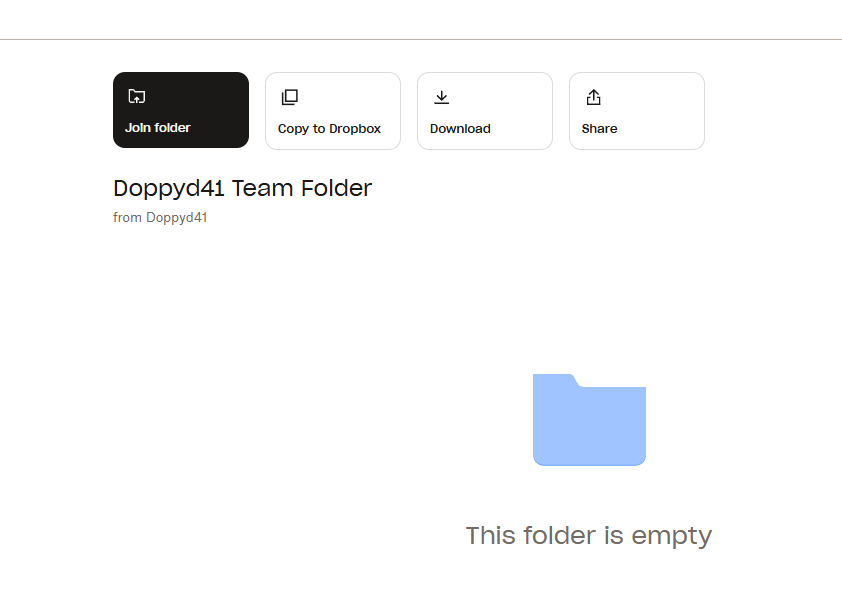
The link takes me to an empty DropBox folder.
-
@Dave-R Thsnks Dave. I will have to try again. I thought I had the file in that folder.
-
@dave-r Can you try again. I think I just got the file moved/copied to that folder.
-
Can someone test this and let me know if you can download and open this SketchUp SKP file in the link.
Sketchup File -
Download the free D'oh Book for SketchUp 📖
-
@Rich-O-Brien Thanks Rich. Now I know that I can share the link with Fredo6 on the Animator thread so he can download the file and look at it (to hopefully identify the problem I have been having trying to generate a video).
You might also try generating an Animator video and see what results you get.



Hello! It looks like you're interested in this conversation, but you don't have an account yet.
Getting fed up of having to scroll through the same posts each visit? When you register for an account, you'll always come back to exactly where you were before, and choose to be notified of new replies (either via email, or push notification). You'll also be able to save bookmarks and upvote posts to show your appreciation to other community members.
With your input, this post could be even better 💗
Register Login


Advertisement