sketchucation logo sketchucation
    • 登入
    Oops, your profile's looking a bit empty! To help us tailor your experience, please fill in key details like your SketchUp version, skill level, operating system, and more. Update and save your info on your profile page today!
    🔌 Smart Spline | Fluid way to handle splines for furniture design and complex structures. Download

    [Plugin] Slicer5

    已排程 已置頂 已鎖定 已移動 Plugins
    336 貼文 82 Posters 320.8k 瀏覽 81 Watching
    正在載入更多貼文
    • 從舊到新
    • 從新到舊
    • 最多點贊
    回覆
    • 在新貼文中回覆
    登入後回覆
    此主題已被刪除。只有擁有主題管理權限的使用者可以查看。
    • A 離線
      alexakaczor
      最後由 編輯

      Is it possible to get this for sketchup 2019?

      1 條回覆 最後回覆 回覆 引用 0
      • Dave RD 離線
        Dave R
        最後由 編輯

        @alexakaczor said:

        Is it possible to get this for sketchup 2019?

        Yes. It already is compatible with SU2019. Right here: https://sketchucation.com/pluginstore?pln=TIG_Slicer

        Install the Sketchucation Extension Store tool and let it install Slicer and other extensions for you directly.

        Etaoin Shrdlu

        %

        (THERE'S NO PLACE LIKE)

        G28 X0.0 Y0.0 Z0.0

        M30

        %

        1 條回覆 最後回覆 回覆 引用 0
        • A 離線
          alexakaczor
          最後由 編輯

          Is it possible to get this updated to be compatible with SKP 2019?? Thanks!

          1 條回覆 最後回覆 回覆 引用 0
          • Dave RD 離線
            Dave R
            最後由 編輯

            @alexakaczor said:

            Is it possible to get this updated to be compatible with SKP 2019?? Thanks!

            It already is compatible with SU2019. I just made an example in SU2019 to show you.
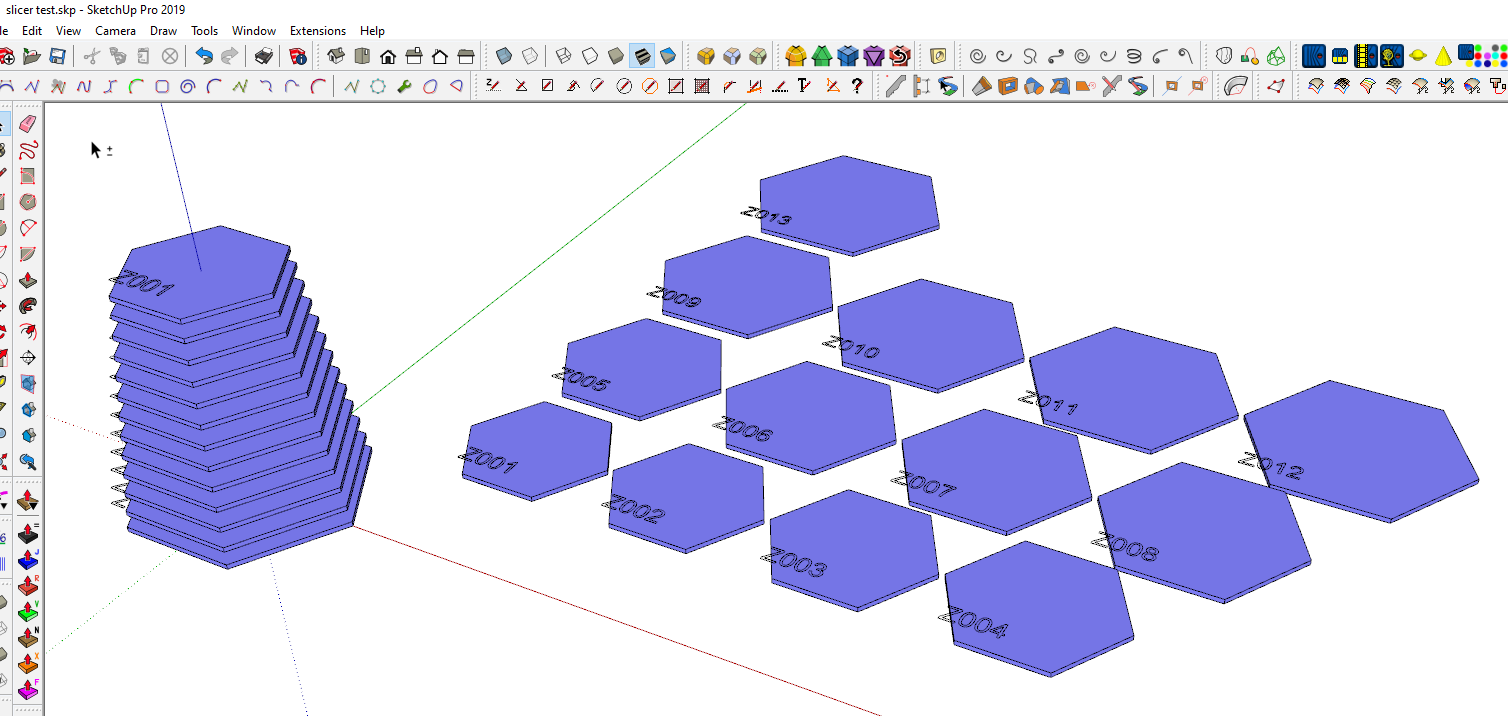
            Screenshot - 10_14_2019 , 6_11_58 AM.png

            Etaoin Shrdlu

            %

            (THERE'S NO PLACE LIKE)

            G28 X0.0 Y0.0 Z0.0

            M30

            %

            1 條回覆 最後回覆 回覆 引用 0
            • N 離線
              Nudornn
              最後由 編輯

              thxxxxxxxxxxx

              1 條回覆 最後回覆 回覆 引用 0
              • K 離線
                kulibin
                最後由 編輯

                Hi!
                Can you add dogbones
                like this https://fablab.ruc.dk/more-elegant-cnc-dogbones/
                and chamfer cut for start of joint?
                💚

                1 條回覆 最後回覆 回覆 引用 0
                • M 離線
                  misterdee
                  最後由 編輯

                  Hello TIG

                  Great PlugIn, thank you very much!

                  However, when I slice with it, arcs are converted to edges and the sliced shape loses the nice curves.

                  Is there any way to prevent this?

                  Or an easy way to iron this out afterwards?

                  Thanks in advance

                  Best regards

                  misterdee

                  1 條回覆 最後回覆 回覆 引用 0
                  • Dave RD 離線
                    Dave R
                    最後由 編輯

                    @misterdee said:

                    However, when I slice with it, arcs are converted to edges and the sliced shape loses the nice curves.

                    Can you share an example .skp file that shows what you are seeing?

                    What version of SketchUp are you actually using? Your profile says 2018 Free/Make but there is no such version.

                    Etaoin Shrdlu

                    %

                    (THERE'S NO PLACE LIKE)

                    G28 X0.0 Y0.0 Z0.0

                    M30

                    %

                    1 條回覆 最後回覆 回覆 引用 0
                    • TIGT 線上
                      TIG Moderator
                      最後由 編輯

                      The slice is by its very nature a cut through a 3d-object.
                      It ignores any 'curves' that might result and substitutes a segmented solution.
                      If the surface you are cutting is for example a cylinder with 24 facets from its original circle the cut geometry will have 24 segments.
                      So if you are cutting objects where you have control of their 'faceted-ness' from an early stage, then a cylinder with 72 facets will obviously result in a smoother slice...

                      TIG

                      1 條回覆 最後回覆 回覆 引用 0
                      • P 離線
                        pshearn11
                        最後由 編輯

                        Hello,
                        I have installed Slicer and enabled it. When I try to use it I get an error message that reads "No selection!" This happens on all of the tool options in the Slicer toolset.

                        I have tried installing other plugins and extensions and they work fine.

                        Any help would be greatly appreciated!!!

                        1 條回覆 最後回覆 回覆 引用 0
                        • Dave RD 離線
                          Dave R
                          最後由 編輯

                          Did you select the object you wanted to slice? You have to select a component or group in order for Slicer to have something to do.

                          Etaoin Shrdlu

                          %

                          (THERE'S NO PLACE LIKE)

                          G28 X0.0 Y0.0 Z0.0

                          M30

                          %

                          1 條回覆 最後回覆 回覆 引用 0
                          • P 離線
                            pshearn11
                            最後由 編輯

                            @dave r said:

                            Did you select the object you wanted to slice? You have to select a component or group in order for Slicer to have something to do.

                            DOH! Thanks!

                            1 條回覆 最後回覆 回覆 引用 0
                            • B 離線
                              BCISTEVIE
                              最後由 編輯

                              Do you know if this plugin will work with sketchup pro 2021?
                              thanks in advance.

                              1 條回覆 最後回覆 回覆 引用 0
                              • Dave RD 離線
                                Dave R
                                最後由 編輯

                                @bcistevie said:

                                Do you know if this plugin will work with sketchup pro 2021?

                                Yes. It works fine in SketchUp 2021 Pro.

                                BTW, please correct your profile. It says you are using 2021 Free/Make which can't be.

                                Etaoin Shrdlu

                                %

                                (THERE'S NO PLACE LIKE)

                                G28 X0.0 Y0.0 Z0.0

                                M30

                                %

                                1 條回覆 最後回覆 回覆 引用 0
                                • S 離線
                                  sftc
                                  最後由 編輯

                                  Hi TIG,

                                  How do I contact you to make a custom plugin?

                                  my contact email matt[at]sftc.com.au

                                  1 條回覆 最後回覆 回覆 引用 0
                                  • TIGT 線上
                                    TIG Moderator
                                    最後由 編輯

                                    To discuss something like this send me a Private-Message outlining what it is you want to do, I'll then get back to you with some ideas...

                                    TIG

                                    1 條回覆 最後回覆 回覆 引用 0
                                    • S 離線
                                      sftc
                                      最後由 編輯

                                      Hi TIG,

                                      This website isn't the most user friendly how do I even send you a private message
                                      ? Could you email me matt[at]sftc.com.au

                                      1 條回覆 最後回覆 回覆 引用 0
                                      • TIGT 線上
                                        TIG Moderator
                                        最後由 編輯

                                        No - I will not become involved in email discussions, except in exceptional circumstances...
                                        But it is NOT difficult to PM here...

                                        Also, please stop posting your email address publicly - spam-bots will scrape it and you'll get extra spam emails ! I edited your posts' address's @ to an [at] to protect you from this...

                                        It's very easy to do a PM...
                                        Click the Private-Message icon [box?] below my avatar to the left of this message.
                                        In the page/dialog that appears type/edit [or copy/paste] your text, attach files or images etc, as appropriate and then submit it to me.
                                        I'll be notified immediately under my own Message heading, and we can then have a simple to-and-fro conversation, all of which will be 'in private', with you getting notifications when my reply is in your in-box etc...

                                        TIG

                                        1 條回覆 最後回覆 回覆 引用 0
                                        • T 離線
                                          TBoy
                                          最後由 編輯

                                          Mr. TIG
                                          Is it possible to make variation of this plugin for cutting object to pieces
                                          (For example a big object cut to pieces fitting for 3d printing) ?
                                          May be "Slicer" workflow will be OK - cutting in X, Y, Z or any combination of the 3 axes.

                                          1 條回覆 最後回覆 回覆 引用 0
                                          • TIGT 線上
                                            TIG Moderator
                                            最後由 編輯

                                            Look at my "Split to Plane" - which should be able to split your container into parts...
                                            https://sketchucation.com/pluginstore?pln=TIG_Split_to_plane

                                            TIG

                                            1 條回覆 最後回覆 回覆 引用 0
                                            • 1
                                            • 2
                                            • 3
                                            • 4
                                            • 5
                                            • 6
                                            • 7
                                            • 8
                                            • 16
                                            • 17
                                            • 6 / 17
                                            • 第一個貼文
                                              最後的貼文
                                            Buy SketchPlus
                                            Buy SUbD
                                            Buy WrapR
                                            Buy eBook
                                            Buy Modelur
                                            Buy Vertex Tools
                                            Buy SketchCuisine
                                            Buy FormFonts

                                            Advertisement
