sketchucation logo sketchucation
    • 登入
    Oops, your profile's looking a bit empty! To help us tailor your experience, please fill in key details like your SketchUp version, skill level, operating system, and more. Update and save your info on your profile page today!
    🔌 Smart Spline | Fluid way to handle splines for furniture design and complex structures. Download

    [Plugin] FredoTools - v4.5c - 24 Jun 24


    已排程 已置頂 已鎖定 已移動 Plugins
    463 貼文 123 Posters 710.9k 瀏覽 121 Watching
    正在載入更多貼文
    • 從舊到新
    • 從新到舊
    • 最多點贊
    回覆
    • 在新貼文中回覆
    登入後回覆
    此主題已被刪除。只有擁有主題管理權限的使用者可以查看。
    • X 離線
      xroo2
      最後由 編輯

      @xroo2 said:

      When I download the .rbz file...it comes in as a PDF. What's up wtih that?

      ..found out that it is just my computer which inserts Adobe icon and suffix for 'whatever' reason. The .rbz file opens find through Extension Manager 😕

      1 條回覆 最後回覆 回覆 引用 0
      • fredo6F 離線
        fredo6
        最後由 編輯

        NEW RELEASE: FredoTools v3.3a - 21 Oct 18

        Requirement: LibFredo6 v8.6i or above

        FredoTools 3.3a fixes bugs in FredoTools::ReportLabelArea.


        See FredoTools plugin home page for Download.

        See also main post of this thread for User Discussion.

        Fredo

        1 條回覆 最後回覆 回覆 引用 0
        • P 離線
          Pascalou54
          最後由 編輯

          Bonjour,
          J'ai toujours une erreur sur SU2017,
          "erreur de chargement du fichier Fredo6_FredoTools/__loader__FredoTools
          Could not find included file 'Fredo6_FredoTools/_loader__FredoTools"
          Dans quel répertoire doit on mettre \Fredo6_FredoTools
          -_v1.8c ?
          merci

          1 條回覆 最後回覆 回覆 引用 0
          • pilouP 離線
            pilou
            最後由 編輯

            Il vaut mieux utiliser le Ruby rouge pour installer les plugins, comme cela aucun problème de savoir où il faut les installer, dans quels répetoires etc...dans cette jungle de windose! 💚 (bouton rouge [highlight=#ff4040:1j6ys88t]"Installer l'Extension"[/highlight:1j6ys88t] (bas de page)

            Il faut installer aussi la dernière Fredo Lib avant! 🤓 (avec le même Ruby rouge! 😉

            Toujours avec le Ruby rouge, il vaut mieux dé-installer les anciennes versions des plugins à venir avec la section "Gérer"! (haut de page)
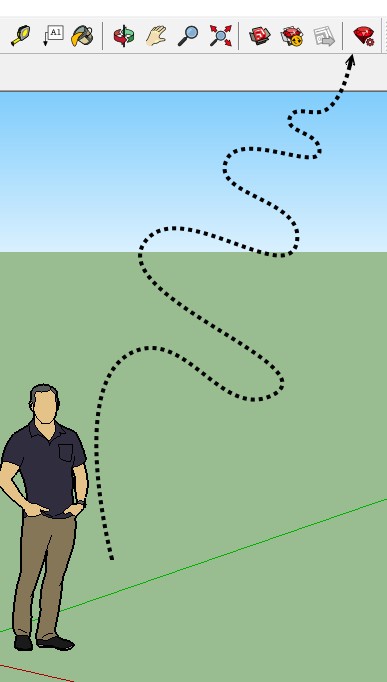
            https://i.postimg.cc/GhZ8S2tW/red_ruby.jpg

            Frenchy Pilou
            Is beautiful that please without concept!
            My Little site :)

            1 條回覆 最後回覆 回覆 引用 0
            • D 離線
              dedmin
              最後由 編輯

              See the video. Windows 10, SU Pro - all up to date.
              https://imgur.com/a/jyUEA0P

              1 條回覆 最後回覆 回覆 引用 0
              • fredo6F 離線
                fredo6
                最後由 編輯

                @dedmin said:

                See the video. Windows 10, SU Pro - all up to date.
                https://imgur.com/a/jyUEA0P

                Thanks for signaling.

                This is fixed in [url=https://sketchucation.com/pluginstore?pln=LibFredo6:3fes6yqn]LibFredo6 8.6n[/url:3fes6yqn], just published.

                1 條回覆 最後回覆 回覆 引用 0
                • D 離線
                  dedmin
                  最後由 編輯

                  Thanks, Fredo.

                  1 條回覆 最後回覆 回覆 引用 0
                  • M 離線
                    masloprojekt
                    最後由 編輯

                    First of all, a great plugin, the reporting part is probably the only one and the best one available. However, I encountered a problem while using it. I generated a space report sorted by Container. Group of components, components are simple planes. The report looks good and contains correct data, but unfortunately when I try to export to CSV I get a file containing only some kind of the header. There is also no popup confirming the correct export. Has anyone encountered such a problem?

                    1 條回覆 最後回覆 回覆 引用 0
                    • fredo6F 離線
                      fredo6
                      最後由 編輯

                      @masloprojekt said:

                      First of all, a great plugin, the reporting part is probably the only one and the best one available. However, I encountered a problem while using it. I generated a space report sorted by Container. Group of components, components are simple planes. The report looks good and contains correct data, but unfortunately when I try to export to CSV I get a file containing only some kind of the header. There is also no popup confirming the correct export. Has anyone encountered such a problem?

                      I guess you talk about the ReportLabelAreatool.

                      There is a small bug, which exists only for the views by Container and by Layer.

                      I have fixed them and will republish soon.

                      Fredo

                      PS: this should only happen when the unit contains a square exponent.

                      1 條回覆 最後回覆 回覆 引用 0
                      • fredo6F 離線
                        fredo6
                        最後由 編輯

                        NEW RELEASE: FredoTools v3.3b - 14 Mar 19

                        Requirement: LibFredo6 v8.6i or above

                        FredoTools 3.3b fixes bugs in FredoTools::ReportLabelArea for CSV export, as signaled by masloprojekt.


                        See FredoTools plugin home page for Download.

                        See also main post of this thread for User Discussion.

                        Fredo

                        1 條回覆 最後回覆 回覆 引用 0
                        • fredo6F 離線
                          fredo6
                          最後由 編輯

                          NEW RELEASE: FredoTools v3.3c - 24 Mar 19

                          Requirement: LibFredo6 v8.6i or above

                          FredoTools 3.3c fixes bugs in FredoTools::EdgeInspector preneting it to work in SU2019.


                          See FredoTools plugin home page for Download.

                          See also main post of this thread for User Discussion.

                          Fredo

                          1 條回覆 最後回覆 回覆 引用 0
                          • fredo6F 離線
                            fredo6
                            最後由 編輯

                            NEW RELEASE: FredoTools v3.4a - 12 Apr 19

                            Requirement: LibFredo6 v8.6i or above

                            FredoTools 3.4a improves performance when the Outliner is open. This may be important for ThruPaint, when you paint a complex model.


                            See FredoTools plugin home page for Download.

                            See also main post of this thread for User Discussion.

                            Fredo

                            1 條回覆 最後回覆 回覆 引用 0
                            • M 離線
                              miguelgba
                              最後由 編輯

                              Hi Fredo, Your Plugin is simply one of the best and most usefull of Sketchup. But I have a request, the ReportLabelArea (report) is not exported in a CSV format that the Layout of Sketchup can read, every time I tried to copy and paste the .csv into layout it give me a blank table. I'm trying to use your plugin to make a quantity takeoff and insert the table on Layout, if this turns into possible and practical will be a wonder to my tries to use de Layout for construction drawings.
                              Thanks in advance

                              1 條回覆 最後回覆 回覆 引用 0
                              • Dave RD 離線
                                Dave R
                                最後由 編輯

                                @miguelgba said:

                                the ReportLabelArea (report) is not exported in a CSV format that the Layout of Sketchup can read, every time I tried to copy and paste the .csv into layout it give me a blank table.

                                Open the CSV file in a spreadsheet program such as Excel and save it as XLSX or make it an RTF file. Both of these file types are supported by LayOut.

                                Additionally, you shouldn't copy and paste files into LayOut. The reference that is created with copy and paste links to a temporary file location which will be removed when the operating system does its normal cleanup. You should use File>Insert and insert the file from its real location.

                                Etaoin Shrdlu

                                %

                                (THERE'S NO PLACE LIKE)

                                G28 X0.0 Y0.0 Z0.0

                                M30

                                %

                                1 條回覆 最後回覆 回覆 引用 0
                                • W 離線
                                  Wise Vast
                                  最後由 編輯

                                  I had installed libfredo v8.8a. And then, I install the fredotools v3.4a. I cannot find any tools, although extension manager shows that fredotools had been installed.

                                  1 條回覆 最後回覆 回覆 引用 0
                                  • TIGT 離線
                                    TIG Moderator
                                    最後由 編輯

                                    Have you restarted SketchUp following the installations ?
                                    That will ensure everything gets properly synced...
                                    Also, are you looking in the right places ?
                                    Many of Fredo's tools have their own Toolbar.
                                    And most of them also appear under SketchUp's "Tools" menu - in large submenus - "Fredo Tools" and "Fredo6 Collection"...

                                    TIG

                                    1 條回覆 最後回覆 回覆 引用 0
                                    • A 離線
                                      ardesigninterior
                                      最後由 編輯

                                      Thanks for the Plugin by Fredo6. it is awesome to help my works.

                                      1 條回覆 最後回覆 回覆 引用 0
                                      • designerbursaD 離線
                                        designerbursa
                                        最後由 編輯

                                        Can you add a command that shows the external dimensions of the solid part?

                                        1 條回覆 最後回覆 回覆 引用 0
                                        • designerbursaD 離線
                                          designerbursa
                                          最後由 編輯

                                          solid volume command. It would be nice to have a report window that shows the dimensions of the part I selected on the screen.

                                          1 條回覆 最後回覆 回覆 引用 0
                                          • fredo6F 離線
                                            fredo6
                                            最後由 編輯

                                            @designerbursa said:

                                            solid volume command. It would be nice to have a report window that shows the dimensions of the part I selected on the screen.

                                            I think it should be a different plugin, because the request does apply to objects which are non-solid.

                                            By the way, there may exist already some plugins giving the dimension of the bounding box, which I assume is what you want.

                                            Fredo

                                            PS: indeed, there is no problem to adding this feature to Solid Volume, but that would be restrictive.

                                            1 條回覆 最後回覆 回覆 引用 0
                                            • 1
                                            • 2
                                            • 10
                                            • 11
                                            • 12
                                            • 13
                                            • 14
                                            • 23
                                            • 24
                                            • 12 / 24
                                            • 第一個貼文
                                              最後的貼文
                                            Buy SketchPlus
                                            Buy SUbD
                                            Buy WrapR
                                            Buy eBook
                                            Buy Modelur
                                            Buy Vertex Tools
                                            Buy SketchCuisine
                                            Buy FormFonts

                                            Advertisement