sketchucation logo sketchucation
    • Login
    Oops, your profile's looking a bit empty! To help us tailor your experience, please fill in key details like your SketchUp version, skill level, operating system, and more. Update and save your info on your profile page today!
    ⚠️ Update | Sketchucation Tools 5.0.8 released with licensing improvements and bugfixes Download

    [Plugin] QuadFaceTools

    Scheduled Pinned Locked Moved Plugins
    680 Posts 116 Posters 745.0k Views 116 Watching
    Loading More Posts
    • Oldest to Newest
    • Newest to Oldest
    • Most Votes
    Reply
    • Reply as topic
    Log in to reply
    This topic has been deleted. Only users with topic management privileges can see it.
    • L
      Luigi987
      last edited by

      Amazing plugin!

      Though, on various occasions it does this:
      http://puu.sh/8aAc

      the corners always get messed up no matter how perfectly I make them.
      Not sure if this is a bug or just me being dumb, help appreciated though~

      1 Reply Last reply
      Reply Quote 0
      • thomthomT
        thomthom
        last edited by

        I'm suspecting it's the shape of the quads in the corners that makes the UV mapping distort in such a manner. I'm guessing it's native quads - so I'd try to triangulate them (using the Triangulate method in QuadFace Tools.)

        Can you share a sample model?

        Thomas Thomassen — SketchUp Monkey & Coding addict
        List of my plugins and link to the CookieWare fund

        1 Reply Last reply
        Reply Quote 0
        • L
          Luigi987
          last edited by

          @thomthom said:

          I'm suspecting it's the shape of the quads in the corners that makes the UV mapping distort in such a manner. I'm guessing it's native quads - so I'd try to triangulate them (using the Triangulate method in QuadFace Tools.)

          Can you share a sample model?

          Tried triangulating with said option, no luck.

          Here's the model part.

          example.skp

          1 Reply Last reply
          Reply Quote 0
          • T
            Thiago Luz
            last edited by

            This plugin only works for now with 4 faces between lines is this?

            I'm sorry, I do not speak English and use an online translator does not always help a lot!

            Because I would like to map quilts, but I see that this is not possible, as this is the following example:
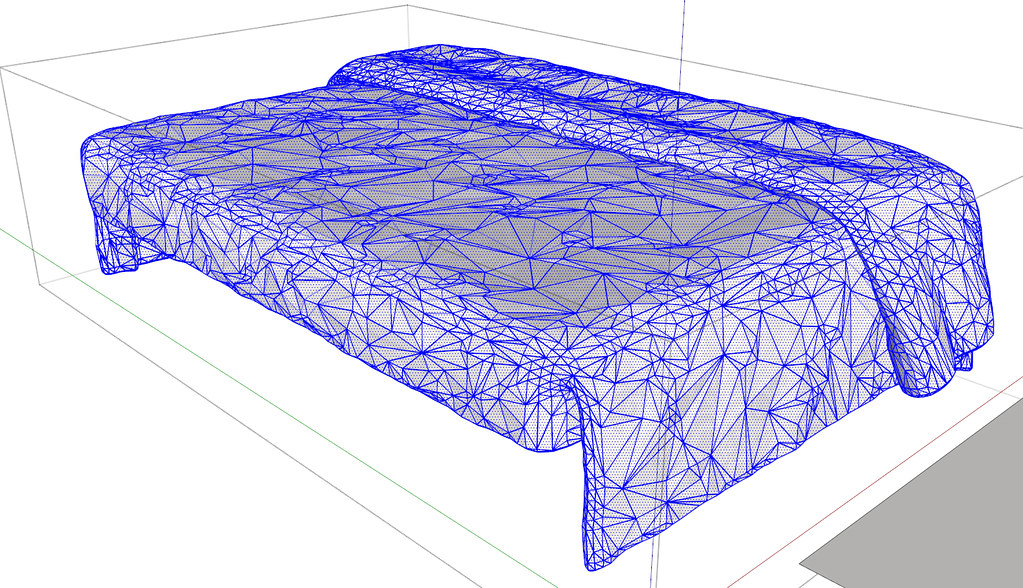
            http://farm7.static.flickr.com/6107/6321101719_f427ed0d38_b.jpg

            ERROR: The request could not be satisfied

            favicon

            (farm7.static.flickr.com)

            Thanks!

            1 Reply Last reply
            Reply Quote 0
            • thomthomT
              thomthom
              last edited by

              @thiago luz said:

              This plugin only works for now with 4 faces between lines is this?

              Yes, they must be quads, and you also needs to have a good topology of quads for the tools to work well.

              Thomas Thomassen — SketchUp Monkey & Coding addict
              List of my plugins and link to the CookieWare fund

              1 Reply Last reply
              Reply Quote 0
              • thomthomT
                thomthom
                last edited by

                @luigi987 said:

                @thomthom said:

                I'm suspecting it's the shape of the quads in the corners that makes the UV mapping distort in such a manner. I'm guessing it's native quads - so I'd try to triangulate them (using the Triangulate method in QuadFace Tools.)

                Can you share a sample model?

                Tried triangulating with said option, no luck.

                Here's the model part.

                Here's your sample model remapped ( I erased the hidden geometry stuff and purged before reposting to keep filesize down )
                The screenshot got annotations to what I did.
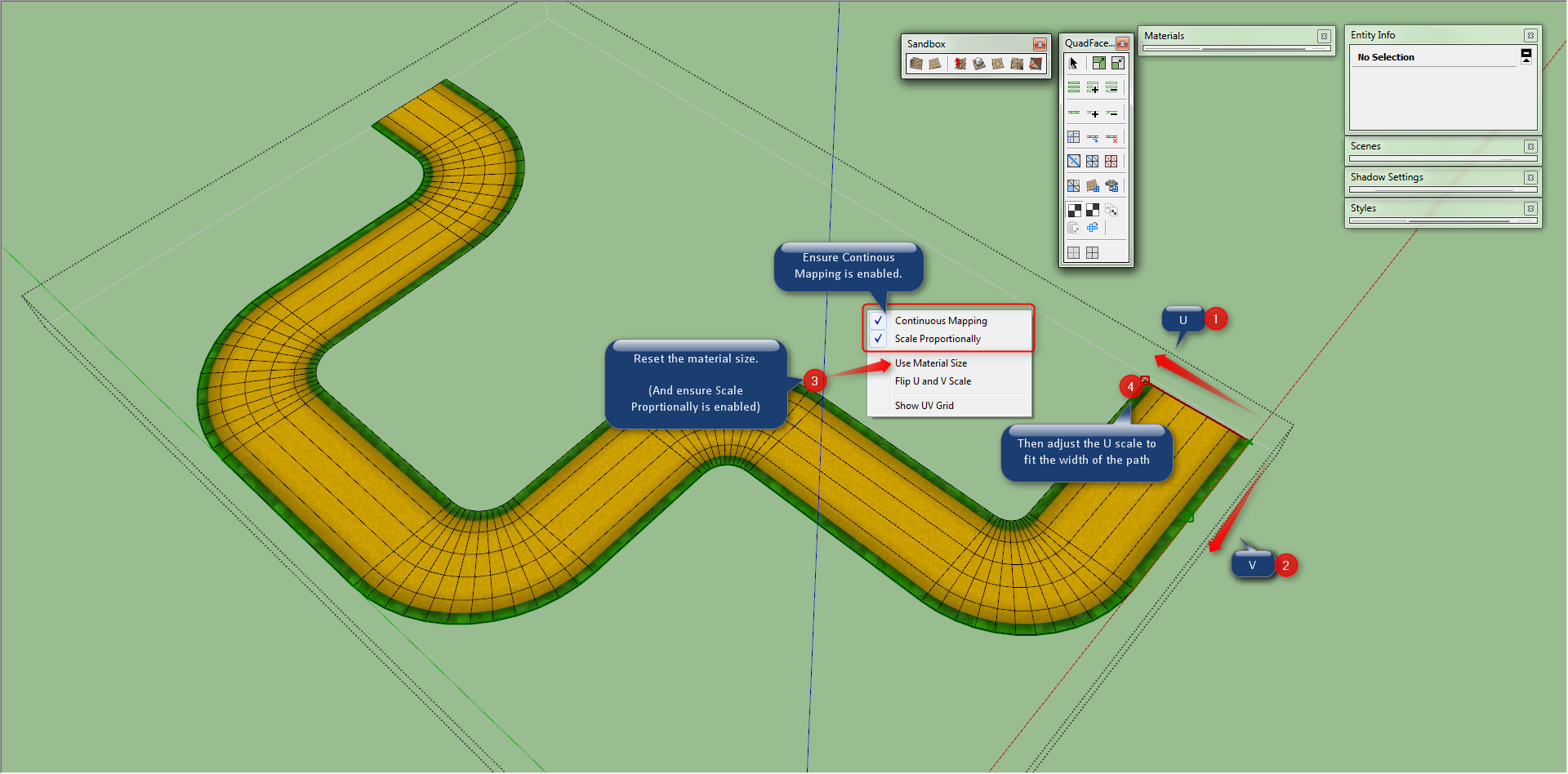

                UV Map.png


                example mapped.skp

                Thomas Thomassen — SketchUp Monkey & Coding addict
                List of my plugins and link to the CookieWare fund

                1 Reply Last reply
                Reply Quote 0
                • T
                  Thiago Luz
                  last edited by

                  Still, a great plugin, thanks!

                  1 Reply Last reply
                  Reply Quote 0
                  • Rich O BrienR
                    Rich O Brien Moderator
                    last edited by

                    Thom,

                    Is it possible that you'll mimic Selection Toys and allow the user to choose what's on the toolbar?

                    Or am I missing the option?

                    Download the free D'oh Book for SketchUp 📖

                    1 Reply Last reply
                    Reply Quote 0
                    • thomthomT
                      thomthom
                      last edited by

                      @unknownuser said:

                      Is it possible that you'll mimic Selection Toys and allow the user to choose what's on the toolbar?
                      Or am I missing the option?

                      That is in fact something I want to implement. The features and commands for this plugin has grown a lot since first version, and there's several commands still without toolbar buttons and more will come. yaiks...

                      Though first I need to get 0.6 out asap - that address the issue with scenes breaking the quads... 😞

                      Thomas Thomassen — SketchUp Monkey & Coding addict
                      List of my plugins and link to the CookieWare fund

                      1 Reply Last reply
                      Reply Quote 0
                      • Rich O BrienR
                        Rich O Brien Moderator
                        last edited by

                        That's good to hear ☀

                        Any Bezier Surface news on the horizon?

                        Download the free D'oh Book for SketchUp 📖

                        1 Reply Last reply
                        Reply Quote 0
                        • thomthomT
                          thomthom
                          last edited by

                          I hope so... 😞 I've really blown my internally estimated timeline for this... Gotto get my focus straight! First sign will be that beta for Vertex Tools open up.

                          Thomas Thomassen — SketchUp Monkey & Coding addict
                          List of my plugins and link to the CookieWare fund

                          1 Reply Last reply
                          Reply Quote 0
                          • romboutR
                            rombout
                            last edited by

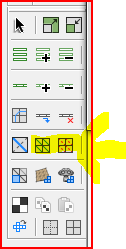
                            i cant find a option to make quads of a selection?!
                            1 Reply Last reply
                            Reply Quote 0
                            • TIGT
                              TIG Moderator
                              last edited by

                              @rombout said:

                              i cant find a option to make quads of a selection?!
                              Capture.PNG

                              TIG

                              1 Reply Last reply
                              Reply Quote 0
                              • Rich O BrienR
                                Rich O Brien Moderator
                                last edited by

                                You need to select a quad to then convert the mesh to quads.

                                Download the free D'oh Book for SketchUp 📖

                                1 Reply Last reply
                                Reply Quote 0
                                • thomthomT
                                  thomthom
                                  last edited by

                                  @rombout said:

                                  i cant find a option to make quads of a selection?!

                                  What kind of selection do you got?

                                  There are a couple of commands to Convert to quads:
                                  QFConvert.png

                                  The left command "Convert Triangulated Mesh to Quads" will try to find quads in the mesh - you need to either selected a native quad or two triangles as a starting point.

                                  The right one is converting Sandbox Tools type of quad mesh into QuadFace quads.

                                  Maybe you can explain, and show, what mesh you have and what you try to convert?

                                  Thomas Thomassen — SketchUp Monkey & Coding addict
                                  List of my plugins and link to the CookieWare fund

                                  1 Reply Last reply
                                  Reply Quote 0
                                  • thomthomT
                                    thomthom
                                    last edited by

                                    @tig said:

                                    @rombout said:

                                    i cant find a option to make quads of a selection?!
                                    [attachment=0:zfyitihf]<!-- ia0 -->Capture.PNG<!-- ia0 -->[/attachment:zfyitihf]

                                    That's Triangulate and Remove Triangulation you highlighted... don't think it's what he's looking for.

                                    Thomas Thomassen — SketchUp Monkey & Coding addict
                                    List of my plugins and link to the CookieWare fund

                                    1 Reply Last reply
                                    Reply Quote 0
                                    • V
                                      vouda
                                      last edited by

                                      Big congratulations for your plugin!
                                      But I have a problem. When I render with su podium the aspect ratio of edited surfaces colapses.
                                      Any solution?

                                      1 Reply Last reply
                                      Reply Quote 0
                                      • thomthomT
                                        thomthom
                                        last edited by

                                        @vouda said:

                                        When I render with su podium the aspect ratio of edited surfaces colapses.

                                        I do not understand what you mean by that. Got screenshot and possibly a sample model?

                                        Thomas Thomassen — SketchUp Monkey & Coding addict
                                        List of my plugins and link to the CookieWare fund

                                        1 Reply Last reply
                                        Reply Quote 0
                                        • V
                                          vouda
                                          last edited by

                                          I edit the model with the tools and it looks ok.
                                          Then when i render the model, the surface material distorts.
                                          I will try to upload the model later

                                          1 Reply Last reply
                                          Reply Quote 0
                                          • thomthomT
                                            thomthom
                                            last edited by

                                            Sounds like it has problems with distorted textures - many render engines has.

                                            Try to triangulate the quads - see if that make a difference.

                                            Thomas Thomassen — SketchUp Monkey & Coding addict
                                            List of my plugins and link to the CookieWare fund

                                            1 Reply Last reply
                                            Reply Quote 0

                                            Hello! It looks like you're interested in this conversation, but you don't have an account yet.

                                            Getting fed up of having to scroll through the same posts each visit? When you register for an account, you'll always come back to exactly where you were before, and choose to be notified of new replies (either via email, or push notification). You'll also be able to save bookmarks and upvote posts to show your appreciation to other community members.

                                            With your input, this post could be even better 💗

                                            Register Login
                                            • 1
                                            • 2
                                            • 8
                                            • 9
                                            • 10
                                            • 11
                                            • 12
                                            • 33
                                            • 34
                                            • 10 / 34
                                            • First post
                                              Last post
                                            Buy SketchPlus
                                            Buy SUbD
                                            Buy WrapR
                                            Buy eBook
                                            Buy Modelur
                                            Buy Vertex Tools
                                            Buy SketchCuisine
                                            Buy FormFonts

                                            Advertisement

