[Plugin] !AdditionalPluginFolders - v5.4a - 27 Sep 20
-
Fredo,
This plugin does'nt work anymore after Sketchup's update today 11/1/2013 (Layout asked for it). The ruby is still in the normal plugin-folder but not vissible in the Window-menu.
How to solve this? Thanks a lot! -
Problem solved after restarting pc. Sorry...
-
@matt.gordon320 said:
Hi guys,
I've been having an issue with 000_AdditionalPluginFolders ever since I installed the Developer Tools Plugins that were announced at Base Camp 2012. Is anybody else having this following issue?
PLUGIN: testuprunner.rb
FOLDER: C:/Program Files/Google/Google SketchUp 8/Plugins/sketchup-developer-tools/testup/ruby
ERROR: No such file or directory - test_cases.manI've visited the Developer Tool subfolder, but I can't really figure out what's missing.
Let me know if that isn't enough info!
Thanks Gents,
Matt
Hey guys, I'm still having trouble wrapping my head around how to get this error to go away. I've run every test I can in TestUp (that I know how at this point), but I still get this error on every start. I've had no difference when I've placed the Developer Tools into the tools folder.
Any thoughts?
Thanks, Matt
-
NEW RELEASE 3.1a - 29 Jan 2013
Major Fix of issues related to loading RBS scripts:
This update fixes problems related to loading certain rbs files (scrambled scripts) such as OSCoolean.
Thanks to Thomthom and Dan Rathbun for providing a diagnosis and a solution.
It is strongly advised to upgrade.
See first post of this thread for downloading the script.
-
How about design a "Loader" ?
Launch a menu and shift the plugin folder to the one you need then load SU... -
@unknownuser said:
How about design a "Loader" ?
Launch a menu and shift the plugin folder to the one you need then load SU...I think you have the standard Plugin extensions for that.
Fredo
-
Sorry for my poor Englsh ...
Because I hope I can divide my work into some sessions: modeling,texturing, rendering ...etc
I am thinking if we can make a "standard plugin" each time that contains only the plugins we need before we launch SU.
Actually I am doing this by a batch file now (I know the interface is ugly):\Google SketchUp 8\Plugins
\plugins_modeling
\plugins_texturing
\plugins_vray
\plugins_test
------------------- .....etc
for example, if I need to do a render work,
I run the batch file to rename "plugins" to "plugins_00"
and rename "plugins_vray" to "plugins"
and call Sketchup.exe
after the work, I leave SU, the folder will rename back.I know that is not a ruby issue, but I think maybe it's not a bad idea ..

Addy
-
Hey guys, I could use some advice. I removed all my plugins from my folder because I'm reinstalling all of them from scratch (I'm having something create a bunch of help menus and can't pin down the problem). However, after I've removed all plugins from the plugins folder, I still get missing plugin warnings from 000_AdditionalPlugins - even though I don't use it or have it installed on my system. Any idea what's going on?
-
I'm going to guess you're using Windows (Could you please fill out your profile with SU version and OS?) and that you're running into problems with Virtual Store.
Have a look at this utility to help you locate files that's strayed into Virtual Store: http://sketchucation.com/forums/viewtopic.php?f=180&t=48399 -
@thomthom said:
I'm going to guess you're using Windows (Could you please fill out your profile with SU version and OS?) and that you're running into problems with Virtual Store.
Have a look at this utility to help you locate files that's strayed into Virtual Store: http://sketchucation.com/forums/viewtopic.php?f=180&t=48399I will both update my info (apologies) and try that. Thank you sir! I'll get back to you.
EDIT Ok, it looks like there's a whole bunch of plugins that I had removed saved to the Virtual Store. I'm guessing I need to purge that file, and then re-install the plugins I'm going to use?
-
@matt.gordon320 said:
EDIT Ok, it looks like there's a whole bunch of plugins that I had removed saved to the Virtual Store. I'm guessing I need to purge that file, and then re-install the plugins I'm going to use?
Yea, Windows will place files in Virtual Store when you have UAC enabled, I think. I don't have this issue, but I'm running as administrator with UAC disabled because I muck about the system a lot when programming. It's not recommended for regular users to do so.
Instead give yourself full access to the Plugins folder.When you look in a folder and some files have ended up in Virtual Store there should be a "Compatibility Files" button that does pretty much the same as that utility I linked to.
-
@thomthom said:
Yea, Windows will place files in Virtual Store when you have UAC enabled, I think. I don't have this issue, but I'm running as administrator with UAC disabled because I muck about the system a lot when programming. It's not recommended for regular users to do so.
Instead give yourself full access to the Plugins folder.When you look in a folder and some files have ended up in Virtual Store there should be a "Compatibility Files" button that does pretty much the same as that utility I linked to.
Thanks Thomthom. Yes, I'm running in an office setup with IT Management, and though they've granted full access to my plugins and installation rights, I'd never heard of VirtualStore until now. Thanks for bringing it to my attention. I've never had the issue before, but I always like to know the reason I get errors as well as how to resolve them. Thanks agian mate!
-
Thank you very much!
-
thank you
-
Thank you
-
what is this error ?

-
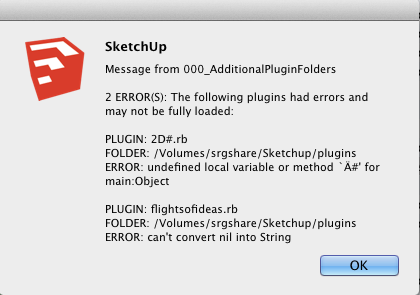
I have a plugin that doesn't run if I put it in the additional plugin folder. This is the plugin: http://code.google.com/p/sketchup-svg-outline-plugin/downloads/list
Attached is a screenshot of the errors I get.
I'd appreciate any suggestions that will get this to work.
-
Scott,
Never heard of these plugins.
Anyway, they may not be able to run in another directory than the native Sketchup Plugins folder.
Or they may have bug. Keep in mind that 000_AdditionalPluginFolders just reports in clear what Ruby would find as an error at startup time, but without showing it to the user. And also, trapping the errors, avoid that the whole load process stops.
Fredo
-
The
2D#.rbfile is the initial-loader for my2Dtools.
It will try to load a file in the2DToolssubfolder that is named2D#loader.rb.
This2D#.rbfile and its2DToolsfolder must be in the same directory - which is usually Plugins. but as long as it is on the $LOAD_PATH list it should be OK.
This2D#loaderfile in turn loads various 2d tools rb files from the subfolder to make a single submenu and the2Dtoolstoolbar.Fredo's tool can generate some odd errors, e.g. if you have 'dislocated' a loader rb and its subfolder of scripts.
This error message bears no resemblance to anything that this particular file does, so either it is this dislocation issue [which I suspect], OR you have somehow corrupted the rb file - perhaps you have opened it in a wordprocessor rather than a plain-text editor, which would have then added formating to the text that will break SketchUp when it tries to load it... -
I've been using this plugin for long and haven't found any problem yet.
Until now. I installed SketchUp in this PC of a friend along with the plugin I've been using too in the PC at home.
But it gave me this message and I don't understand what it means;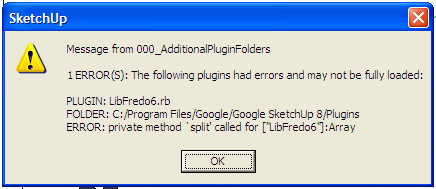
I've tried to reinstall the LibFredo.






Advertisement