Twisted Geometry -- Am I Missing A Plugin?
-
I didn't try this, but you might. Tube Along Path by TIG. Use Bezier Curves to build the path and do the necessary segment settings. But set the polygon with 4 sides in the dialog box.
Tube Along Path seems to handle curves more smoothly and does not load up the object with lots of groups.
But you probably have already done this.
-
I hadn't thought of Tube Along Path but I just tried with no success. It results in both ends being twisted instead of just one.
Thanks for the suggestion, though.
It does result in an interesting shape, though.

-
DrawMetal's TaperMaker maybe?
-
@dave r said:
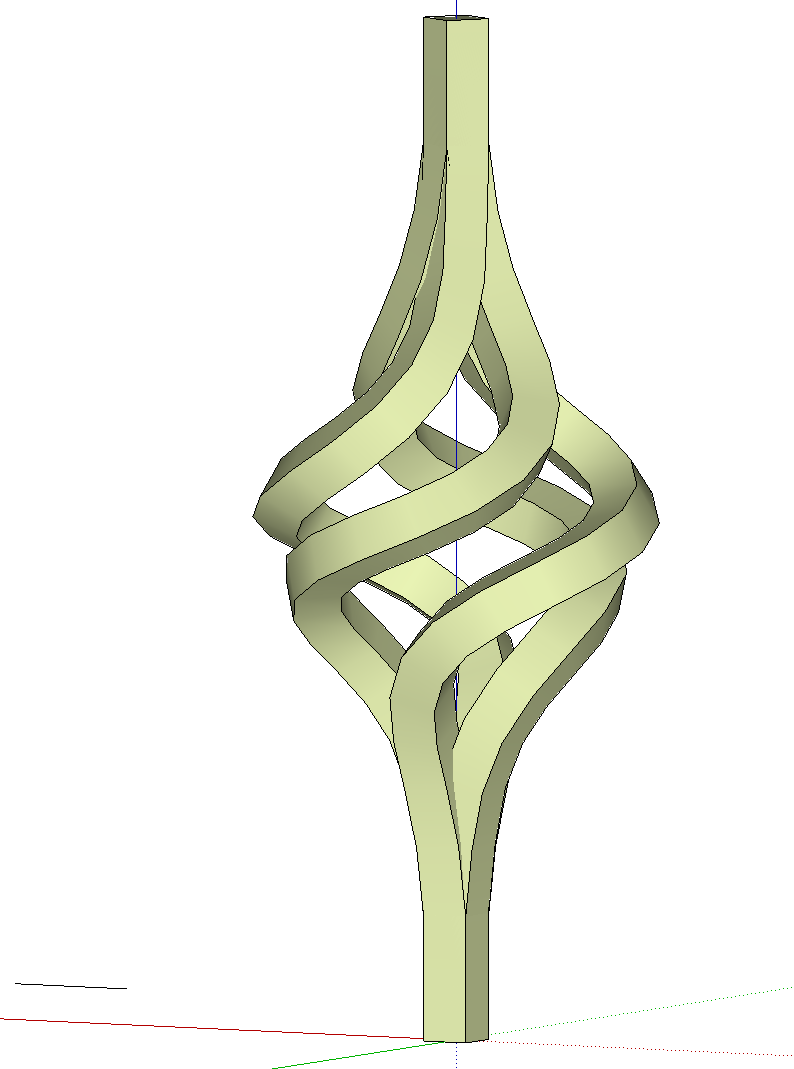
..I tried Follow and Keep (in green) but you can see it doesn't do what I need either. I could do it manually by placing square sections at the nodes oriented correctly and then stitching them together....
Dave, I tried with 'FollowMeAndKeep' and strange enough, it works well for me.
There is no "node" in the middle. Although I do know what you are talking about. I've seen similar things happening to my models in the past. How many segments do you have? Could you upload the path in its current drawing axes position?(What I did is rotating (90 degrees) the twisted path from the model I uploaded previously. Extended one end with a horizontal segment and positioned a 4-sided circular face at that end. Welded the entire curved path and applied the plugin.)
-
Good thought, Massimo. thank you. I gave it a try but it does the same thing as Follow Me. I already had a conversation with Terry, the author of the plugin, about this but no luck. I need to go and look at a real piece of iron work like I'm trying to draw. Maybe that will give some ideas.
-
Gerrit, here you go.
I've added the 4-sided circle and rotated the path to horizontal. I'll let you play from there.
What I need to have happen is to have the square at the other end oriented so its sides are vertical and horizontal. That seems to happen but I also need it to stay the same thickness throughout which doesn't happen with FAK.Thanks for looking.
-
hi dave,
is this the desired outcome or am I missing something?
john
-
Is this the shape you need?
-
John,
That's what I get with Follow Me. The problem is that the square at the top is turned 45° relative to the bottom. I want it to have the same orientation at both ends.
-
Rich, that works.
 What did you do?

-
[flash=600,450:183fm0ey]http://www.youtube.com/v/lbQzgmKNnhU[/flash:183fm0ey]
-
Rich. Thank you very much! And thank you for taking the time to make the video. It's absolutely perfect. And it turns out I was indeed just not looking at the right plugin since it is there.
Thank you again.
-
I know what you mean by not knowing what to use. It's a case now of understanding which plugins are defunct because of curviloft. It's the most powerful tool out if you ask me. Mix it with Tgi and Artisan (and Pen Tool +
 ) and you're sorted
 -
I see Rich and you Dave have sorted it out.
This is what I could come up with comparing both your curve and mine.
(see attached file)With your curve I unfortunately got the same result as in your first post.
-
Rich, you are absolutely correct.
Gerrit, thank you for taking the time to look at it. Your points are something to consider. After I drew the Bezier curve and the vertical lines, I checked the segment count and used a circle with the same number of segments. I just used Bezier.rb for the curve and could have used a BZ Spline tool instead to get more segments.
-
Here's the result.

Thanks again to all who helped and to those who tried.
-
I do lovely work

-
"...those who tried."
Yeah, I can be trying at times.
-
Yes, you do, Rich.
@mitcorb said:
"...those who tried."
Yeah, I can be trying at times.My wife tells me I am, too.





Hello! It looks like you're interested in this conversation, but you don't have an account yet.
Getting fed up of having to scroll through the same posts each visit? When you register for an account, you'll always come back to exactly where you were before, and choose to be notified of new replies (either via email, or push notification). You'll also be able to save bookmarks and upvote posts to show your appreciation to other community members.
With your input, this post could be even better 💗
Register Login


Advertisement