sketchucation logo sketchucation
    • 登入
    Oops, your profile's looking a bit empty! To help us tailor your experience, please fill in key details like your SketchUp version, skill level, operating system, and more. Update and save your info on your profile page today!
    🔌 Smart Spline | Fluid way to handle splines for furniture design and complex structures. Download

    [Plugin] Simple Scale Tool Handles v1.2 7-25-2011

    已排程 已置頂 已鎖定 已移動 Plugins
    49 貼文 19 Posters 39.2k 瀏覽 19 Watching
    正在載入更多貼文
    • 從舊到新
    • 從新到舊
    • 最多點贊
    回覆
    • 在新貼文中回覆
    登入後回覆
    此主題已被刪除。只有擁有主題管理權限的使用者可以查看。
    • K 離線
      kyyu
      最後由 kyyu 編輯

      By request, a plugin to make it easier to use the scale tool, on thin sheet parts. Component/group definitions have a property that hides the handles. When the scale tool is used on a modified component/group, the drag handles are reduces from the normal 26 to only 10.
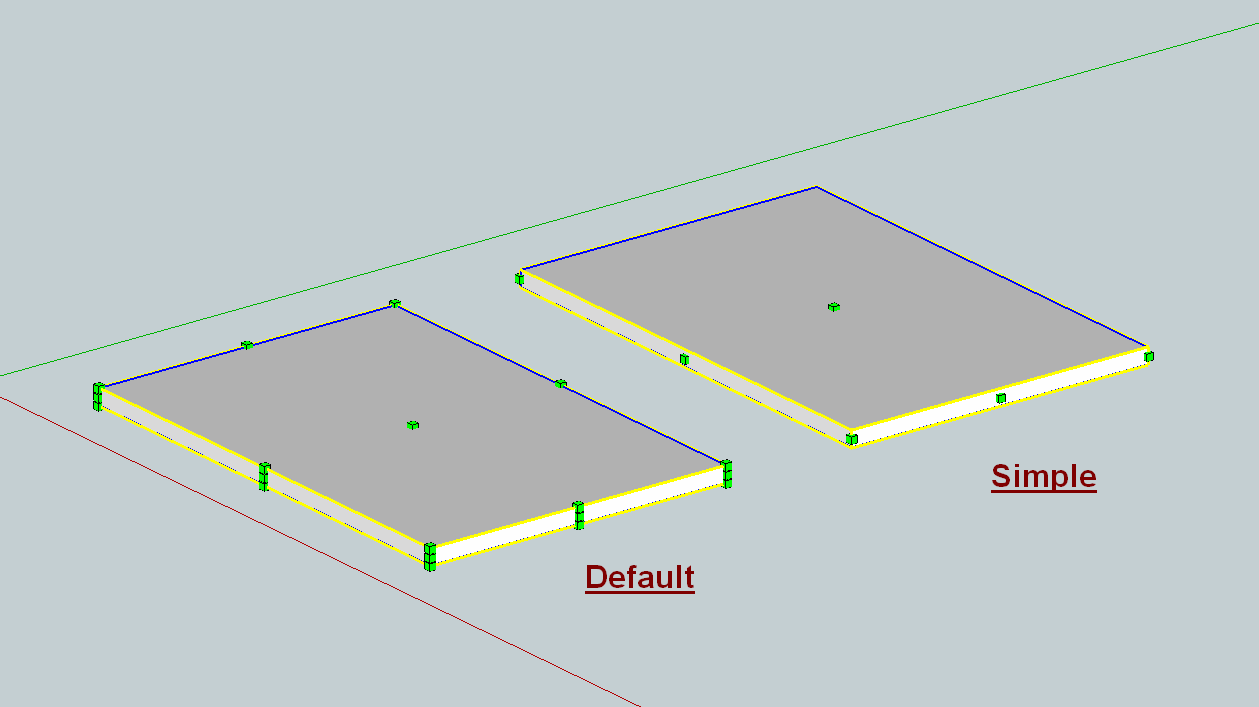
      Simple scale tool handles.png

      Newest is version 1.2
      v1.0 (7-21-2011) initial version
      v1.1 (7-23-2011) added Toolbar
      v1.2 (7-25-2011) Toolbar now processes selection, with option to only process all.

      @unknownuser said:

      Permission to use, copy, modify, and distribute this software for any purpose and without fee is hereby granted, provided this notice appears in any copies.

      THIS SOFTWARE IS PROVIDED "AS IS" AND WITHOUT ANY EXPRESS OR IMPLIED WARRANTIES, INCLUDING, WITHOUT LIMITATION, THE IMPLIED WARRANTIES OF MERCHANTABILITY AND FITNESS FOR A PARTICULAR PURPOSE.

      Author: kyyu (7-25-2011) v1.2

      Description: This plugin makes it easier to use the scale tool, on thin sheet parts. When the scale tool is used on a modified component/group, the drag handles are reduces from the normal 26 to only 10. Tested on SU8, and also seems to work with SU7.

      Activated from (Plugins menu "[ky] Simple Scale Handles") or (Toolbar). If nothing is selected, than all active groups/components are processed. Toolbar icons are depressed, as a visual indicator when all comp/groups are proccessed. Depressed icons can still be clicked, for example to process a selection. There is an option below, for the toolbar to ignore selection.

      Options: There are 3 vaiables at the beginning of the script, whos value can be changed to customize the plugin.
      [menu = true] -load "Plugins Menu item"
      [toolbar = true] -load Toolbar
      [@toolbar_all = false] -if true, Toolbar will ignore selection, and only process all active comp/groups.

      Tip: You need to have the z axis, of group/component, aligned with the thickness of the sheet.

      simple scale handles_v1.2.zip

      1 條回覆 最後回覆 回覆 引用 0
      • R 請勿打擾
        rv1974
        最後由 編輯

        Oh I'm sotired with the default one. Huge thank you!!!

        1 條回覆 最後回覆 回覆 引用 0
        • KrisidiousK 離線
          Krisidious
          最後由 編輯

          are you saying this flattens stuff?

          By: Kristoff Rand
          Home DesignerUnique House Plans

          1 條回覆 最後回覆 回覆 引用 0
          • dereiD 離線
            derei
            最後由 編輯

            Simple and Awesome. some things should be by default in SU

            DESIGNER AND ARTIST DEREI.UK

            1 條回覆 最後回覆 回覆 引用 0
            • kenK 離線
              ken
              最後由 編輯

              This is nice plugin and needed by me since I work in large size 1/4" thick steel plate. I have added a icon and now trying to make the selection of the icon a toggle, Simple to Default and back.

              Thanks for your work

              Ken

              Fight like your the third monkey on Noah's Ark gangway.

              1 條回覆 最後回覆 回覆 引用 0
              • TIGT 離線
                TIG Moderator
                最後由 編輯

                A very simple yet very clever new tool. 🤓
                Which shows us that there are still many new or alternative ideas that can be realized without thousands of lines of code... 😄

                TIG

                1 條回覆 最後回覆 回覆 引用 0
                • jolranJ 離線
                  jolran
                  最後由 編輯

                  Great tool Kyyu! Thanks.

                  1 條回覆 最後回覆 回覆 引用 0
                  • thomthomT 離線
                    thomthom
                    最後由 編輯

                    Might want to wrap that up on a start/commit operation so it can be undone in one go.

                    Thomas Thomassen — SketchUp Monkey & Coding addict
                    List of my plugins and link to the CookieWare fund

                    1 條回覆 最後回覆 回覆 引用 0
                    • B 離線
                      Ben Ritter
                      最後由 編輯

                      Thank you very much.

                      1 條回覆 最後回覆 回覆 引用 0
                      • K 離線
                        kyyu
                        最後由 編輯

                        @krisidious said:

                        are you saying this flattens stuff?

                        No, it changes the apperance of the skechup native scale tool. The right part in the image shows the change.

                        1 條回覆 最後回覆 回覆 引用 0
                        • J 離線
                          Jim
                          最後由 編輯

                          Very handy. Thanks.

                          Hi

                          1 條回覆 最後回覆 回覆 引用 0
                          • K 離線
                            kyyu
                            最後由 編輯

                            @thomthom said:

                            Might want to wrap that up on a start/commit operation so it can be undone in one go.

                            I had the start/commit operation in there originally, but no undo was created? So I removed it. Any other benifit of having it in there?

                            1 條回覆 最後回覆 回覆 引用 0
                            • TIGT 離線
                              TIG Moderator
                              最後由 編輯

                              kyyu

                              I see what you mean - it seems that the resetting of the scale-handles happens outside of the undo stack ? The definition.behavior.no_scale_mask= seems weird in this respect ? Fortunately you have a simple reset to 'all' in your dialog choices... 😕

                              TIG

                              1 條回覆 最後回覆 回覆 引用 0
                              • K 離線
                                kyyu
                                最後由 編輯

                                I added a toolbar. 1st post updated to version 1.1

                                1 條回覆 最後回覆 回覆 引用 0
                                • TIGT 離線
                                  TIG Moderator
                                  最後由 編輯

                                  Thanks! 😄

                                  TIG

                                  1 條回覆 最後回覆 回覆 引用 0
                                  • R 請勿打擾
                                    rv1974
                                    最後由 編輯

                                    Hi Kyyu!
                                    Could you please make a simple version of the script without any icons and dropdown options?
                                    Just a distillated simple scale ruby. Please!
                                    Thank you!

                                    1 條回覆 最後回覆 回覆 引用 0
                                    • halroachH 離線
                                      halroach
                                      最後由 編輯

                                      @kyyu said:

                                      @unknownuser said:

                                      Description: This plugin makes it easier to use the scale tool, on thin sheet parts. When the scale tool is used on a modified component/group, the drag handles are reduces from the normal 26 to only 10. Tested on SU8, and also seems to work with SU7.

                                      From Plugins Menu: If nothing is selected, than all active groups/components are processed. Run from the Plugins menu: "[ky] Simple Scale Handles"

                                      Nice plugin!
                                      Though it doesn't work for me as described. If I select one component, and run the tool, it still effects all of the components, except for components that are within components. No matter what I select, it always effects everything.

                                      FlexTools - Super Quick Windows, Doors, Slats...

                                      1 條回覆 最後回覆 回覆 引用 0
                                      • K 離線
                                        kyyu
                                        最後由 編輯

                                        @unknownuser said:

                                        @kyyu said:

                                        @unknownuser said:

                                        Description: This plugin makes it easier to use the scale tool, on thin sheet parts. When the scale tool is used on a modified component/group, the drag handles are reduces from the normal 26 to only 10. Tested on SU8, and also seems to work with SU7.

                                        From Plugins Menu: If nothing is selected, than all active groups/components are processed. Run from the Plugins menu: "[ky] Simple Scale Handles"

                                        Nice plugin!
                                        Though it doesn't work for me as described. If I select one component, and run the tool, it still effects all of the components, except for components that are within components. No matter what I select, it always effects everything.

                                        From the plugin menu? I just double check and it works the way it should. From the toolbar icon, it's supposed to only processes everything (if you look at the next paragraph in the description). The idea was that a depressed icon would indicate, you had processed everything. Although, I could probably set it up so the toolbar can be used with selection and only depress whatever was last all processed. You can still click the icon, when it is depressed. Is that the way people would like to have it set up?

                                        1 條回覆 最後回覆 回覆 引用 0
                                        • K 離線
                                          kyyu
                                          最後由 編輯

                                          @rv1974 said:

                                          Hi Kyyu!
                                          Could you please make a simple version of the script without any icons and dropdown options?
                                          Just a distillated simple scale ruby. Please!
                                          Thank you!

                                          You really want a one way ruby? copy/paste into ruby console or .rb file.

                                          UI.menu("Plugins").add_item("simple scale handles"){Sketchup.active_model.definitions.each{|e|e.behavior.no_scale_mask=88}}
                                          
                                          1 條回覆 最後回覆 回覆 引用 0
                                          • K 離線
                                            kyyu
                                            最後由 編輯

                                            Updated to v1.2, see 1st post. The menu item has always processed the selection, if it exsit. Now the toolbar icons do this, too. But there is an option to change it back to only processing all. See the description. Also, I darkened the icons.


                                            1 條回覆 最後回覆 回覆 引用 0
                                            • 1
                                            • 2
                                            • 3
                                            • 1 / 3
                                            • 第一個貼文
                                              最後的貼文
                                            Buy SketchPlus
                                            Buy SUbD
                                            Buy WrapR
                                            Buy eBook
                                            Buy Modelur
                                            Buy Vertex Tools
                                            Buy SketchCuisine
                                            Buy FormFonts

                                            Advertisement




