sketchucation logo sketchucation
    • 登入
    Oops, your profile's looking a bit empty! To help us tailor your experience, please fill in key details like your SketchUp version, skill level, operating system, and more. Update and save your info on your profile page today!
    ⚠️ Important | Libfredo 15.6b introduces important bugfixes for Fredo's Extensions Update

    Subdividing faces for displacement plugin

    已排程 已置頂 已鎖定 已移動 SketchUp Discussions
    sketchup
    25 貼文 8 Posters 5.1k 瀏覽 8 Watching
    正在載入更多貼文
    • 從舊到新
    • 從新到舊
    • 最多點贊
    回覆
    • 在新貼文中回覆
    登入後回覆
    此主題已被刪除。只有擁有主題管理權限的使用者可以查看。
    • srxS 離線
      srx
      最後由 編輯

      Well, I didn't wrote one 😄, but maybe you can.
      The common problem when exporting to render application - for me this is Thea render.
      Faces which material will be displaced needs more subdivisions.
      How to fast evenly subdivide all the faces with that material only?
      The plugin with this function would be welcomed.

      www.saurus.rs

      1 條回覆 最後回覆 回覆 引用 0
      • TIGT 離線
        TIG Moderator
        最後由 編輯

        Try thomthom's Edge-Tools - search the Plugins-Index...

        TIG

        1 條回覆 最後回覆 回覆 引用 0
        • srxS 離線
          srx
          最後由 編輯

          I already use Edge tools. You mean Divide face tool? It is too manual. It would took me ages...
          I was thinking about more automotive work flow.
          1 Input - one or more materials (for example stone)
          2 Output - All the faces with stone material applied are subdivided evenly (more or less). This is what displacement needs.

          Wright now I do it this way:
          Make raster with sandbox tool parallel to the surface I want to subdivide.
          Project this raster onto the surface.
          This works for the terrain. But if I want to subdivide all walls (and ceilings) in the house?

          This is kind of reversed "remove collinear edges" command - Add collinear edges 😄

          www.saurus.rs

          1 條回覆 最後回覆 回覆 引用 0
          • Rich O BrienR 離線
            Rich O Brien Moderator
            最後由 編輯

            Can you show an image of your preferred subdivided mesh?

            Download the free D'oh Book for SketchUp 📖

            1 條回覆 最後回覆 回覆 引用 0
            • GaieusG 離線
              Gaieus
              最後由 編輯

              @unknownuser said:

              Can you show an image of your preferred subdivided mesh?

              It should be anything that resembles the sandbox from scratch. Ideally dividing the face into squares (maybe also option for triangulation).

              Problem with Thea's native subdivision (and most of the subdivision tools available) is that it subdivides faces based on equal subdivision of the edges - i.e. when a face is not square, the subdivision will not be squar-"ish" either. But this is the ideal subdivision for displacement.
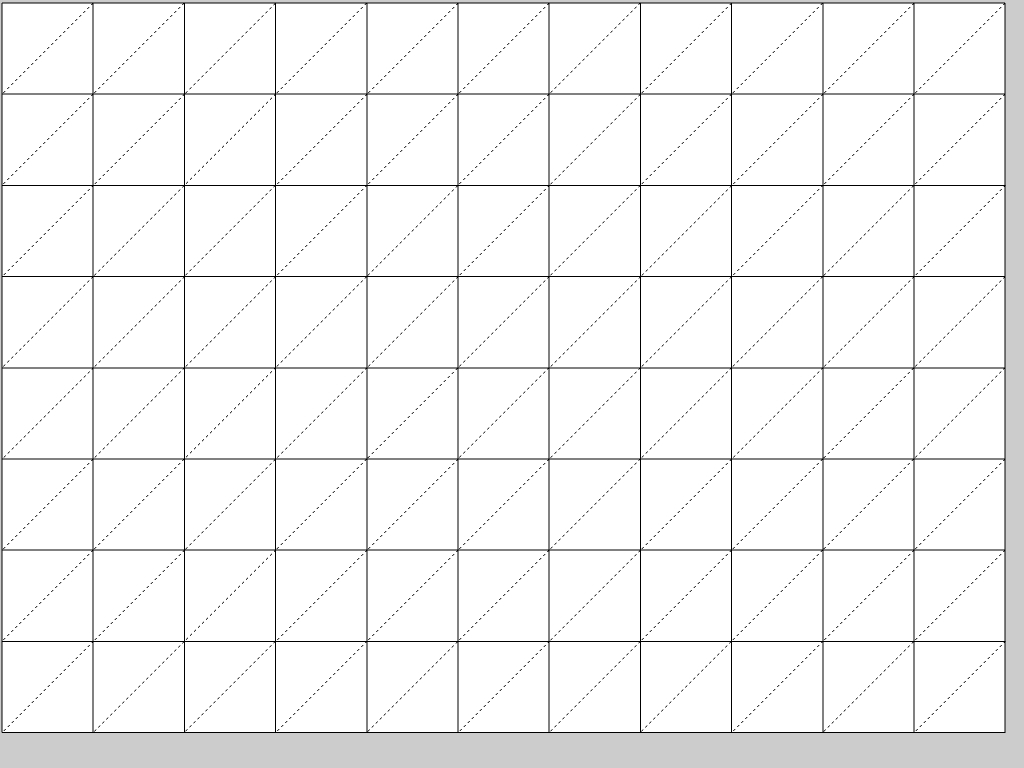

              Subdivision.jpg

              Gai...

              1 條回覆 最後回覆 回覆 引用 0
              • Rich O BrienR 離線
                Rich O Brien Moderator
                最後由 編輯

                Tgi3D Amorph upsample feature produces this result. Give it a try

                Download the free D'oh Book for SketchUp 📖

                1 條回覆 最後回覆 回覆 引用 0
                • GaieusG 離線
                  Gaieus
                  最後由 編輯

                  Nope. As I said, these plugins divide each bounding edge equally. So there are no squares but longish rectangles only.
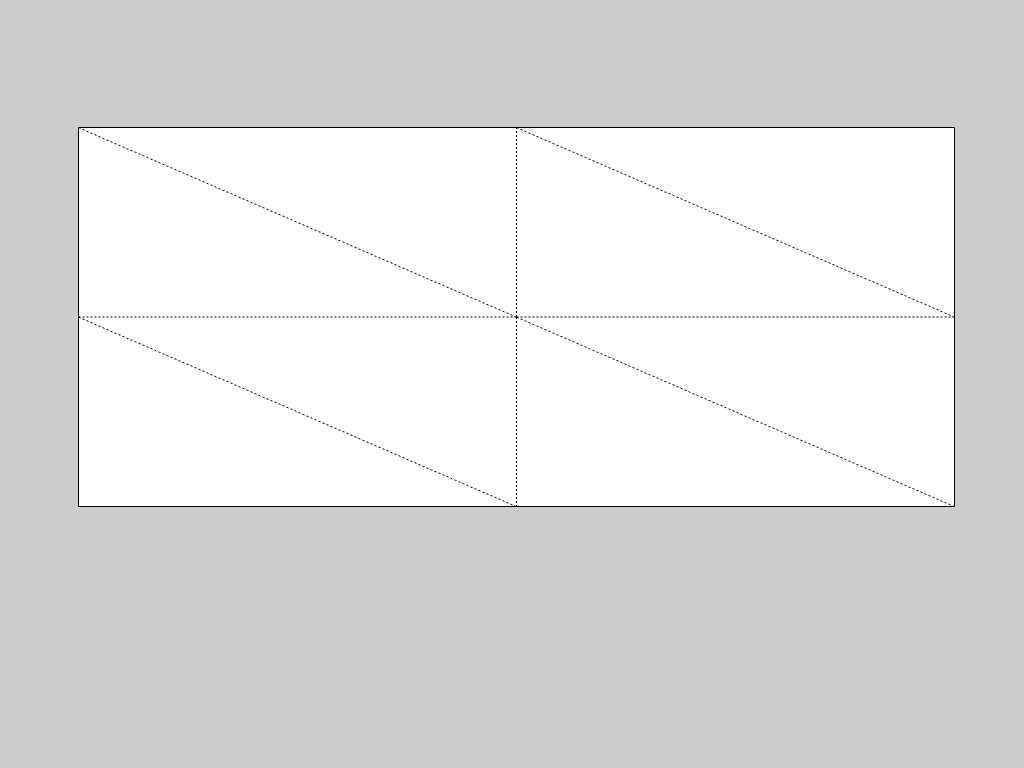

                  upsample.jpg

                  Gai...

                  1 條回覆 最後回覆 回覆 引用 0
                  • Rich O BrienR 離線
                    Rich O Brien Moderator
                    最後由 編輯

                    I see 👍

                    Download the free D'oh Book for SketchUp 📖

                    1 條回覆 最後回覆 回覆 引用 0
                    • jason_marantoJ 離線
                      jason_maranto
                      最後由 編輯

                      Bonzai3D contains a native "meshing" feature that does exactly this -- the idea is you simply tell it how large you would like the squares to be (in whatever units you are working in) and it will re-create the meshed faces.

                      That is a really nice feature of their package -- other nice features are: they have much better import and export capabilities and Nurbs tools built in... all for the same price as Sketchup Pro. I hope Sketchup is feeling the pressure applied by Bonzai3D and will begin to more seriously develop similar tools for Pro users.

                      Best,
                      Jason.

                      I create video tutorial series about several 2D & 3D graphics programs.

                      1 條回覆 最後回覆 回覆 引用 0
                      • GaieusG 離線
                        Gaieus
                        最後由 編輯

                        Actually there is a way for Tgi3D Amorph to subdivide with more regular rectangles (I mean closer to squares or whatever you need) just divide the bounding edges first - then it will use those endpoints as well to upsample the face.

                        But then it's again some manual fiddling around with the edges/faces...


                        Divided longer edges


                        Resulting subdivision - x3

                        Gai...

                        1 條回覆 最後回覆 回覆 引用 0
                        • Rich O BrienR 離線
                          Rich O Brien Moderator
                          最後由 編輯

                          So, a tool that draws Divided Edges 😉

                          Download the free D'oh Book for SketchUp 📖

                          1 條回覆 最後回覆 回覆 引用 0
                          • GaieusG 離線
                            Gaieus
                            最後由 編輯

                            Well, not really. A tool that subdivides faces with rectangle as close to squares as possible.

                            I would not connect it to a certain material however (as opposed to the original request) One may want to slightly bevel some edges - those should only be subdivided in the longer direction of the very narrow rectangles (those are not favourable at all).

                            Gai...

                            1 條回覆 最後回覆 回覆 引用 0
                            • GaieusG 離線
                              Gaieus
                              最後由 編輯

                              Also, look at Pixero's excellent mini-tut over the Thea Forums about modelling a hedge. In this case, some similar subdivision would be a god-send.
                              http://www.thearender.com/forum/viewtopic.php?p=42727#p42727

                              Gai...

                              1 條回覆 最後回覆 回覆 引用 0
                              • srxS 離線
                                srx
                                最後由 編輯

                                Maybe this plugin could work like this:
                                1 Take the regular mesh Gai presented.
                                2 Align and project it to every selected face (with filter for selecting faces with the same material 😄

                                www.saurus.rs

                                1 條回覆 最後回覆 回覆 引用 0
                                • EarthMoverE 離線
                                  EarthMover
                                  最後由 編輯

                                  How about using Soap Skin & Bubble, but just using the "skin" button to generate the even subdivisions? It works well as a subdivision skinning tool. Double click the face, hit skin, set the subdivisions, let it process, then explode the group.

                                  3D Artist at Clearstory 3D Imaging
                                  Guide Tool at Winning With Sketchup
                                  Content Creator at Skapeup

                                  1 條回覆 最後回覆 回覆 引用 0
                                  • srxS 離線
                                    srx
                                    最後由 編輯

                                    Who could thought of this? Interesting method. It riches the half of the job.
                                    Still is not automatic for more than one differently oriented faces.

                                    www.saurus.rs

                                    1 條回覆 最後回覆 回覆 引用 0
                                    • GaieusG 離線
                                      Gaieus
                                      最後由 編輯

                                      Yes, SSB would do the trick - at least the "manual subdivision part".

                                      With a hedge like in Pixero's tutorial, it could still be laborious.

                                      Gai...

                                      1 條回覆 最後回覆 回覆 引用 0
                                      • sdmitchS 離線
                                        sdmitch
                                        最後由 編輯

                                        @srx said:

                                        I was thinking about more automotive work flow.
                                        1 Input - one or more materials (for example stone)
                                        2 Output - All the faces with stone material applied are subdivided evenly (more or less). This is what displacement needs.

                                        This is kind of reversed "remove collinear edges" command - Add collinear edges 😄

                                        srx, The attached plugin is my attempt to automate the sub-dividing of faces with a given material. For reasons I have yet to figure out, it sometimes has a problem around window openings if the grid happens to fall a certain way. I hope you find it helpful.


                                        sub-divides face with given material

                                        Nothing is worthless, it can always be used as a bad example.

                                        http://sdmitch.blogspot.com/

                                        1 條回覆 最後回覆 回覆 引用 0
                                        • EarthMoverE 離線
                                          EarthMover
                                          最後由 編輯

                                          Thanks Sam. Good tool. It seems you have to select all faces by material and then also choose the material in the drop down for it to work properly. Might make more sense to just have it either divide the selected faces, or allow you to run the plugin with no selection and then divide by material. Current method seems a tad redundant. Either way it is a time saver and much appreciated! 👍

                                          3D Artist at Clearstory 3D Imaging
                                          Guide Tool at Winning With Sketchup
                                          Content Creator at Skapeup

                                          1 條回覆 最後回覆 回覆 引用 0
                                          • srxS 離線
                                            srx
                                            最後由 編輯

                                            Thank you Sam!

                                            I love this forum.

                                            The plugin should have its own topic. It's very useful.

                                            www.saurus.rs

                                            1 條回覆 最後回覆 回覆 引用 0
                                            • 1
                                            • 2
                                            • 1 / 2
                                            • 第一個貼文
                                              最後的貼文
                                            Buy SketchPlus
                                            Buy SUbD
                                            Buy WrapR
                                            Buy eBook
                                            Buy Modelur
                                            Buy Vertex Tools
                                            Buy SketchCuisine
                                            Buy FormFonts

                                            Advertisement