sketchucation logo sketchucation
    • 登入
    Oops, your profile's looking a bit empty! To help us tailor your experience, please fill in key details like your SketchUp version, skill level, operating system, and more. Update and save your info on your profile page today!
    🔌 Smart Spline | Fluid way to handle splines for furniture design and complex structures. Download

    [Plugin] Sketchup Ivy

    已排程 已置頂 已鎖定 已移動 Plugins
    732 貼文 172 Posters 314.3k 瀏覽 172 Watching
    正在載入更多貼文
    • 從舊到新
    • 從新到舊
    • 最多點贊
    回覆
    • 在新貼文中回覆
    登入後回覆
    此主題已被刪除。只有擁有主題管理權限的使用者可以查看。
    • P 離線
      Pierreden
      最後由 編輯

      @thomthom said:

      @pierreden said:

      @Gaieus: Of course. But is it possible to attach a rar file directly to the post?

      Yes - under the textbox when you write a post there is an "Upload attachment" tab where you can upload files.

      Hehe, sorry about that. Latskap.

      1 條回覆 最後回覆 回覆 引用 0
      • GaieusG 離線
        Gaieus
        最後由 編輯

        And I have just checked; the extension "rar" is also allowed (I thought maybe that's the problem).

        Gai...

        1 條回覆 最後回覆 回覆 引用 0
        • S 離線
          Sergio Morera
          最後由 編輯

          Thank you for your generosity. I look forward to give it a try 👍

          1 條回覆 最後回覆 回覆 引用 0
          • Didier BurD 離線
            Didier Bur
            最後由 編輯

            Hi,

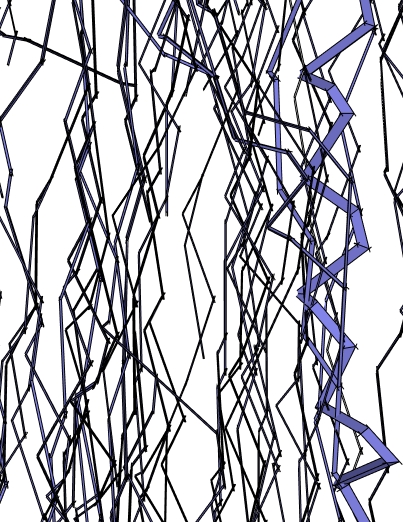
            Very interesting. Two remarks/questions: lots of branches have their faces reversed. Do you think this will be fixed in a future release ?
            Do I have to play with the parameters to make it 'grow', as it seems to 'fall' more than to climb ?
            Regards,
            ivy.jpg

            DB

            1 條回覆 最後回覆 回覆 引用 0
            • OxerO 離線
              Oxer
              最後由 編輯

              Hi,
              A very interesting plugin, i have used Ivy Generator by Thomas Luft but it's better if you can make ivy into Sketchup directly.
              I use Mac and the plugin don't works on OSX, i hope that you can solved this problem.
              Bye and congratulations for this promising plugin. 👍

              This is a unfinished old project, i would like make this into SU directly.
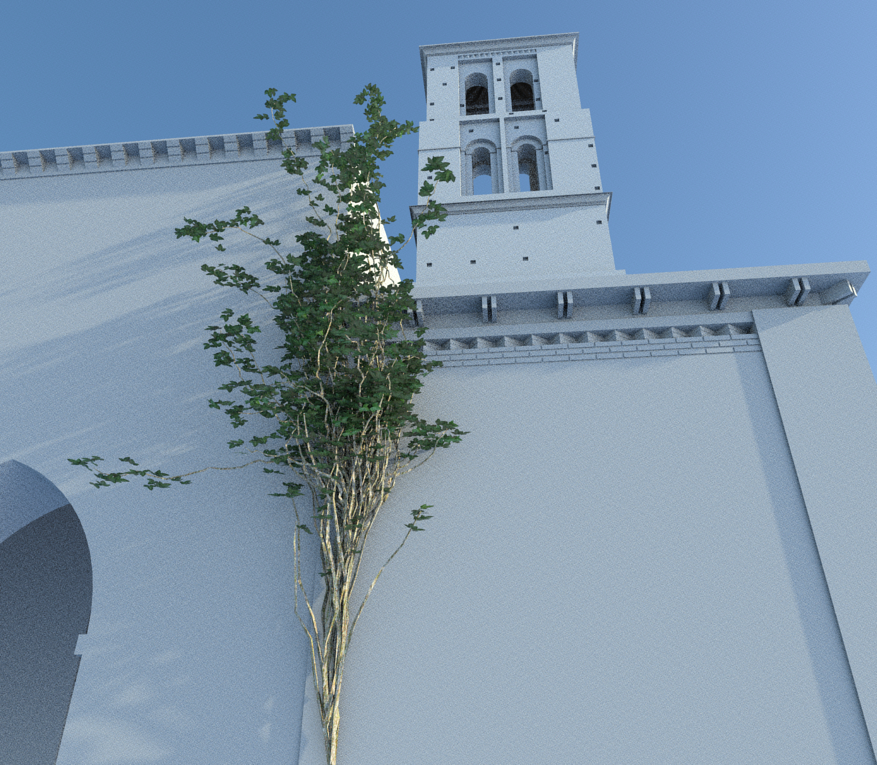
              ivy created with Ivy Generator (Thomas Luft)

              "The result is the end what is important is the process" by Oxer
              http://www.oxervision.blogspot.com/

              1 條回覆 最後回覆 回覆 引用 0
              • R 離線
                robert111
                最後由 編輯

                can anyone make tuto for this nice plugin plzzzzzzzzzzz

                thanks robert

                1 條回覆 最後回覆 回覆 引用 0
                • A 離線
                  andre51
                  最後由 編輯

                  Great plugin! Thanks a lot

                  ivy.jpg

                  1 條回覆 最後回覆 回覆 引用 0
                  • P 離線
                    Pierreden
                    最後由 編輯

                    @didier bur said:

                    Hi,

                    Very interesting. Two remarks/questions: lots of branches have their faces reversed. Do you think this will be fixed in a future release ?
                    Do I have to play with the parameters to make it 'grow', as it seems to 'fall' more than to climb ?
                    Regards,

                    I think both off these issues have been fixed in the v.0.1 release 😉

                    @Oxer:
                    I can take a look at it. If you could PM me the error output in the ruby console it would be of great help! ("windows" > "Ruby console" inside sketchup and then try to make a new Ivy with this window open and copy the error message)

                    1 條回覆 最後回覆 回覆 引用 0
                    • OxerO 離線
                      Oxer
                      最後由 編輯

                      I probe the plugin again and don't works, the Console window appears blank and happens nothing.
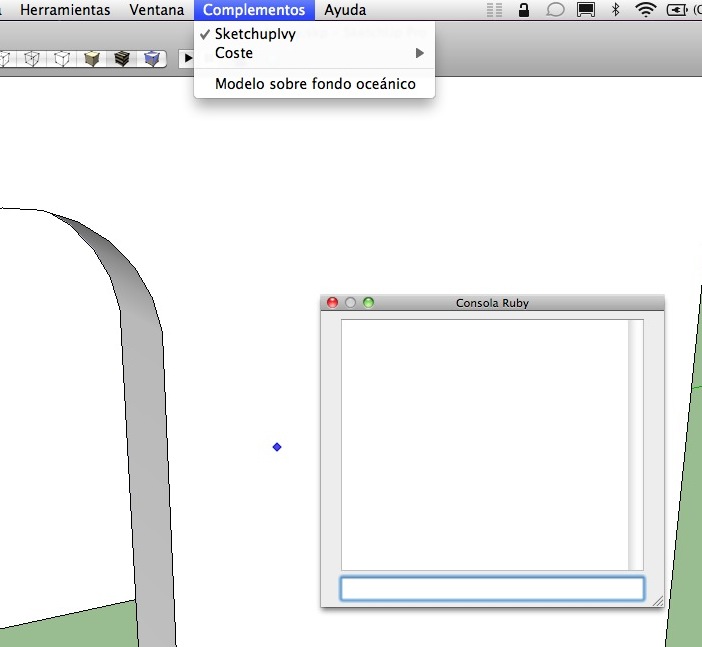
                      Console window

                      Sorry Pierreden but i would like help you more, if there are another mac users please comment about the use of the plugin on Mac OSX.

                      "The result is the end what is important is the process" by Oxer
                      http://www.oxervision.blogspot.com/

                      1 條回覆 最後回覆 回覆 引用 0
                      • Alan FraserA 離線
                        Alan Fraser
                        最後由 編輯

                        Some great improvements there...and pretty easy to customise (I doubled the float length). One issue I have on my system is that when the progress meter hits 100% I still can't see the red latent growth path. It's only visible from certain very specific angles, so I have to keep constantly orbiting to a new position to see where it's up to. I have the latest graphic drivers. It's no biggee, but I thought I'd mention it.

                        3D Figures
                        Were you required to walk 500 miles? Were you advised to walk 500 more?
                        You could be entitled to compensation. Call the Pro Claimers now!

                        1 條回覆 最後回覆 回覆 引用 0
                        • N 離線
                          notareal
                          最後由 編輯

                          Interesting project. I am sure that this has more potent than just to grow a ivy. 👍

                          Welcome to try Thea Render, Thea support | kerkythea.net -team member

                          1 條回覆 最後回覆 回覆 引用 0
                          • thomthomT 離線
                            thomthom
                            最後由 編輯

                            @alan fraser said:

                            Some great improvements there...and pretty easy to customise (I doubled the float length). One issue I have on my system is that when the progress meter hits 100% I still can't see the red latent growth path. It's only visible from certain very specific angles, so I have to keep constantly orbiting to a new position to see where it's up to. I have the latest graphic drivers. It's no biggee, but I thought I'd mention it.

                            That's probably because the tool doesn't implement the Tool.get_extent method: http://code.google.com/apis/sketchup/docs/ourdoc/tool.html#getExtents

                            @Pierreden: Beware that adding methods into the base classes risk running into conflicts with other plugins. It's the same as adding methods to the root namespace - everything is shared. Method names such as .to_v, .to_p, .all_faces could potentially be used by other plugins authors.
                            Even though it looks nicer to extend the base classes there always is a risk of clashes. I always advice people to void it just to be on the safe side.

                            Thomas Thomassen — SketchUp Monkey & Coding addict
                            List of my plugins and link to the CookieWare fund

                            1 條回覆 最後回覆 回覆 引用 0
                            • L 離線
                              Lobster
                              最後由 編輯

                              Hi,

                              Looks really interesting but I too have a problem on a Mac OSX 10.6.6. Sketchup 8.

                              There is no output in the console window showing fault after choosing/ticking in the plugin list and clicking on a surface.

                              The extraction of the .rar seemed fine and i have the folder and .rb file in the correct directory. I presume that the files remain in the Sketchupivy folder?

                              Regards

                              Sam

                              1 條回覆 最後回覆 回覆 引用 0
                              • TIGT 離線
                                TIG Moderator
                                最後由 編輯

                                Lobster
                                You should a file called si.rb that is in Plugins and a folder called SketchupIvy containing other files, that folder also goes into Plugins.
                                If your .rar extractor has put these inside another folder then move the .rb and folder into the Plugins folder.

                                TIG

                                1 條回覆 最後回覆 回覆 引用 0
                                • L 離線
                                  Lobster
                                  最後由 編輯

                                  Hi Tig,

                                  Thanks for the clarification. My path is correct. I have the Sketchupivy folder and the .rb file in the plug ins folder.

                                  Regards

                                  Sam

                                  1 條回覆 最後回覆 回覆 引用 0
                                  • P 離線
                                    Pierreden
                                    最後由 編輯

                                    @lobster said:

                                    Hi Tig,

                                    Thanks for the clarification. My path is correct. I have the Sketchupivy folder and the .rb file in the plug ins folder.

                                    Regards

                                    Sam

                                    I have little experience with mac, but try to replace the tool.rb in the "SketchupIvy" folder with the attached one. Might work 😕


                                    tool.rb

                                    1 條回覆 最後回覆 回覆 引用 0
                                    • TIGT 離線
                                      TIG Moderator
                                      最後由 編輯

                                      Copy/paste this into your Ruby Console Sketchup.find_support_file("Plugins")
                                      It will give you the correct location for Plugins on your MAC.
                                      Both the si.rb and tool's folder should be in this folder...

                                      TIG

                                      1 條回覆 最後回覆 回覆 引用 0
                                      • P 離線
                                        Pierreden
                                        最後由 編輯

                                        @thomthom said:

                                        @alan fraser said:

                                        Some great improvements there...and pretty easy to customise (I doubled the float length). One issue I have on my system is that when the progress meter hits 100% I still can't see the red latent growth path. It's only visible from certain very specific angles, so I have to keep constantly orbiting to a new position to see where it's up to. I have the latest graphic drivers. It's no biggee, but I thought I'd mention it.

                                        That's probably because the tool doesn't implement the Tool.get_extent method: http://code.google.com/apis/sketchup/docs/ourdoc/tool.html#getExtents

                                        @Pierreden: Beware that adding methods into the base classes risk running into conflicts with other plugins. It's the same as adding methods to the root namespace - everything is shared. Method names such as .to_v, .to_p, .all_faces could potentially be used by other plugins authors.
                                        Even though it looks nicer to extend the base classes there always is a risk of clashes. I always advice people to void it just to be on the safe side.

                                        Yeah. Im aware of this but do this mostly because my experiments and tests never leave my computer/Sketchup. Will do something about this soon.

                                        1 條回覆 最後回覆 回覆 引用 0
                                        • Dave RD 離線
                                          Dave R
                                          最後由 編輯

                                          It is an interesting plugin. Thank you. Like Alan, I don't see the red latent growth path. Most of the time orbiting doesn't help. Also, even with branching probability set to .99 I don't get any branches. If I have units set to Fractional as I normally do I get the following in the console.

                                          %(#FF0000)[nil
                                          Error: #<NoMethodError: undefined method []' for nil:NilClass> C:/Program Files/Google/Google SketchUp 8/Plugins/SketchupIvy/tool.rb:43:in onLButtonDown'
                                          C:/Program Files/Google/Google SketchUp 8/Plugins/SketchupIvy/tool.rb:43]

                                          Etaoin Shrdlu

                                          %

                                          (THERE'S NO PLACE LIKE)

                                          G28 X0.0 Y0.0 Z0.0

                                          M30

                                          %

                                          1 條回覆 最後回覆 回覆 引用 0
                                          • TIGT 離線
                                            TIG Moderator
                                            最後由 編輯

                                            To ensure that all of the model is included in the current drawn view within the Tool's class you have this method

                                            def getExtents
                                                bbox=Sketchup.active_model.bounds
                                                bbox.add(@ip.position)if @ip and @ip.valid?
                                                return bbox
                                            end
                                            

                                            assuming that @ip is your input point etc

                                            TIG

                                            1 條回覆 最後回覆 回覆 引用 0
                                            • 1
                                            • 2
                                            • 32
                                            • 33
                                            • 34
                                            • 35
                                            • 36
                                            • 37
                                            • 34 / 37
                                            • 第一個貼文
                                              最後的貼文
                                            Buy SketchPlus
                                            Buy SUbD
                                            Buy WrapR
                                            Buy eBook
                                            Buy Modelur
                                            Buy Vertex Tools
                                            Buy SketchCuisine
                                            Buy FormFonts

                                            Advertisement