[Plugin] CameraKeyMaker 1.0 (Update 2011-04-09)
-
hi macgile
sorry that path pic was me trying to edit out the camera rotate,
on this simple version the camera rotates on scene 4.john
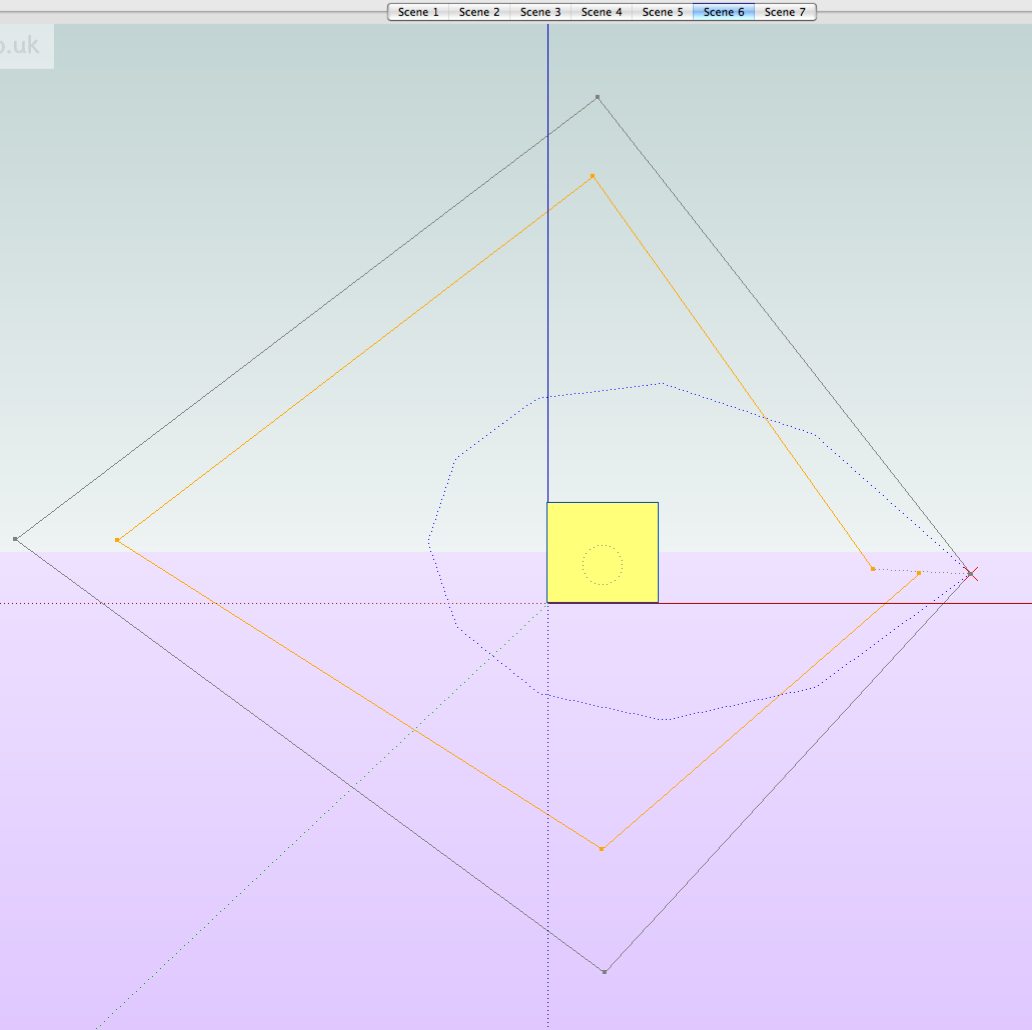
-
In the next version this offset will be smaller, and higher accuracy.
I also added the ability to move around the target (the locked or not)
or rotate the eye of the camera.
This should facilitate the zigzagging between objects.Hi Macgile,
Can't wait to try the next version (I don't mean to pressure you by this.. haha (= ). God bless you in your pursuit to excellence.
The ability to rotate the eye of the camera is a great idea, as well.
I don't know if I am pushing the limit but I remember one 3D software where you can see the camera on the path and being able to see (from the top view) in what direction the cam is facing much like the AdvanceCameraTool... but anyways, as it is, I believe this plugin is great already.. kudos to you.
-
@isda said:
In the next version this offset will be smaller, and higher accuracy.
I also added the ability to move around the target (the locked or not)
or rotate the eye of the camera.
This should facilitate the zigzagging between objects.Hi Macgile,
Can't wait to try the next version (I don't mean to pressure you by this.. haha (= ). God bless you in your pursuit to excellence.
The ability to rotate the eye of the camera is a great idea, as well.
I don't know if I am pushing the limit but I remember one 3D software where you can see the camera on the path and being able to see (from the top view) in what direction the cam is facing much like the AdvanceCameraTool... but anyways, as it is, I believe this plugin is great already.. kudos to you.
hi isda
yes drarq already suggesting this improvement.
but it will be for a future release.
now I made a version that works for everyone (PC and MAC OS)
I fix bugs and improve the design.best regards
-
macgile, this is awesome! Thank you!
-
-
@driven said:
hi macgile
sorry that path pic was me trying to edit out the camera rotate,
on this simple version the camera rotates on scene 4.john[attachment=0:1hzgzkb0]<!-- ia0 -->loop2.png<!-- ia0 -->[/attachment:1hzgzkb0]
hi driven

Ok in the next release you can do it with rotate around camera target.best regard
-
@pixero said:
Just did a quick test and it's supersmooth.
Love it already.please tell me how i can make video from sketchup with render image..
-
Hey,
I noticed you updated something for "large models". Mine might be excessively large but I'm trying to get a "flightpath" along a road and acrross a bridge. This looks like it would work great for that because it is able to set the camera point andthe point of focus. I however, found that starting the script made the model disappear. It seems to have zoomed way out and I can't zoom in to set the camera position. Wondering if this has to do with the model being so large. My road chainage is around 2.6km. I tried using flightpath.rb but it still has the lag between scenes with 0 scene delay so it's not doing me much good.
Has anyone thought about making a script that places points or cameras (like advanced camera tools) and connects those points afterwards to make a smooth path? That would allow the user to set points without "being" the camera. Just some thoughts...
Enzay.
-
Hi
Just tried to install your plug in but i'm getting the error box - no file to load. Any ideas?

-
@designchest said:
Hi
Just tried to install your plug in but I'm getting the error box - no file to load. Any ideas?
Celina
Please get a screen-capture of the error-message and post it that way we can then try to help solve the issue. I suspect from what you say here and other of your posts that you are not installing these plugins properly...
Please reread the installation instructions that accompany almost all Plugins
This thread covers many issues http://forums.sketchucation.com/viewtopic.php?f=323&t=35746
Also as a MAC user please double check you are using the right Plugins folder and that any files that are supplied in a subfolder within a zip file are left inside an equivalent subfolder inside the Plugins folder - some poor [or badly optioned] unzip tools ignore the subfolders and don't extract properly. Also if you have inadvertently put any such files into Plugins that shouldn't be there please remove them before restarting Sketchup as these could we cause unexpected problems as all scripts directly within Plugins will auto-load... -
Thanks Tig
I knew it must be something i was not doing. Will follow your instructs and fingers crossed I'll be on my way. I have had a bit of headway with some of the installs now.
Trying to get my animations up to scratch for a client whom I am hoping to design a great film set for. So used to hand drafting that the world of sketchup is just opening up to me, so bear with me - a little green still.
]
-
Great plugin! Couple of questions tho,
How do you control the speed of the animation after turning it into scenes. I say this because on the model I have, I get only one very slow speed regardless of how many transition frames I use, i have used numbers from 1 to 999 and I see no difference.
Also does this actually work with Vray? If so does anyone know how?
Cheers
-
Ok I used scene transitions.rb and it works a treat now. New problem now lol. The animation is not smooth, im still getting jumps as the camera slows towards the next scene. Its fine on the preview however... any suggestions?
-
Ok think I got it, in preferences, SU scene transitions need to be longer than the actual keymaker transitions, i.e max 100 secs. This seems to smooth over the animation and stops SU taking over. Im still confused why i have to workaround this, guess im doing something wrong
*EDIT . actually that hasn't worked

-
I tried to use CameraKeyMaker on a Mac running Sketchup 8, but ran in to the same problem others have mentioned: I cannot seem to find an equivilant key combination to Alt-Q used on Windows, and so I can't place any camera keys. (neither Opt-Q or Ctrl-Q work for me)
If there's a simple fix for this I'd love to hear about it, otherwise I'll eagerly wait for the next version. This seems like a great tool that we could use on many projects.
Best Regards,
Joshua Cohen
Fat Pencil Studio
+1.503.465.4533
info@fatpencilstudio.com -
@jcohen71 said:
If there's a simple fix for this I'd love to hear about it,
in camera_key_maker.rb
I changed line 387 to readif key == 81 and $preview == falseI then did a search and replace for the word Alt and replaced it with Shift,
so Shift+ Q works on my mac...
-
I do not know this tool in any detail... but in passing... I see that there are $ global variables like '$preview' these are dangerous - especially if they have simplistic names [like 'preview'] as other authors might have used them [ill-advisedly] too, as globals works across all scripts in that session - better to use '@preview' as an instance variable, or '@@preview' as a class variable, to hold your data specifically for your own tool so such potential clashes are avoided...

-
@tig said:
I do not know this tool in any detail... but in passing... I see that there are $ global variables like '$preview' these are dangerous - especially if they have simplistic names [like 'preview'] as other authors might have used them [ill-advisedly] too, as globals works across all scripts in that session - better to use '@preview' as an instance variable, or '@@preview' as a class variable, to hold your data specifically for your own tool so such potential clashes are avoided...
Yes TIG
when I developed this plugin I had only one months experience the ruby language and API sketchup.
certainly you will find other errors of this type in the source, but I perfecting every day.
in the next release several beginner mistakes are corrected but it will remain.best regard
-
hi guys
i have here a bit strange behavior of the plug ..
I have set up simple fly-around with 10 camera Keys - previews look perfect , smooth and going exactly as we want... ... camera follows busier curve ...till this moment everything is nice and easy
problems are:

1/after i press the ENTER even if i change the number for Frames between each key I always get 19 scenes .. is this correct?
2/ bigger one scenes which were produced change the Field of View and positions now it is in position is same as the key ...
What can i do to get result same as Preview ... or do i have to set up properly the Keys and forget what the preview is showing??
many thanks!!!!
-
 I can't run it at all!!!! any conflict with other plugs?
where I must seek it? plugin menu? tools menu?
how can I activate it's toolbar (ui) please?
edit: thanks ... wow this is wonderful, thank you, I was seeking it in false place.

I just wondering how can I edit the path?





Advertisement