sketchucation logo sketchucation
    • 登入
    Oops, your profile's looking a bit empty! To help us tailor your experience, please fill in key details like your SketchUp version, skill level, operating system, and more. Update and save your info on your profile page today!
    🔌 Smart Spline | Fluid way to handle splines for furniture design and complex structures. Download

    Solid Tools crashing on mac

    已排程 已置頂 已鎖定 已移動 SketchUp Discussions
    sketchup
    38 貼文 10 Posters 2.8k 瀏覽 10 Watching
    正在載入更多貼文
    • 從舊到新
    • 從新到舊
    • 最多點贊
    回覆
    • 在新貼文中回覆
    登入後回覆
    此主題已被刪除。只有擁有主題管理權限的使用者可以查看。
    • EdsonE 離線
      Edson
      最後由 編輯

      solid tools's behavior on mac is erratic, to say the least. most of the times it crashes sketchup even though I may be testing them with the simplest of solids. some other times it works flawlessly. before someone suggests it: yes, I always check the groups and components to see if they are real solids.

      is anyone having the same problem? I am attaching a simple file that is crashing SU8.


      solid_test.skp

      edson mahfuz, architect| porto alegre • brasil
      http://www.mahfuz.arq.br

      1 條回覆 最後回覆 回覆 引用 0
      • cmdC 離線
        cmd
        最後由 編輯

        Edson,

        I am not getting any crashes on my end. Can you share the workflow to get SU to crash? ... or is it just "click and crash"?

        CMD

        • CMD
        1 條回覆 最後回覆 回覆 引用 0
        • EdsonE 離線
          Edson
          最後由 編輯

          @cmd said:

          Edson,

          I am not getting any crashes on my end. Can you share the workflow to get SU to crash? ... or is it just "click and crash"?

          CMD

          I select the box, then the trim tool, then I click on the second object: crash. the same with subtract.

          edson mahfuz, architect| porto alegre • brasil
          http://www.mahfuz.arq.br

          1 條回覆 最後回覆 回覆 引用 0
          • Jean LemireJ 離線
            Jean Lemire
            最後由 編輯

            Hi Edson, hi folks.

            It doesn't crash on my Imac, with system 10.6.7.

            Just ideas.

            Jean (Johnny) Lemire from Repentigny, Quebec, Canada.

            1 條回覆 最後回覆 回覆 引用 0
            • O 離線
              otb designworks
              最後由 編輯

              Mac pro with 10.5.8 here and everything is working as expected; no crashes.

              Cheers, Chuck

              OTB Designworks is on Youtube

              6 core nMP, 32 gig RAM, (2) D700 GPU's, dual monitors

              1 條回覆 最後回覆 回覆 引用 0
              • EdsonE 離線
                Edson
                最後由 編輯

                this is very odd. it must have something to do with those solids although the Entity Info says they are perfect solid groups. I have tried now with the same file and sketchup crashed again. then I modeled similar solids in a new file and it worked fine. the same thing has happened with other files.

                by the way, I just updated my system to 10.6.7.

                edson mahfuz, architect| porto alegre • brasil
                http://www.mahfuz.arq.br

                1 條回覆 最後回覆 回覆 引用 0
                • jbacusJ 離線
                  jbacus
                  最後由 編輯

                  @edson said:

                  ...most of the times it crashes sketchup even though I may be testing them with the simplest of solids.

                  Unfortunately, I'm not able to reproduce your crash, either. I'll pass your file on to Tricia and the rest of the QA gang to see if they can reproduce the problem in the lab. Which solid operation are you trying to do? Most importantly, are you submitting crash reports? If so, can you mention the name of the file you posted so that we can correlate the crash with the file?

                  thanks,
                  john
                  .

                  "...exaggerate the essential and leave the obvious unclear." --Vincent Van Gogh

                  John Bacus
                  jbacus@sketchup.com

                  1 條回覆 最後回覆 回覆 引用 0
                  • EdsonE 離線
                    Edson
                    最後由 編輯

                    @jbacus said:

                    @edson said:

                    ...most of the times it crashes sketchup even though I may be testing them with the simplest of solids.

                    Unfortunately, I'm not able to reproduce your crash, either. I'll pass your file on to Tricia and the rest of the QA gang to see if they can reproduce the problem in the lab. Which solid operation are you trying to do? Most importantly, are you submitting crash reports? If so, can you mention the name of the file you posted so that we can correlate the crash with the file?

                    thanks,
                    john
                    .

                    yes, I have. the files I posted are: trim_subtract.skp and trim_subtract2.skp. please, also see the PM I sent you.

                    edson mahfuz, architect| porto alegre • brasil
                    http://www.mahfuz.arq.br

                    1 條回覆 最後回覆 回覆 引用 0
                    • S 離線
                      sketchup guide jody
                      最後由 編輯

                      Hi Edson et al,

                      I've tried as well with your exact steps and its working for me as well.

                      What kind of Mac are you using Edson?
                      Do you know the video card?
                      Do you have Hardware Acceleration enabled?

                      I can't figure what could be conflicting, maybe a Ruby script. Do you have anything non-standard installed? If you remove all 3rd party Ruby scripts does it still happen?

                      OS X 10.6.6
                      SU 8.0.4810
                      Processor: 2.53 GHz Intel Core i5
                      Memory: 4 Gb
                      Video Card: NVIDIA GeForce GT 330M

                      Jody

                      Jody Gates
                      SketchUp Support

                      1 條回覆 最後回覆 回覆 引用 0
                      • bmikeB 離線
                        bmike
                        最後由 編輯

                        I'm having horrible luck with the solids tools. Dell Precision M6400, Vista. SketchUp Pro 8, latest official release.

                        What i've found is that if i have solid components with multiple copies or that may have been scaled - and I perform a solid tools operation - SketchUp will crash.

                        I've also found that if the component axis is rotated in space (such as a rafter) - this will force a crash. If I explode and re-create the component using the default axis, I get hit and miss crashes.

                        The only way I've been able to continue to use the solid tools is to explode and create a group. This keeps the axis in the same orientation as the model axis, and things seem to run OK.

                        Not sure if this helps. Attached is a model - the red timbers are components - they force a crash on my machine. The blue timbers are groups. They work fine.

                        I can shoot a video if needed...


                        solidstest.skp

                        mike beganyi design + consulting llc

                        1 條回覆 最後回覆 回覆 引用 0
                        • bmikeB 離線
                          bmike
                          最後由 編輯

                          OK, I just swapped my backup folder of Plugins from my original SketchUp install. All is working fine on that model I posted.

                          So... there is a conflicting plugin somewhere...
                          Here's what I was running:
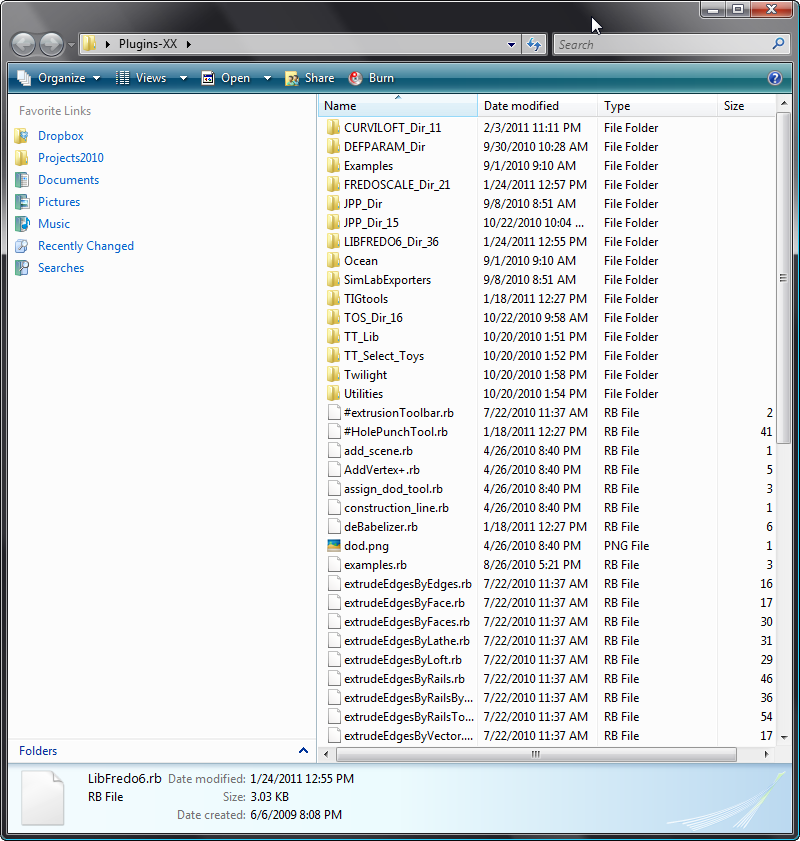

                          plugins1.png


                          plugins2.png

                          mike beganyi design + consulting llc

                          1 條回覆 最後回覆 回覆 引用 0
                          • jbacusJ 離線
                            jbacus
                            最後由 編輯

                            @bmike said:

                            OK, I just swapped my backup folder of Plugins from my original SketchUp install. All is working fine on that model I posted.

                            So... there is a conflicting plugin somewhere...
                            Here's what I was running:
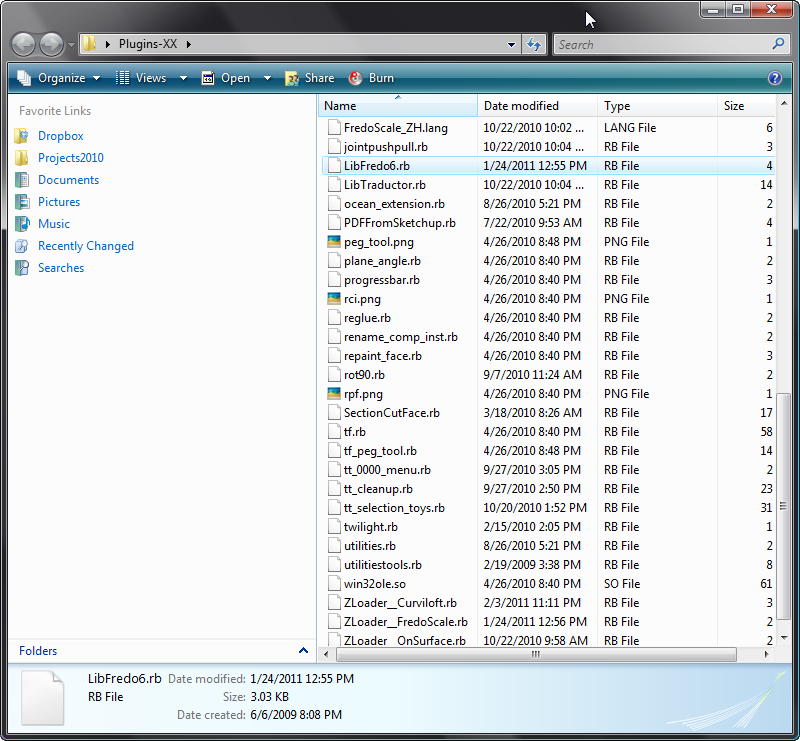
                            Hi again,

                            Tricia is running through a couple tests, and it does seem likely on our end that there may be a conflicting plugin installed. Can you share with us the list of plugins that you have installed when you see crashing or other instability with Solid Tools?

                            thanks-
                            john
                            .

                            "...exaggerate the essential and leave the obvious unclear." --Vincent Van Gogh

                            John Bacus
                            jbacus@sketchup.com

                            1 條回覆 最後回覆 回覆 引用 0
                            • bmikeB 離線
                              bmike
                              最後由 編輯

                              @jbacus said:

                              @bmike said:

                              OK, I just swapped my backup folder of Plugins from my original SketchUp install. All is working fine on that model I posted.

                              So... there is a conflicting plugin somewhere...
                              Here's what I was running:

                              Hi again,

                              Tricia is running through a couple tests, and it does seem likely on our end that there may be a conflicting plugin installed. Can you share with us the list of plugins that you have installed when you see crashing or other instability with Solid Tools?

                              thanks-
                              john
                              .

                              See the list above. That is what is in my folder when I crash. No problems when I run with the originals. I'm in the process of moving them over 1 by 1 now...

                              mike beganyi design + consulting llc

                              1 條回覆 最後回覆 回覆 引用 0
                              • bmikeB 離線
                                bmike
                                最後由 編輯

                                Seems that the problem is with TIGs hole punch tool. I removed it, and things seem to be working fine.

                                mike beganyi design + consulting llc

                                1 條回覆 最後回覆 回覆 引用 0
                                • TIGT 離線
                                  TIG Moderator
                                  最後由 編輯

                                  No need to do 1-by-1...
                                  Do a half of them first - if no error then it's not in that half so set those aside.
                                  Then do half of what's left - if no error then it's not in that half set those aside - etc etc until you have the few 'suspects' left.
                                  However, if there is an error with the 'half' you tested then set the rest aside, and now keep halving the suspect ones - you know the culprit is in there somewhere...
                                  This way you eliminate half of the 'suspected files' at each step and so you can quickly zoom in on the culprit [if any 😕 ]
                                  If it's some weird interaction of two seemingly unconnected scripts dong it 1-by-1 won't help anyway.

                                  TIG

                                  1 條回覆 最後回覆 回覆 引用 0
                                  • TIGT 離線
                                    TIG Moderator
                                    最後由 編輯

                                    As it seems to 'be' my HolePunching tool causing the issue I would be interested to see why ?

                                    I use it and have no problems doing these other operations ? Perhaps a MAC issue ? What's your OS ?

                                    The HolePunch tool does nothing to Boolean or related operations so I am currently at a loss to see what this could be ...

                                    TIG

                                    1 條回覆 最後回覆 回覆 引用 0
                                    • bmikeB 離線
                                      bmike
                                      最後由 編輯

                                      Confirmed. Put #HolePunchTool.rb back in my Plugin folder and it immediately crashed on a SolidTools operation.

                                      Could it be the way SketchUp handles renaming components?
                                      My prior work around was to explode and create group(s) - do the operation, then re-make the components.
                                      This method worked - but as soon as I had components to do the operation(s), I would crash.

                                      Dell Precision M6400, Vista Something, SketchUp Pro8...latest.

                                      mike beganyi design + consulting llc

                                      1 條回覆 最後回覆 回覆 引用 0
                                      • EdsonE 離線
                                        Edson
                                        最後由 編輯

                                        @unknownuser said:

                                        Hi Edson et al,

                                        I've tried as well with your exact steps and its working for me as well.

                                        What kind of Mac are you using Edson?
                                        Do you know the video card?
                                        Do you have Hardware Acceleration enabled?

                                        I can't figure what could be conflicting, maybe a Ruby script. Do you have anything non-standard installed? If you remove all 3rd party Ruby scripts does it still happen?

                                        OS X 10.6.6
                                        SU 8.0.4810
                                        Processor: 2.53 GHz Intel Core i5
                                        Memory: 4 Gb
                                        Video Card: NVIDIA GeForce GT 330M

                                        Jody

                                        macbook pro 2.8 GHz Intel Core 2 Duo
                                        memory: 4Gb
                                        OS X 10.6.7
                                        video cards: NVIDIA GeForce 9400M + NVIDIA GeForce 9600M GT
                                        hardware acceleration ON

                                        the only I have not tried is to use the solid tools with no extra plugins. I'll do it next. I suspect of some conflict with some ruby script. I wiil try to find that out as soon as I can.

                                        edson mahfuz, architect| porto alegre • brasil
                                        http://www.mahfuz.arq.br

                                        1 條回覆 最後回覆 回覆 引用 0
                                        • EdsonE 離線
                                          Edson
                                          最後由 編輯

                                          @jbacus said:

                                          Hi again,

                                          Tricia is running through a couple tests, and it does seem likely on our end that there may be a conflicting plugin installed. Can you share with us the list of plugins that you have installed when you see crashing or other instability with Solid Tools?

                                          thanks-
                                          john
                                          .

                                          john,
                                          I have 325 items on my plugins folder. do you want me to post a sequence of screen shots of it? just say the word and I will do it.

                                          edson mahfuz, architect| porto alegre • brasil
                                          http://www.mahfuz.arq.br

                                          1 條回覆 最後回覆 回覆 引用 0
                                          • bmikeB 離線
                                            bmike
                                            最後由 編輯

                                            @edson said:

                                            @jbacus said:

                                            Hi again,

                                            Tricia is running through a couple tests, and it does seem likely on our end that there may be a conflicting plugin installed. Can you share with us the list of plugins that you have installed when you see crashing or other instability with Solid Tools?

                                            thanks-
                                            john
                                            .

                                            john,
                                            I have 325 items on my plugins folder. do you want me to post a sequence of screen shots of it? just say the word and I will do it.

                                            Are you using TIGs HolePunch? I found that to be the problem.

                                            mike beganyi design + consulting llc

                                            1 條回覆 最後回覆 回覆 引用 0
                                            • 1
                                            • 2
                                            • 1 / 2
                                            • 第一個貼文
                                              最後的貼文
                                            Buy SketchPlus
                                            Buy SUbD
                                            Buy WrapR
                                            Buy eBook
                                            Buy Modelur
                                            Buy Vertex Tools
                                            Buy SketchCuisine
                                            Buy FormFonts

                                            Advertisement