[Plugin]T2H_BuildingStructureTools2.2.4 in20141207
-
@facer said:
The UK_pflistAC file does not show list of steel
SketchupMaker 2014
W7 operating systemFile location for UK_pflistAC is:
Documents\Sketchup_Maker_2014\UK_pflistACHi,facer.
I will test it later.
Please wait. -
Hi,facer and all.
I update this to v1.9.6. in 2014.05.25.
The problem of the read profile in sketchup2014 was fixed.And add some improves.
HKBauing.
From the menubar ->"plugins"->"building structure tool"->"Change language file"
Select the lang file.
and It will complete with restart sketchup.Thanks.
TAK2HATA
-
Hi Tak2hata,
I just saw this new version coming up and even if I have no direct need for the plugin it, looks impressive indeed! Congratulations!
As I was watching the video and I saw that you classify building elements by type and name I remembered the new SU2014 "classifier" feature and I thought that it would be truly useful for your users if your tool would classify strutural elements in a standard BIM way, like IFC using the 2014 "classifier".
Probably it already does that and I missed that feature, but if it doesn't, with what you have right now, what a monster this might become...
Congratulations once again and keep up your great work.
PS: I saw in a post before, you had an accident, I hope your better now...
-
Hello Tak2hata,
this is your new updated Bs Tools 1.9.6 getting error when opening Show Tools Option and Table Editor in Sketchup 2013 Version 13.0.4812
Please check below . . . . . . .
"show webdialog by CODE" Error; #<NoMethodError; undefined method `encode' for #<String;0xcd547a4>> C;/Program Files (x86)/SketchUp/SketchUp 2013/Plugins/building_structure_tool/tst1_mod_common_util.rb;518;in `split_csvline' C;/Program Files (x86)/SketchUp/SketchUp 2013/Plugins/building_structure_tool/tst1_mod_common_util.rb;480;in `getCSVFile' C;/Program Files (x86)/SketchUp/SketchUp 2013/Plugins/building_structure_tool/tst1_mod_common_util.rb;477;in `each_line' C;/Program Files (x86)/SketchUp/SketchUp 2013/Plugins/building_structure_tool/tst1_mod_common_util.rb;477;in `getCSVFile' C;/Program Files (x86)/SketchUp/SketchUp 2013/Plugins/building_structure_tool/tst1_mod_common_util.rb;326;in `readProfiles' C;/Program Files (x86)/SketchUp/SketchUp 2013/Plugins/building_structure_tool/tst1_class_tool_for_wdlg.rb;580;in `init_webdialog' C;/Program Files (x86)/SketchUp/SketchUp 2013/Plugins/building_structure_tool/tst1_class_tool_for_wdlg.rb;849;in `show_tooldialog' C;/Program Files (x86)/SketchUp/SketchUp 2013/Plugins/building_structure_tool/main.rb;421;in `call' C;/Program Files (x86)/SketchUp/SketchUp 2013/Plugins/building_structure_tool/main.rb;421 Error; #<NoMethodError; undefined method `encode' for #<String;0xcee32a0>> C;/Program Files (x86)/SketchUp/SketchUp 2013/Plugins/building_structure_tool/main.rb;421;in `tst_menu_add' C;/Program Files (x86)/SketchUp/SketchUp 2013/Plugins/building_structure_tool/tst1_mod_common_util.rb;480;in `getCSVFile' C;/Program Files (x86)/SketchUp/SketchUp 2013/Plugins/building_structure_tool/tst1_mod_common_util.rb;477;in `each_line' C;/Program Files (x86)/SketchUp/SketchUp 2013/Plugins/building_structure_tool/tst1_mod_common_util.rb;477;in `getCSVFile' C;/Program Files (x86)/SketchUp/SketchUp 2013/Plugins/building_structure_tool/tst1_mod_common_util.rb;326;in `readProfiles' C;/Program Files (x86)/SketchUp/SketchUp 2013/Plugins/building_structure_tool/tst1_class_table_editor.rb;24;in `show_tooldialog' (eval);1;in `tst_menu_add' C;/Program Files (x86)/SketchUp/SketchUp 2013/Plugins/building_structure_tool/tst1_mod_common_util.rb;518;in `eval' C;/Program Files (x86)/SketchUp/SketchUp 2013/Plugins/building_structure_tool/main.rb;421;in `tst_menu_add' C;/Program Files (x86)/SketchUp/SketchUp 2013/Plugins/building_structure_tool/tst1_mod_common_util.rb;518;in `call' C;/Program Files (x86)/SketchUp/SketchUp 2013/Plugins/building_structure_tool/tst1_mod_common_util.rb;518 -
Hi,
I update this to v1.9.7.
Fix the encoding code problem.Hi,JQL.
I search the Sketchup ruby API,
but there are no method for approaching to classifier.
I will wait for future release.Thanks.
-
Hello Tak2hata Sir,
NOW Its working . . . . . . . Thanks . . . . .

-
Good day !
Found bug in versions of Sketchup 2013 and Sketchup2014.
in Sketchup 2014 when you open the "Component Options" message on the error.
If using the editor Attribute in the Directory "BEAM_SPECS" attribute "PATH" to change the value of " [Point3d(0, 0, 0), Point3d(0, 100, 0)] "
to Point3d(0, 0, 0), Point3d(0, 100, 0) " , deleting the characters "[" and "]" ,
the error message does not occur.
-
@goga63 said:
Good day !
Found bug in versions of Sketchup 2013 and Sketchup2014.
in Sketchup 2014 when you open the "Component Options" message on the error.
If using the editor Attribute in the Directory "BEAM_SPECS" attribute "PATH" to change the value of " [Point3d(0, 0, 0), Point3d(0, 100, 0)] "
to Point3d(0, 0, 0), Point3d(0, 100, 0) " , deleting the characters "[" and "]" ,
the error message does not occur.Hi,goga63.
I understand the problem.
I try to fix it.
Thanks. -
Hi,All.
I update this to Version2.0.1a in 2014.09.28.
Some new function and Improves and Bugfixs.
Please watch what's new movie on top of thread.
Thanks! -
nice improvements... That wall tool looks nice. Can it possibly do curved walls? or transform lines into walls?
-
Thank, tak2hata !!!
Excellent !!!
but ...now the length of the replaced part is not equal to the length of the deleted...
https://www.youtube.com/watch?v=CNm6fd-uhIU%26amp;list=UUYHOlAYFzT2R55uH7KDFIaQ -
@goga63 said:
Thank, tak2hata !!!
Excellent !!!
but ...now the length of the replaced part is not equal to the length of the deleted...
https://www.youtube.com/watch?v=CNm6fd-uhIU%26amp;list=UUYHOlAYFzT2R55uH7KDFIaQHi,goga63.
Thanks for your testing.
But I can not make same scene.
Please send me your tested scene file with mwall files.Thanks.
-
Hi,All.
It has been a long time.
I re-updated to version2.0.2a.The problem that goga63 told me is fixed.
But this script is very long.
So I think there will be any other problems.I will check for more time.
Thanks.
-
Yes ! now everything works !!!
...but if I find bugs ...
...I'll be back ...

-
... using the new features of the plugin ...
[flash=425,344:19h84au5]http://www.youtube.com/v/osD9DL--Wu0&hl=en&fs=1&rel=0[/flash:19h84au5]
-
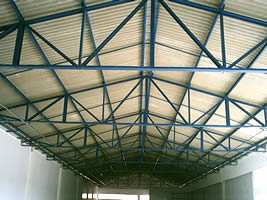
Can anyone help me with ese kind of structure? Would beams with measures 100x50x2,5mm. I am not able to produce with the application. Thank you.
-
Havent used this in a while. Can someone remind me how to create a slab. Do I select a face and then apply all, or select outer lines and draw by clicks? Nothing seems to work for me and I must be doing something wrong as all the other items work fine.
Edit: figured it out, click face then draw by clicks. Doh!
-
Using the new SHAPE class, does the ALIGN function not work with this? No matter how I draw my shape it draws it with a justification of bottom right. Any workaround?
-
Hi,ALL.
I update this to v2.1.0 in 2014.11.01.
Some Improves.Hi,Cadmunkey.
"SHAPE" class not support ALIGN option.
I will consider the method for Align of "SHAPE" in future.Thanks.
-
@tak2hata said:
Hi,ALL.
I update this to v2.1.0 in 2014.11.01.
Some Improves.Hi,Cadmunkey.
"SHAPE" class not support ALIGN option.
I will consider the method for Align of "SHAPE" in future.Thanks.
OK, thanks for considering it. Such a great plugin I couldn't live without now



Hello! It looks like you're interested in this conversation, but you don't have an account yet.
Getting fed up of having to scroll through the same posts each visit? When you register for an account, you'll always come back to exactly where you were before, and choose to be notified of new replies (either via email, or push notification). You'll also be able to save bookmarks and upvote posts to show your appreciation to other community members.
With your input, this post could be even better 💗
Register Login


Advertisement