sketchucation logo sketchucation
    • 登入
    Oops, your profile's looking a bit empty! To help us tailor your experience, please fill in key details like your SketchUp version, skill level, operating system, and more. Update and save your info on your profile page today!
    🔌 Smart Spline | Fluid way to handle splines for furniture design and complex structures. Download

    [Plugin]T2H_BuildingStructureTools2.2.4 in20141207

    已排程 已置頂 已鎖定 已移動 Plugins
    337 貼文 108 Posters 476.7k 瀏覽 108 Watching
    正在載入更多貼文
    • 從舊到新
    • 從新到舊
    • 最多點贊
    回覆
    • 在新貼文中回覆
    登入後回覆
    此主題已被刪除。只有擁有主題管理權限的使用者可以查看。
    • sumasterS 離線
      sumaster
      最後由 編輯

      @tak2hata said:

      Hi,All.
      I update to version1.2. in Sep17,2012.
      v1.2:2012.09.17:
      Bugs? fixed.and Improves.
      #Fix:Undo when Multi(Extend/Chamfer/Grow).
      #Fix:Undo when change properties of many entities.
      #Fix:(Extend/Chamfer/Grow) Structure entity which have devided side by user.
      #Improve about create slab.

      Thanks.

      Hi Tak2hata

      Thanks you 👍 😉
      And I'm CHKing Now

      @tak2hata said:

      Hi,Sumaster.
      In your file ,there was no compound wall.
      But the wall's edge was cutted by your manipulation.It do not good for "Extend tool" in previous version.
      It was improved in this ver.

      Thanks.

      Oh. . . .

      and here the new tool get random color
      how i fix the color means ( Walls get White, Steel Member get Medium Red, . . etc )

      Thank you,
      SUmaster

      1 條回覆 最後回覆 回覆 引用 0
      • T 離線
        tak2hata
        最後由 編輯

        Hi,all.
        I attach CTMan's UK Steel pflist file on top of this thread.

        It will helps Building structure tool users.

        Thanks.


        by TAK2HATA

        1 條回覆 最後回覆 回覆 引用 0
        • S 離線
          SUFractal
          最後由 編輯

          I just upgraded to the latest version, but am no longer able to access "steel columns" in the North American List? Other elements appear to work fine.

          1 條回覆 最後回覆 回覆 引用 0
          • T 離線
            tak2hata
            最後由 編輯

            @sufractal said:

            I just upgraded to the latest version, but am no longer able to access "steel columns" in the North American List? Other elements appear to work fine.

            Hi,Sufractal.
            In my enviroment,"Steel Column" shown from "North American pflist" no problem.
            Check the line include "##" in the csv file, If you edited it.
            "##STEEL_COLUMN" is needed.

            so, send to me your profile list or upload here it.
            and I will look it.

            Thanks.


            by TAK2HATA

            1 條回覆 最後回覆 回覆 引用 0
            • sumasterS 離線
              sumaster
              最後由 編輯

              HI ,

              How i fix the color of BST wall . . . ?

              now its get random color . . .

              Thank you,
              SUmaster

              1 條回覆 最後回覆 回覆 引用 0
              • S 離線
                SUFractal
                最後由 編輯

                @tak2hata said:

                @sufractal said:

                I just upgraded to the latest version, but am no longer able to access "steel columns" in the North American List? Other elements appear to work fine.

                Hi,Sufractal.
                In my enviroment,"Steel Column" shown from "North American pflist" no problem.
                Check the line include "##" in the csv file, If you edited it.
                "##STEEL_COLUMN" is needed.

                so, send to me your profile list or upload here it.
                and I will look it.

                Thanks.

                i believe I used the correct text in the file?
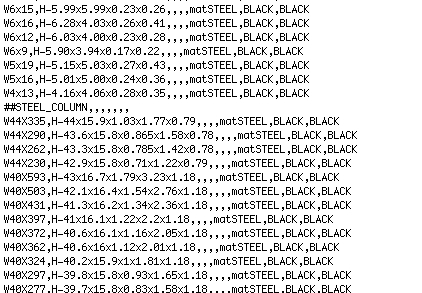

                North american.jpg

                1 條回覆 最後回覆 回覆 引用 0
                • T 離線
                  tak2hata
                  最後由 編輯

                  @sufractal said:

                  @tak2hata said:

                  @sufractal said:

                  I just upgraded to the latest version, but am no longer able to access "steel columns" in the North American List? Other elements appear to work fine.

                  Hi,Sufractal.
                  In my enviroment,"Steel Column" shown from "North American pflist" no problem.
                  Check the line include "##" in the csv file, If you edited it.
                  "##STEEL_COLUMN" is needed.

                  so, send to me your profile list or upload here it.
                  and I will look it.

                  Thanks.

                  i believe I used the correct text in the file?

                  Hi,
                  I tested it working fine.
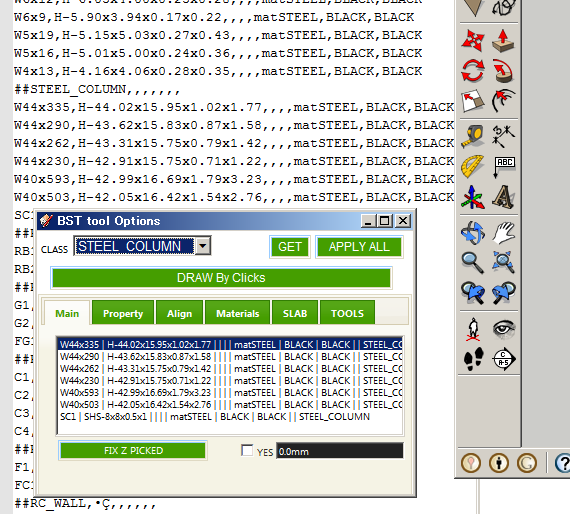
                  Steel Column shown fine.
                  I judge that it is fine by looking only that picture.
                  The last advice I say is "Change Profile list path" and select it again.

                  The information about this problem is too small.
                  Is there anyone had same problem?
                  and please reply here.

                  Thanks.


                  by TAK2HATA

                  1 條回覆 最後回覆 回覆 引用 0
                  • H 離線
                    hygicell
                    最後由 編輯

                    excellent tool, but not (yet) working for me:
                    I cannot find an installation manual
                    nor a user manual
                    and where do I put the .csv files?
                    please help
                    Frank

                    1 條回覆 最後回覆 回覆 引用 0
                    • MasterhandM 離線
                      Masterhand
                      最後由 編輯

                      Excellent tool. I worked great.
                      Does anyone know if there is a plugin that allows easily verify whether a modulation structure, or structure, if feasible or still standing?.
                      To just have a quick overview or a quick sample of what model can work it without having to do the entire calculation of the structure (which will be done later).
                      So, I mean, for example: look, without calculating it yet, I can show that it may be feasible or holds

                      1 條回覆 最後回覆 回覆 引用 0
                      • T 離線
                        tak2hata
                        最後由 編輯

                        @hygicell said:

                        excellent tool, but not (yet) working for me:
                        I cannot find an installation manual
                        nor a user manual
                        and where do I put the .csv files?
                        please help
                        Frank

                        Hi, hygicell.
                        Please puts ".csv"file to folder you like.but windows special folder is not recommended.
                        The windows special folder is like "C:\program files" "C:\Windows".
                        Mac user do not mind this.

                        After puts it,You must "Change profile list path" from plugins menu.
                        and select the file.

                        Hi,Mastarhand.
                        Me,too.

                        Hi,all.
                        I will update this script after few days.

                        Thanks.


                        by TAK2HATA

                        1 條回覆 最後回覆 回覆 引用 0
                        • T 離線
                          tak2hata
                          最後由 編輯

                          Hi,
                          I update to version 1.4beta.

                          I add usefull function "Table Editor".
                          and improves.

                          enjoy. 😄


                          by TAK2HATA

                          1 條回覆 最後回覆 回覆 引用 0
                          • sumasterS 離線
                            sumaster
                            最後由 編輯

                            Hello Tak2hata,

                            1st Thank you. Its too good and very useful . . . . 👍 😄 😄
                            Nice one UPDATE Query Attributes and Table Editor

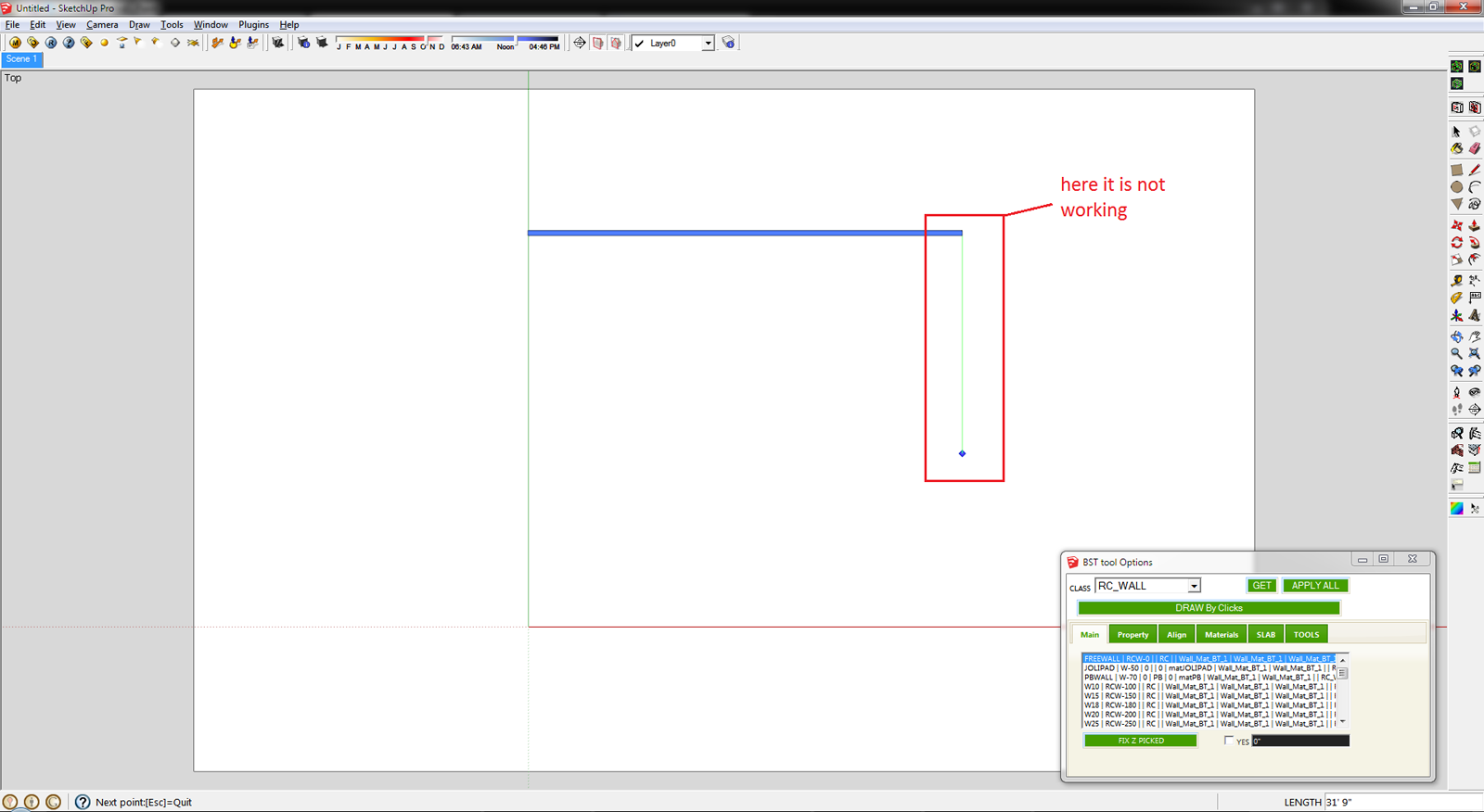
                            ****** CHK the Axies locking
                            when draw 1st time its work perfectly
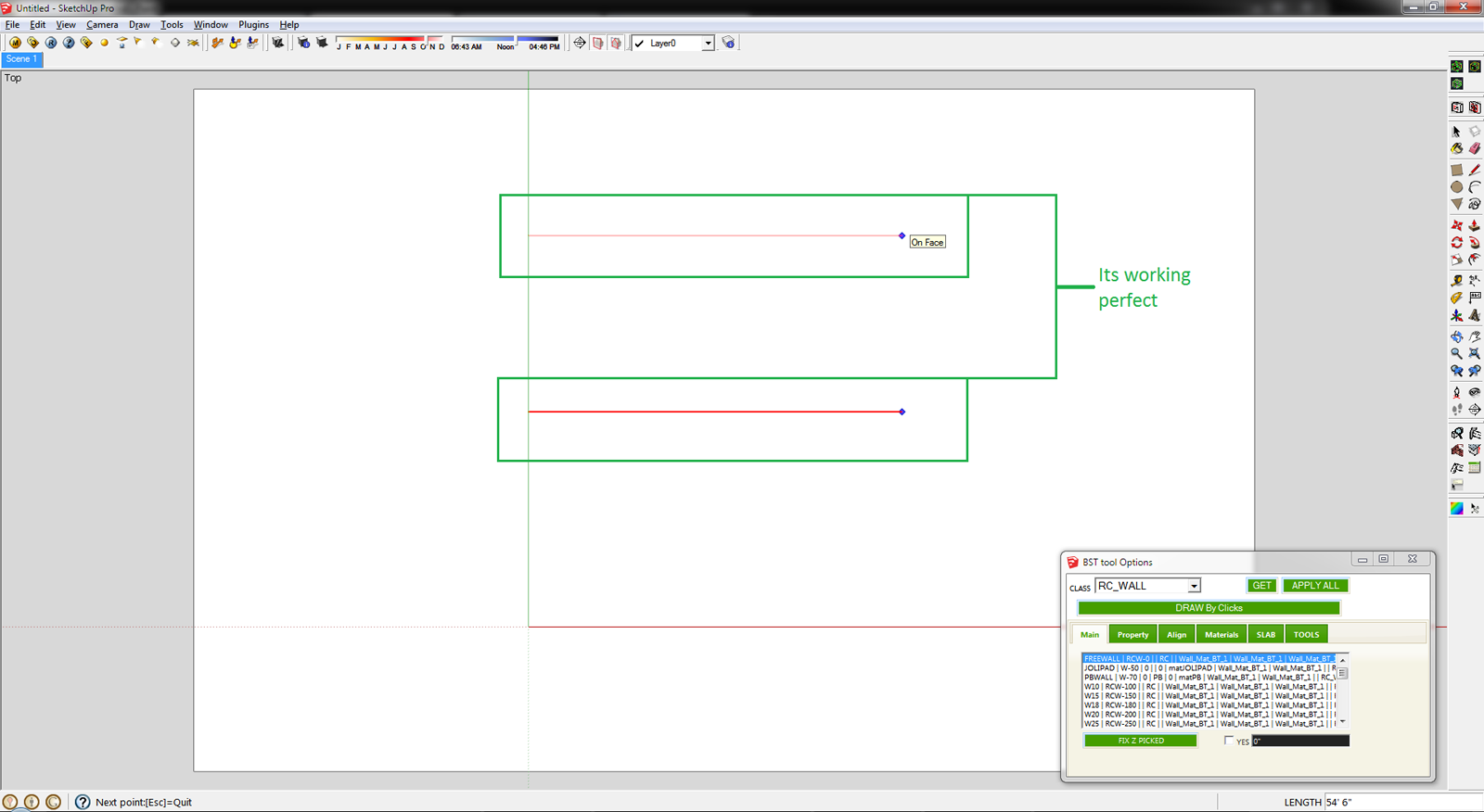
                            L - 1.png

                            but 2nd time not working

                            L - 2.png

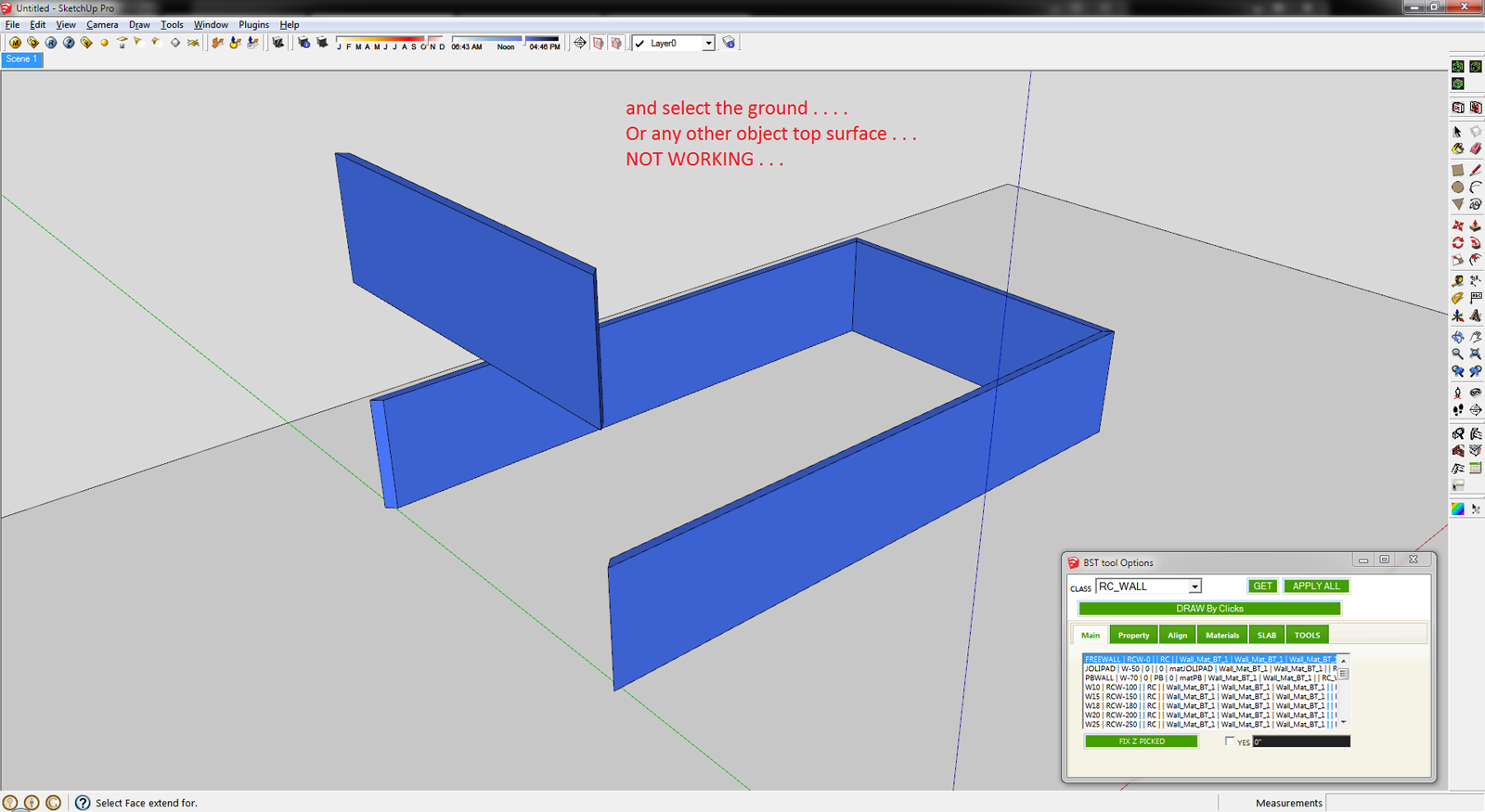
                            ****** CHK the Grow To Face tool

                            Select the object and use the Grow To Face tool . . .
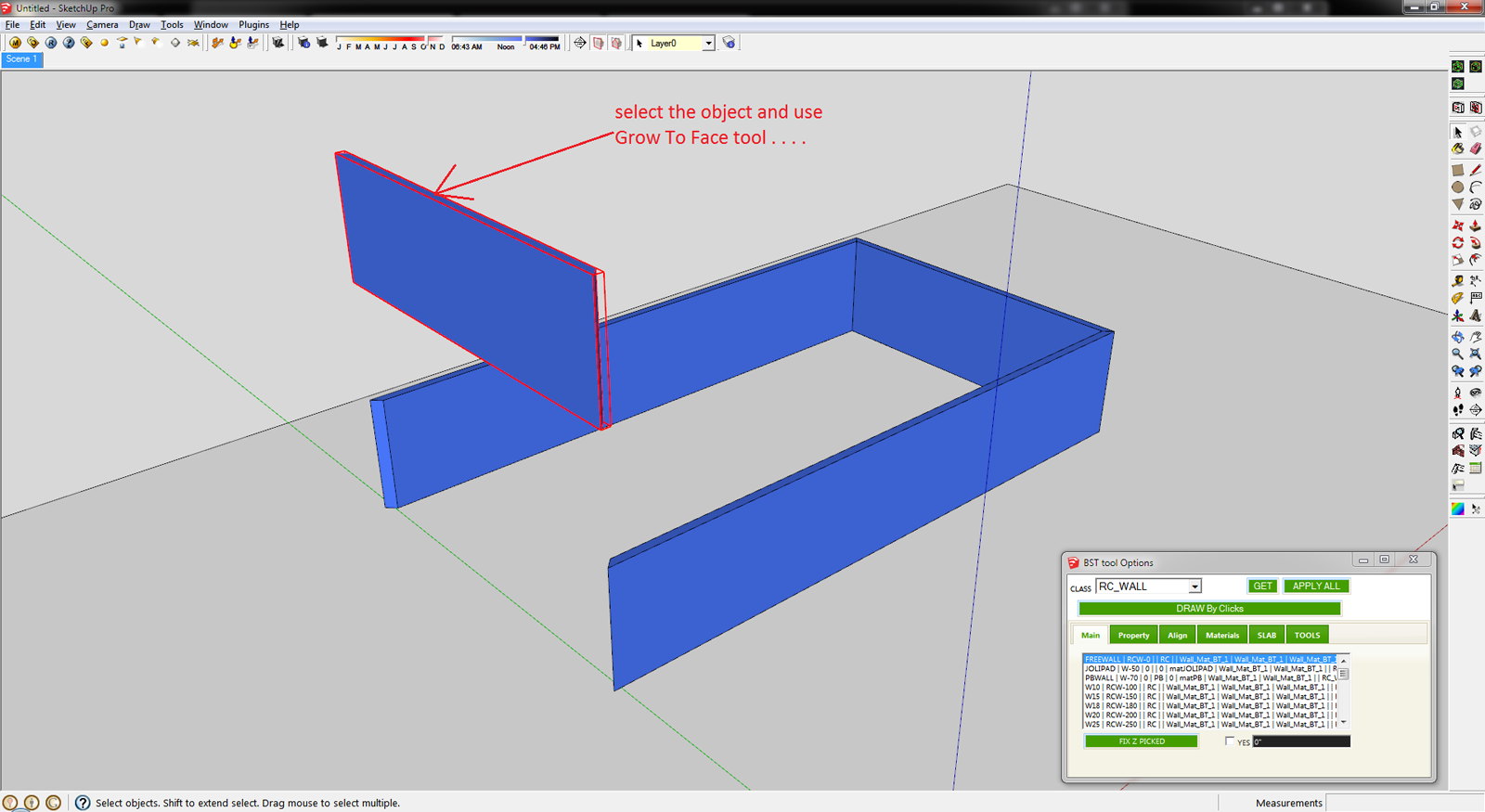
                            GUP Tool - 1.png

                            and select the ground NOT WORKING . . . .
                            GUP Tool - 2.png

                            Here it is SKP File

                            123 .skp

                            Thank you,
                            SUmaster

                            1 條回覆 最後回覆 回覆 引用 0
                            • T 離線
                              tulacong
                              最後由 編輯

                              thank you...thank you ....oh zeeee

                              1 條回覆 最後回覆 回覆 引用 0
                              • T 離線
                                tak2hata
                                最後由 編輯

                                @tulacong said:

                                thank you...thank you ....oh zeeee

                                Hi,tulacong.
                                I am happy for your word!

                                Hi,SUMASTER.
                                I will improve it and update it after two weeks.

                                Thnx. 😉


                                by TAK2HATA

                                1 條回覆 最後回覆 回覆 引用 0
                                • V 離線
                                  victor hugo
                                  最後由 編輯

                                  Hello.

                                  My MWALL is not working, is on the list but it does not work, has any one had this problem too?

                                  1 條回覆 最後回覆 回覆 引用 0
                                  • T 離線
                                    tak2hata
                                    最後由 編輯

                                    @unknownuser said:

                                    Hello.

                                    My MWALL is not working, is on the list but it does not work, has any one had this problem too?

                                    Hi ,HUGO.
                                    I knew it and "SHAPES" class ,too.
                                    I have small time ,so I will update in head of next week.

                                    Please wait.


                                    by TAK2HATA

                                    1 條回覆 最後回覆 回覆 引用 0
                                    • maxmarjamaaM 離線
                                      maxmarjamaa
                                      最後由 編輯

                                      Thanks you! ☀

                                      1 條回覆 最後回覆 回覆 引用 0
                                      • T 離線
                                        tak2hata
                                        最後由 編輯

                                        Hi,
                                        I update to version1.5 in Oct 28,2012.
                                        Bugfix and Improves.

                                        1. inference axes.
                                        2. extending with already selected single entity.
                                        3. query attributes.
                                        4. Work well about MWALLS and SHAPES.

                                        Next update will take more than 2 weeks.
                                        Thanks.


                                        by TAK2HATA

                                        1 條回覆 最後回覆 回覆 引用 0
                                        • sumasterS 離線
                                          sumaster
                                          最後由 編輯

                                          HI tak2hata,

                                          Please chk this . . . .

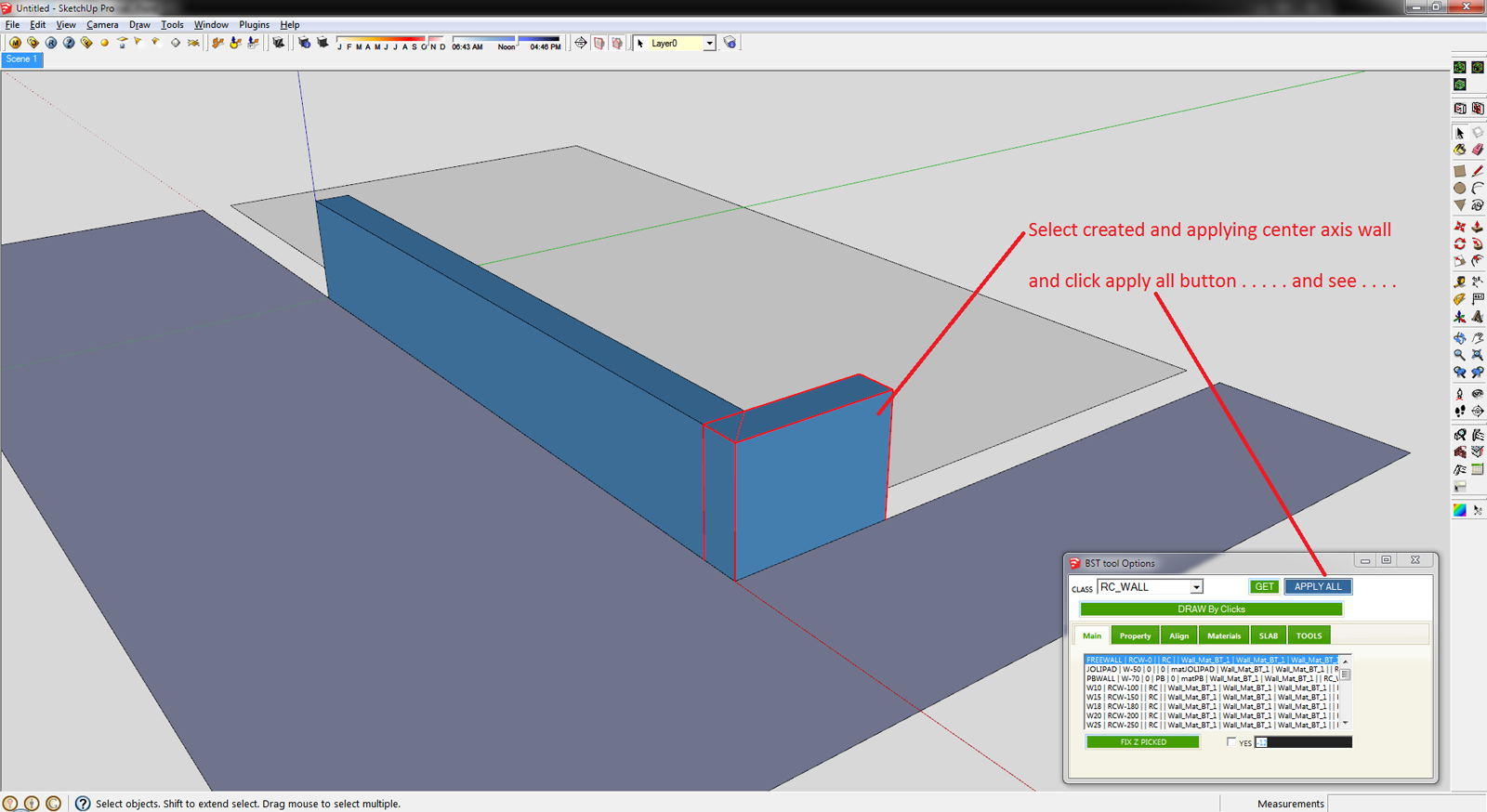
                                          1st create the L type wall and applying the Set Axis Point tool (thomthom Sir tool)
                                          http://sketchucation.com/forums/viewtopic.php?t=30508
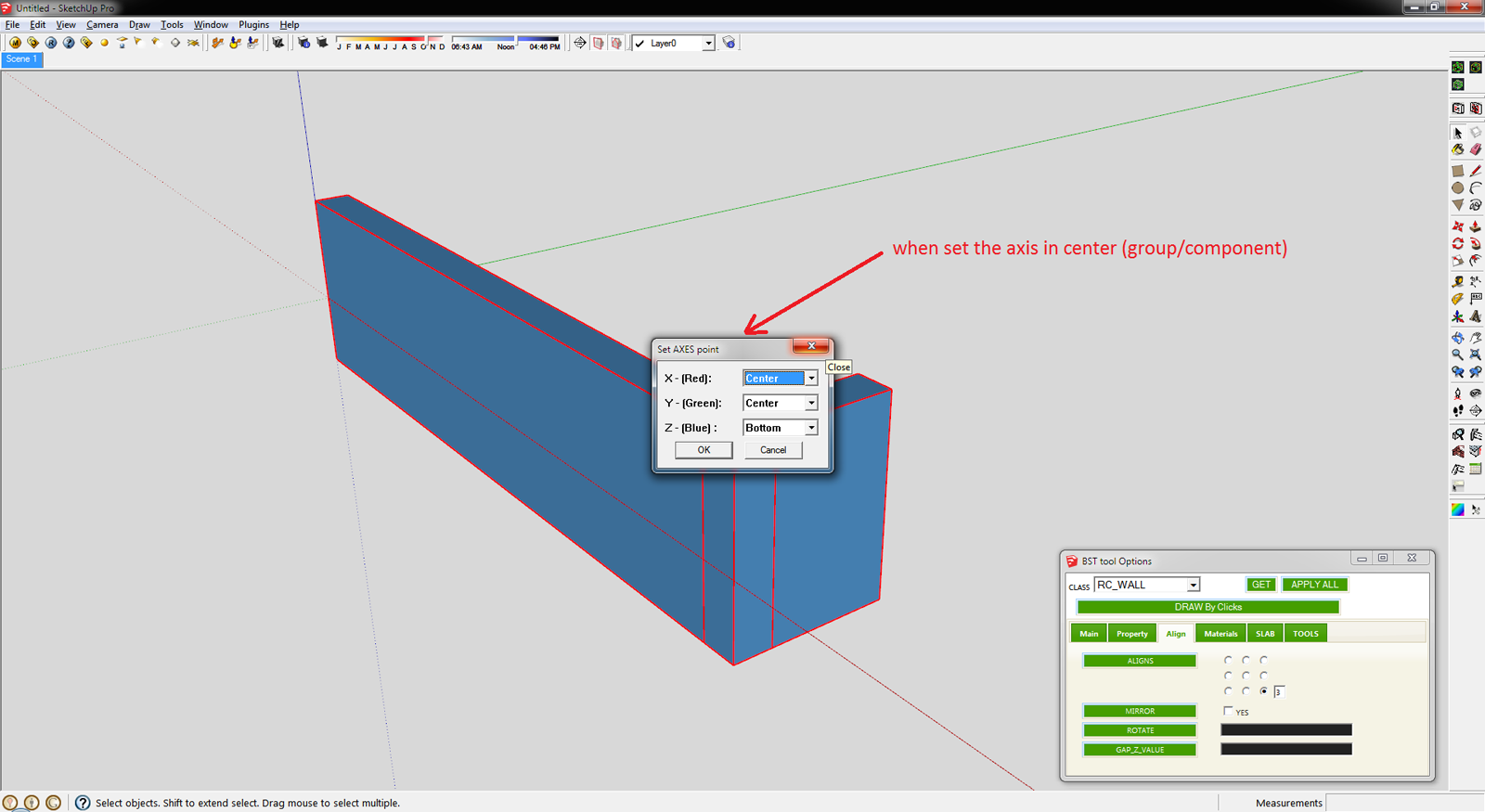
                                          Align - 1.png

                                          and click APPLY ALL button . . . . .

                                          Align - 2.png

                                          This is the Final Result . . . .
                                          another way is you can create the mark button . . .
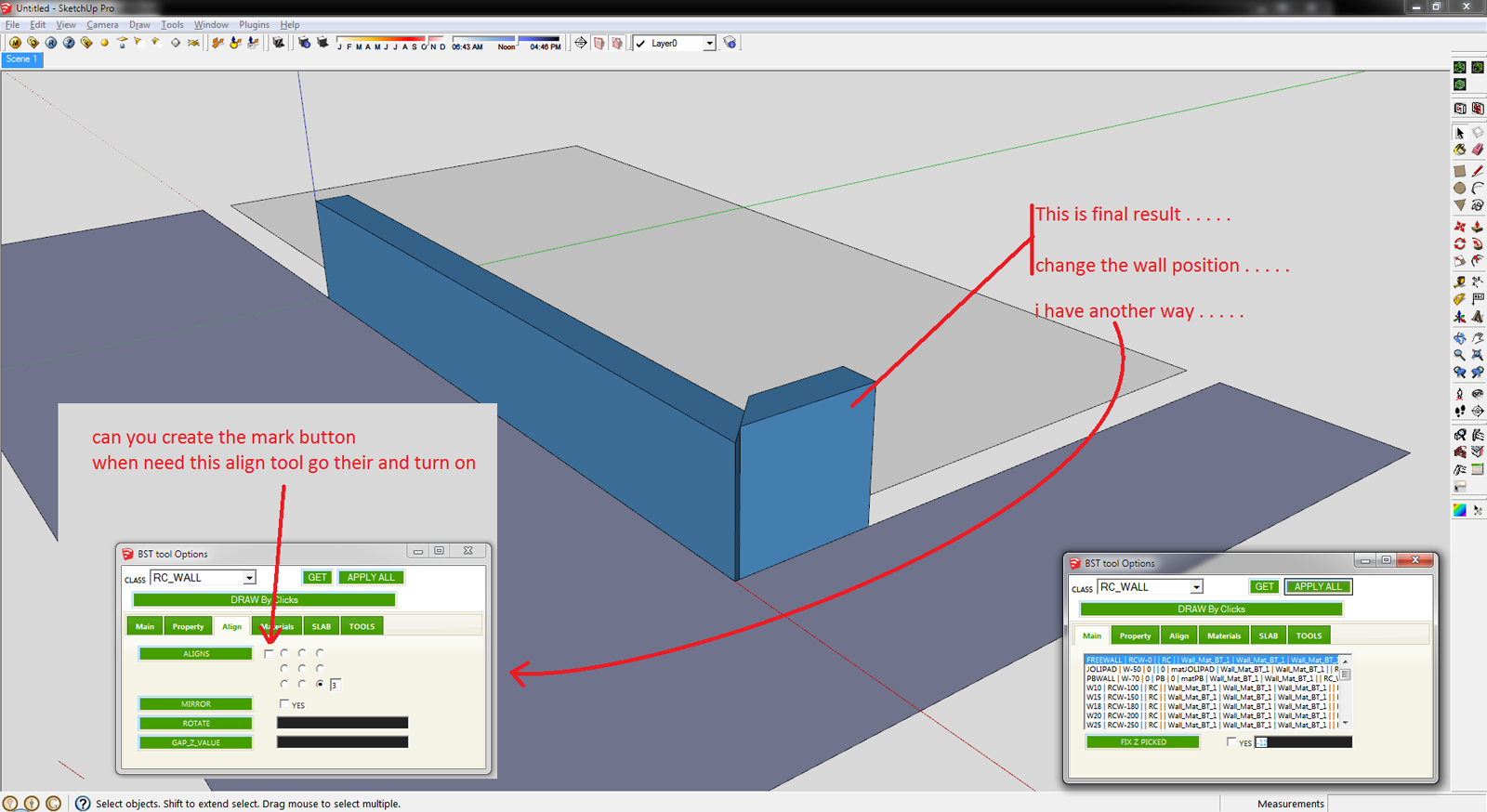
                                          Align - 3.png

                                          Sketchup File :
                                          Align SKP File.skp

                                          THanks 👍 👍

                                          Thank you,
                                          SUmaster

                                          1 條回覆 最後回覆 回覆 引用 0
                                          • T 離線
                                            tak2hata
                                            最後由 編輯

                                            Hi, Sumaster.

                                            @sumaster said:

                                            HI tak2hata,

                                            Please chk this . . . .

                                            1st create the L type wall and applying the Set Axis Point tool (thomthom Sir tool)
                                            http://sketchucation.com/forums/viewtopic.php?t=30508

                                            [attachment=3:22ix9rqt]<!-- ia3 -->Align - 1.png<!-- ia3 -->[/attachment:22ix9rqt]

                                            and click APPLY ALL button . . . . .

                                            [attachment=2:22ix9rqt]<!-- ia2 -->Align - 2.png<!-- ia2 -->[/attachment:22ix9rqt]

                                            This is the Final Result . . . .
                                            another way is you can create the mark button . . .

                                            [attachment=1:22ix9rqt]<!-- ia1 -->Align - 3.png<!-- ia1 -->[/attachment:22ix9rqt]

                                            Sketchup File :
                                            [attachment=0:22ix9rqt]<!-- ia0 -->Align SKP File.skp<!-- ia0 -->[/attachment:22ix9rqt]

                                            THanks 👍 👍

                                            Axis is very important for BST entity.
                                            So changing it as you like will not be control well by my tool.
                                            It is naturally phenomenon.

                                            Thanks.


                                            by TAK2HATA

                                            1 條回覆 最後回覆 回覆 引用 0
                                            • 1
                                            • 2
                                            • 13
                                            • 14
                                            • 15
                                            • 16
                                            • 17
                                            • 17 / 17
                                            • 第一個貼文
                                              最後的貼文
                                            Buy SketchPlus
                                            Buy SUbD
                                            Buy WrapR
                                            Buy eBook
                                            Buy Modelur
                                            Buy Vertex Tools
                                            Buy SketchCuisine
                                            Buy FormFonts

                                            Advertisement