sketchucation logo sketchucation
    • 登入
    Oops, your profile's looking a bit empty! To help us tailor your experience, please fill in key details like your SketchUp version, skill level, operating system, and more. Update and save your info on your profile page today!
    🔌 Smart Spline | Fluid way to handle splines for furniture design and complex structures. Download

    [Plugin]T2H_BuildingStructureTools2.2.4 in20141207

    已排程 已置頂 已鎖定 已移動 Plugins
    337 貼文 108 Posters 476.7k 瀏覽 108 Watching
    正在載入更多貼文
    • 從舊到新
    • 從新到舊
    • 最多點贊
    回覆
    • 在新貼文中回覆
    登入後回覆
    此主題已被刪除。只有擁有主題管理權限的使用者可以查看。
    • T 離線
      tak2hata
      最後由 編輯

      @unknownuser said:

      Depressed!
      Early versions of the dot, line automatically created according to the function also is gone!!

      Hi,zfrps.
      I think your sketchup was missing profile list filepath.
      Profile schema keeps working well.

      In this version the profile list is not included in main file.
      Because installing guard from overwriting the already existed profile list you changed.

      So you must set your profile list file path,if you delete your profile list with building structure tool folder.
      The generating automatically from edges with "apply" button.

      Please watch video I added in first thread.
      Thanks.


      by TAK2HATA

      1 條回覆 最後回覆 回覆 引用 0
      • S 離線
        SUFractal
        最後由 編輯

        takshata:

        I just installed your new plugin, but all of the boxes in the dialog window are filled in 'black' and I cannot see the values inside of them?

        Thanks.

        1 條回覆 最後回覆 回覆 引用 0
        • A 離線
          andyomis
          最後由 編輯

          Tak2hata san

          Thank you for your reply. I have now loaded the new .rbz file.
          When I open the BST tool options there are no profiles listed.
          When I select CLASS I get the following message "how to edit_pflist.pdf is not Exists. So read from default.
          When I select OK I get the following message "could not find profile list. So select your profile list file"
          There is no CSV file or xml file that I can select.

          When I cancel the select file dialog some default profile appear.
          If I change the class then I get the same sequences of messages again.

          When I look at the other tabs in the BST tool options the box backgrounds are black so I can't see anything.

          Can you guide me to the csv or xml file. Thank you

          1 條回覆 最後回覆 回覆 引用 0
          • T 離線
            tak2hata
            最後由 編輯

            @sufractal said:

            takshata:

            I just installed your new plugin, but all of the boxes in the dialog window are filled in 'black' and I cannot see the values inside of them?

            Thanks.

            hi,SUFractal.
            I am out now.
            So I will test it later.
            But I tested this verison in mac os yesterday.It was no problems.

            Please tell me you install from "RBZ"? or "ZIP".

            Thanks.


            by TAK2HATA

            1 條回覆 最後回覆 回覆 引用 0
            • T 離線
              troypiggo
              最後由 編輯

              @sufractal said:

              takshata:

              I just installed your new plugin, but all of the boxes in the dialog window are filled in 'black' and I cannot see the values inside of them?

              Thanks.

              Sounds like this problem: http://forums.sketchucation.com/viewtopic.php?f=11&t=45382

              This is not my signature. I type it at the end of every message for quality control.

              1 條回覆 最後回覆 回覆 引用 0
              • T 離線
                tak2hata
                最後由 編輯

                @troypiggo said:

                @sufractal said:

                takshata:

                I just installed your new plugin, but all of the boxes in the dialog window are filled in 'black' and I cannot see the values inside of them?

                Thanks.

                Sounds like this problem: http://forums.sketchucation.com/viewtopic.php?f=11&t=45382

                Thanks troypiggo.
                It is very helpful information.

                I will add html code about text background color to white.

                Thanks.


                by TAK2HATA

                1 條回覆 最後回覆 回覆 引用 0
                • Z 離線
                  ZFRPS
                  最後由 編輯

                  Thanks takshata !

                  sketchup is bim

                  1 條回覆 最後回覆 回覆 引用 0
                  • S 離線
                    SUFractal
                    最後由 編輯

                    @tak2hata said:

                    @sufractal said:

                    takshata:

                    I just installed your new plugin, but all of the boxes in the dialog window are filled in 'black' and I cannot see the values inside of them?

                    Thanks.

                    hi,SUFractal.
                    I am out now.
                    So I will test it later.
                    But I tested this verison in mac os yesterday.It was no problems.

                    Please tell me you install from "RBZ"? or "ZIP".

                    Thanks.

                    I've installed it via both methods, but with no change in result.

                    I have also kept my original .list.csv files.

                    Thanks.

                    1 條回覆 最後回覆 回覆 引用 0
                    • kenK 離線
                      ken
                      最後由 編輯

                      Hello

                      After installing V 1.0a, I have the following error code. Not sure why.

                      Thanks in advance for your plugins and help

                      Ken
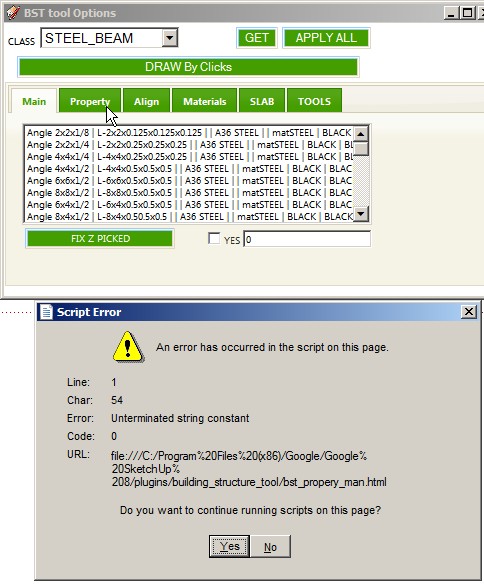

                      ScreenHunter_31 Jul. 15 17.34.jpg

                      Fight like your the third monkey on Noah's Ark gangway.

                      1 條回覆 最後回覆 回覆 引用 0
                      • T 離線
                        tak2hata
                        最後由 編輯

                        Hi,all.
                        I update version1.1a.

                        ...andyomis.
                        I placed the profile list file in the top of threadhttp://forums.sketchucation.com/viewtopic.php?f=323&t=35798#p315482
                        please download "default_pflist.csv" or "northAmerica_pflist.csv" or "default_pflist_xml(unzip from default_pflist_xml.zip)".
                        And change profile list path.
                        "menu" -> "plugins" -> "building structure tools1.0" - > "change profile list path"

                        ....SUFractal.
                        The problem is related to web browser "Safari".
                        I changed css styles about textbox text color to white.
                        Probabry you will see texts in textbox.
                        (But that problem is not shown on my mac os, so it fixed "probabry")
                        ...Ken.
                        I fixed about sending command with imperial length to webdialog.

                        Thanks to becoming Completion for all.


                        by TAK2HATA

                        1 條回覆 最後回覆 回覆 引用 0
                        • T 離線
                          tak2hata
                          最後由 編輯

                          HI,all.
                          I update to version 1.1b.
                          Very Small bugfix. 😉
                          The error about color name fixed.

                          Thanks.


                          by TAK2HATA

                          1 條回覆 最後回覆 回覆 引用 0
                          • S 離線
                            SUFractal
                            最後由 編輯

                            @tak2hata said:

                            HI,all.
                            I update to version 1.1b.
                            Very Small bugfix. 😉
                            The error about color name fixed.

                            Thanks.

                            Thanks tak2hata.

                            (Not sure if this matters, but I generally don't use Safari anyway.)

                            1 條回覆 最後回覆 回覆 引用 0
                            • B 離線
                              Ben Ritter
                              最後由 編輯

                              Thank you very much for your hard work and generosity

                              1 條回覆 最後回覆 回覆 引用 0
                              • B 離線
                                Ben Ritter
                                最後由 編輯

                                What do I need to do to select North American shapes?

                                1 條回覆 最後回覆 回覆 引用 0
                                • kenK 離線
                                  ken
                                  最後由 編輯

                                  @unknownuser said:

                                  Hello

                                  After installing V 1.0a, I have the following error code. Not sure why.

                                  Thanks in advance for your plugins and help

                                  Ken

                                  Tak2hata

                                  Thanks for the update 1.1b. It fixed the above illustrated error. However, I notice now, that the beams selection will not make any beams that are vertical. It will make beams close to vertical but not exactly 90 degrees. As close as I can get to vertical is 0.067 degrees off vertical. I didn't see this problem on the first version.

                                  Again thanks for the quick response on the other error.

                                  Ken

                                  Fight like your the third monkey on Noah's Ark gangway.

                                  1 條回覆 最後回覆 回覆 引用 0
                                  • T 離線
                                    tak2hata
                                    最後由 編輯

                                    @ben ritter said:

                                    What do I need to do to select North American shapes?

                                    place it valid path.(the path must not include non-english characters)
                                    And Set that file by the menu "Change Profile List Path".
                                    Menubar -> "Plugins" -> "building structure tools v1.0" -> "Change Profile List Path"

                                    It will work fine! 👍


                                    by TAK2HATA

                                    1 條回覆 最後回覆 回覆 引用 0
                                    • S 離線
                                      SUFractal
                                      最後由 編輯

                                      @tak2hata said:

                                      HI,all.
                                      I update to version 1.1b.
                                      Very Small bugfix. 😉
                                      The error about color name fixed.

                                      Thanks.

                                      Excellent! (White text in black box = clever!) The basic function appears to be working now. I'll jump into the fancier features you've added when I get a chance.

                                      Thanks again tak2hata ... this is a great plugin!

                                      1 條回覆 最後回覆 回覆 引用 0
                                      • A 離線
                                        andyomis
                                        最後由 編輯

                                        Tak2hata san,

                                        Thank you very much for the bug fix and the profile files

                                        1 條回覆 最後回覆 回覆 引用 0
                                        • Z 離線
                                          ZFRPS
                                          最後由 編輯

                                          Tak2hata:

                                          Thank you very much !
                                          I LOVE YOU !

                                          sketchup is bim

                                          1 條回覆 最後回覆 回覆 引用 0
                                          • T 離線
                                            tak2hata
                                            最後由 編輯

                                            @unknownuser said:

                                            @unknownuser said:

                                            Hello

                                            After installing V 1.0a, I have the following error code. Not sure why.

                                            Thanks in advance for your plugins and help

                                            Ken

                                            Tak2hata

                                            Thanks for the update 1.1b. It fixed the above illustrated error. However, I notice now, that the beams selection will not make any beams that are vertical. It will make beams close to vertical but not exactly 90 degrees. As close as I can get to vertical is 0.067 degrees off vertical. I didn't see this problem on the first version.

                                            Again thanks for the quick response on the other error.

                                            Ken

                                            Hi,Ken.

                                            I want to see your description as picture.and parameters in webdialog.

                                            And I have an elementary question.
                                            "degrees" is units of distance?
                                            In my country ,distance is decimal.so I'm not used to be the degree as distance.
                                            Does 90 degrees equal to 1/4"?

                                            Thanks.


                                            by TAK2HATA

                                            1 條回覆 最後回覆 回覆 引用 0
                                            • 1
                                            • 2
                                            • 3
                                            • 4
                                            • 5
                                            • 6
                                            • 16
                                            • 17
                                            • 4 / 17
                                            • 第一個貼文
                                              最後的貼文
                                            Buy SketchPlus
                                            Buy SUbD
                                            Buy WrapR
                                            Buy eBook
                                            Buy Modelur
                                            Buy Vertex Tools
                                            Buy SketchCuisine
                                            Buy FormFonts

                                            Advertisement
