sketchucation logo sketchucation
    • 登入
    Oops, your profile's looking a bit empty! To help us tailor your experience, please fill in key details like your SketchUp version, skill level, operating system, and more. Update and save your info on your profile page today!
    🔌 Smart Spline | Fluid way to handle splines for furniture design and complex structures. Download

    [Plugin] (TIG) Rotate Plan View v1.1 20110316

    已排程 已置頂 已鎖定 已移動 Plugins
    54 貼文 17 Posters 46.9k 瀏覽 17 Watching
    正在載入更多貼文
    • 從舊到新
    • 從新到舊
    • 最多點贊
    回覆
    • 在新貼文中回覆
    登入後回覆
    此主題已被刪除。只有擁有主題管理權限的使用者可以查看。
    • C 離線
      cobb89
      最後由 編輯

      @tig said:

      As well as a toolbar you'd need a dialog for the angle ?

      yeah....whatever is possible.... 😒

      1 條回覆 最後回覆 回覆 引用 0
      • TIGT 離線
        TIG Moderator
        最後由 編輯

        Here's v1.1 http://forums.sketchucation.com/viewtopic.php?p=313264#p313264
        It includes View menu item and toolbar with dialog entry of angles - the Ruby Console version works as before for those of you not wishing clutter... The toolbar only gets made if there's a png file so that's a simple way to stop that being created if you don't want it!

        TIG

        1 條回覆 最後回覆 回覆 引用 0
        • M 離線
          Michaelv
          最後由 編輯

          TIG, can I use it to include into a tool I'm working on. It's an easy simple rotate tool, and I'd like to include this as planview rotation when hovering over the origin.

          1 條回覆 最後回覆 回覆 引用 0
          • TIGT 離線
            TIG Moderator
            最後由 編輯

            @michaelv said:

            TIG, can I use it to include into a tool I'm working on. It's an easy simple rotate tool, and I'd like to include this as planview rotation when hovering over the origin.

            No problem, just give some acknowledgment in the header 😄

            TIG

            1 條回覆 最後回覆 回覆 引用 0
            • C 離線
              cobb89
              最後由 編輯

              @tig said:

              Here's v1.1 http://forums.sketchucation.com/viewtopic.php?p=313264#p313264
              It includes View menu item and toolbar with dialog entry of angles - the Ruby Console version works as before for those of you not wishing clutter... The toolbar only gets made if there's a png file so that's a simple way to stop that being created if you don't want it!

              Thanks a lot!! 😄

              1 條回覆 最後回覆 回覆 引用 0
              • Bob JamesB 離線
                Bob James
                最後由 編輯

                It seems that whenever I go to parallel projection and top view the scene is never at the angle I want it, so this plugin is really handy.

                Okay, so I'm lazy, but it would be very nice to speed up workflow if the plugin did the preliminary steps automatically: set camera to parallel projection and set to top view 😎

                i7-4930K 3.4Ghz, 2x GTX780 6GB, 32GB DDR3-1600 ECC, OCZ Vertex 4 500GB, WD Black 3TB, 32TB NAS, 4x 27" Monitors, SpaceMouse Pro, X-keys XK-60

                1 條回覆 最後回覆 回覆 引用 0
                • EarthMoverE 離線
                  EarthMover
                  最後由 編輯

                  Great idea and very useful. Thanks TIG!! 👍

                  3D Artist at Clearstory 3D Imaging
                  Guide Tool at Winning With Sketchup
                  Content Creator at Skapeup

                  1 條回覆 最後回覆 回覆 引用 0
                  • D 離線
                    dan19936
                    最後由 編輯

                    Also available is the free Camera Controls by Smustard
                    http://www.smustard.com/script/CameraControls

                    Dan

                    1 條回覆 最後回覆 回覆 引用 0
                    • jwliiiJ 離線
                      jwliii
                      最後由 編輯

                      Great Great Great - Donated!

                      1 條回覆 最後回覆 回覆 引用 0
                      • Dave RD 離線
                        Dave R
                        最後由 編輯

                        @unknownuser said:

                        Is there a way to lock the scene so that it cannot be identically dragged away from its intended orientation?

                        What do you mean by that? "Identically dragged" ????

                        Set up the orientation as you want it and create a scene. Or update the existing scene.

                        Etaoin Shrdlu

                        %

                        (THERE'S NO PLACE LIKE)

                        G28 X0.0 Y0.0 Z0.0

                        M30

                        %

                        1 條回覆 最後回覆 回覆 引用 0
                        • S 離線
                          seasdes
                          最後由 編輯

                          If you click on the middle mouse button and drag (identically) the view will change. I would like to stop that from happening.
                          Thanks Dave

                          Using Sketchup Pro 2019

                          1 條回覆 最後回覆 回覆 引用 0
                          • S 離線
                            seasdes
                            最後由 編輯

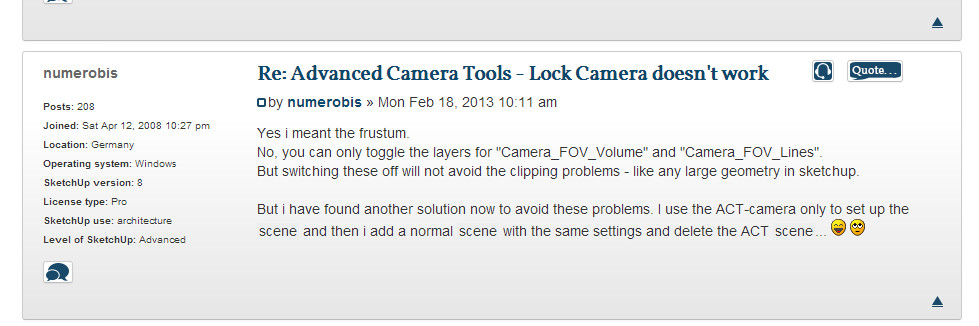
                            This post may have a workaround unless others know of a better way
                            http://sketchucation.com/forums/viewtopic.php?f=15&t=50685&p=457482&hilit=scene#p457496

                            2013-02-28_224836.jpg

                            Using Sketchup Pro 2019

                            1 條回覆 最後回覆 回覆 引用 0
                            • TIGT 離線
                              TIG Moderator
                              最後由 編輯

                              Make a Scene-tab to remember the plan-view camera as you have just made it... then after you zoom/pan/orbit and have mess it up, you simply click on the Scene-tab and that view is restored...

                              TIG

                              1 條回覆 最後回覆 回覆 引用 0
                              • Dave RD 離線
                                Dave R
                                最後由 編輯

                                @seasdes said:

                                If you click on the middle mouse button and drag (identically) the view will change. I would like to stop that from happening.
                                Thanks Dave

                                "identically" I don't think that word means what you think it means.

                                As I said and now TIG has said, create a scene after setting the view. Then when you've changed the view by clicking on the middle mouse button and dragging (orbiting) you can return to it.

                                Or if you don't want the view to change, don't press the middle mouse button and drag.

                                Etaoin Shrdlu

                                %

                                (THERE'S NO PLACE LIKE)

                                G28 X0.0 Y0.0 Z0.0

                                M30

                                %

                                1 條回覆 最後回覆 回覆 引用 0
                                • S 離線
                                  seasdes
                                  最後由 編輯

                                  Sorry Dave I meant 'accidentally'. I have corrected the typo. Another senior moment.

                                  Using Sketchup Pro 2019

                                  1 條回覆 最後回覆 回覆 引用 0
                                  • S 離線
                                    seasdes
                                    最後由 編輯

                                    This is a wonderful tool. I was made aware of it by Dave.
                                    Is there a way to lock the scene so that it cannot be accidentally dragged away from its intended orientation?

                                    Using Sketchup Pro 2019

                                    1 條回覆 最後回覆 回覆 引用 0
                                    • the_slothT 離線
                                      the_sloth
                                      最後由 編輯

                                      For some reason, I am having a hard time installing this script.

                                      When I run from Ruby Console I get the following message:

                                      Rotateplanview.rb
                                      Error: #<NoMethodError: undefined method `rb' for Rotateplanview:Class>
                                      (eval)

                                      I also do not see the Toolbar under View > Toolbars > ___. I believe I have it installed correctly.
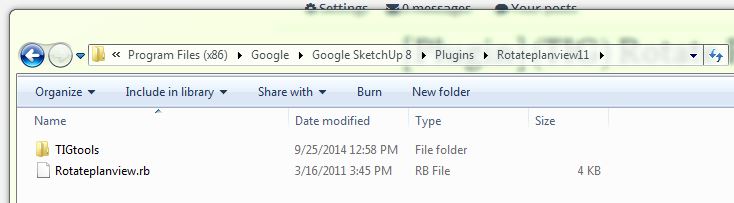
                                      install location screenshot

                                      There are many other scripts in my plugin folder that are working properly. I have restarted SU8 several times. I am sure I am missing something simple.

                                      Thanks in advance.

                                      1 條回覆 最後回覆 回覆 引用 0
                                      • Dave RD 離線
                                        Dave R
                                        最後由 編輯

                                        I would agree. The plugin is not installed correctly. The folder and the rb file should be in the Plugins directory instead. Makes me wonder how you went about installing the plugin and why you did it that way.

                                        Etaoin Shrdlu

                                        %

                                        (THERE'S NO PLACE LIKE)

                                        G28 X0.0 Y0.0 Z0.0

                                        M30

                                        %

                                        1 條回覆 最後回覆 回覆 引用 0
                                        • the_slothT 離線
                                          the_sloth
                                          最後由 編輯

                                          Thank you. That was helpful. The reason I kept Rotate Plan View in its folder is that there are other ruby scripts that seem to operate fine from within folders (see image below). Anyway, thanks again for the response.
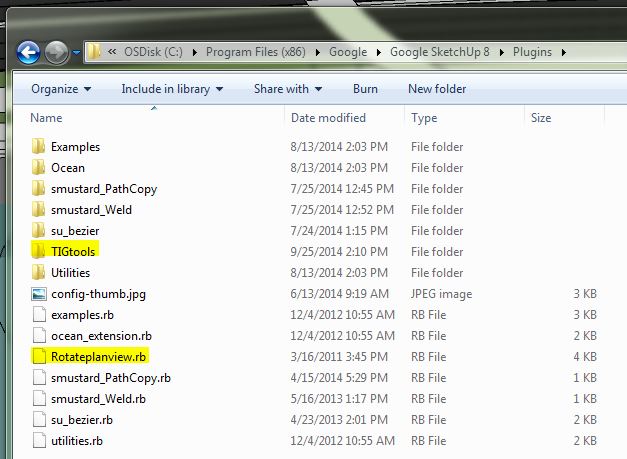
                                          correct install location

                                          1 條回覆 最後回覆 回覆 引用 0
                                          • Dave RD 離線
                                            Dave R
                                            最後由 編輯

                                            How are you going about installing plugins?

                                            Etaoin Shrdlu

                                            %

                                            (THERE'S NO PLACE LIKE)

                                            G28 X0.0 Y0.0 Z0.0

                                            M30

                                            %

                                            1 條回覆 最後回覆 回覆 引用 0
                                            • 1
                                            • 2
                                            • 3
                                            • 2 / 3
                                            • 第一個貼文
                                              最後的貼文
                                            Buy SketchPlus
                                            Buy SUbD
                                            Buy WrapR
                                            Buy eBook
                                            Buy Modelur
                                            Buy Vertex Tools
                                            Buy SketchCuisine
                                            Buy FormFonts

                                            Advertisement