sketchucation logo sketchucation
    • Login
    Oops, your profile's looking a bit empty! To help us tailor your experience, please fill in key details like your SketchUp version, skill level, operating system, and more. Update and save your info on your profile page today!
    Mac User? | Join the Rayscaper Beta for Mac Learn More

    [Plugin] CADup

    Scheduled Pinned Locked Moved Plugins
    64 Posts 28 Posters 98.1k Views 28 Watching
    Loading More Posts
    • Oldest to Newest
    • Newest to Oldest
    • Most Votes
    Reply
    • Reply as topic
    Log in to reply
    This topic has been deleted. Only users with topic management privileges can see it.
    • TIGT
      TIG Moderator
      last edited by

      @jim w said:

      Great Plugin !!!
      Thank you so much !!!
      The AXO's are great but I do a lot of "Isometeric Drawings" in CAD that have the base angles (x,y) at 30 degrees instead of the AXO's 45. Would it be possible somehow to get such an Iso at 30 degrees?
      Thanks again for you great work!!!
      Regards

      Iso's are MUCH harder to make than Axo's... that's why you don't get them πŸ˜‰
      I have a made a separate IsoAxo toolset to set a view to Iso or Axo [with model Z-scaling as needed] - search for that on the forums here...
      I have an upgrade in the pipeline [currently 'blocked'] but that's not on the list πŸ˜’

      TIG

      1 Reply Last reply
      Reply Quote 0
      • L
        lapx
        last edited by

        Hello Tig,

        Will this be similar to the old ADO autimatic drawings export of pages in dwg or image format. Do you recall this ruby script. It was very easy to use. I think Didier B was the original author. It as also very useful.

        Thanks,

        1 Reply Last reply
        Reply Quote 0
        • TIGT
          TIG Moderator
          last edited by

          Not quite like ADO as it assembles actual 2d hidden line 'component's' as flat 2d objects based on the standard views...

          TIG

          1 Reply Last reply
          Reply Quote 0
          • O
            oscartung
            last edited by

            omg!!! this is so great!
            thank you very much TIG

            1 Reply Last reply
            Reply Quote 0
            • M
              MartinK
              last edited by

              Thanks TIG. I will be trying this out to create 2D furniture and fixtures from 3D files. This should make that a pretty simple task.

              1 Reply Last reply
              Reply Quote 0
              • S
                Scaifewang
                last edited by

                Hi Tig

                Im way off center here but did you do any further owrk on this superb plugin?

                Works great getting 2d into DoubleCAD...

                Regards Scooby

                1 Reply Last reply
                Reply Quote 0
                • TIGT
                  TIG Moderator
                  last edited by

                  It's stalled at this stage - but it still has some useful features πŸ˜„

                  TIG

                  1 Reply Last reply
                  Reply Quote 0
                  • K
                    khancyrus
                    last edited by

                    Brilliant Tig!

                    1 Reply Last reply
                    Reply Quote 0
                    • yorik1984Y
                      yorik1984
                      last edited by

                      Thank you for work!
                      Can the script do this tipe of projection of detail?

                      http://storage1.static.itmages.ru/i/13/0609/s_1370722566_8997578_4ada51f771.png

                      And, optionaly, if it posible, user can choose what projection they need.

                      1 Reply Last reply
                      Reply Quote 0
                      • TIGT
                        TIG Moderator
                        last edited by

                        Here's a slight update http://sketchucation.com/forums/viewtopic.php?p=309485#p309485
                        It now comes with ArcCurveTests.rb for backwards compatibility with v7 etc when handling curves/arcs etc...

                        TIG

                        1 Reply Last reply
                        Reply Quote 0
                        • V
                          vfz
                          last edited by

                          Hey TIG,
                          seems like a great plugin that would help a lot to me, but it seems I cannot get it to work (on SU 2014/Win).
                          When I run the command, after some processing it makes all the new layers, a copy of the component/group on SKAD layer, but all the other layers are empty. I do not see any of the 2D views.
                          the ruby console says
                          "skad
                          Error: #<TypeError: reference to deleted ComponentInstance>
                          ...
                          <main>:in <main>' -e:1:in eval'
                          nil"
                          what do i do wrong?

                          1 Reply Last reply
                          Reply Quote 0
                          • TIGT
                            TIG Moderator
                            last edited by

                            Unsure.
                            It's an old plugin, but should still work in v2014...
                            Do you always get the error?
                            Can you post of PM a SKP containing the problem component...
                            πŸ˜•

                            TIG

                            1 Reply Last reply
                            Reply Quote 0
                            • V
                              vfz
                              last edited by

                              Thanks for the fast answer.
                              I tried some different models, in different versions of su (7,8,2013,2014) and I always get the same results.

                              I really feel like an idiot now, but I don't see where can I send pm.

                              1 Reply Last reply
                              Reply Quote 0
                              • TIGT
                                TIG Moderator
                                last edited by

                                I now have your PM and SKP.
                                Unfortunately I'm away very shortly but I can look at it in the middle of next week...

                                TIG

                                1 Reply Last reply
                                Reply Quote 0
                                • V
                                  vfz
                                  last edited by

                                  Thanks TIG for the help. I've found my mistake. There were components inside the component.
                                  I exploded everything and made one group/component and your plugin worked like a charm!

                                  1 Reply Last reply
                                  Reply Quote 0
                                  • TIGT
                                    TIG Moderator
                                    last edited by

                                    Thanks, saves me having to fix it πŸ˜‰

                                    TIG

                                    1 Reply Last reply
                                    Reply Quote 0
                                    • T
                                      tombyrne
                                      last edited by

                                      Ive Recently installed the CADup extension, I tried both ways, through the software and dropping it in the plugins folder, but I cant find it anywhere within the software, it tells me that its installed and ready for use but no sign of it, I looked under plugins and also toolbars,
                                      Any tips?

                                      1 Reply Last reply
                                      Reply Quote 0
                                      • pilouP
                                        pilou
                                        last edited by

                                        @unknownuser said:

                                        So, select your Component-Instance OR Group [and nothing else].
                                        Pick 'CADup' off the 'Tools' menu [or type 'cadup' or 'skad' in the
                                        Ruby Console]

                                        Nothing of this works for you?

                                        Frenchy Pilou
                                        Is beautiful that please without concept!
                                        My Little site :)

                                        1 Reply Last reply
                                        Reply Quote 0
                                        • TIGT
                                          TIG Moderator
                                          last edited by

                                          @pilou said:

                                          @unknownuser said:

                                          So, select your Component-Instance OR Group [and nothing else].
                                          Pick 'CADup' off the 'Tools' menu [or type 'cadup' or 'skad' in the
                                          Ruby Console]

                                          As Pilou says - it appears under the 'Tools' menu as 'CADup'.
                                          It works in all versions of SketchUp from v2015 downwards - at least down to v8, but I suspect Pilou uses it in an even earlier versions. πŸ˜‰
                                          It is not without its foibles... some text on 'right-hand elevations/sections can get offset somewhat to the right - edit the container and relocate it manually; also the Axo views can sometimes over lap the last Ortho view nearest to them, but they can also be relocated easily...
                                          Sometimes a few edges are missed off...
                                          Its function is really to create a set of 2d Ortho/Axo views from a 3d component.
                                          For DXF/DWG export for use to CAD - the CADup layering allows you to differentiate between hidden lines etc in the CAD display...
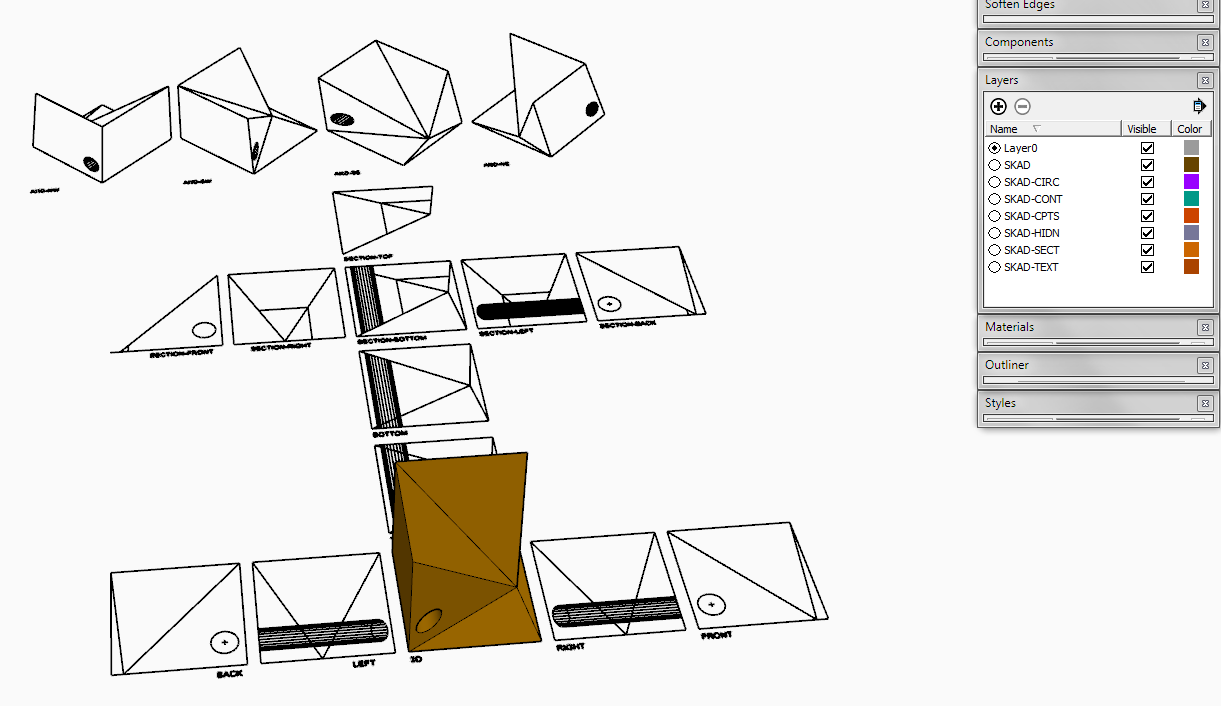

                                          Capture.PNG

                                          TIG

                                          1 Reply Last reply
                                          Reply Quote 0
                                          • TIGT
                                            TIG Moderator
                                            last edited by

                                            Here's v1.3.
                                            A quick botch to trap some errors and signed for v2016...
                                            Still very slow and flaky but it's just an idea...
                                            http://sketchucation.com/pluginstore?pln=CADup

                                            TIG

                                            1 Reply Last reply
                                            Reply Quote 0

                                            Hello! It looks like you're interested in this conversation, but you don't have an account yet.

                                            Getting fed up of having to scroll through the same posts each visit? When you register for an account, you'll always come back to exactly where you were before, and choose to be notified of new replies (either via email, or push notification). You'll also be able to save bookmarks and upvote posts to show your appreciation to other community members.

                                            With your input, this post could be even better πŸ’—

                                            Register Login
                                            • 1
                                            • 2
                                            • 3
                                            • 4
                                            • 4 / 4
                                            • First post
                                              Last post
                                            Buy SketchPlus
                                            Buy SUbD
                                            Buy WrapR
                                            Buy eBook
                                            Buy Modelur
                                            Buy Vertex Tools
                                            Buy SketchCuisine
                                            Buy FormFonts

                                            Advertisement