[Plugin] CADup
-
Not quite like ADO as it assembles actual 2d hidden line 'component's' as flat 2d objects based on the standard views...
-
omg!!! this is so great!
thank you very much TIG -
Thanks TIG. I will be trying this out to create 2D furniture and fixtures from 3D files. This should make that a pretty simple task.
-
Hi Tig
Im way off center here but did you do any further owrk on this superb plugin?
Works great getting 2d into DoubleCAD...
Regards Scooby
-
It's stalled at this stage - but it still has some useful features

-
Brilliant Tig!
-
Thank you for work!
Can the script do this tipe of projection of detail?

And, optionaly, if it posible, user can choose what projection they need. -
Here's a slight update http://sketchucation.com/forums/viewtopic.php?p=309485#p309485
It now comes with ArcCurveTests.rb for backwards compatibility with v7 etc when handling curves/arcs etc... -
Hey TIG,
seems like a great plugin that would help a lot to me, but it seems I cannot get it to work (on SU 2014/Win).
When I run the command, after some processing it makes all the new layers, a copy of the component/group on SKAD layer, but all the other layers are empty. I do not see any of the 2D views.
the ruby console says
"skad
Error: #<TypeError: reference to deleted ComponentInstance>
...
<main>:in<main>' -e:1:ineval'
nil"
what do i do wrong? -
Unsure.
It's an old plugin, but should still work in v2014...
Do you always get the error?
Can you post of PM a SKP containing the problem component...

-
Thanks for the fast answer.
I tried some different models, in different versions of su (7,8,2013,2014) and I always get the same results.I really feel like an idiot now, but I don't see where can I send pm.
-
I now have your PM and SKP.
Unfortunately I'm away very shortly but I can look at it in the middle of next week... -
Thanks TIG for the help. I've found my mistake. There were components inside the component.
I exploded everything and made one group/component and your plugin worked like a charm! -
Thanks, saves me having to fix it

-
Ive Recently installed the CADup extension, I tried both ways, through the software and dropping it in the plugins folder, but I cant find it anywhere within the software, it tells me that its installed and ready for use but no sign of it, I looked under plugins and also toolbars,
Any tips? -
@unknownuser said:
So, select your Component-Instance OR Group [and nothing else].
Pick 'CADup' off the 'Tools' menu [or type 'cadup' or 'skad' in the
Ruby Console]Nothing of this works for you?
-
@pilou said:
@unknownuser said:
So, select your Component-Instance OR Group [and nothing else].
Pick 'CADup' off the 'Tools' menu [or type 'cadup' or 'skad' in the
Ruby Console]As Pilou says - it appears under the 'Tools' menu as 'CADup'.
It works in all versions of SketchUp from v2015 downwards - at least down to v8, but I suspect Pilou uses it in an even earlier versions.
It is not without its foibles... some text on 'right-hand elevations/sections can get offset somewhat to the right - edit the container and relocate it manually; also the Axo views can sometimes over lap the last Ortho view nearest to them, but they can also be relocated easily...
Sometimes a few edges are missed off...
Its function is really to create a set of 2d Ortho/Axo views from a 3d component.
For DXF/DWG export for use to CAD - the CADup layering allows you to differentiate between hidden lines etc in the CAD display...
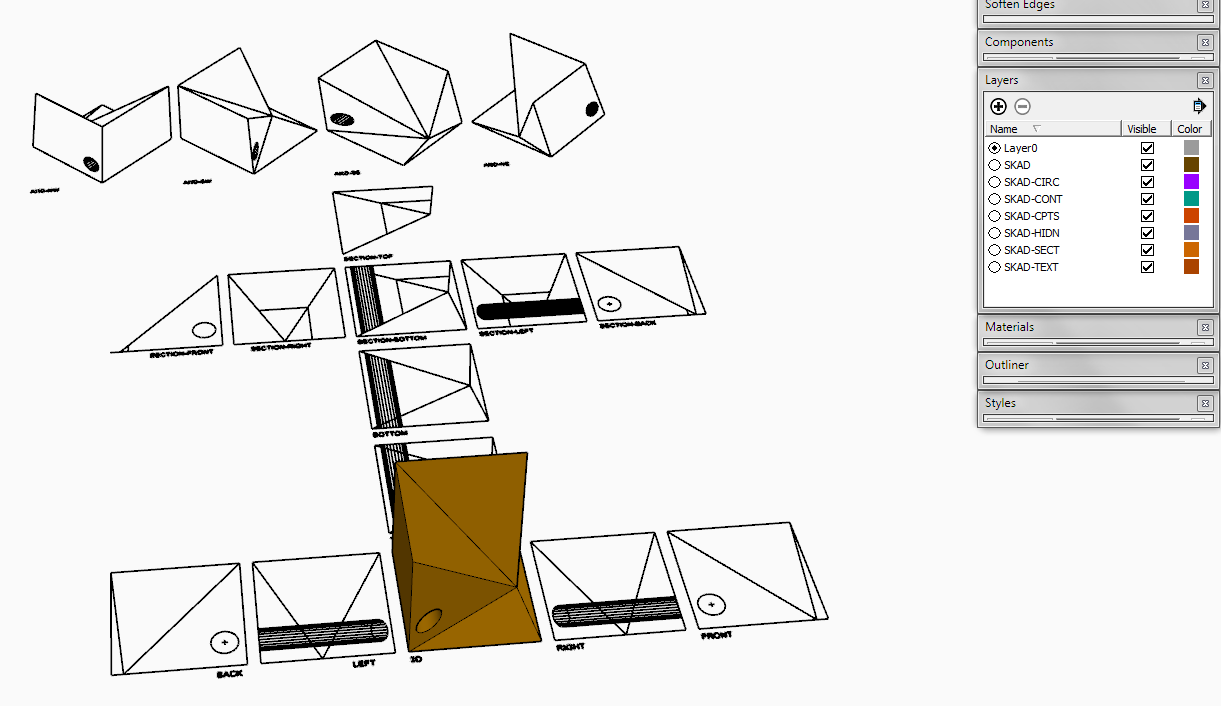
-
Here's v1.3.
A quick botch to trap some errors and signed for v2016...
Still very slow and flaky but it's just an idea...
http://sketchucation.com/pluginstore?pln=CADup -
..am I the only one thinking this plugins is REALLY AWESOME and would need an update? This really has a great potential: reducing models to 2d lines inside SU could ease the load of layout in recalculating vector viewports!
TIG, is this a project you had some ideas on or not?
-
Dear My Friend/
You created great Plugin. could you update it for Sketchup2022?



Hello! It looks like you're interested in this conversation, but you don't have an account yet.
Getting fed up of having to scroll through the same posts each visit? When you register for an account, you'll always come back to exactly where you were before, and choose to be notified of new replies (either via email, or push notification). You'll also be able to save bookmarks and upvote posts to show your appreciation to other community members.
With your input, this post could be even better 💗
Register Login


Advertisement