sketchucation logo sketchucation
    • Login
    Oops, your profile's looking a bit empty! To help us tailor your experience, please fill in key details like your SketchUp version, skill level, operating system, and more. Update and save your info on your profile page today!
    Mac User? | Join the Rayscaper Beta for Mac Learn More

    Mesh Surface Calculation, Can You?

    Scheduled Pinned Locked Moved SketchUp Discussions
    sketchup
    17 Posts 8 Posters 1.1k Views 8 Watching
    Loading More Posts
    • Oldest to Newest
    • Newest to Oldest
    • Most Votes
    Reply
    • Reply as topic
    Log in to reply
    This topic has been deleted. Only users with topic management privileges can see it.
    • thomthomT
      thomthom
      last edited by

      Ensure you have selected only faces. Then Enity Info will give you the total area of all selected faces.

      Thomas Thomassen โ€” SketchUp Monkey & Coding addict
      List of my plugins and link to the CookieWare fund

      1 Reply Last reply
      Reply Quote 0
      • spenceS
        spence
        last edited by

        Thomas,

        Ok, so what is the best way to select all the surfaces on a mesh without selecting any of the lines?

        Spence

        1 Reply Last reply
        Reply Quote 0
        • spenceS
          spence
          last edited by

          I think I figured it out. Give the surface a material, then select all same material. And I believe this will work if you have a surface that has been smoothed by turning on hidden line then doing the same thing.

          Spence

          1 Reply Last reply
          Reply Quote 0
          • Jean LemireJ
            Jean Lemire
            last edited by

            Hi folks.

            Make sure that all edges are smoothed. This will make SU see the face as only one large face, even if it is curved.

            Show hidden geometry.

            Select the Text Tool. When used on a face, it gives the face's area. With hidden geometry visible, it becomes easy to place the tool on a face (avoiding edges and endpoints).

            Just ideas.

            Jean (Johnny) Lemire from Repentigny, Quebec, Canada.

            1 Reply Last reply
            Reply Quote 0
            • D
              d12dozr
              last edited by

              @spence said:

              Thomas,

              Ok, so what is the best way to select all the surfaces on a mesh without selecting any of the lines?

              If your needs are more complicated than what you or Jean said, use Thomthom's excellent Selection Toys

              3D Printing with SketchUp Book
              http://goo.gl/f7ooYh

              1 Reply Last reply
              Reply Quote 0
              • thomthomT
                thomthom
                last edited by

                @d12dozr said:

                @spence said:

                Thomas,
                Ok, so what is the best way to select all the surfaces on a mesh without selecting any of the lines?

                If your needs are more complicated than what you or Jean said, use Thomthom's excellent Selection Toys

                ๐Ÿ˜ณ I'd forgotten it's not part of SU... ๐Ÿ˜’ ( Ctrl+1 (Select Only Edges) and Ctrl+2 (Select Only Faces) is my most used shortcut in SU. )

                Thomas Thomassen โ€” SketchUp Monkey & Coding addict
                List of my plugins and link to the CookieWare fund

                1 Reply Last reply
                Reply Quote 0
                • mitcorbM
                  mitcorb
                  last edited by

                  @ThomThom: Is there a typo in your reply?

                  I take the slow, deliberate approach in my aimless wandering.

                  1 Reply Last reply
                  Reply Quote 0
                  • thomthomT
                    thomthom
                    last edited by

                    @mitcorb said:

                    @ThomThom: Is there a typo in your reply?

                    waves hand
                    There is no typo.

                    ๐Ÿ˜Ž

                    Thomas Thomassen โ€” SketchUp Monkey & Coding addict
                    List of my plugins and link to the CookieWare fund

                    1 Reply Last reply
                    Reply Quote 0
                    • Rich O BrienR
                      Rich O Brien Moderator
                      last edited by

                      He's got a shortcut for a shortcut ๐Ÿ˜ฒ

                      Download the free D'oh Book for SketchUp ๐Ÿ“–

                      1 Reply Last reply
                      Reply Quote 0
                      • thomthomT
                        thomthom
                        last edited by

                        I'll short your cut!

                        Thomas Thomassen โ€” SketchUp Monkey & Coding addict
                        List of my plugins and link to the CookieWare fund

                        1 Reply Last reply
                        Reply Quote 0
                        • Rich O BrienR
                          Rich O Brien Moderator
                          last edited by

                          I smash cookies to ease my pain....

                          http://www.cookiemadness.net/wp-content/uploads/2008/09/ibarra2.jpg

                          Bring it!

                          Download the free D'oh Book for SketchUp ๐Ÿ“–

                          1 Reply Last reply
                          Reply Quote 0
                          • mitcorbM
                            mitcorb
                            last edited by

                            Good! I am glad I was wrong about the typo. I really need new glasses, or a new brain. ๐Ÿ’š
                            No more Jedi mind tricks, please ๐Ÿ˜†

                            I take the slow, deliberate approach in my aimless wandering.

                            1 Reply Last reply
                            Reply Quote 0
                            • thomthomT
                              thomthom
                              last edited by

                              @unknownuser said:

                              I smash cookies to ease my pain....

                              Blasphemy! ๐Ÿ˜ฎ

                              Thomas Thomassen โ€” SketchUp Monkey & Coding addict
                              List of my plugins and link to the CookieWare fund

                              1 Reply Last reply
                              Reply Quote 0
                              • pilouP
                                pilou
                                last edited by

                                Tricky! ๐Ÿ˜Ž

                                Frenchy Pilou
                                Is beautiful that please without concept!
                                My Little site :)

                                1 Reply Last reply
                                Reply Quote 0
                                • fredo6F
                                  fredo6
                                  last edited by

                                  @spence said:

                                  I may be missing something super simple here but I'm not able to figure out the surface area of a mesh (like what you can create with the sandbox tools). Is there a way to do this?

                                  Hi,

                                  When you have a selection that includes faces, go to the contextual menu and use "Area > Selection". You'll get the area of faces in the selection.
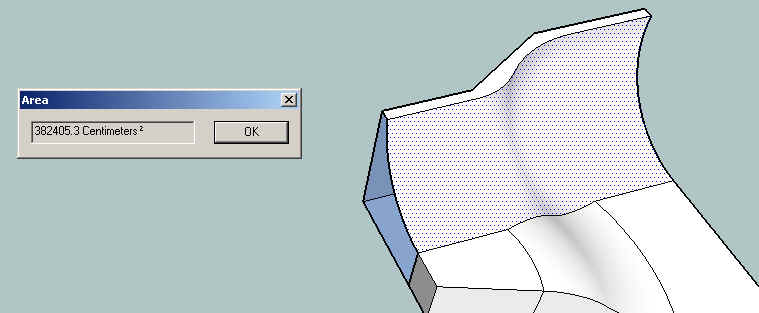
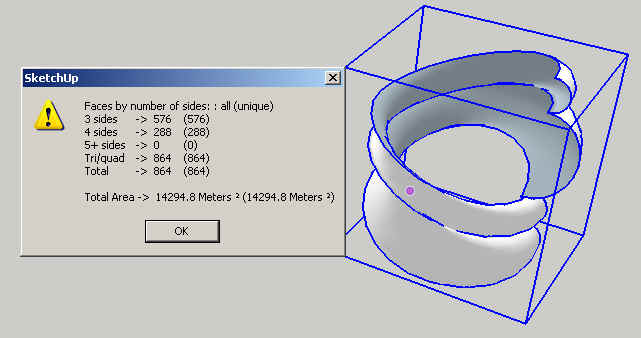
                                  CountFacesBySide 14 - 0.jpg

                                  Just in case, I modified the script CounFacesBySide to also calculate the area of all faces in the selection, even if they are within groups and components.

                                  The script is based on the selection (top-level geometry and components / groups recursively). It will only take into account the faces regardless of what you selected.

                                  Here is the link to CountFacesBySides
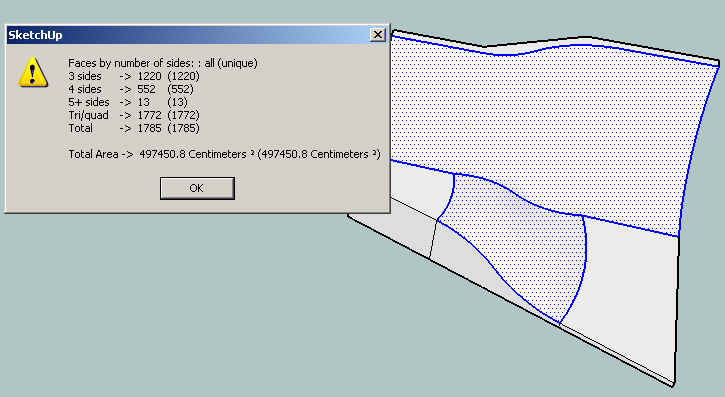
                                  CountFacesBySide 14 - 2.jpg
                                  CountFacesBySide 14.jpg

                                  Fredo

                                  1 Reply Last reply
                                  Reply Quote 0
                                  • spenceS
                                    spence
                                    last edited by

                                    Hey thanks a lot everyone, this has been very helpful and enlightening โ˜€ I now have a doctorate in selection and data on mesh surfaces. Love this community, best bunch of pros ๐Ÿ˜„. The selection toys are super Thomas, you have some awesome skills in creating quality plugins.

                                    Fredo6, I don't think I have ever seen the Area within the contextual Menu, awesome, thanks.

                                    Spence

                                    1 Reply Last reply
                                    Reply Quote 0

                                    Hello! It looks like you're interested in this conversation, but you don't have an account yet.

                                    Getting fed up of having to scroll through the same posts each visit? When you register for an account, you'll always come back to exactly where you were before, and choose to be notified of new replies (either via email, or push notification). You'll also be able to save bookmarks and upvote posts to show your appreciation to other community members.

                                    With your input, this post could be even better ๐Ÿ’—

                                    Register Login
                                    • 1 / 1
                                    • First post
                                      Last post
                                    Buy SketchPlus
                                    Buy SUbD
                                    Buy WrapR
                                    Buy eBook
                                    Buy Modelur
                                    Buy Vertex Tools
                                    Buy SketchCuisine
                                    Buy FormFonts

                                    Advertisement