Double Line 2 (dline.rb update)
-
Sure; although there seems to be some problems with the creation of the geometry in some cases. I haven't looked at that part.
-
Jim
I also noticed that you use the
onKeyDownmethod to get 'TAB'... this usually fails on a MAC as TAB is screwed on key-down... the recommended way is to usedef onKeyUp(key, repeat, flags, view) if key==9 or key==15 or key==48 ### TAB =9 for PC, MAC 15/48 for some locales ? ###Note how I also have some other keys mapped as in some locales/MacOSs it seems that '9' isn't Tab

-
Is there no VK_* constant for tab that would be correct for the platform it runs on?
-
@thomthom said:
Is there no VK_* constant for tab that would be correct for the platform it runs on?
No. There should be but it's missing...
It's a simple matter to always check for 'key-up' if using 'Tab' though
-
Don't work on the V6 (pc)

Drawing lines are good but
Walls are not drawn when Enter pressed
Error; #<ArgumentError; wrong number of arguments(2 for 1)> C;/Program Files/Google/Google SketchUp 6/Plugins/dline2.rb;157;in `start_operation' C;/Program Files/Google/Google SketchUp 6/Plugins/dline2.rb;157;in `onReturn' C;/Program Files/Google/Google SketchUp 6/Plugins/dline2.rb;157 -
@unknownuser said:
Don't work on the V6 (pc)
Drawing lines are good but
Walls are not drawn when Enter pressed> Error; #<ArgumentError; wrong number of arguments(2 for 1)> > C;/Program Files/Google/Google SketchUp 6/Plugins/dline2.rb;157;in `start_operation' > C;/Program Files/Google/Google SketchUp 6/Plugins/dline2.rb;157;in `onReturn' > C;/Program Files/Google/Google SketchUp 6/Plugins/dline2.rb;157This is the same problem I mentioned with
DrawHelixandmodel.start_operationtaking a second argument after v6.
Unfortunately in this tool it is NOT coded to allow use in v6 at all... BUT here is the fix...
In a copy of the script in the v6 folder find the two lines reading [one might be in French ]
]
Sketchup.active_model.start_operation("Double Line", true)
and edit the text so there is no 'true' thus
Sketchup.active_model.start_operation("Double Line")
Now it will work in v6 [this will also work in v7/8 but is less efficient in refresh of display terms]
I think a relatively idiot proof way of doing a start_operation that is optimized for all versions isbegin Sketchup.active_model.start_operation("Double Line", true) rescue Sketchup.active_model.start_operation("Double Line") endThat is, it tries to start an operation with a second argument flag set [best for most v7/8 uses] BUT if it fails then it does one without the flag - e.g. v6..........
-
No one really responded when I asked the question about begin-rescue clause with start_operation. Probably a poor choice for a topic sentence on my part.
-
@jim said:
No one really responded when I asked the question about begin-rescue clause with start_operation. Probably a poor choice for a topic sentence on my part.
http://forums.sketchucation.com/viewtopic.php?f=180&t=22338Great minds think alike... fools never differ...
I agree that this begin-rescue way is less prone to error like your .version v. .version_number typo which screwed Pilou's v6... -
I can't get my Mac to print out the key code for a Tab?
using this: http://rhin.crai.archi.fr/RubyLibraryDepot/plugin_details.php?id=205
-
@jim said:
I can't get my Mac to print out the key code for a Tab?
using this: http://rhin.crai.archi.fr/RubyLibraryDepot/plugin_details.php?id=205
For
onKeyDownit won't as Tab on Mac doesn't fire onKeyDown
But with onKeyUp it should return 9
BUT note that some locales/MacOSs can return 15 or even 48 for Tab...
I use this### Type 'keycode' in the Ruby Console... class TIG_KeyCode def activate @key="" puts "TIG's Non-Shortcut Keycode Reporter.\n" puts "Click in the Main Window outside of the" puts "Ruby Console then Press Non-Shortcut Keys..." end def onKeyDown(key, repeat, flags, view) @key=key.to_s puts "You Pressed Keycode = "+@key end def onKeyUp(key, repeat, flags, view) @key=key.to_s puts "You Released Keycode = "+@key end def deactivate(view) puts "You have pressed a Shortcut Key...\nExiting." return nil end end#class def keycode() Sketchup.active_model.select_tool(TIG_KeyCode.new) puts "" end#if -
Well, that's rather a pain, not to mention bug-ish.
-
Is it reported?
-
@thomthom said:
Is it reported?
I have seen it discussed in various places - I've added it to the Tool's API notes...
-
@tig said:
I have seen it discussed in various places - I've added it to the Tool's API notes...
Link?
-
-
I don't see any note.
-
Updated to fix Tab issue and correct start_operation for version 6+
-
@jim said:
@tig said:
I have seen it discussed in various places - I've added it to the Tool's API notes...
Link?
Y'know... I don't recall... BUT I have been avoiding using onKeyDown for TAB-key for MAC compatibility for ages by using onKeyUp key==9 etc... I even teach it to my students
I've search my usual haunts... and not found a link but there must be something somewhere as I can't have dreamed up the problem alone...
It seems to have been raised around here http://forums.sketchucation.com/viewtopic.php?p=273542#p273542 Jeff was also involved and Fredo? ... -
@jim said:
I don't see any note.
It's currently the first item in the User Notes list [~5 hours ago] - are your pages cached ? Try refreshing them...
-
@jim said:
Updated to fix Tab issue and correct start_operation for version 6+
http://forums.sketchucation.com/viewtopic.php?f=323&t=33875Jim
When you link back to something you need to get the link from the 'small-file-square' below the post's title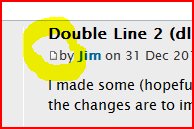 that way you link to the very page, not the thread itself... http://forums.sketchucation.com/viewtopic.php?p=297720#p297720 works
http://forums.sketchucation.com/viewtopic.php?f=323&t=33875 does not.



Hello! It looks like you're interested in this conversation, but you don't have an account yet.
Getting fed up of having to scroll through the same posts each visit? When you register for an account, you'll always come back to exactly where you were before, and choose to be notified of new replies (either via email, or push notification). You'll also be able to save bookmarks and upvote posts to show your appreciation to other community members.
With your input, this post could be even better 💗
Register Login


Advertisement