sketchucation logo sketchucation
    • 登入
    Oops, your profile's looking a bit empty! To help us tailor your experience, please fill in key details like your SketchUp version, skill level, operating system, and more. Update and save your info on your profile page today!
    🔌 Smart Spline | Fluid way to handle splines for furniture design and complex structures. Download

    [Plugin]$ Keyframe Animation

    已排程 已置頂 已鎖定 已移動 Plugins
    150 貼文 39 Posters 127.1k 瀏覽 39 Watching
    正在載入更多貼文
    • 從舊到新
    • 從新到舊
    • 最多點贊
    回覆
    • 在新貼文中回覆
    登入後回覆
    此主題已被刪除。只有擁有主題管理權限的使用者可以查看。
    • R 離線
      Regular Polygon
      最後由 編輯

      @tfdesign said:

      A great plugin, but I think your price is a little on the steep side.

      Well, I guess the market will ultimately decide this issue. But, compared to other commercial animation plugins, I thought the price was a bargain. 😐

      My SketchUp Plugins

      1 條回覆 最後回覆 回覆 引用 0
      • D 離線
        dtrarch
        最後由 編輯

        RP

        It is 👍

        dtr

        1 條回覆 最後回覆 回覆 引用 0
        • R 離線
          Regular Polygon
          最後由 編輯

          @solo said:

          I'd like to see some sort of dialogue, or maybe a toolbar if possible.

          I agree. Web dialogs will likely be in the updates.

          A toolbar is quicker than a menu. But if you make shortcuts for the menu items, then you can access them just as fast.

          My SketchUp Plugins

          1 條回覆 最後回覆 回覆 引用 0
          • T 離線
            tfdesign
            最後由 編輯

            @regular polygon said:

            @tfdesign said:

            A great plugin, but I think your price is a little on the steep side.

            Well, I guess the market will ultimately decide this issue. But, compared to other commercial animation plugins, I thought the price was a bargain. 😐

            SketchUp was offered by Google to be a non-elitist app for everyone- why I imagine, it was offered for free, but for someone living in a 3rd-world country, or someone on unemployment benefit (and there is a lot of it about these days) $20 is a lot of money. Compared to say the SDS plugin, which IMO does something a lot more complex, and costs $2 more. Or how about even FredoScale, which is a dynamite plugin, but donationware. Please, don't get me wrong, and I'm sure your plugin will do very well, but again it will be richer countries like America who will be able to afford the more basic, yet essential payware plugins, leaving many in poorer nations, out (again).

            Tom 😄

            My book "Let's SketchUp!" Download from here

            1 條回覆 最後回覆 回覆 引用 0
            • thomthomT 離線
              thomthom
              最後由 編輯

              Living in one of the most expensive countries in the world (a cinema ticket here is about 15$) I can't charge a price that fits the poorest - then there'd be no return value at all. Plugins take a lot of time to develop and the market for profit isn't that big. A price of 10-20$ (even 30$) isn't unreasonable.

              The complexity of a plugin can not be determined unless you've seen the code for it. A plugin may appear very simple to the user, but be doing very complex things under the hood.

              If this plugin had ben trivial - there'd be a free one out there already. As he mention in his post, there are some that does part of what his do, but not everything and has some issues. Providing a plugin that completes the package is worth $20. Just because SU comes in a free version doesn't mean every plugin has to be free. It's a matter of time spent and value gained. And he has contributed free plugins - so it's not as if he's all about profit.

              Thomas Thomassen — SketchUp Monkey & Coding addict
              List of my plugins and link to the CookieWare fund

              1 條回覆 最後回覆 回覆 引用 0
              • GaieusG 離線
                Gaieus
                最後由 編輯

                @thomthom said:

                Living in one of the most expensive countries in the world (a cinema ticket here is about 15$) I can't charge a price that fits the poorest - then there'd be no return value at all.

                OK, how about this then; you make the plugin and I collect the money?
                😆

                Gai...

                1 條回覆 最後回覆 回覆 引用 0
                • thomthomT 離線
                  thomthom
                  最後由 編輯

                  You getting into Hungarian mafia business now? 😲
                  You'll be asking me for "protection"?

                  Thomas Thomassen — SketchUp Monkey & Coding addict
                  List of my plugins and link to the CookieWare fund

                  1 條回覆 最後回覆 回覆 引用 0
                  • GaieusG 離線
                    Gaieus
                    最後由 編輯

                    It was just a gentle "offer". 😒
                    (Now let's stay on topic...)

                    Gai...

                    1 條回覆 最後回覆 回覆 引用 0
                    • Rich O BrienR 離線
                      Rich O Brien Moderator
                      最後由 編輯

                      I think $19 is fair considering it has a trial period and it's open licence on private use. Also any future upgrades are bundled in. Compared to tgi3d it's peanuts. I know there's more in tgi3d but so far RP has offered his plugins free. Time to reward his efforts.

                      @ Csaba

                      On topic enough? 😉

                      Download the free D'oh Book for SketchUp 📖

                      1 條回覆 最後回覆 回覆 引用 0
                      • GaieusG 離線
                        Gaieus
                        最後由 編輯

                        @unknownuser said:

                        On topic enough? 😉

                        Yes, finally, somebody. 👍
                        😄

                        Gai...

                        1 條回覆 最後回覆 回覆 引用 0
                        • T 離線
                          tfdesign
                          最後由 編輯

                          @thomthom said:

                          The complexity of a plugin can not be determined unless you've seen the code for it. A plugin may appear very simple to the user, but be doing very complex things under the hood.

                          Sure, but your missing the point.

                          Just for the record, I think the UK is now catching up on Norway 😉 😲

                          Open licence on private use? Sorry I didn't see that. 😳 Fair enough then! 😄

                          My book "Let's SketchUp!" Download from here

                          1 條回覆 最後回覆 回覆 引用 0
                          • jason_marantoJ 離線
                            jason_maranto
                            最後由 編輯

                            This looks really great -- I can do almost all of that with Dynamic components (except export) in Sketchup Pro but for Free version users who want that functionality this plugin is truly a bargain at roughly $480 less.

                            Best,
                            Jason.

                            I create video tutorial series about several 2D & 3D graphics programs.

                            1 條回覆 最後回覆 回覆 引用 0
                            • T 離線
                              tfdesign
                              最後由 編輯

                              I'm sure it is Jason 😉 😄

                              My book "Let's SketchUp!" Download from here

                              1 條回覆 最後回覆 回覆 引用 0
                              • spenceS 離線
                                spence
                                最後由 編輯

                                This is a great plugin. Animation in SU is something that is so weak and this plugin will definitely help fill the gap in a big way. I see some great ways to use this plugin. Nice job!

                                Spence

                                1 條回覆 最後回覆 回覆 引用 0
                                • kenK 離線
                                  ken
                                  最後由 編輯

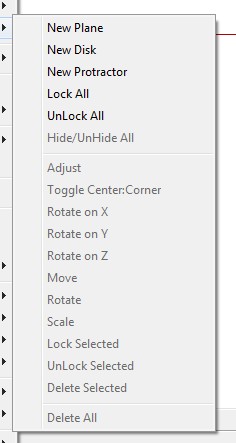
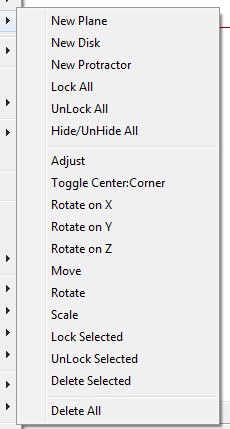
                                  OK, attached are two illustrations. The illustration labeled "with", has Keyframe Animation 1.0 loaded. The illustration labeled "without" does not have Keyframe Animation 1.0 loaded. As shown in the two illustrations, Keyframe Animation greys out the bottom half of the context menu for workplane.

                                  I am not smart enough to know why, I just discovered it.

                                  Any help would be nice.

                                  Without.jpg


                                  With.jpg

                                  Fight like your the third monkey on Noah's Ark gangway.

                                  1 條回覆 最後回覆 回覆 引用 0
                                  • R 離線
                                    Regular Polygon
                                    最後由 編輯

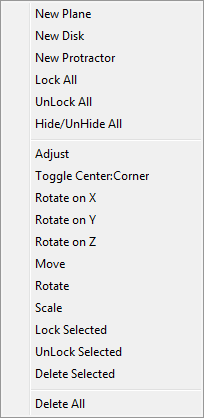
                                    I installed Work Plane v2.3 to see what would happen. The menu isn't grayed out for me.
                                    With Keyframe Animation 1.0

                                    As I recall, the cause for grayed out menus was due to plugins that create UI::Command objects inside of context-menu handlers. If that is happening, it is not due to Keyframe Animation, because it does not create any UI::Command objects, and it doesn't even have any context-menus.

                                    Is this bug reproducible? If you remove KFA does it go away? If you reinstall KFA, does it come back?

                                    My SketchUp Plugins

                                    1 條回覆 最後回覆 回覆 引用 0
                                    • kenK 離線
                                      ken
                                      最後由 編輯

                                      @regular polygon said:

                                      I installed Work Plane v2.3 to see what would happen. The menu isn't grayed out for me.

                                      [attachment=0:1cscrbxh]<!-- ia0 -->workplane_context_menu.png<!-- ia0 -->[/attachment:1cscrbxh]

                                      As I recall, the cause for grayed out menus was due to plugins that create UI::Command objects inside of context-menu handlers. If that is happening, it is not due to Keyframe Animation, because it does not create any UI::Command objects, and it doesn't even have any context-menus.

                                      Is this bug reproducible? If you remove KFA does it go away? If you reinstall KFA, does it come back?

                                      The two illustrations show KFA installed, the "with" illustration and KFA not installed the "without" illustration. There is no model, no other activity except, open Sketchup, make a workplane, and context menu select the workplane to arrive at the two illustrations. And yes this is repeatable.

                                      Ken

                                      Fight like your the third monkey on Noah's Ark gangway.

                                      1 條回覆 最後回覆 回覆 引用 0
                                      • thomthomT 離線
                                        thomthom
                                        最後由 編輯

                                        I think this can occur if a user has an unusual high number of installed plugins. Possibly SketchUp has a limit to how many menu items it can manage.

                                        Thomas Thomassen — SketchUp Monkey & Coding addict
                                        List of my plugins and link to the CookieWare fund

                                        1 條回覆 最後回覆 回覆 引用 0
                                        • kenK 離線
                                          ken
                                          最後由 編輯

                                          @thomthom said:

                                          I think this can occur if a user has an unusual high number of installed plugins. Possibly SketchUp has a limit to how many menu items it can manage.

                                          Well, Thomthom, that would be me.

                                          Fight like your the third monkey on Noah's Ark gangway.

                                          1 條回覆 最後回覆 回覆 引用 0
                                          • thomthomT 離線
                                            thomthom
                                            最後由 編輯

                                            So far, I think only some of Fredo's older plugins has been identified to leak UI::Command objects. If you updated all off these, and can verify that the number of Command objects isn't growing (using the utility in the threads that discussed this) then I think you may have run into a SketchUp limit that plugin authors can't do anything about. Until Google can address this I think the only thing you can do is be a bit more selective on the plugins you have enabled.

                                            Thomas Thomassen — SketchUp Monkey & Coding addict
                                            List of my plugins and link to the CookieWare fund

                                            1 條回覆 最後回覆 回覆 引用 0
                                            • 1
                                            • 2
                                            • 3
                                            • 4
                                            • 5
                                            • 6
                                            • 7
                                            • 8
                                            • 2 / 8
                                            • 第一個貼文
                                              最後的貼文
                                            Buy SketchPlus
                                            Buy SUbD
                                            Buy WrapR
                                            Buy eBook
                                            Buy Modelur
                                            Buy Vertex Tools
                                            Buy SketchCuisine
                                            Buy FormFonts

                                            Advertisement