sketchucation logo sketchucation
    • Login
    Oops, your profile's looking a bit empty! To help us tailor your experience, please fill in key details like your SketchUp version, skill level, operating system, and more. Update and save your info on your profile page today!
    Mac User? | Join the Rayscaper Beta for Mac Learn More

    [Plugin] Bitmap To Mesh

    Scheduled Pinned Locked Moved Plugins
    264 Posts 75 Posters 517.1k Views 75 Watching
    Loading More Posts
    • Oldest to Newest
    • Newest to Oldest
    • Most Votes
    Reply
    • Reply as topic
    Log in to reply
    This topic has been deleted. Only users with topic management privileges can see it.
    • Dave RD
      Dave R
      last edited by

      Image editor maybe?
      1zx6zck gray scale.jpg

      Etaoin Shrdlu

      %

      (THERE'S NO PLACE LIKE)

      G28 X0.0 Y0.0 Z0.0

      M30

      %

      1 Reply Last reply
      Reply Quote 0
      • thomthomT
        thomthom
        last edited by

        If all you do is desaturating a colour image to grayscale then the plugin does this automatically while processing.

        However, as I've been trying to stress before - converting an image to greyscale doesn't give you a height map. The light and dark areas doesn't properly represent high and low points of the geometry. Shadows, reflection and light direction will give incorrect result.

        Thomas Thomassen — SketchUp Monkey & Coding addict
        List of my plugins and link to the CookieWare fund

        1 Reply Last reply
        Reply Quote 0
        • Dave RD
          Dave R
          last edited by

          André asked for a grey scale image so I gave him one. I didn't think it would be all that useful for creating the mesh since it doesn't suit the requirements of a height map.

          Etaoin Shrdlu

          %

          (THERE'S NO PLACE LIKE)

          G28 X0.0 Y0.0 Z0.0

          M30

          %

          1 Reply Last reply
          Reply Quote 0
          • pilouP
            pilou
            last edited by

            Free Heightmap editor

            Frenchy Pilou
            Is beautiful that please without concept!
            My Little site :)

            1 Reply Last reply
            Reply Quote 0
            • T
              tacokid
              last edited by

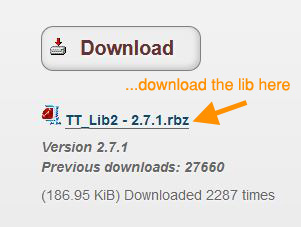
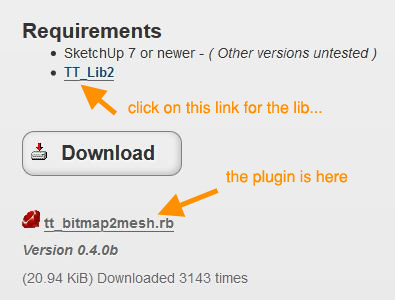
              First, let me apologize because I have no idea where this is going. I have never posted on any forum, so it's all new to me. What I am trying to find out is how do you download the bitmap to mesh plugin and the tt_lib that goes with it? I have been clicking on links for a while, but I'm just going in circles. I hope this plugin does what shows on the video as it could solve my problem.

              Thanks,
              tacokid

              1 Reply Last reply
              Reply Quote 0
              • massimoM
                massimo Moderator
                last edited by

                Look at the very first post of the thread.
                Cattura.JPG
                Cattura_01.JPG

                1 Reply Last reply
                Reply Quote 0
                • thomthomT
                  thomthom
                  last edited by

                  And you can use this to aid the installation process: http://sketchucation.com/forums/viewtopic.php?t=42315#p375454

                  Thomas Thomassen — SketchUp Monkey & Coding addict
                  List of my plugins and link to the CookieWare fund

                  1 Reply Last reply
                  Reply Quote 0
                  • T
                    tacokid
                    last edited by

                    You're not going to believe this, but I was having the same trouble. You would think I'm just learning to use computer too !! I did find my problem. For some reason, when I disabled my pop up blocker and re-started my browser, the pop up blocker re-enabled. So I was chasing my own tail. Did get it downloaded and will try it soon.

                    Thanks a lot

                    1 Reply Last reply
                    Reply Quote 0
                    • thomthomT
                      thomthom
                      last edited by

                      👍 👍

                      Thomas Thomassen — SketchUp Monkey & Coding addict
                      List of my plugins and link to the CookieWare fund

                      1 Reply Last reply
                      Reply Quote 0
                      • F
                        frankleng
                        last edited by

                        thanks. very nice.

                        1 Reply Last reply
                        Reply Quote 0
                        • S
                          Soyphrenn
                          last edited by

                          Just one question : no working with Sketchup MacOS ?

                          1 Reply Last reply
                          Reply Quote 0
                          • Dave RD
                            Dave R
                            last edited by

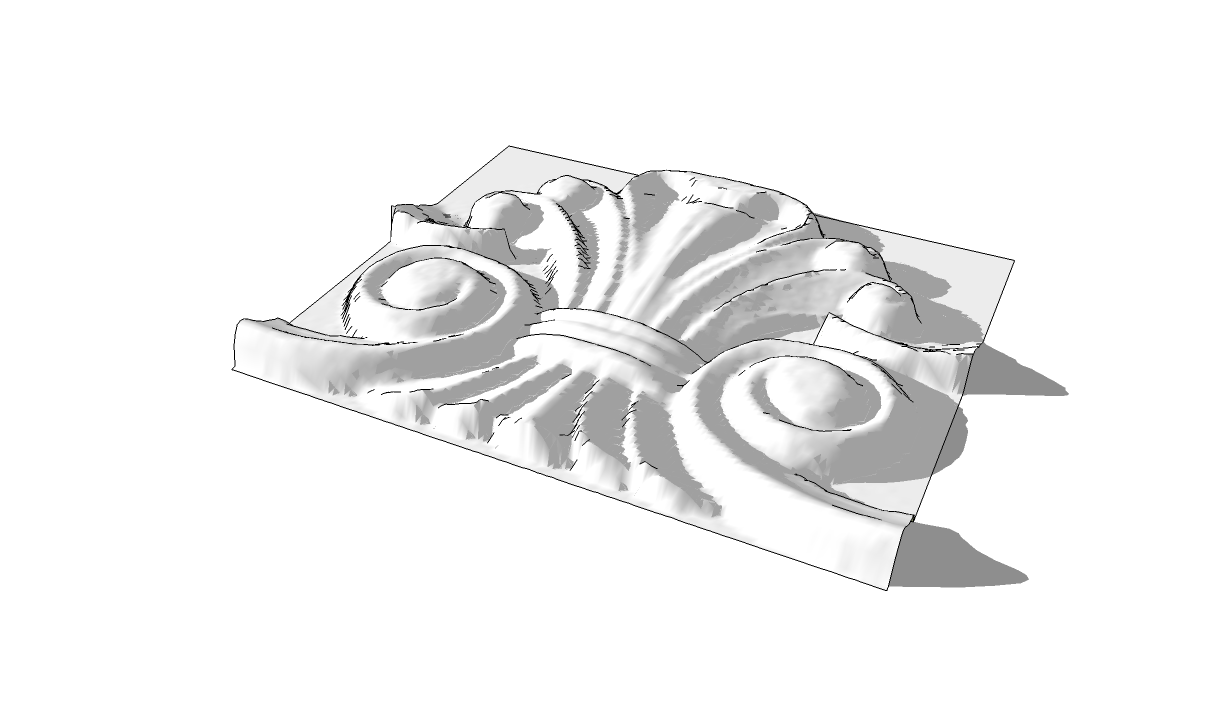
                            Works just fine on my Mac (OSX 10.8.4)

                            I did this a few minutes ago.
                            BMP2mesh.png

                            Etaoin Shrdlu

                            %

                            (THERE'S NO PLACE LIKE)

                            G28 X0.0 Y0.0 Z0.0

                            M30

                            %

                            1 Reply Last reply
                            Reply Quote 0
                            • thomthomT
                              thomthom
                              last edited by

                              Yea, should work on OSX. Are you getting errors?
                              Did you install TT_Lib2 as well? (it's a required dependency.)

                              Thomas Thomassen — SketchUp Monkey & Coding addict
                              List of my plugins and link to the CookieWare fund

                              1 Reply Last reply
                              Reply Quote 0
                              • J
                                jjduncs
                                last edited by

                                256x256 bmp taking 45 minutes to finish. Activity monitor shows Sketchup only using 5% while this is processing.

                                1 Reply Last reply
                                Reply Quote 0
                                • tt_suT
                                  tt_su
                                  last edited by

                                  @jjduncs said:

                                  256x256 bmp taking 45 minutes to finish. Activity monitor shows Sketchup only using 5% while this is processing.

                                  How many cores do you have? Quad core hyper-threaded? SketchUp and Ruby 1.8 only makes use of a single core.

                                  256x256 pixels would produce 131072 triangles - so you'd have quite a dense mesh. Ruby is quite slow by itself, but the bottleneck here is SketchUp's speed of adding geometry. The more geometry already in the group you add to the slower it gets.

                                  1 Reply Last reply
                                  Reply Quote 0
                                  • J
                                    jjduncs
                                    last edited by

                                    Yeah quad core, not sure on the hyper-threading.

                                    Ended up just scaling down to 100 x 100 in PS. Still took 20 minutes though. CPU usage only spikes higher for the last maybe 20 seconds after it finishes the generating mesh task.

                                    Thanks though.
                                    100x100 turned out fine anyway.

                                    1 Reply Last reply
                                    Reply Quote 0
                                    • K
                                      khancyrus
                                      last edited by

                                      Hello,
                                      I had a question. I have tried this plugin and it works brilliant, but I feel I could only make it work for rectangular or planes curved in one plane only. I just wanted to know if it is possible with more organic or bulbous or more bulging surfaces in all x,y,z planes. Please forgive me if I'm using wrong terms or doing it wrong.
                                      Btw thanks for all the plugins thomthom!

                                      CSK

                                      1 Reply Last reply
                                      Reply Quote 0
                                      • tt_suT
                                        tt_su
                                        last edited by

                                        You mean take a surface mapped with a texture and generate new mesh - like a displacement map would?

                                        1 Reply Last reply
                                        Reply Quote 0
                                        • K
                                          khancyrus
                                          last edited by

                                          Its sth like that if Im understanding what it is, for example I wish to create a mesh a bulging surface that would have holes in it, taken from Half tone bitmaps.
                                          For example, the facades of BIG's Tam Art Cross, but in this case a bulbous one! Im wondering, is it possible in sketchup?

                                          http://www.big.dk/#projects-tam

                                          1 Reply Last reply
                                          Reply Quote 0
                                          • C
                                            cuttingedge
                                            last edited by

                                            Hi everyone, just installed bitmap to mesh. Can anyone show me where I can locate the tool?

                                            1 Reply Last reply
                                            Reply Quote 0

                                            Hello! It looks like you're interested in this conversation, but you don't have an account yet.

                                            Getting fed up of having to scroll through the same posts each visit? When you register for an account, you'll always come back to exactly where you were before, and choose to be notified of new replies (either via email, or push notification). You'll also be able to save bookmarks and upvote posts to show your appreciation to other community members.

                                            With your input, this post could be even better 💗

                                            Register Login
                                            • 1
                                            • 2
                                            • 7
                                            • 8
                                            • 9
                                            • 10
                                            • 11
                                            • 12
                                            • 13
                                            • 14
                                            • 9 / 14
                                            • First post
                                              Last post
                                            Buy SketchPlus
                                            Buy SUbD
                                            Buy WrapR
                                            Buy eBook
                                            Buy Modelur
                                            Buy Vertex Tools
                                            Buy SketchCuisine
                                            Buy FormFonts

                                            Advertisement