sketchucation logo sketchucation
    • Login
    Oops, your profile's looking a bit empty! To help us tailor your experience, please fill in key details like your SketchUp version, skill level, operating system, and more. Update and save your info on your profile page today!
    Mac User? | Join the Rayscaper Beta for Mac Learn More

    [Plugin] Export 2d with Alpha

    Scheduled Pinned Locked Moved Plugins
    148 Posts 42 Posters 143.9k Views 42 Watching
    Loading More Posts
    • Oldest to Newest
    • Newest to Oldest
    • Most Votes
    Reply
    • Reply as topic
    Log in to reply
    This topic has been deleted. Only users with topic management privileges can see it.
    • thomthomT
      thomthom
      last edited by

      view.vpwidth and view.vpheight

      Error 404 (Not Found)!!1

      favicon

      (code.google.com)

      Thomas Thomassen β€” SketchUp Monkey & Coding addict
      List of my plugins and link to the CookieWare fund

      1 Reply Last reply
      Reply Quote 0
      • dereiD
        derei
        last edited by

        @thomthom said:

        view.vpwidth and view.vpheight

        Error 404 (Not Found)!!1

        favicon

        (code.google.com)

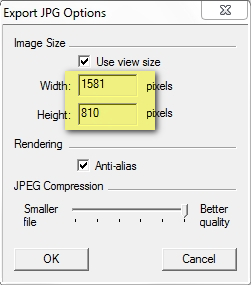
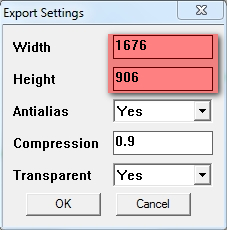
        Interesting...it seems that vpheight; width takes into consideration the viewport WITHOUT toolbars. Any fix for this?

        2011-09-26_174948.jpg


        2011-09-26_175104.jpg

        DESIGNER AND ARTIST DEREI.UK

        1 Reply Last reply
        Reply Quote 0
        • D
          davidlouis
          last edited by

          Hi Thom

          I've been using your plugin and am loving it... πŸ‘

          One small thing I have noticed is that a 'blank background' behind a 'glass' material is still interpreted as a complete transparency in the png exported file and if you're trying to slide in a sky behind say a glazed building, this can look a bit unrealistic.

          Would there be anyway to alter the plugin to recognize a transparent sketchup material and produce a semi transparent section over these areas in the resulting png much like the alpha maps generated by Vray that accompany jpg exports where black represents 100% transparent, white 100% opaque and shades of grey somewhere in between...? I'm not asking for a true alpha map file like Vray, merely that the coloured png export takes cogniscence of the transparent materials...

          Thanks

          Dave

          1 Reply Last reply
          Reply Quote 0
          • GaieusG
            Gaieus
            last edited by

            I am far not any expert at any scripting things but what I can imagine, here the plugin uses the same "exploring" methods of what is opaque and what is not as the SU shadow engine. I.e. if something is more than 70% opaque, it will be fully opaque and if it is less that 70% opaque, it will be fully transparent.

            Can you try a quick test to slide the opacity of these windows to 70%+ and export that way? Eventually, as a workaround, you can export two images this way and overlay them to get something "in-between" (and which you can mask out easily in PP).

            Gai...

            1 Reply Last reply
            Reply Quote 0
            • thomthomT
              thomthom
              last edited by

              I'm afraid I cannot do anything about the export results. I'm just calling a SketchUp method...

              Thomas Thomassen β€” SketchUp Monkey & Coding addict
              List of my plugins and link to the CookieWare fund

              1 Reply Last reply
              Reply Quote 0
              • M
                mods135
                last edited by

                Thomas I am wondering if the plugin works for version 8? I cannot seem to get an export with just the object showing. There is always still a background. Your plugin loaded ok and I left the settings as on this site (transparency =yes etc). The only problem I noticed is that the file type drop down list is blank - no file types show, so I cannot select png.
                Can you help?
                Thanks
                mods135

                1 Reply Last reply
                Reply Quote 0
                • Rich O BrienR
                  Rich O Brien Moderator
                  last edited by

                  When saving add .png to the file name. If the name is image then save as image.png.

                  This plugin only works with v8

                  Download the free D'oh Book for SketchUp πŸ“–

                  1 Reply Last reply
                  Reply Quote 0
                  • GaieusG
                    Gaieus
                    last edited by

                    Also make sure that you turn off ground and sky in your styles settings and set background colour to pure white (255,255,255)

                    Gai...

                    1 Reply Last reply
                    Reply Quote 0
                    • N
                      nomeradona
                      last edited by

                      never realized that this was a year old posting and yet this is my first time to see this excellent script. Thanks Thomas.

                      visit my blog: http://www.nomeradona.blogspot.com

                      1 Reply Last reply
                      Reply Quote 0
                      • A
                        AlainBo
                        last edited by

                        Very nice.
                        Could you just remember the settings we choosed, at least per session?
                        Could you have alook at the fields's parsing orde via tab key?
                        And why not a "respect aspect ratio checkbox?
                        And why not automatically add the .png extension which not seems to be the case. In fact if we don't specify extension, the image is not generated.

                        Wow, will be perfect.... lol

                        Thanks,
                        Alain

                        1 Reply Last reply
                        Reply Quote 0
                        • S
                          shahkoorosh
                          last edited by

                          thank you very much thomthom for this plugin, but unfortunately I couldn't use this.
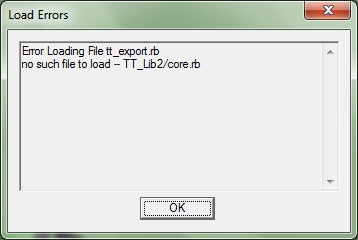
                          when I try to open SU this error will appears.

                          could u help me? thanks πŸ˜„


                          Error

                          1 Reply Last reply
                          Reply Quote 0
                          • TIGT
                            TIG Moderator
                            last edited by

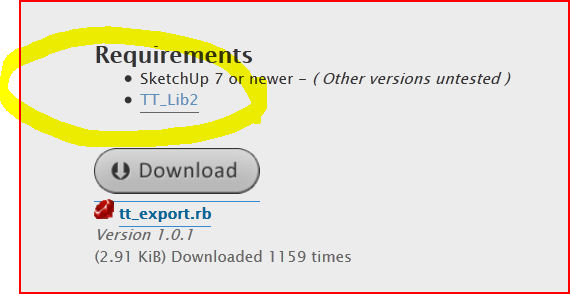
                            If you go back to the first page - where you downloaded the .rb file from you will see it says you require a support 'library' of files.
                            Use the link to get it, extract it and place its folder into the Plugins folder.
                            After Sketchup restarts it ought to find the required files in that folder and so your errors should stop...Capture.PNG
                            TIG

                            1 Reply Last reply
                            Reply Quote 0
                            • thomthomT
                              thomthom
                              last edited by

                              I'm going to change my template so that plugins will display a more Plain English message that TT_Lib is missing.

                              Thomas Thomassen β€” SketchUp Monkey & Coding addict
                              List of my plugins and link to the CookieWare fund

                              1 Reply Last reply
                              Reply Quote 0
                              • S
                                shahkoorosh
                                last edited by

                                @tig said:

                                If you go back to the first page - where you downloaded the .rb file from you will see it says you require a support 'library' of files.
                                Use the link to get it, extract it and place its folder into the Plugins folder.
                                After Sketchup restarts it ought to find the required files in that folder and so your errors should stop...[attachment=0:3vcl16zk]<!-- ia0 -->Capture.PNG<!-- ia0 -->[/attachment:3vcl16zk]

                                Thanks dude, It's worked

                                1 Reply Last reply
                                Reply Quote 0
                                • S
                                  seen
                                  last edited by

                                  Thank you very much πŸ‘

                                  1 Reply Last reply
                                  Reply Quote 0
                                  • O
                                    optimaforever
                                    last edited by

                                    Hello Thom,

                                    This script is very useful.
                                    Now when you export a batch of cameras from SU it resets the output resolution to your default 800x600.
                                    Is it possible to keep the last output resolution by default? (I mean, if I saved a PNG in 2000x1000, the next output will keep 2000x1000 instead of 800x600)...
                                    Thanks anyway.

                                    Ryo

                                    1 Reply Last reply
                                    Reply Quote 0
                                    • thomthomT
                                      thomthom
                                      last edited by

                                      I have an update coming up soon. Not ready yet though.

                                      Thomas Thomassen β€” SketchUp Monkey & Coding addict
                                      List of my plugins and link to the CookieWare fund

                                      1 Reply Last reply
                                      Reply Quote 0
                                      • Rich O BrienR
                                        Rich O Brien Moderator
                                        last edited by

                                        You can change the code using a text editor.

                                        I've mine setup to my resolution. πŸ‘

                                        Download the free D'oh Book for SketchUp πŸ“–

                                        1 Reply Last reply
                                        Reply Quote 0
                                        • R
                                          raineysky
                                          last edited by

                                          @thomthom said:

                                          I have an update coming up soon. Not ready yet though.

                                          Add mindreader to your list of skills. I just did a two hour search of the forums regarding transparent backgrounds and came across this. THANK YOU!!!

                                          1 Reply Last reply
                                          Reply Quote 0
                                          • R
                                            RichardU
                                            last edited by

                                            @thomthom said:

                                            I have an update coming up soon. Not ready yet though.

                                            I'm looking forward to it. Thanks.

                                            1 Reply Last reply
                                            Reply Quote 0

                                            Hello! It looks like you're interested in this conversation, but you don't have an account yet.

                                            Getting fed up of having to scroll through the same posts each visit? When you register for an account, you'll always come back to exactly where you were before, and choose to be notified of new replies (either via email, or push notification). You'll also be able to save bookmarks and upvote posts to show your appreciation to other community members.

                                            With your input, this post could be even better πŸ’—

                                            Register Login
                                            • 1
                                            • 2
                                            • 3
                                            • 4
                                            • 5
                                            • 6
                                            • 7
                                            • 8
                                            • 8 / 8
                                            • First post
                                              Last post
                                            Buy SketchPlus
                                            Buy SUbD
                                            Buy WrapR
                                            Buy eBook
                                            Buy Modelur
                                            Buy Vertex Tools
                                            Buy SketchCuisine
                                            Buy FormFonts

                                            Advertisement