sketchucation logo sketchucation
    • Login
    Oops, your profile's looking a bit empty! To help us tailor your experience, please fill in key details like your SketchUp version, skill level, operating system, and more. Update and save your info on your profile page today!
    ⚠️ Update | Sketchucation Tools 5.0.8 released with licensing improvements and bugfixes Download

    UGLY Sketchup Icon !

    Scheduled Pinned Locked Moved SketchUp Discussions
    sketchup
    24 Posts 13 Posters 3.9k Views 13 Watching
    Loading More Posts
    • Oldest to Newest
    • Newest to Oldest
    • Most Votes
    Reply
    • Reply as topic
    Log in to reply
    This topic has been deleted. Only users with topic management privileges can see it.
    • jeff hammondJ
      jeff hammond
      last edited by

      @al hart said:

      I have both SketchUp 7 and SketchUp 8 on my Windows toolbar - but they have the same icon.

      Has anyone created a good icon I could use for SU 8, to differentiate it from SU 7?

      I could easily change the icon on the toolbar, but do they still have programs which change the icon in the .EXE?

      i made a simple mod to the regular icon for version 7.. it's easy to change on macs but i'm not sure how to do it on windows..
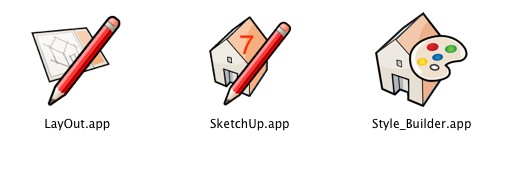

      screen1.jpg

      dotdotdot

      1 Reply Last reply
      Reply Quote 0
      • Dan RathbunD
        Dan Rathbun
        last edited by

        @al hart said:

        I could easily change the icon on the toolbar, but do they still have programs which change the icon in the .EXE?

        Any change to the EXE would be lost at the next maintanance release. In addition some firewalls or anti-virus programs will detect a change in the executable file's checksum.

        It is easy to change a shortcut (.lnk file,) to use any icon you choose. Right click the shortcut, choose "Properties" from the context menu, and click the "Change Icon..." button. Then browse to an custom .ico file, or a .dll file (that has internel icons.)

        I'm not here much anymore.

        1 Reply Last reply
        Reply Quote 0
        • GaieusG
          Gaieus
          last edited by

          @unknownuser said:

          ...However I've just found out that I'm not allowed to attach ico files...

          Try now...
          😉

          Gai...

          1 Reply Last reply
          Reply Quote 0
          • kiloK
            kilo
            last edited by

            Never posted on here before but as I design Oak framed buildings I created my own icon which I'm happy to share if anyone wants it!

            http://www.technical.primeoak.co.uk/wilson/index_htm_files/50.png

            However I've just found out that I'm not allowed to attach ico files - if anyone replies, I'll upload it somewhere else.
            Kilo

            Thanks !!


            Sketchup Icon

            1 Reply Last reply
            Reply Quote 0
            • brodieB
              brodie
              last edited by

              😄 Nice icon, very cool spinoff of the original.

              -Brodie

              steelblue http://www.steelbluellc.com

              1 Reply Last reply
              Reply Quote 0
              • P
                penumbradesign
                last edited by

                Very nice icon indeed Andy!

                1 Reply Last reply
                Reply Quote 0
                • EdsonE
                  Edson
                  last edited by

                  SkUp8icon_128.jpg

                  edson mahfuz, architect| porto alegre • brasil
                  http://www.mahfuz.arq.br

                  1 Reply Last reply
                  Reply Quote 0
                  • Al HartA
                    Al Hart
                    last edited by

                    I like the one with the "8", since my main confusion is between SketchUp versions.

                    However, this one is a .jpg and not a (hopefully transparent) .ico. So Windows will not let me use it.

                    Al Hart

                    http://wiki.renderplus.com/images/e/ef/Render_plus_colored30x30).PNG
                    IRender nXt from Render Plus

                    1 Reply Last reply
                    Reply Quote 0
                    • EdsonE
                      Edson
                      last edited by

                      I am almost sure you can find free programs to convert any image into a windows icon.

                      edson mahfuz, architect| porto alegre • brasil
                      http://www.mahfuz.arq.br

                      1 Reply Last reply
                      Reply Quote 0
                      • Al HartA
                        Al Hart
                        last edited by

                        OK 😛

                        Al Hart

                        http://wiki.renderplus.com/images/e/ef/Render_plus_colored30x30).PNG
                        IRender nXt from Render Plus

                        1 Reply Last reply
                        Reply Quote 0
                        • Dan RathbunD
                          Dan Rathbun
                          last edited by

                          I'm told GIMP will do it (and that it also has Ruby scripting.)

                          I'm not here much anymore.

                          1 Reply Last reply
                          Reply Quote 0
                          • jeff hammondJ
                            jeff hammond
                            last edited by

                            here it is as a transparent png..

                            SketchUp 8.png

                            preview

                            and an icns file (which i'm not certain will work with windows)
                            su8.icns.zip

                            dotdotdot

                            1 Reply Last reply
                            Reply Quote 0
                            • EdsonE
                              Edson
                              last edited by

                              @unknownuser said:

                              and an icns file (which i'm not certain will work with windows)

                              jeff,
                              the icon does not appear in the get info window (others do).
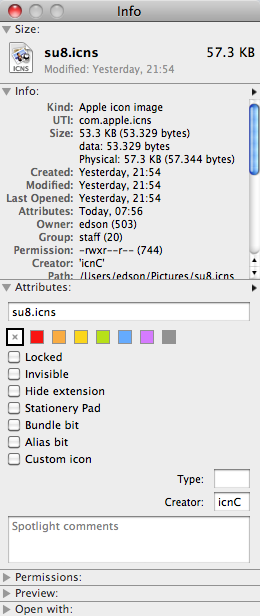
                              icon8.png

                              edson mahfuz, architect| porto alegre • brasil
                              http://www.mahfuz.arq.br

                              1 Reply Last reply
                              Reply Quote 0
                              • jeff hammondJ
                                jeff hammond
                                last edited by

                                see, that's what happens when i go posting things without testing first 😄

                                if you want to assign that icon to sketchup8 (on mac) then use the png instead..

                                -- open the png in preview then select all and copy (⌘A, ⌘C)
                                -- use the get info dialog for sketchup8
                                -- click the icon in the get info dialog and it will highlight
                                -- paste the png (⌘V)

                                you can do this for any thing with an icon and a get info dialog.. the original icon remains stored so anytime you want to revert to the original, get info -> select the icon -> delete

                                dotdotdot

                                1 Reply Last reply
                                Reply Quote 0
                                • EdsonE
                                  Edson
                                  last edited by

                                  thanks, jeff. it worked.

                                  edson mahfuz, architect| porto alegre • brasil
                                  http://www.mahfuz.arq.br

                                  1 Reply Last reply
                                  Reply Quote 0
                                  • jim smithJ
                                    jim smith
                                    last edited by

                                    @edson said:

                                    I am almost sure you can find free programs to convert any image into a windows icon.

                                    True- I found four without looking hard (I picked "image2iconConverter"). Easy to convert and in windows, just right click the icon, go to properties, change icon and pick the icon from where ever you stored it. Very easy
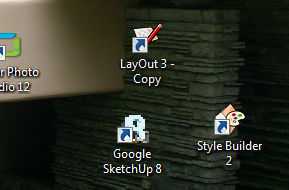


                                    2010-09-27_1009.png

                                    "Out of clutter find simplicity,
                                    from discord find harmony,
                                    In the middle of difficulty lies opportunity"
                                    Albert Einstein

                                    1 Reply Last reply
                                    Reply Quote 0

                                    Hello! It looks like you're interested in this conversation, but you don't have an account yet.

                                    Getting fed up of having to scroll through the same posts each visit? When you register for an account, you'll always come back to exactly where you were before, and choose to be notified of new replies (either via email, or push notification). You'll also be able to save bookmarks and upvote posts to show your appreciation to other community members.

                                    With your input, this post could be even better 💗

                                    Register Login
                                    • 1
                                    • 2
                                    • 1 / 2
                                    • First post
                                      Last post
                                    Buy SketchPlus
                                    Buy SUbD
                                    Buy WrapR
                                    Buy eBook
                                    Buy Modelur
                                    Buy Vertex Tools
                                    Buy SketchCuisine
                                    Buy FormFonts

                                    Advertisement