sketchucation logo sketchucation
    • 登入
    Oops, your profile's looking a bit empty! To help us tailor your experience, please fill in key details like your SketchUp version, skill level, operating system, and more. Update and save your info on your profile page today!
    🔌 Smart Spline | Fluid way to handle splines for furniture design and complex structures. Download

    SU 9 Wishlist

    已排程 已置頂 已鎖定 已移動 SketchUp Feature Requests
    sketchup
    436 貼文 99 Posters 95.7k 瀏覽 99 Watching
    正在載入更多貼文
    • 從舊到新
    • 從新到舊
    • 最多點贊
    回覆
    • 在新貼文中回覆
    登入後回覆
    此主題已被刪除。只有擁有主題管理權限的使用者可以查看。
    • R 離線
      Ruturaj
      最後由 編輯

      Hello,

      I think add rotate tool in to the material >> edit
      see below .......
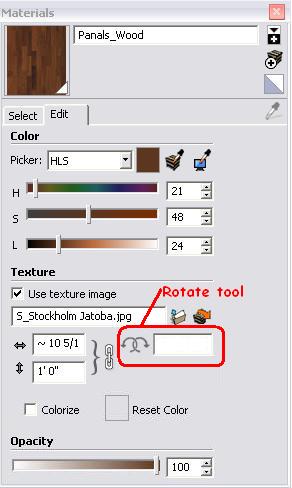
      Paint Bucket2 .JPG

      Thanks,
      RuturaJ

      1 條回覆 最後回覆 回覆 引用 0
      • boofredlayB 離線
        boofredlay
        最後由 編輯

        @unknownuser said:

        "Folder organization for the "In Model" material tab. Ex: grouping materials by component, allowing manual creation of folders within the "In Model" tab or when you create or import a group or component, have the option to create or choose a folder."

        I posted the above on the Google Moderator that everyone has access to here:
        https://www.google.com/moderator/#16/e=24a7a

        http://www.coroflot.com/boofredlay

        1 條回覆 最後回覆 回覆 引用 0
        • kenK 離線
          ken
          最後由 編輯

          My wish for Sketchup 9.

          I get three types of CAD drawings. The first is the original cad drawings, which I can use without any problems. The second is a PDF scanned drawing of an older hand drawing, that never was a CAD drawing. Which, I can import into Adobe Elements and turn parts of the drawing into PNG files which I can use, with some difficulty. And the third type is a PDF drawing either saved or printed from a CAD drawing.

          With the last drawing type, I have a program, PFD2DFX, which helps, and give me the opportunity to work with the drawing.

          So my wish is to have a native PDF to Sketchup importer, such that I don’t need to use another program to convert the PDF to a workable Sketchup drawing. This importer would only work on PDF files made from CAD drawing by the process of either exporting or printing from the CAD program to a PDF drawing.

          It would also be nice if one could import a scanned PDF drawing into Sketchup, like you can do now with a PNG or JPG file.

          Thanks for listening and the great Basecamp.

          Ken

          Ken

          Fight like your the third monkey on Noah's Ark gangway.

          1 條回覆 最後回覆 回覆 引用 0
          • T 離線
            tfdesign
            最後由 編輯

            @unknownuser said:

            It would also be nice if one could import a scanned PDF drawing into Sketchup, like you can do now with a PNG or JPG file.

            That's odd. Can't you do this? I can do it here- I just tried. Perhaps it's a Windows thing?

            My book "Let's SketchUp!" Download from here

            1 條回覆 最後回覆 回覆 引用 0
            • kenK 離線
              ken
              最後由 編輯

              @tfdesign said:

              @unknownuser said:

              It would also be nice if one could import a scanned PDF drawing into Sketchup, like you can do now with a PNG or JPG file.

              That's odd. Can't you do this? I can do it here- I just tried. Perhaps it's a Windows thing?

              No, I believe that the Mac's can, but not the windows.

              Ken

              Fight like your the third monkey on Noah's Ark gangway.

              1 條回覆 最後回覆 回覆 引用 0
              • jeff hammondJ 離線
                jeff hammond
                最後由 編輯

                something that i think would be interesting, helpful, as well as just plain cool (and something i feel google might be into) is a web version of sketchup.

                i upload a model then other people can join in and watch, navigate, edit, voice conference, etc..
                this is already happening in basic form but google seems to be one of the best companies to really make something like this work properly.

                dotdotdot

                1 條回覆 最後回覆 回覆 引用 0
                • D 離線
                  d12dozr
                  最後由 編輯

                  ...or even just a web-based Sketchup viewer so a client doesn't have to download anything...make it have the ability to support scenes for easier navigation.

                  3D Printing with SketchUp Book
                  http://goo.gl/f7ooYh

                  1 條回覆 最後回覆 回覆 引用 0
                  • B 離線
                    biff
                    最後由 編輯

                    How about the ability to incorporate equations into the measurements box, a la revit type equations. E.G. move command, then in box

                    =3000+(1000/3)
                    

                    and the object moves 3333 mm.
                    I so miss that function in SU.

                    1 條回覆 最後回覆 回覆 引用 0
                    • jeff hammondJ 離線
                      jeff hammond
                      最後由 編輯

                      still wishing for the ability to rotate with snapping/inferencing..
                      [wished for it last year too 😄 http://forums.sketchucation.com/viewtopic.php?p=192332#p192332 ]

                      it's not even 11am yet and i already needed that ability 3 times today!

                      dotdotdot

                      1 條回覆 最後回覆 回覆 引用 0
                      • TIGT 離線
                        TIG Moderator
                        最後由 編輯

                        @unknownuser said:

                        still wishing for the ability to rotate with snapping/inferencing..
                        [wished for it last year too 😄 http://forums.sketchucation.com/viewtopic.php?p=192332#p192332 ]
                        it's not even 11am yet and i already needed that ability 3 times today!

                        Try my Free Rotate Tool v3 ?

                        TIG

                        1 條回覆 最後回覆 回覆 引用 0
                        • EscapeArtistE 離線
                          EscapeArtist
                          最後由 編輯

                          Something that's driving me nuts lately is the ability to do a proper bevel job on sharp edges. IMO the SU folks probably view SU as primarily an architectural type program with a built in render solution and sharp edges aren't a concern, but when I model something that I'm going to export to an external render solution it isn't generally a house. In fact, I've never exported a house; my models all been real-world objects that don't have sharp edges. To be honest, I have yet to find a renderer that does a decent job of beveling. The bevel and bevel by bezier scripts work ok, but I'm forever chasing down mis-matched edges, holes, and surfaces that have shot past the object's edge in order to repair them (no matter the model size). It'd be great to be able to model something and have a simple, reliable bevel ability.

                          1 條回覆 最後回覆 回覆 引用 0
                          • T 離線
                            tfdesign
                            最後由 編輯

                            My wish for 9 is that the mouse zooming is just as effective over blank space as it is over a space that contains vector information (solid). It drives me crazy sometimes trying to zoom like mad, and just not to get very far.

                            Anyone else suffer from this? (Or has TIG made a plugin to remedy the situation?)

                            My book "Let's SketchUp!" Download from here

                            1 條回覆 最後回覆 回覆 引用 0
                            • thomthomT 離線
                              thomthom
                              最後由 編輯

                              I find the zooming over blank space to be too aggressive - too big jump. Troublesome when I'm working on just edges - like imported DWG data. I have to constantly keep aiming the cursor to be over an edge to avoid SU from zooming too far.

                              Thomas Thomassen — SketchUp Monkey & Coding addict
                              List of my plugins and link to the CookieWare fund

                              1 條回覆 最後回覆 回覆 引用 0
                              • T 離線
                                tfdesign
                                最後由 編輯

                                Oh yes, fix the bl**dy layers management!! Why is it that within a grouped object, several entities can co-exist on different layers all at the same time? This is utterly crazy! I can understand for whole objects, but single little things? It's silly. Perhaps I'm missing something here? 😕

                                My book "Let's SketchUp!" Download from here

                                1 條回覆 最後回覆 回覆 引用 0
                                • T 離線
                                  tfdesign
                                  最後由 編輯

                                  @thomthom said:

                                  I find the zooming over blank space to be too aggressive - too big jump.

                                  😲 😲 😲

                                  Really?? Maybe we're both missing something? Is there a missing variable somewhere, that can change this? Mine is painfully slow. 😕

                                  My book "Let's SketchUp!" Download from here

                                  1 條回覆 最後回覆 回覆 引用 0
                                  • thomthomT 離線
                                    thomthom
                                    最後由 編輯

                                    @tfdesign said:

                                    Oh yes, fix the bl**dy layers management!! Why is it that within a grouped object, several entities can co-exist on different layers all at the same time? This is utterly crazy! I can understand for whole objects, but single little things? It's silly. Perhaps I'm missing something here? 😕

                                    I find it useful to have fine control of the entities like that. Let me toggle on/off edges for parts of the mesh for instance - which is useful to control the object's presentation.

                                    Thomas Thomassen — SketchUp Monkey & Coding addict
                                    List of my plugins and link to the CookieWare fund

                                    1 條回覆 最後回覆 回覆 引用 0
                                    • thomthomT 離線
                                      thomthom
                                      最後由 編輯

                                      @tfdesign said:

                                      @thomthom said:

                                      I find the zooming over blank space to be too aggressive - too big jump.

                                      😲 😲 😲

                                      Really?? Maybe we're both missing something? Is there a missing variable somewhere, that can change this? Mine is painfully slow. 😕

                                      When you zoom while the mouse if over an entity to goes slower - and I wonder if the speed depends on how close it is to the camera - so when you get closer it goes slower.

                                      Zoom in while the mouse if over empty space and the zoom goes into hyperdrive.

                                      Thomas Thomassen — SketchUp Monkey & Coding addict
                                      List of my plugins and link to the CookieWare fund

                                      1 條回覆 最後回覆 回覆 引用 0
                                      • EscapeArtistE 離線
                                        EscapeArtist
                                        最後由 編輯

                                        Ability to sort and file Plugins!

                                        1 條回覆 最後回覆 回覆 引用 0
                                        • T 離線
                                          tfdesign
                                          最後由 編輯

                                          @thomthom said:

                                          @tfdesign said:

                                          @thomthom said:

                                          I find the zooming over blank space to be too aggressive - too big jump.

                                          😲 😲 😲

                                          Really?? Maybe we're both missing something? Is there a missing variable somewhere, that can change this? Mine is painfully slow. 😕

                                          When you zoom while the mouse if over an entity to goes slower - and I wonder if the speed depends on how close it is to the camera - so when you get closer it goes slower.

                                          Zoom in while the mouse if over empty space and the zoom goes into hyperdrive.

                                          Thom, I've just tried again, and I get the problem when I'm zoomed right in (something I do a lot). I can't seem to replicate what you are getting. There however doesn't seem to be a problem for me when I'm zoomed out. I also never use the zoom tool. Always the wheel on my Logitech Trackball Marble.

                                          Tom

                                          My book "Let's SketchUp!" Download from here

                                          1 條回覆 最後回覆 回覆 引用 0
                                          • thomthomT 離線
                                            thomthom
                                            最後由 編輯

                                            Yea - I always use the mouse scroll wheel as well.

                                            Thomas Thomassen — SketchUp Monkey & Coding addict
                                            List of my plugins and link to the CookieWare fund

                                            1 條回覆 最後回覆 回覆 引用 0
                                            • 1
                                            • 2
                                            • 3
                                            • 4
                                            • 5
                                            • 21
                                            • 22
                                            • 3 / 22
                                            • 第一個貼文
                                              最後的貼文
                                            Buy SketchPlus
                                            Buy SUbD
                                            Buy WrapR
                                            Buy eBook
                                            Buy Modelur
                                            Buy Vertex Tools
                                            Buy SketchCuisine
                                            Buy FormFonts

                                            Advertisement




