[Plugin] Solid Inspector
-
@thomthom said:
There are cases where a solid has tiny holes, where SketchUp fails to create a face because the edges are too small.
But aren't these then capable of 'healing'... any!edge.faces[1]can be tested for tiny length [say <= 0.5mm ?] and then its end vertex transformed to be over its start vertex so it then ceases to exist...
a long thin hole with one or more tiny sides becomes an edge with no hole, a hole with all tiny sides simply ceases to exist at all.
I have tested some code and I admit that making the ends of a tiny edge coincident isn't working - as you are left with an edge of zero length [!] with two coincident edges too! Moving vertices to become coincident must be possible - the TT-vertex-tools ? I am stumped
-
@tig said:
I have tested some code and I admit that making the ends of a tiny edge coincident isn't working - as you are left with an edge of zero length [!] with two coincident edges too! Moving vertices to become coincident must be possible - the TT-vertex-tools ? I am stumped
The only way I found, was a method similar to how you heal edges, you make a temp edge and then erase it. That will merge the vertices located at the same position and remove the zero length edge.
-
Actually, there is some more to it. Here are a few methods I use in Vertex Tools 1.1 to heal geometry after manipulating vertices:
<span class="syntaxdefault"><br /> </span><span class="syntaxcomment"># Heal geoemtry<br /></span><span class="syntaxdefault"> </span><span class="syntaxcomment"># (i) When vertices are merged into one point it one end up with zero size<br /></span><span class="syntaxdefault"> </span><span class="syntaxcomment"># faces and edges. These produce a messy mesh and cause errors to be<br /></span><span class="syntaxdefault"> </span><span class="syntaxcomment"># reported when Su validates the model.<br /></span><span class="syntaxdefault"> </span><span class="syntaxcomment">#<br /></span><span class="syntaxdefault"> </span><span class="syntaxcomment"># If one draw a dummy edge with SU's native edge tool it heals the <br /></span><span class="syntaxdefault"> </span><span class="syntaxcomment"># geometry. But if one does the same with the Ruby API it doesn't.<br /></span><span class="syntaxdefault"> </span><span class="syntaxcomment">#<br /></span><span class="syntaxdefault"> </span><span class="syntaxcomment"># Thanks to Gulcan Ocali from Tgi3D for suggesting a workaround where<br /></span><span class="syntaxdefault"> </span><span class="syntaxcomment"># the edge is created in a dummy group - then exploded. This appear to<br /></span><span class="syntaxdefault"> </span><span class="syntaxcomment"># make SU heal the geometry. The dummy edge is turned into a zero length<br /></span><span class="syntaxdefault"> </span><span class="syntaxcomment"># edge before exploding so it's automatically cleaned up when the group<br /></span><span class="syntaxdefault"> </span><span class="syntaxcomment"># is exploded.<br /></span><span class="syntaxdefault"> </span><span class="syntaxcomment">#<br /></span><span class="syntaxdefault"> </span><span class="syntaxcomment"># http://forums.sketchucation.com/viewtopic.php?f=180&t=35470#p312814<br /></span><span class="syntaxdefault"> </span><span class="syntaxcomment">#<br /></span><span class="syntaxdefault"> </span><span class="syntaxcomment"># This does however feel too much like a dirty hack. Would be nice to<br /></span><span class="syntaxdefault"> </span><span class="syntaxcomment"># know how to correctly do this.<br /></span><span class="syntaxdefault"> </span><span class="syntaxcomment">#<br /></span><span class="syntaxdefault"> </span><span class="syntaxcomment"># (?) Turn into a reusable method accepting an array of vertices to heal.<br /></span><span class="syntaxdefault"> </span><span class="syntaxcomment">#<br /></span><span class="syntaxdefault"> </span><span class="syntaxcomment"># (?) Is it nessesary to also do the same to soft-selected vertices?<br /></span><span class="syntaxdefault"> </span><span class="syntaxcomment">#<br /></span><span class="syntaxdefault"> </span><span class="syntaxcomment"># @since 1.1.0<br /></span><span class="syntaxdefault"> def self</span><span class="syntaxkeyword">.</span><span class="syntaxdefault">heal_vertex</span><span class="syntaxkeyword">(</span><span class="syntaxdefault"> entities</span><span class="syntaxkeyword">,</span><span class="syntaxdefault"> point </span><span class="syntaxkeyword">)<br /></span><span class="syntaxdefault"> point </span><span class="syntaxkeyword">=</span><span class="syntaxdefault"> point</span><span class="syntaxkeyword">.</span><span class="syntaxdefault">position if point</span><span class="syntaxkeyword">.</span><span class="syntaxdefault">is_a</span><span class="syntaxkeyword">?(</span><span class="syntaxdefault"> Sketchup</span><span class="syntaxkeyword">;;</span><span class="syntaxdefault">Vertex </span><span class="syntaxkeyword">)<br /></span><span class="syntaxdefault"> temp_group </span><span class="syntaxkeyword">=</span><span class="syntaxdefault"> entities</span><span class="syntaxkeyword">.</span><span class="syntaxdefault">add_group<br /> temp_edge </span><span class="syntaxkeyword">=</span><span class="syntaxdefault"> temp_group</span><span class="syntaxkeyword">.</span><span class="syntaxdefault">entities</span><span class="syntaxkeyword">.</span><span class="syntaxdefault">add_line</span><span class="syntaxkeyword">(</span><span class="syntaxdefault"> point</span><span class="syntaxkeyword">,</span><span class="syntaxdefault"> point</span><span class="syntaxkeyword">.</span><span class="syntaxdefault">offset</span><span class="syntaxkeyword">(</span><span class="syntaxdefault"> Z_AXIS </span><span class="syntaxkeyword">)</span><span class="syntaxdefault"> </span><span class="syntaxkeyword">)<br /></span><span class="syntaxdefault"> temp_group</span><span class="syntaxkeyword">.</span><span class="syntaxdefault">entities</span><span class="syntaxkeyword">.</span><span class="syntaxdefault">transform_by_vectors</span><span class="syntaxkeyword">(</span><span class="syntaxdefault"> </span><span class="syntaxkeyword">[</span><span class="syntaxdefault">temp_edge</span><span class="syntaxkeyword">.</span><span class="syntaxdefault">end</span><span class="syntaxkeyword">],</span><span class="syntaxdefault"> </span><span class="syntaxkeyword">[</span><span class="syntaxdefault">Z_AXIS</span><span class="syntaxkeyword">.</span><span class="syntaxdefault">reverse</span><span class="syntaxkeyword">]</span><span class="syntaxdefault"> </span><span class="syntaxkeyword">)<br /></span><span class="syntaxdefault"> temp_group</span><span class="syntaxkeyword">.</span><span class="syntaxdefault">explode<br /> end<br /> <br /> </span><span class="syntaxcomment"># @since 1.1.0<br /></span><span class="syntaxdefault"> def self</span><span class="syntaxkeyword">.</span><span class="syntaxdefault">heal_vertices</span><span class="syntaxkeyword">(</span><span class="syntaxdefault"> entities</span><span class="syntaxkeyword">,</span><span class="syntaxdefault"> points </span><span class="syntaxkeyword">)<br /></span><span class="syntaxdefault"> if points</span><span class="syntaxkeyword">.</span><span class="syntaxdefault">is_a</span><span class="syntaxkeyword">?(</span><span class="syntaxdefault"> Enumerable </span><span class="syntaxkeyword">)<br /></span><span class="syntaxdefault"> for point in points<br /> self</span><span class="syntaxkeyword">.</span><span class="syntaxdefault">heal_vertex</span><span class="syntaxkeyword">(</span><span class="syntaxdefault"> entities</span><span class="syntaxkeyword">,</span><span class="syntaxdefault"> point </span><span class="syntaxkeyword">)<br /></span><span class="syntaxdefault"> end<br /> else<br /> self</span><span class="syntaxkeyword">.</span><span class="syntaxdefault">heal_vertex</span><span class="syntaxkeyword">(</span><span class="syntaxdefault"> entities</span><span class="syntaxkeyword">,</span><span class="syntaxdefault"> points </span><span class="syntaxkeyword">)<br /></span><span class="syntaxdefault"> end<br /> end<br /> <br /> </span><span class="syntaxcomment"># Tries to heal all zero length edges in the given set of entities. This<br /></span><span class="syntaxdefault"> </span><span class="syntaxcomment"># should also heal zero size faces since they are bound by zero length edges.<br /></span><span class="syntaxdefault"> </span><span class="syntaxcomment">#<br /></span><span class="syntaxdefault"> </span><span class="syntaxcomment"># @since 1.1.0<br /></span><span class="syntaxdefault"> def self</span><span class="syntaxkeyword">.</span><span class="syntaxdefault">heal_entities</span><span class="syntaxkeyword">(</span><span class="syntaxdefault"> entities </span><span class="syntaxkeyword">)<br /></span><span class="syntaxdefault"> return if entities</span><span class="syntaxkeyword">.</span><span class="syntaxdefault">length </span><span class="syntaxkeyword">==</span><span class="syntaxdefault"> 0<br /> parent </span><span class="syntaxkeyword">=</span><span class="syntaxdefault"> entities</span><span class="syntaxkeyword">.</span><span class="syntaxdefault">first</span><span class="syntaxkeyword">.</span><span class="syntaxdefault">parent<br /> for entity in entities<br /> next unless entity</span><span class="syntaxkeyword">.</span><span class="syntaxdefault">is_a</span><span class="syntaxkeyword">?(</span><span class="syntaxdefault"> Sketchup</span><span class="syntaxkeyword">;;</span><span class="syntaxdefault">Edge </span><span class="syntaxkeyword">)<br /></span><span class="syntaxdefault"> if entity</span><span class="syntaxkeyword">.</span><span class="syntaxdefault">length </span><span class="syntaxkeyword">==</span><span class="syntaxdefault"> 0<br /> self</span><span class="syntaxkeyword">.</span><span class="syntaxdefault">heal_vertex</span><span class="syntaxkeyword">(</span><span class="syntaxdefault"> parent</span><span class="syntaxkeyword">,</span><span class="syntaxdefault"> entity</span><span class="syntaxkeyword">.</span><span class="syntaxdefault">start </span><span class="syntaxkeyword">)<br /></span><span class="syntaxdefault"> end<br /> end<br /> end<br /></span> -
So that method[s] run after any tiny [0.5mm?] edges are shrunk to be zero by transforming the end vertex to be over the start vertex will then heal any 'small [zero width] holes' ?
-
@tig said:
So that method run after any tiny [0.5mm?] edges are shrunk to zero will heal the 'small [zero width] holes' ?
Any zero length edge and zero size face should be healed (read: removed by SU's auto-merge feature).
-
But if you find some edges ~0.5mm long and merge the vertices that edge still exists as a zero length edge - SUp doesn't auto-merge them - also the previously separated other sides of the hole are now coincident and not auto-merged either!
So your code would remove the zero length edge by forcing an auto-merge BUT do the coincident edges then merge too? I don't have time to test it - but if it works it's the basis of having a tool to 'make solid' groups etc that have tiny holes -
OMG, THANK YOU THANK YOU THANK YOU!
I cant wait to use this too...combined with Artisan...OMG...FINALLY, I can do 3D
modeling without countless hours of error fixing (even when working large scale).
This is going to save days of my life...lol.
CHEERS!
<---swigs a brewski in your honor!
-
OK, I'm having the same problem as another user, Solid Inspector doesn't show up in the menu. I'm using Sketchup 8 (7 is gone), put the .rb in the plugins folder and also the library2 folder in the plugins folder. (In fact, now that I look at it, several plugins don't show up?) What am I doing wrong:


-
@papabear60 said:
What am I doing wrong:
You ain't looking at the description of the plugin.
 Not all plugins add menus to the Plugins menu. Check the info in the first post for how to use.
 -
As TT said... not all scripts appear in the
PluginsMenu - this one is set to load in theToolsMenu as explained on the tool's download page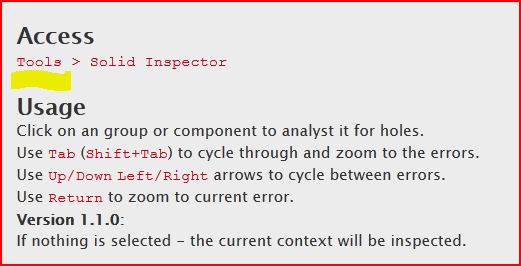 that is UNLESS the "
ThomThom's Plugins" menu is loaded by the scripttt_0000_menu.rb- then that submenu is added inPluginsand TT's tools all collect there ! [but that's academic as you don't appear to have file that inPluginsfolder, or the submenu it would make...]
So look in theToolsMenu...
If it's still not there come back to us... -
@papabear60 said:
OK, I'm having the same problem as another user, Solid Inspector doesn't show up in the menu. I'm using Sketchup 8 (7 is gone), put the .rb in the plugins folder and also the library2 folder in the plugins folder. (In fact, now that I look at it, several plugins don't show up?) What am I doing wrong:
FWIW, you don't have the current cutlist plugin either.
-
OK, that worked ... as did the Solid Inspector, when I first clicked on the tool then used the controls. My bad. Still learning this great product. This tool solves a big problem that I've encountered creating solids - and will save me hours of time spent recreating solids that aren't really solids.
Thank you both.
Dave
-
OK, thanks for the heads-up on Cut List, but how could you tell from the picture I sent?
-
By the name. The current version would show as "cutlist.rb".
-
Just wanted to say: this plugin is the biggest thing to happen since hotdogs. Hurray for workflow!
-
Very, VERY impressive application! Thom you've made my work so much easier, and for that I am truly grateful. This "Error GPS" is remarkable, thank you so much for the amount of time and effort you've put into this plugin, in order of making everyone elses life T-H-A-T M-U-C-H easier. Merci mon amis !
Sincerely,
Kyle James
-
-
Now thatwas a proper "thank you".
-
Hi, kind of a sketchup newbie here. I am using this plugin to check my model for water tightness, but I am having trouble understanding the output. Would anyone mind looking at these screen shots and giving me some tips? Thanks!
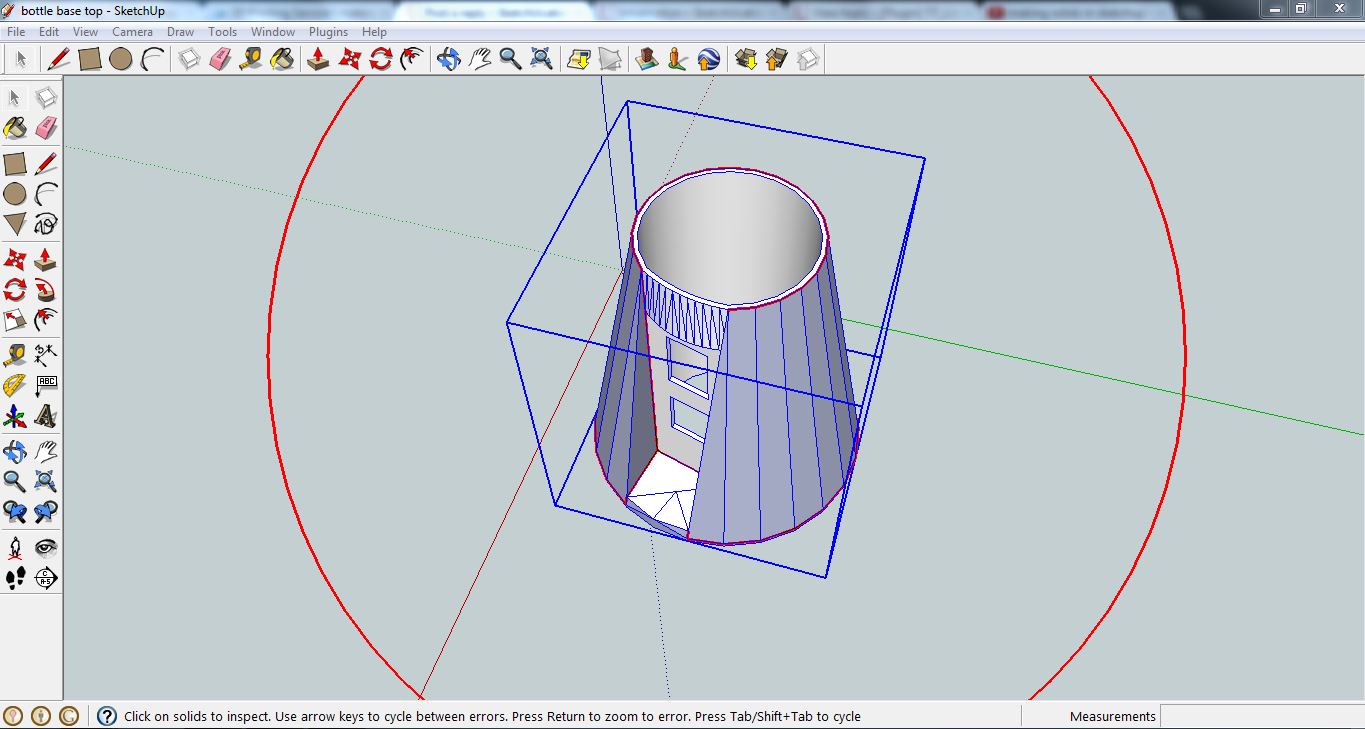
-
In order to build a solid object, there cannot be inner faces (amopng other conditions). You have some - and that's still not the only reason as deleting the face in the screenshot below still does not fix it.
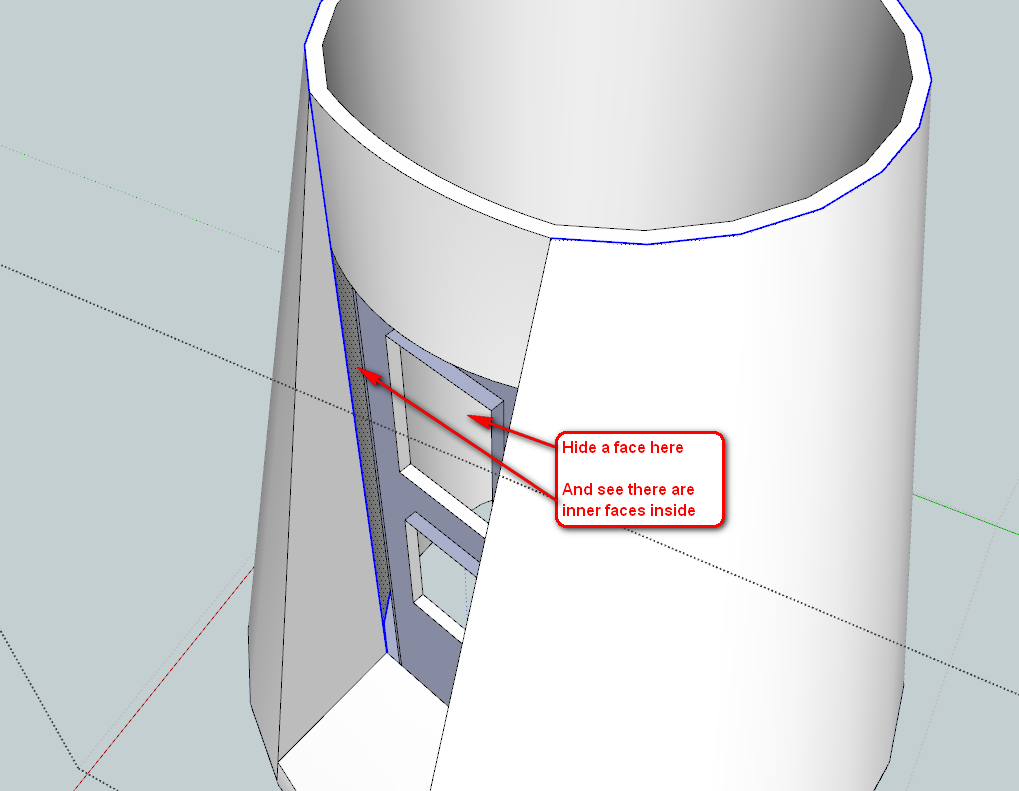
(Note that I have reversed some faces and smoothed the group generally...)
As it turns out, it was all inner faces. Did not take too long to fix: when you have some time, send ThomThom a cookie.





Advertisement