SketchUP 8
-
@cadmunkey said:
Jeff what did you do in that video that you couldnt already do in SU7? Am I missing something here?
For one , I never left sketchup. Two, received a color image. But the main thing is when I turned on hidden geometry at the end. If I imported terrain for that site in su7, it'd be divided into 3 sections along the short side leaving me with 300x300' squares of land. 8 gets the terrain more detailed and accurate and it's actually a usable feature now.
-
I was just about to say something similar, before the terrain that came from GE was useless and I had to use SDS to get it smooth, now I can get a color image with a higher quality mesh and even export into Vue with minimal tweaking.
-
@cadmunkey said:
@unknownuser said:
lol
i used this one simple video to send to the homeoffice showing a site we're planning for and immediately received approval to upgrade to su8.[flash=660,405:2ccvl0e5]http://www.youtube.com/v/TRcNgLDk7OA?fs=1&hl=en_US&rel=0&color1=0x2b405b&color2=0x6b8ab6&border=1[/flash:2ccvl0e5]
Jeff what did you do in that video that you couldnt already do in SU7? Am I missing something here?
he got double the accuracy of the elevation data,
he got a color texture on it,
he got to determine the exact rectangular cut he wanted.
he was also able to search for and retrieve the data without ever opening Google Earth -
So the mesh is now alot more accurate. Thats great I will give it a try. I have used land meshes before from google earth but I find that they tend to be a couple of meters out here and there once I get a proper site survey data thru at a later stage.
I am getting SU8 btw, paid for upgrade by my client. Just wish the UV tools were improved natively, not via ruby scripts and increased polygon support. I guess most of us are expecting great things from sketchup without paying an exorbitant price, maybe a little unfair on the SU team I dunno. -
Bought and paid for my upgrade yesterday.
I'm using LayOut more and more, so the minor tweaks there are welcome.
Solid tools are also welcome.And I really like the new 'back edges' view. Seems to be quicker than XRay in many situations.
I do like the new 'Get Location' feature. I've only done 1 grab with it... but might make workflow a bit easier.
Overall seems a bit speedier than 7.xx? that I was running, but I can't back that up with facts.
I don't do much rendering aside from simple materials and sketchy output that I'll fotosketch... so for me - anything that speeds up native SketchUp processes and makes walkthroughs / Layout / etc. easier I like.So far the few plugins I use are up and running, with the exception of the SimLab 3d PDF exporter. Getting a runtime error on it.
On the griping about 8 issue:
-
Personally I think SU should move to an open platform model.
-
Keep the base program simple, with modules, rubies, plugines, etc. easy to use and to customize for each niche / industry. (and a central app world type model for distributing - might be a way to integrate Google checkout with 'certified' plugins. PRO might be base + architecture pack or base + rendering pack or base + landscape pack.
-
LayOut - its underated, and sometimes a bit underpowered - but has some nice potential. I am starting to do construction docs with SketchUp and LayOut - so speed boosts in LayOut would be huge, as well as smarter tools for cutting and detailing sections in my SketchUp models). Split it off from the modeling portion of the program, so my above idea might be base sketchup + architecture pack pro(plugins, tools, etc.) + LayOut = $495.
-
Avoid bloatware and feature creep! I have AutoCAD and a host of other programs that I can use to work in a bloated, non intuitive program if I want. I like that in SketchUp there are basic tools that are fairly easy to use, and I can tweak those basics with rubies / plugins.
-
Is Stylemaker necessary? I wonder what the user base is for it. I'd rather see it be phased out and resources devoted to other concerns within the main program.
-
Dynamic Components... such promise. Any chance there will be more meat here, with easier (and more elegant) to use toolbar / palette access?
-
-
I was initially quite happy with the improvements - maybe because my expectations were rather moderate and because I was happy there was something new at last..
I was especially excited about the new 'back edges' because I like using SU for NPR. I had tried to get something like back edges by overlaying normal and X-Ray imagery in photoshop. Back edges could take the process to another level. BUT... it seems like you can only use the back edges in the Default Styles. In all other styles it's disabled. And nothing about back edges in Style Builder, so you cannot design your own back edge style.
If something in the styles department is changed one would at least expect it to be fully implemented. This looks like a first simple tryout of a new function. Since it's all part of the same render engine it should not be that difficult to implement it in all styles and design some extra hidden line styles for the existing styles? After all these years, even the 'competition' styles haven't changed, and no new styles were added. So I'm not disappointed about the new functionality - that's how SU works - but rather about it's shallow implementation.
Is there a roadmap for Back Edges mr. Bacus?
For me it's not so much about the lack of new functions (we have rubies for that), but about the poor implementation. Dynamic Components in 7 - great idea, questionable implementation - and now back edges in 8.
-
I'm coming to this thread a bit late, since I'm usually in LayOut Land. We love ruby just as a lot of you do, but it's not for everyone. Just as Apple can easily see that their top crashes are Flash-based, we in QA see ruby crashes, and to quote Bono: "uno dos tres catorce". And there are probably a few on the top crash list sprinkled between tres and catorce. That's OK for some of you, in exchange for the power you get, but just like trying to get your older relatives to adopt Linux, you may find that it's not for everyone. Just be considerate of others opinions, and we'll keep trying to listen to yours.
b
-
I must say that I am still experiencing serious errors in part and layer management, which I would very much like to cleared up at some point please.
-
@pitrak said:
Is there a roadmap for Back Edges mr. Bacus?
As a matter of policy (both Google's and before that @Last's), we won't comment on unreleased features or future directions for the product in any but the broadest possible terms. I recognize how much you'd like to know what's coming next, but we need to preserve a quiet space in which the team is free to experiment with projects that may not work out. Software development is more like painting than manufacturing, and you're better off in the end if we're free to be creative.
john
. -
@aerilius said:
@bmike said:
questionable implementation
I think you meant:
@pitrak said:
For me it's not so much about the lack of new functions (we have rubies for that), but about the poor implementation. Dynamic Components in 7 - great idea, questionable implementation - and now back edges in 8.
-
Sorry, I promiss, I quoted from pitrak and didn't edit the quote. I have no clue how that happened

Now I corrected it, hope that's fine
-
@aerilius said:
Sorry, I promiss, I quoted from pitrak and didn't edit the quote. I have no clue how that happened
Now I corrected it, hope that's fineNo worries!

-
@jbacus said:
As a matter of policy (both Google's and before that @Last's), we won't comment on unreleased features or future directions for the product in any but the broadest possible terms. I recognize how much you'd like to know what's coming next, but we need to preserve a quiet space in which the team is free to experiment with projects that may not work out. Software development is more like painting than manufacturing, and you're better off in the end if we're free to be creative.
john
.Thanks for your answer. Exactly what I'ld like to do: paint and be more creative. Still haven't got a clue why Back Edges were not implemented in depth, but now at least I know why I don't know.
-
@aerilius said:
@pitrak said:
questionable implementation
SketchUp has already very flexible tools (-> modifier keys) that allow a basic interface with only very few but powerful toolbar buttons. Similar to your request, there are ideas to "complete" or polish existing tools so that they have less limits:
I was only referring to DC and now Back edges. I agree that the other tools are simple, flexible and powerful. But there is indeed a lot of room for improvement.
Personally I am a big fan of MoI3D, I just use it for different purposes than Sketchup. Developed by one single, brilliant guy, who gives amazing user feedback and constantly works to get the program better. Big advantage for him is his users are mainly pros and give very meaningful suggestions.
If you talk about simple buttons with a lot of power, for me MoI beats Sketchup. You can trim a line with a solid, operations are dependent on your viewport, infinite construction lines can be drawn while you're inside your command, it all works flawlessly and powerfully with very simple functions. If you're a newbie, you'll get up to speed fast enough. If you know all the tricks and hidden shortcuts and functions, you have lots of control and drawing power.But MoI is 'just' a nurbs modeler, and for some tasks I like to model with textures applied. What I want to say: we all know what sketchup is good at, but we also know that it could be improved upon without giving up on simplicity.
I'll get back to my model now.. Just have to push the right buttons and she does everything I want!
-
I just read that Sketchup is still bigger than Revit, right behind 3ds Max.
http://www.cgarchitect.com/news/Reviews/Review070_1.aspLooking at these numbers I understand the disappointment about were Sketchip is going according to Google's stated strategy. Obviously a large portion of SU's userbase would love to stay on board a winning ship. One wonders truly how a more dedicated CAD company would have handled such succes in the business. A good chance SU would become the industry standard in architectural modeling. Many feel here that SU needs another, younger and more enthousiastic captain more like the original one to command the current SU team.
But at the moment SU is still a great tool and SU8 is even better. But looking at SU8, SU will slowly drop down the list knowing that it could have been moving up.
Francois -
Aerilius - unsuccessful for you does not mean unsuccessful for everyone, and whom did I offend?
b
-
@pitrak said:
questionable implementation
SketchUp has already very flexible tools (-> modifier keys) that allow a basic interface with only very few but powerful toolbar buttons. Similar to your request, there are ideas to "complete" or polish existing tools so that they have less limits:
scale: orientation of scaling box
pushpull: why can't I use it on curved surfaces (would a new user ask)
polygon: orientation of edge-mid-point in mouse direction
consistent line style options (back edges in all styles available)I fear that improvements in the old tools could hold the SketchUp team off from concentrating at the same time on the most needed new features (and the requests list is this time long). Me and many others would probably like both.
-
**%(#000060)[I have just downloaded the 8th version, wich by the way it is not noticed that there is this upgrade when I ve runned the 7.1 version that i have.
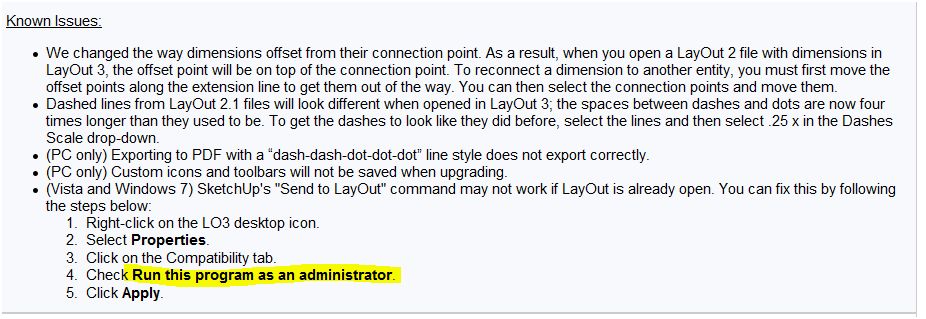
LAYOUT 3 vanissh...s when it is openned telling that i have 4..whatever minutes left in the trial.
I just can not test it ¡¡¡
maybe it is my computer and so on...
but I ask you people here, does it occurs to you ?
thanks]** -
@unknownuser said:
**]. But looking at SU8, SU will slowly drop down the list knowing that it could have been moving up.
Francois%(#000080)[we have been saying this for a long time now...
I thought that as far as LAYOUT was growing stable and more stable and improving a lot it was a guarantee.
But now, if it is confirmed that I can not test it before I buy it,
well ............................................there is no hope i would think.] -
**%(#000040)[Ok,
solved
just seen the known issues
sorry for my enter
but it would be good to give this information directly somewhere
thank_you]**







Advertisement