sketchucation logo sketchucation
    • 登入
    Oops, your profile's looking a bit empty! To help us tailor your experience, please fill in key details like your SketchUp version, skill level, operating system, and more. Update and save your info on your profile page today!
    ⚠️ Important | Libfredo 15.6b introduces important bugfixes for Fredo's Extensions Update

    [Tutorial] PickHelper - Visual Guide

    已排程 已置頂 已鎖定 已移動 Developers' Forum
    34 貼文 11 Posters 2.8k 瀏覽 11 Watching
    正在載入更多貼文
    • 從舊到新
    • 從新到舊
    • 最多點贊
    回覆
    • 在新貼文中回覆
    登入後回覆
    此主題已被刪除。只有擁有主題管理權限的使用者可以查看。
    • thomthomT 離線
      thomthom
      最後由 編輯

      When I first came across the PickHelper I was confused to exactly what data the various methods returned. I finally got around to compile a small visual guide.

      [mod=Outdated:3qctczkf]Latest version is here: http://www.thomthom.net/thoughts/2013/01/pickhelper-a-visual-guide/[/mod:3qctczkf]

      Note: this is not a complete guide of all the methods.
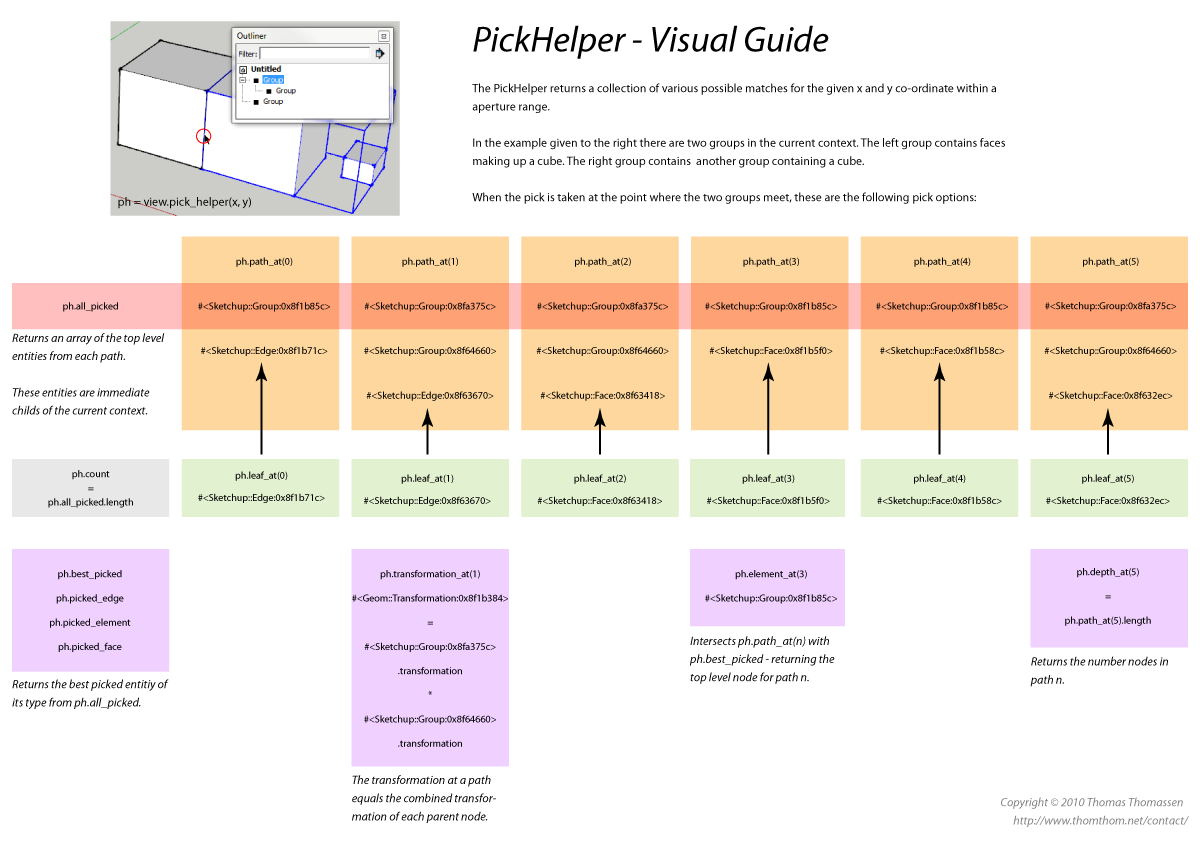
      PickHelper - Visual Guide

      What you think? Understandable?


      PickHelper - Visual Guide
      Print Version

      Thomas Thomassen — SketchUp Monkey & Coding addict
      List of my plugins and link to the CookieWare fund

      1 條回覆 最後回覆 回覆 引用 0
      • Chris FullmerC 離線
        Chris Fullmer
        最後由 編輯

        I'm looking it over. The first thing I see if in the top, it says "in the example to right". the example is actually to the left.

        Lately you've been tan, suspicious for the winter.
        All my Plugins I've written

        1 條回覆 最後回覆 回覆 引用 0
        • thomthomT 離線
          thomthom
          最後由 編輯

          Left - Right - it's all semantics... 😒 😳

          Thomas Thomassen — SketchUp Monkey & Coding addict
          List of my plugins and link to the CookieWare fund

          1 條回覆 最後回覆 回覆 引用 0
          • EdsonE 離線
            Edson
            最後由 編輯

            sorry, guys. you have lost me. what the heck is PickHelper???? 😲

            edson mahfuz, architect| porto alegre • brasil
            http://www.mahfuz.arq.br

            1 條回覆 最後回覆 回覆 引用 0
            • thomthomT 離線
              thomthom
              最後由 編輯

              @edson said:

              sorry, guys. you have lost me. what the heck is PickHelper???? 😲

              You have strayed into the dark path of SketchUp API programming. 😄
              http://code.google.com/apis/sketchup/docs/ourdoc/pickhelper.html

              Thomas Thomassen — SketchUp Monkey & Coding addict
              List of my plugins and link to the CookieWare fund

              1 條回覆 最後回覆 回覆 引用 0
              • EdsonE 離線
                Edson
                最後由 編輯

                sorry: wrong mumber. 😉

                edson mahfuz, architect| porto alegre • brasil
                http://www.mahfuz.arq.br

                1 條回覆 最後回覆 回覆 引用 0
                • Chris FullmerC 離線
                  Chris Fullmer
                  最後由 編輯

                  🤣

                  @Thom - I've decided I do not know enough about the pickhelper to understand this yet. I've used it, but only the best_picked method. So I've never had to worry about leafs and paths. Maybe once I get more into the pickhelper I'll have something useful to say 😛

                  Lately you've been tan, suspicious for the winter.
                  All my Plugins I've written

                  1 條回覆 最後回覆 回覆 引用 0
                  • thomthomT 離線
                    thomthom
                    最後由 編輯

                    Well - that means there is room for improvements. 😉
                    Is there some parts that does make sense?

                    Thomas Thomassen — SketchUp Monkey & Coding addict
                    List of my plugins and link to the CookieWare fund

                    1 條回覆 最後回覆 回覆 引用 0
                    • TIGT 離線
                      TIG Moderator
                      最後由 編輯

                      Sorry, but I understood it better before you published your guide 😒 😉

                      TIG

                      1 條回覆 最後回覆 回覆 引用 0
                      • J 離線
                        jessejames
                        最後由 編輯

                        Wow ThomThom this is a tough crowd tonight! 😲. My connect speed seems to be on granny mode tonight (or your pdf is really large) but as soon as i can get an eyeall on that PDF i'll let ya know what i think 😉

                        Always sleep with a loaded gun under your pillow!

                        1 條回覆 最後回覆 回覆 引用 0
                        • thomthomT 離線
                          thomthom
                          最後由 編輯

                          Nothing to it but back to the drawing board. Think I'll make the next one bigger. Bigger is better, right? 😄

                          Thomas Thomassen — SketchUp Monkey & Coding addict
                          List of my plugins and link to the CookieWare fund

                          1 條回覆 最後回覆 回覆 引用 0
                          • M 離線
                            MartinRinehart
                            最後由 編輯

                            Bravo, ThomThom! 👍 👍 👍

                            I love it when explorers return from parts unknown bearing and sharing maps.

                            (Nit: The plural of child is children.)

                            Author, Edges to Rubies - The Complete SketchUp Tutorial at http://www.MartinRinehart.com/models/tutorial.

                            1 條回覆 最後回覆 回覆 引用 0
                            • thomthomT 離線
                              thomthom
                              最後由 編輯

                              @martinrinehart said:

                              Bravo, ThomThom! 👍 👍 👍

                              Someone understood this? 😮 😄

                              @martinrinehart said:

                              (Nit: The plural of child is children.)

                              Thanks - I'll sort it out for version 2. Getting a better idea on how to visualize this.

                              Thomas Thomassen — SketchUp Monkey & Coding addict
                              List of my plugins and link to the CookieWare fund

                              1 條回覆 最後回覆 回覆 引用 0
                              • thomthomT 離線
                                thomthom
                                最後由 編輯

                                Revision 3

                                I've finally got around to work on a revision for this. Would you please have a look at this draft and give me your thoughts? Is it more understandable?
                                This version is more verbose and instead of trying to explain the entire class in one diagram I broke it down into categories.


                                PickHelper - Rev3 - 09-12-2013.pdf

                                Thomas Thomassen — SketchUp Monkey & Coding addict
                                List of my plugins and link to the CookieWare fund

                                1 條回覆 最後回覆 回覆 引用 0
                                • jolranJ 離線
                                  jolran
                                  最後由 編輯

                                  I had a quick look. Good stylished job! Appears very easy too follow.

                                  1 條回覆 最後回覆 回覆 引用 0
                                  • Dan RathbunD 離線
                                    Dan Rathbun
                                    最後由 編輯

                                    Text in Console Boxes a bit too small.

                                    Green bubble text 2 steps too small.

                                    Content text a bit too small.

                                    Any Ruby expressions could be in Ruby-color.

                                    Basically - too much wasted whitespace on the pages.

                                    BUT the organization looks good... a should make a nice tutorial.

                                    I'm not here much anymore.

                                    1 條回覆 最後回覆 回覆 引用 0
                                    • thomthomT 離線
                                      thomthom
                                      最後由 編輯

                                      @dan rathbun said:

                                      Text in Console Boxes a bit too small.

                                      Green bubble text 2 steps too small.

                                      Content text a bit too small.

                                      How are you viewing it? Full pagewidth? On what size monitor?

                                      @dan rathbun said:

                                      Any Ruby expressions could be in Ruby-color.

                                      Higher contrast for the code expressions would be good. But I wanted to ensure the content made any sense before I polished up the graphical details.

                                      @dan rathbun said:

                                      Basically - too much wasted whitespace on the pages.

                                      Specifically where? The edges?
                                      I've deliberately used white space to separate the sections and divide the information into chunks so the eye is served smaller units. Hearing why you think it's too much white-space would be interesting.

                                      First of all I'm trying to gauge if the information is making sense. I want to nail the big details before I polish the small details.

                                      Thomas Thomassen — SketchUp Monkey & Coding addict
                                      List of my plugins and link to the CookieWare fund

                                      1 條回覆 最後回覆 回覆 引用 0
                                      • thomthomT 離線
                                        thomthom
                                        最後由 編輯

                                        @jolran said:

                                        I had a quick look. Good stylished job! Appears very easy too follow.

                                        Did it make any sense?

                                        Thomas Thomassen — SketchUp Monkey & Coding addict
                                        List of my plugins and link to the CookieWare fund

                                        1 條回覆 最後回覆 回覆 引用 0
                                        • jolranJ 離線
                                          jolran
                                          最後由 編輯

                                          Yes it made sence. I love these visual guides 😄

                                          I might be a good testsubject because I have never used pickhelper.

                                          Segments and Points confused me a little, and maybe another row of explanation would not hurt.

                                          Theese following ideas may just be a subject of personal taste.
                                          (People have their way of "taking in" information visually, and it might be impossible to please everyone.)

                                          Label groups and components G1, G2 etc maybe adds 1 more level of translating information? If its for conserving space, maybe the example should include less entities.

                                          The "Test scene" picture could be a "standard style"(lightgrey) screengrab? So user feel familiar with the scene and working in SU.

                                          In any way. Great job, and thanks for doing guides like this.

                                          1 條回覆 最後回覆 回覆 引用 0
                                          • thomthomT 離線
                                            thomthom
                                            最後由 編輯

                                            @jolran said:

                                            Segments and Points confused me a little, and maybe another row of explanation would not hurt.

                                            Expand on what "segments" and "points" are?

                                            @jolran said:

                                            Label groups and components G1, G2 etc maybe adds 1 more level of translating information? If its for conserving space, maybe the example should include less entities.

                                            This is something I went back and forth quite a bit with. Initially I had just plain colours, one for containers (groups and components) and one of leaves.
                                            But I felt the need to reference and identify each branch - as the order of nesting is important. I find it difficult to remove the number of entities as the test scene is specifically set up to cover a multiple of scenarios. (Several entities overlapping each other but in different context.)
                                            I agree though, it does add more noise to the chart - but without them I fear it'd be impossible to follow the flow. The Gx and Cx symbols are used to be able to reference specific entities in the descriptions.

                                            @jolran said:

                                            The "Test scene" picture could be a "standard style"(lightgrey) screengrab? So user feel familiar with the scene and working in SU.

                                            Maybe so. I set it so I'd have darker background to match more the code blocks. But maybe that's not needed. But the light grey is just one of the default templates - Engineering templates are completely different.

                                            I'll have to ponder on all this feedback.

                                            Thomas Thomassen — SketchUp Monkey & Coding addict
                                            List of my plugins and link to the CookieWare fund

                                            1 條回覆 最後回覆 回覆 引用 0
                                            • 1
                                            • 2
                                            • 1 / 2
                                            • 第一個貼文
                                              最後的貼文
                                            Buy SketchPlus
                                            Buy SUbD
                                            Buy WrapR
                                            Buy eBook
                                            Buy Modelur
                                            Buy Vertex Tools
                                            Buy SketchCuisine
                                            Buy FormFonts

                                            Advertisement




