[Plugin] Gradient Tools
-
This set of tools adds text-tages to lines/faces giving the gradient as 1:nnn
There are also 'relink' options to update them after changing geometry - unfortunately the EntityObserver onEntityChange doesn't pick up any edge/vertex changes automatically! Aaaargh!
(c) TIG 2010
gradienttools.rb goes into Plugins folder.
Usage:
[flash=600,338:3iwrudlj]http://www.youtube.com/v/biRTVCPfszg[/flash:3iwrudlj]
Tag Lines:
Select some stuff including the desired Edges.
Pick Plugins Menu Item 'Gradient Tools...' > 'Lines'
ot type 'gradientline' into the Ruby Console.
Text is added at center of the Edges says something like
'1:60' or '1:25.125' or 'HORIZONTAL' or 'VERTICAL'
[if no more than 1mm difference between end levels].
Text is put on layer 'GRAD-LINE'.
See below on how to adjust the default text offset 'vec='...
You can move the text-tag using the Text tool - this location remembered on
Relinking although the arrow will relocate to the Edge's midpoint if appropriate.Tag Faces:
Select some stuff including the desired Faces.
Pick Plugins Menu Item 'Gradient Tools...' > 'Faces'
ot type 'gradientface' into the Ruby Console.
Text is added at center of the Face says something like
'1:60' or '1:25.125' or 'HORIZONTAL' or 'VERTICAL'
[if no more than 1mm difference between end levels].
Text is put on layer 'GRAD-FACE'.
See below on how to adjust the default text offset 'vec='...
You can move the text-tag using the Text tool - this location remembered on
Relinking although the arrow will relocate to the Face's center if appropriate.Relink Line Tags:
This relinks any tagged Edges - using the current gradient for the updated Text
and the current Edge's midpoint for the arrow [relocated text is not moved].
EntityObservers fail on edges/vertices if they are just moved so they can't be used.Relink Face Tags:
This relinks any tagged Faces - using the current gradient for the updated Text
and the current Face's center for the arrow [relocated text is not moved].Relink ALL Tags:
This runs 'Relink Line Tags' and 'Relink Face Tags' at the same time.
Donations:
by PayPal.com to TIGrant@BTinternet.com
Version:
1.0 20100812 First Issue as linegradient.rb
1.1 20100813 Renamed 'gradienttools.rb'. 'Gradient Tools...' submenu added.
Split into tools for 'Lines' and 'Faces'.
Layer GRAD-LINE/GRAD-FACE used. Text-tag now 'tied' to Edge/Face
and changes to match the Edge/Face if 'Relink' option used.
1.2 20100813 Downward pointing faces will now report the correct slope.
1.3 20100814 'Relink ALL Tags' menu option added.
gradienttools.rb -
Let me be one of the first to offer salutations to a prolific Ruby Titan on yet another great achievement!!!
And, if I lived in your neighborhood, I would be there to help you complete your remodeling tasks, TIG.
-
TIG, Thank you very much, for this and all that you do and share.
-
TIG
THX
I have a Question
When I use "Tag Faces"
It tags always "VERTICAL" or "HORIZONTAL"
Is it right? -
@hebeijianke said:
...When I use "Tag Faces"
It tags always "VERTICAL" or "HORIZONTAL"
Is it right?
Should be the same with LINES [edges] AND FACES
A vertical/near-vertical Face/Line = VERTICAL
A horizontal/near-horizontal Face/Line = HORIZONTAL
ALL other slopes return 1:NNN values ?
You need to 'Relink' if you change a Face or Line's vertex...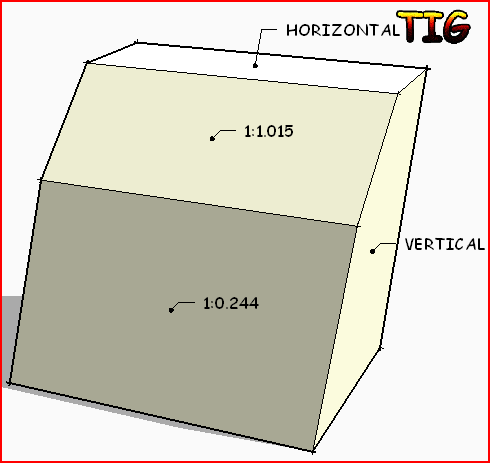
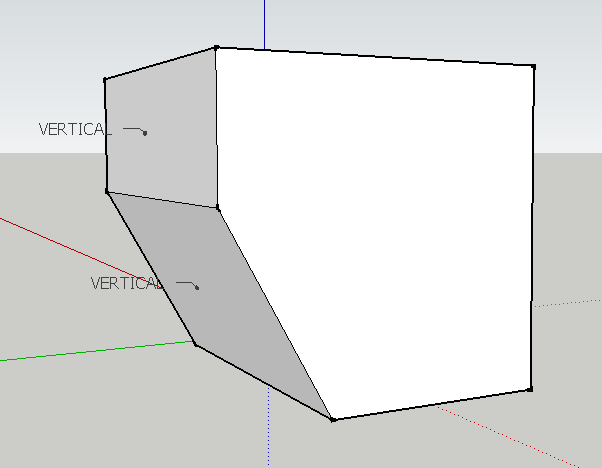
Could you post an example SKP showing us where this happens? -
Look this
-
I understand! Any face that is facing 'down' returns 'VERTICAL'...

It was intended for roof/land-form slopes which are not usually upside down...
BUT it's an easy fix... I'll post an update asap...
-
@tig said:
I understand! Any face that is facing 'down' returns VERTICAL too...
It was intended for roof/land-form slopes which are not usually upside down...
BUT it's an easy fix... I'll post an update asap...THX
Your are so Warm-hearted -
Here's v1.2 20100813 Downward pointing faces will now report the correct slope.
http://forums.sketchucation.com/viewtopic.php?p=264130#p264130 -
Thank you TIG for your continuing wonderful contributions.
-
For a moment I thought you had found a way of making gradient materials...
-
@pixero said:
For a moment I thought you had found a way of making gradient materials...
It simply reports the gradients of edges and faces and tags them - all edge/facetags can be relinked to an edge/face ob a menu click. They are put on their own layers for ease of management.
The use it's intended for is reporting and controlling the gradients of landforms and paths - as you make adjustments you can relink and see if the falls are still acceptable - i.e. not too flat or too steep.
You can also use it on roofs - checking that 'flat' roofs have adequate falls, tiled/slated/shingle roofs have suitable slopes and valleys etc are steep enough.
The tool tags edges or faces as I found that sometimes you need edges like valley centerlines but it's possible to have a face with no edges directly up/down the gradient, then you need to tag the face gradient...
[You can make Gradient Materials using a suitably graded Texture Image - see http://forums.sketchucation.com/viewtopic.php?p=149747#p149747 ]
-
Here's v1.3 20100814 A 'Relink ALL Tags' menu option has been added.
http://forums.sketchucation.com/viewtopic.php?p=264130#p264130 -
@unknownuser said:
@pixero said:
For a moment I thought you had found a way of making gradient materials...
Would it be possible to make this, TIG?
See the link - it's already been done ? Or am I missing something ??
-
Sorry if I used the wrong word, but I was thinking of a procedural ramp texture.
Something like this: http://www.pixero.com/tutorials_ramp.html -
Hello Tig,
I'm new to this plugin and have just downloaded it and am trying to understand how the ratio is representing the gradient.
Is there a way to represent this ratio in degrees?
-
@frekky12 said:
Hello Tig,
I'm new to this plugin and have just downloaded it and am trying to understand how the ratio is representing the gradient.
Is there a way to represent this ratio in degrees?
It's a rise over run thing. 1:1 would be one unit of rise and one unit of run or 45°.
You can get the angle using the yellow Protractor tool.
-
My Roof tool also has a function to report the angle of a picked roof slope in degrees, A:12 and A:B format...
-
TIG, many thanks for your efforts!
Could there be support for slopes in percent? -
optionally http://www.blocklayer.com/PitchAngle.aspx






Hello! It looks like you're interested in this conversation, but you don't have an account yet.
Getting fed up of having to scroll through the same posts each visit? When you register for an account, you'll always come back to exactly where you were before, and choose to be notified of new replies (either via email, or push notification). You'll also be able to save bookmarks and upvote posts to show your appreciation to other community members.
With your input, this post could be even better 💗
Register Login


Advertisement