sketchucation logo sketchucation
    • Login
    Oops, your profile's looking a bit empty! To help us tailor your experience, please fill in key details like your SketchUp version, skill level, operating system, and more. Update and save your info on your profile page today!
    ⚠️ Update | Sketchucation Tools 5.0.8 released with licensing improvements and bugfixes Download

    [Plugin] Gradient Tools

    Scheduled Pinned Locked Moved Plugins
    24 Posts 11 Posters 47.5k Views 11 Watching
    Loading More Posts
    • Oldest to Newest
    • Newest to Oldest
    • Most Votes
    Reply
    • Reply as topic
    Log in to reply
    This topic has been deleted. Only users with topic management privileges can see it.
    • TIGT
      TIG Moderator
      last edited by TIG

      This set of tools adds text-tages to lines/faces giving the gradient as 1:nnn
      There are also 'relink' options to update them after changing geometry - unfortunately the EntityObserver onEntityChange doesn't pick up any edge/vertex changes automatically! Aaaargh! 😒

      (c) TIG 2010

      gradienttools.rb goes into Plugins folder.

      Usage:

      [flash=600,338:3iwrudlj]http://www.youtube.com/v/biRTVCPfszg[/flash:3iwrudlj]

      Tag Lines:

      Select some stuff including the desired Edges.
      Pick Plugins Menu Item 'Gradient Tools...' > 'Lines'
      ot type 'gradientline' into the Ruby Console.
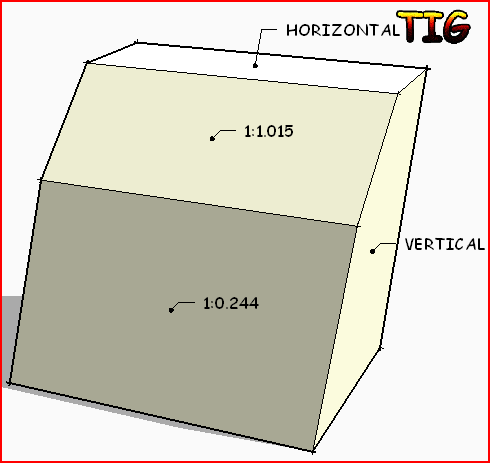
      Text is added at center of the Edges says something like
      '1:60' or '1:25.125' or 'HORIZONTAL' or 'VERTICAL'
      [if no more than 1mm difference between end levels].
      Text is put on layer 'GRAD-LINE'.
      See below on how to adjust the default text offset 'vec='...
      You can move the text-tag using the Text tool - this location remembered on
      Relinking although the arrow will relocate to the Edge's midpoint if appropriate.

      Tag Faces:

      Select some stuff including the desired Faces.
      Pick Plugins Menu Item 'Gradient Tools...' > 'Faces'
      ot type 'gradientface' into the Ruby Console.
      Text is added at center of the Face says something like
      '1:60' or '1:25.125' or 'HORIZONTAL' or 'VERTICAL'
      [if no more than 1mm difference between end levels].
      Text is put on layer 'GRAD-FACE'.
      See below on how to adjust the default text offset 'vec='...
      You can move the text-tag using the Text tool - this location remembered on
      Relinking although the arrow will relocate to the Face's center if appropriate.

      Relink Line Tags:

      This relinks any tagged Edges - using the current gradient for the updated Text
      and the current Edge's midpoint for the arrow [relocated text is not moved].
      EntityObservers fail on edges/vertices if they are just moved so they can't be used.

      Relink Face Tags:

      This relinks any tagged Faces - using the current gradient for the updated Text
      and the current Face's center for the arrow [relocated text is not moved].

      Relink ALL Tags:

      This runs 'Relink Line Tags' and 'Relink Face Tags' at the same time.

      Donations:
      by PayPal.com to TIGrant@BTinternet.com PayPalButton
      Version:
      1.0 20100812 First Issue as linegradient.rb
      1.1 20100813 Renamed 'gradienttools.rb'. 'Gradient Tools...' submenu added.
      Split into tools for 'Lines' and 'Faces'.
      Layer GRAD-LINE/GRAD-FACE used. Text-tag now 'tied' to Edge/Face
      and changes to match the Edge/Face if 'Relink' option used.
      1.2 20100813 Downward pointing faces will now report the correct slope.
      1.3 20100814 'Relink ALL Tags' menu option added.
      gradienttools.rb

      TIG

      1 Reply Last reply
      Reply Quote 0
      • mitcorbM
        mitcorb
        last edited by

        Let me be one of the first to offer salutations to a prolific Ruby Titan on yet another great achievement!!!

        And, if I lived in your neighborhood, I would be there to help you complete your remodeling tasks, TIG.

        I take the slow, deliberate approach in my aimless wandering.

        1 Reply Last reply
        Reply Quote 0
        • B
          Ben Ritter
          last edited by

          TIG, Thank you very much, for this and all that you do and share.

          1 Reply Last reply
          Reply Quote 0
          • H
            hebeijianke
            last edited by

            TIG
            THX
            I have a Question
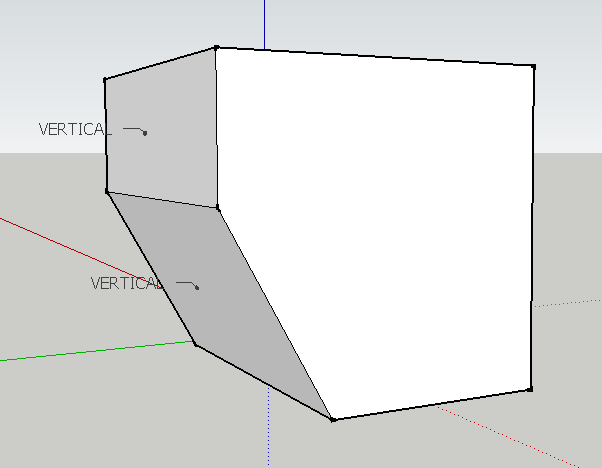
            When I use "Tag Faces"
            It tags always "VERTICAL" or "HORIZONTAL"
            Is it right?

            1 Reply Last reply
            Reply Quote 0
            • TIGT
              TIG Moderator
              last edited by

              @hebeijianke said:

              ...When I use "Tag Faces"
              It tags always "VERTICAL" or "HORIZONTAL"
              Is it right?
              Should be the same with LINES [edges] AND FACES
              A vertical/near-vertical Face/Line = VERTICAL
              A horizontal/near-horizontal Face/Line = HORIZONTAL
              ALL other slopes return 1:NNN values ?
              You need to 'Relink' if you change a Face or Line's vertex...Capture.PNG
              Could you post an example SKP showing us where this happens?

              TIG

              1 Reply Last reply
              Reply Quote 0
              • H
                hebeijianke
                last edited by

                Look this


                0.png

                1 Reply Last reply
                Reply Quote 0
                • TIGT
                  TIG Moderator
                  last edited by

                  I understand! Any face that is facing 'down' returns 'VERTICAL'... 😕
                  It was intended for roof/land-form slopes which are not usually upside down... 😒
                  BUT it's an easy fix... I'll post an update asap... 😉

                  TIG

                  1 Reply Last reply
                  Reply Quote 0
                  • H
                    hebeijianke
                    last edited by

                    @tig said:

                    I understand! Any face that is facing 'down' returns VERTICAL too...
                    It was intended for roof/land-form slopes which are not usually upside down...
                    BUT it's an easy fix... I'll post an update asap...

                    THX
                    Your are so Warm-hearted

                    1 Reply Last reply
                    Reply Quote 0
                    • TIGT
                      TIG Moderator
                      last edited by

                      Here's v1.2 20100813 Downward pointing faces will now report the correct slope.
                      http://forums.sketchucation.com/viewtopic.php?p=264130#p264130

                      TIG

                      1 Reply Last reply
                      Reply Quote 0
                      • C
                        chloesdad
                        last edited by

                        Thank you TIG for your continuing wonderful contributions.

                        1 Reply Last reply
                        Reply Quote 0
                        • PixeroP
                          Pixero
                          last edited by

                          For a moment I thought you had found a way of making gradient materials...

                          1 Reply Last reply
                          Reply Quote 0
                          • TIGT
                            TIG Moderator
                            last edited by

                            @pixero said:

                            For a moment I thought you had found a way of making gradient materials...

                            It simply reports the gradients of edges and faces and tags them - all edge/facetags can be relinked to an edge/face ob a menu click. They are put on their own layers for ease of management.
                            The use it's intended for is reporting and controlling the gradients of landforms and paths - as you make adjustments you can relink and see if the falls are still acceptable - i.e. not too flat or too steep.
                            You can also use it on roofs - checking that 'flat' roofs have adequate falls, tiled/slated/shingle roofs have suitable slopes and valleys etc are steep enough.
                            The tool tags edges or faces as I found that sometimes you need edges like valley centerlines but it's possible to have a face with no edges directly up/down the gradient, then you need to tag the face gradient... 🤓

                            [You can make Gradient Materials using a suitably graded Texture Image - see http://forums.sketchucation.com/viewtopic.php?p=149747#p149747 ]

                            TIG

                            1 Reply Last reply
                            Reply Quote 0
                            • TIGT
                              TIG Moderator
                              last edited by

                              Here's v1.3 20100814 A 'Relink ALL Tags' menu option has been added.
                              http://forums.sketchucation.com/viewtopic.php?p=264130#p264130

                              TIG

                              1 Reply Last reply
                              Reply Quote 0
                              • TIGT
                                TIG Moderator
                                last edited by

                                @unknownuser said:

                                @pixero said:

                                For a moment I thought you had found a way of making gradient materials...

                                Would it be possible to make this, TIG?

                                See the link - it's already been done ? Or am I missing something ??

                                TIG

                                1 Reply Last reply
                                Reply Quote 0
                                • PixeroP
                                  Pixero
                                  last edited by

                                  Sorry if I used the wrong word, but I was thinking of a procedural ramp texture.
                                  Something like this: http://www.pixero.com/tutorials_ramp.html

                                  1 Reply Last reply
                                  Reply Quote 0
                                  • F
                                    frekky12
                                    last edited by

                                    Hello Tig,

                                    I'm new to this plugin and have just downloaded it and am trying to understand how the ratio is representing the gradient.

                                    Is there a way to represent this ratio in degrees?

                                    1 Reply Last reply
                                    Reply Quote 0
                                    • Dave RD
                                      Dave R
                                      last edited by

                                      @frekky12 said:

                                      Hello Tig,

                                      I'm new to this plugin and have just downloaded it and am trying to understand how the ratio is representing the gradient.

                                      Is there a way to represent this ratio in degrees?

                                      It's a rise over run thing. 1:1 would be one unit of rise and one unit of run or 45°.

                                      You can get the angle using the yellow Protractor tool.

                                      Etaoin Shrdlu

                                      %

                                      (THERE'S NO PLACE LIKE)

                                      G28 X0.0 Y0.0 Z0.0

                                      M30

                                      %

                                      1 Reply Last reply
                                      Reply Quote 0
                                      • TIGT
                                        TIG Moderator
                                        last edited by

                                        My Roof tool also has a function to report the angle of a picked roof slope in degrees, A:12 and A:B format...

                                        TIG

                                        1 Reply Last reply
                                        Reply Quote 0
                                        • R
                                          rv1974
                                          last edited by

                                          TIG, many thanks for your efforts!
                                          Could there be support for slopes in percent?

                                          1 Reply Last reply
                                          Reply Quote 0
                                          • gullfoG
                                            gullfo
                                            last edited by

                                            optionally http://www.blocklayer.com/PitchAngle.aspx

                                            Glenn

                                            http://www.runnel.com

                                            1 Reply Last reply
                                            Reply Quote 0

                                            Hello! It looks like you're interested in this conversation, but you don't have an account yet.

                                            Getting fed up of having to scroll through the same posts each visit? When you register for an account, you'll always come back to exactly where you were before, and choose to be notified of new replies (either via email, or push notification). You'll also be able to save bookmarks and upvote posts to show your appreciation to other community members.

                                            With your input, this post could be even better 💗

                                            Register Login
                                            • 1
                                            • 2
                                            • 1 / 2
                                            • First post
                                              Last post
                                            Buy SketchPlus
                                            Buy SUbD
                                            Buy WrapR
                                            Buy eBook
                                            Buy Modelur
                                            Buy Vertex Tools
                                            Buy SketchCuisine
                                            Buy FormFonts

                                            Advertisement