sketchucation logo sketchucation
    • 登入
    Oops, your profile's looking a bit empty! To help us tailor your experience, please fill in key details like your SketchUp version, skill level, operating system, and more. Update and save your info on your profile page today!
    🔌 Easy Offset | Offset selected faces in SketchUp in positive and negative offsets. Download

    [Plugin][$] Vertex Tools

    已排程 已置頂 已鎖定 已移動 Plugins
    667 貼文 92 Posters 414.5k 瀏覽 92 Watching
    正在載入更多貼文
    • 從舊到新
    • 從新到舊
    • 最多點贊
    回覆
    • 在新貼文中回覆
    登入後回覆
    此主題已被刪除。只有擁有主題管理權限的使用者可以查看。
    • X 離線
      xrok1
      最後由 編輯

      it would be like the smoove tool works when nothing is preselected. 😉
      also a weld tool would be nice too with distance setting like in MAX. 💚

      “There are three classes of people: those who see. Those who see when they are shown. Those who do not see.”

      http://www.Twilightrender.com try it!

      1 條回覆 最後回覆 回覆 引用 0
      • thomthomT 離線
        thomthom
        最後由 編輯

        @xrok1 said:

        also a weld tool would be nice too with distance setting like in MAX. 💚

        Yup! Already on my list.

        ... I should probably make a list of the features I am planning...

        Other features are:
        Jitter - randomly offset the vertices
        Gizmos - Move,Rotate and Scale gizmos for better control

        And some other stuff 😉

        Thomas Thomassen — SketchUp Monkey & Coding addict
        List of my plugins and link to the CookieWare fund

        1 條回覆 最後回覆 回覆 引用 0
        • X 離線
          xrok1
          最後由 編輯

          love the jitter idea. i already use the jitter ruby (modified a little 😉 ) to add a little age or just mellow out the CG look sometimes.

          “There are three classes of people: those who see. Those who see when they are shown. Those who do not see.”

          http://www.Twilightrender.com try it!

          1 條回覆 最後回覆 回覆 引用 0
          • honoluludesktopH 離線
            honoluludesktop
            最後由 編輯

            Wow, it that a mesh, or linked surfaces?

            1 條回覆 最後回覆 回覆 引用 0
            • thomthomT 離線
              thomthom
              最後由 編輯

              @honoluludesktop said:

              Wow, it that a mesh, or linked surfaces?

              What is?

              Thomas Thomassen — SketchUp Monkey & Coding addict
              List of my plugins and link to the CookieWare fund

              1 條回覆 最後回覆 回覆 引用 0
              • honoluludesktopH 離線
                honoluludesktop
                最後由 編輯

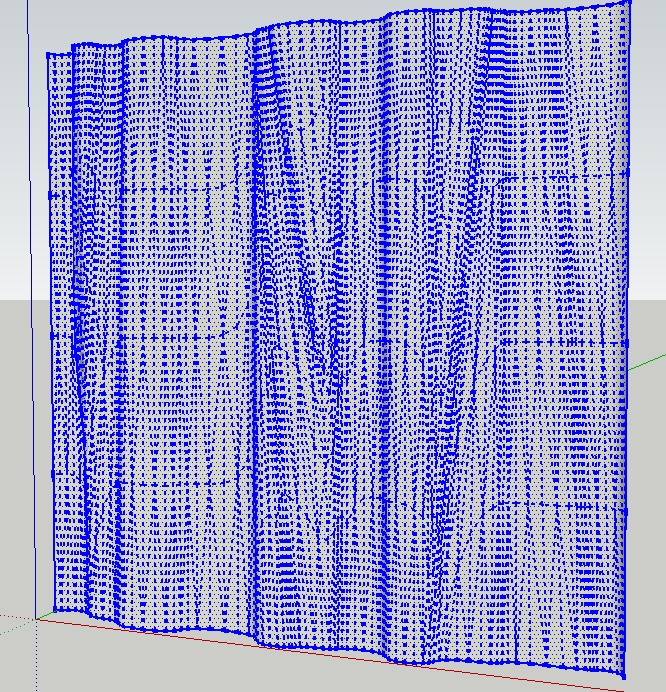
                The plane, or cylinder, etc. Hmm..... maybe I don't know how to ask my question. If still unclear, attached is a sample. Can I change its shape? What happens to the textures? Btw, thats a very slick menu.

                Temp53.jpg


                Temp00.skp

                1 條回覆 最後回覆 回覆 引用 0
                • thomthomT 離線
                  thomthom
                  最後由 編輯

                  @honoluludesktop said:

                  If still unclear, attached is a sample. Can I change its shape?

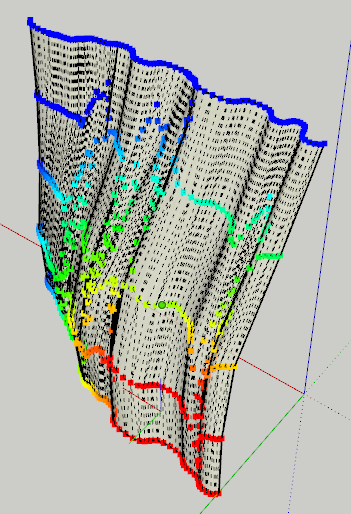
                  Yes - here's your model after I selected a part of it, with soft selection and moved it. Looks like the wind pushes the curtains.
                  Curtains.png

                  As for the UV mapping, that will unfortunately be messed up - as normally happens in SketchUp when you modify UV mapped geometry.
                  However, this is another feature I am looking into. If I can get it working I will probably also make a standalone "preserve UV mapping" plugin.

                  I hope that answered your question? 😕

                  Thomas Thomassen — SketchUp Monkey & Coding addict
                  List of my plugins and link to the CookieWare fund

                  1 條回覆 最後回覆 回覆 引用 0
                  • thomthomT 離線
                    thomthom
                    最後由 編輯

                    Btw, here is your sample file after I modified it. The UV mapping didn't seem to bad.
                    UVmapping.png


                    Temp00_TT.skp

                    Thomas Thomassen — SketchUp Monkey & Coding addict
                    List of my plugins and link to the CookieWare fund

                    1 條回覆 最後回覆 回覆 引用 0
                    • honoluludesktopH 離線
                      honoluludesktop
                      最後由 編輯

                      Thanks, where were you when I needed it 🙂 the texture was a SU floor covering that I scaled and changed the color of.

                      1 條回覆 最後回覆 回覆 引用 0
                      • thomthomT 離線
                        thomthom
                        最後由 編輯

                        Coding into the night 😉

                        Thomas Thomassen — SketchUp Monkey & Coding addict
                        List of my plugins and link to the CookieWare fund

                        1 條回覆 最後回覆 回覆 引用 0
                        • shuraS 離線
                          shura
                          最後由 編輯

                          Woohoo! Thomas, this is a fantastic modelling tool! I feel so lucky watching this wonderful software growing in your hands. Gizmo control? how cool is THAT?
                          btw, nice to hear your voice again 😉
                          best
                          alex

                          1 條回覆 最後回覆 回覆 引用 0
                          • X 離線
                            xrok1
                            最後由 編輯

                            Thom, what address do you send your email from? maybe the domain name is in my blocked sender list for some reason. i still havn't recieved. 😞

                            “There are three classes of people: those who see. Those who see when they are shown. Those who do not see.”

                            http://www.Twilightrender.com try it!

                            1 條回覆 最後回覆 回覆 引用 0
                            • honoluludesktopH 離線
                              honoluludesktop
                              最後由 編輯

                              Thom, How difficult would it be to use portions of your algorithm to redraw a selected mesh with 50% less faces? We could use a simple plugin to do this. I have a pair of shoes I like to include in my scenes to be rendered that have more faces then the model itself. If I could select the mesh that I needed reduced, even if the change is by every other vertex, I could reduce the mesh to something manageable.

                              1 條回覆 最後回覆 回覆 引用 0
                              • X 離線
                                xrok1
                                最後由 編輯

                                are you talking about a cage or proxy mesh? or opposite of subdivision?

                                “There are three classes of people: those who see. Those who see when they are shown. Those who do not see.”

                                http://www.Twilightrender.com try it!

                                1 條回覆 最後回覆 回覆 引用 0
                                • honoluludesktopH 離線
                                  honoluludesktop
                                  最後由 編輯

                                  What is a cage or a proxy mesh?

                                  1 條回覆 最後回覆 回覆 引用 0
                                  • X 離線
                                    xrok1
                                    最後由 編輯

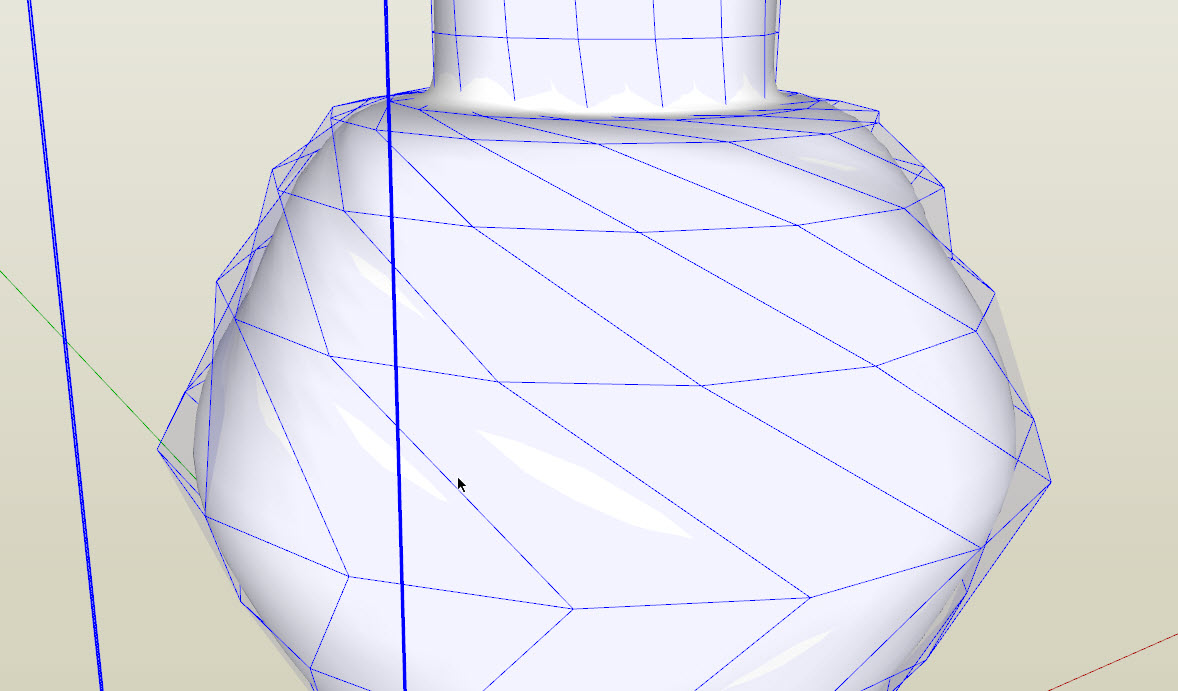
                                    like in SDS where you edit a high poly mesh with a low poly mesh (cage) around it.

                                    here is an example: you manipulate the outer mesh to effect the inner one.

                                    Capture1.JPG

                                    “There are three classes of people: those who see. Those who see when they are shown. Those who do not see.”

                                    http://www.Twilightrender.com try it!

                                    1 條回覆 最後回覆 回覆 引用 0
                                    • X 離線
                                      xrok1
                                      最後由 編輯

                                      😲 this is better than i could have dreamed! it works with SDS!!!!!!!!!!!! 😮

                                      SDS WITH SOFT SELECTION!

                                      http://forsythe4kc.com/uploaded_images/HeadExplodeBig.gif


                                      Capture1.JPG

                                      “There are three classes of people: those who see. Those who see when they are shown. Those who do not see.”

                                      http://www.Twilightrender.com try it!

                                      1 條回覆 最後回覆 回覆 引用 0
                                      • ArcA 離線
                                        Arc
                                        最後由 編輯

                                        I made a little video tut, but I don'n know how to instert ping video in post?
                                        http://www.screencast.com/t/OTlkZWRjMT

                                        [flash=800,600:29tenr79]http://content.screencast.com/users/xwtao/folders/Jing/media/9c408fd9-078e-401b-bb07-fe845dfd7e86/2010-07-21_vertextools.swf&blurover=false[/flash:29tenr79]

                                        1 條回覆 最後回覆 回覆 引用 0
                                        • honoluludesktopH 離線
                                          honoluludesktop
                                          最後由 編輯

                                          Not sure I get it, but it seems like what I suggested is a simple reversal of subdivide. May be not so simple?

                                          1 條回覆 最後回覆 回覆 引用 0
                                          • thomthomT 離線
                                            thomthom
                                            最後由 編輯

                                            @shura said:

                                            Woohoo! Thomas, this is a fantastic modelling tool! I feel so lucky watching this wonderful software growing in your hands. Gizmo control? how cool is THAT?
                                            btw, nice to hear your voice again 😉
                                            best
                                            alex

                                            Hi Alex! Thank you very much!
                                            Hope you are doing well. Give me a shout if you should find yourself in Trondheim again! 😄

                                            Thomas Thomassen — SketchUp Monkey & Coding addict
                                            List of my plugins and link to the CookieWare fund

                                            1 條回覆 最後回覆 回覆 引用 0
                                            • 1
                                            • 2
                                            • 3
                                            • 4
                                            • 5
                                            • 33
                                            • 34
                                            • 2 / 34
                                            • 第一個貼文
                                              最後的貼文
                                            Buy SketchPlus
                                            Buy SUbD
                                            Buy WrapR
                                            Buy eBook
                                            Buy Modelur
                                            Buy Vertex Tools
                                            Buy SketchCuisine
                                            Buy FormFonts

                                            Advertisement