sketchucation logo sketchucation
    • Login
    Oops, your profile's looking a bit empty! To help us tailor your experience, please fill in key details like your SketchUp version, skill level, operating system, and more. Update and save your info on your profile page today!
    Mac User? | Join the Rayscaper Beta for Mac Learn More

    [Plugin][$] Vertex Tools

    Scheduled Pinned Locked Moved Plugins
    667 Posts 92 Posters 655.8k Views 92 Watching
    Loading More Posts
    • Oldest to Newest
    • Newest to Oldest
    • Most Votes
    Reply
    • Reply as topic
    Log in to reply
    This topic has been deleted. Only users with topic management privileges can see it.
    • thomthomT
      thomthom
      last edited by

      @einstein said:

      Cool, but you still cannot manipulate soft selection profile, right? 😞
      I wished so much for that feature. We're getting closer to Blender now but I'd love to have various profile types.

      Not yet - but it's still on my list. πŸ˜„

      Thomas Thomassen β€” SketchUp Monkey & Coding addict
      List of my plugins and link to the CookieWare fund

      1 Reply Last reply
      Reply Quote 0
      • N
        nlipovac
        last edited by

        Finally, I can move vertex along edges. Yay!! πŸ˜„
        Thx for customer discount.

        1 Reply Last reply
        Reply Quote 0
        • thomthomT
          thomthom
          last edited by

          @nlipovac said:

          Finally, I can move vertex along edges. Yay!! πŸ˜„

          Vertex Slide is my personal favorite. πŸ˜„

          Thomas Thomassen β€” SketchUp Monkey & Coding addict
          List of my plugins and link to the CookieWare fund

          1 Reply Last reply
          Reply Quote 0
          • R
            rv1974
            last edited by

            Amazing product in every aspect Thomthom πŸ‘

            1 Reply Last reply
            Reply Quote 0
            • N
              nlipovac
              last edited by

              Well, I reallllllllyyyyyyy love Vertex Slide A LOT!
              Still having some pole issues but this time I have patients to finish it.
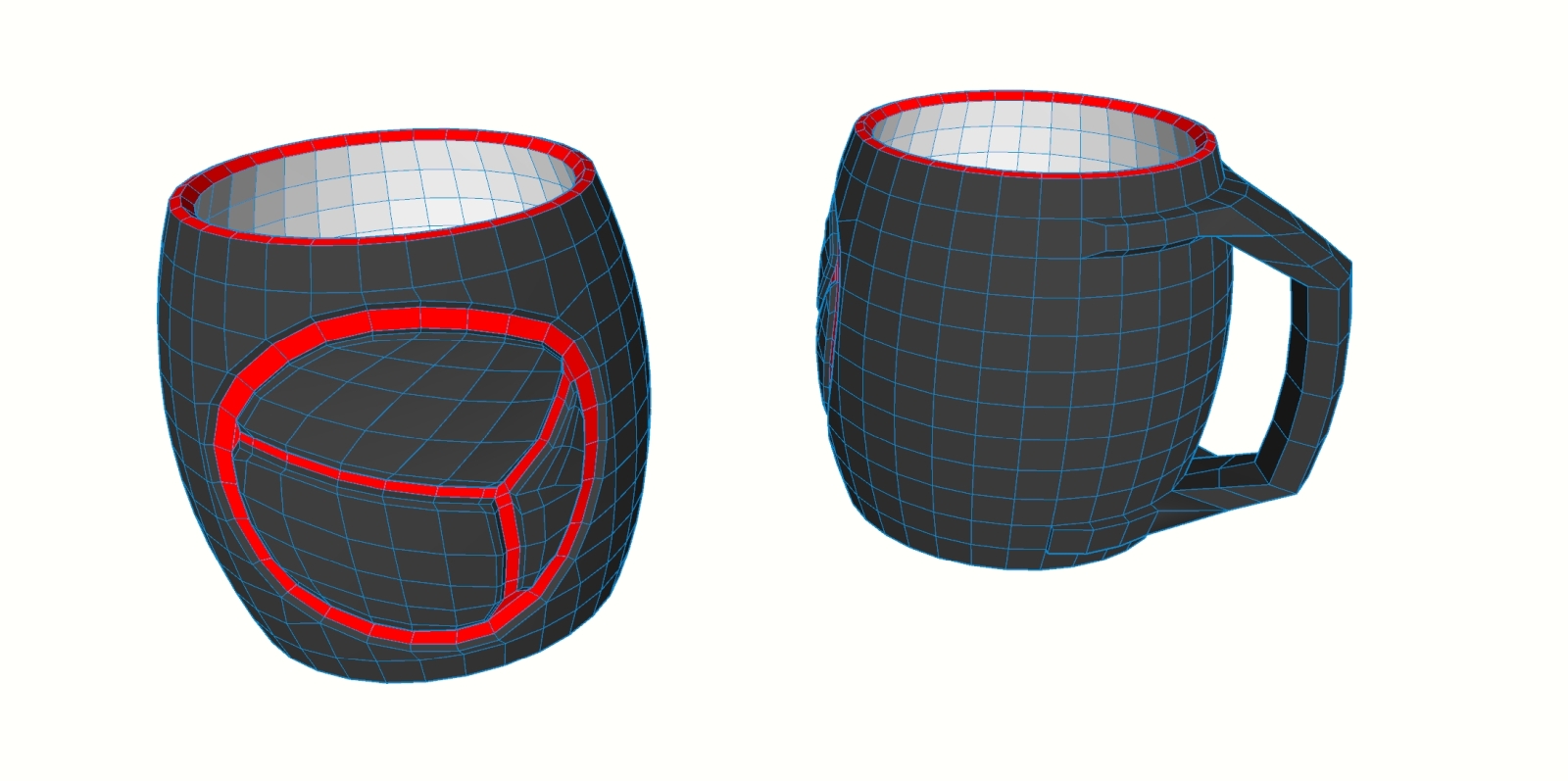

              Control mesh


              Subdivided

              1 Reply Last reply
              Reply Quote 0
              • HornOxxH
                HornOxx
                last edited by

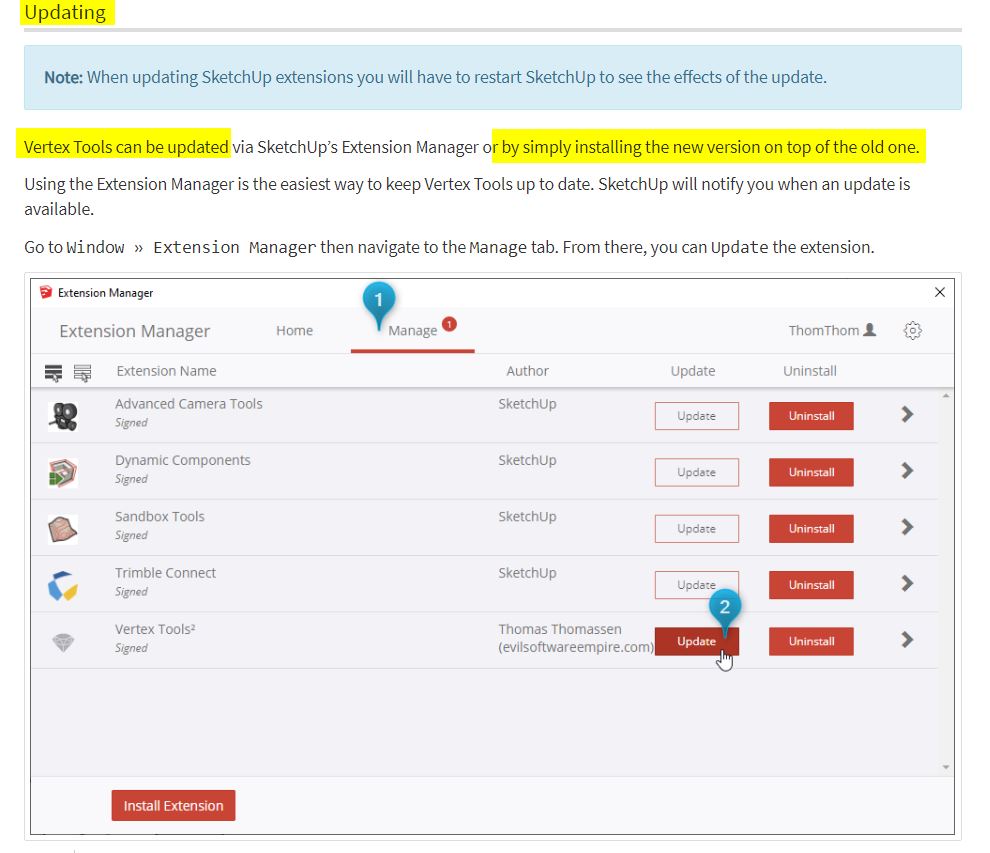
                ... for Dummies like me πŸ˜‰ - do I have to uninstall the previous vertex tools somehow before or does the new version overwrite the old one?

                EDIT:
                I have found the answer to my question πŸ˜„
                https://evilsoftwareempire.com/vertex-tools/manual/getting_started#updating


                update - Getting Started β€” Vertex Tools.jpg

                never trust a skinny cook

                1 Reply Last reply
                Reply Quote 0
                • thomthomT
                  thomthom
                  last edited by

                  @nlipovac said:

                  Well, I reallllllllyyyyyyy love Vertex Slide A LOT!
                  Still having some pole issues but this time I have patients to finish it.
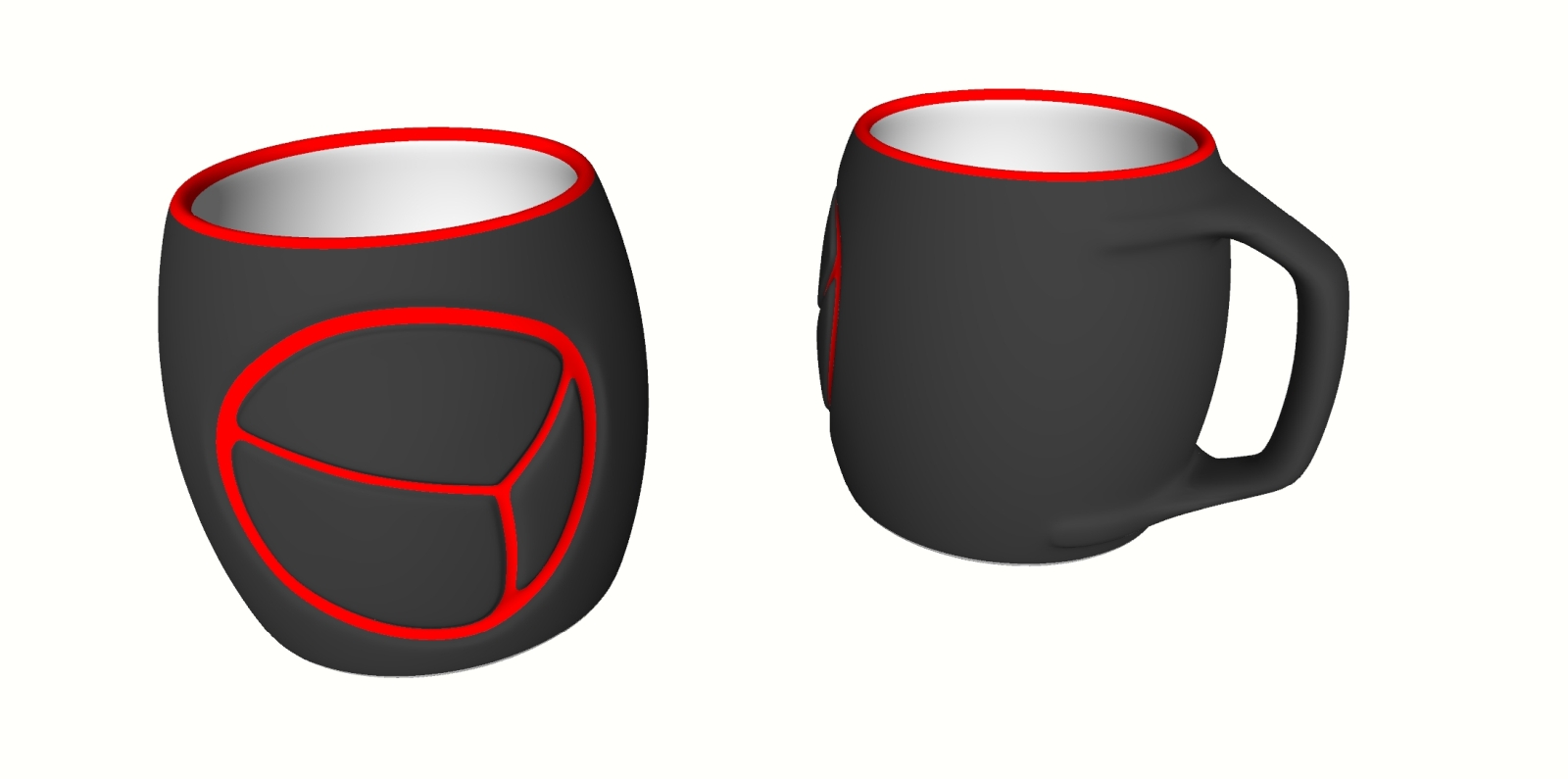
                  I want to find a 3D printing service that can make this in ceramic for me!

                  @hornoxx said:

                  ... for Dummies like me πŸ˜‰ - do I have to uninstall the previous vertex tools somehow before or does the new version overwrite the old one?

                  Version 2 can be installed side by side with version 1. (But v2 got everything v1 got - so I don't see the need.)

                  Thomas Thomassen β€” SketchUp Monkey & Coding addict
                  List of my plugins and link to the CookieWare fund

                  1 Reply Last reply
                  Reply Quote 0
                  • N
                    nlipovac
                    last edited by

                    I found this one in US.
                    https://kwambio.com/

                    @thomthom said:

                    @nlipovac said:

                    Well, I reallllllllyyyyyyy love Vertex Slide A LOT!
                    Still having some pole issues but this time I have patients to finish it.

                    I want to find a 3D printing service that can make this in ceramic for me!

                    @hornoxx said:

                    ... for Dummies like me πŸ˜‰ - do I have to uninstall the previous vertex tools somehow before or does the new version overwrite the old one?

                    Version 2 can be installed side by side with version 1. (But v2 got everything v1 got - so I don't see the need.)

                    1 Reply Last reply
                    Reply Quote 0
                    • thomthomT
                      thomthom
                      last edited by

                      Can you share the 3D model with me?

                      Thomas Thomassen β€” SketchUp Monkey & Coding addict
                      List of my plugins and link to the CookieWare fund

                      1 Reply Last reply
                      Reply Quote 0
                      • N
                        nlipovac
                        last edited by

                        Sure, IΒ΄ve sent you a PM with the model.

                        @thomthom said:

                        Can you share the 3D model with me?

                        1 Reply Last reply
                        Reply Quote 0
                        • R
                          rv1974
                          last edited by

                          tessellated variant will look more interesting. it'd be neat to print before\after subd set.

                          1 Reply Last reply
                          Reply Quote 0
                          • K
                            kaas
                            last edited by

                            Nice update and generous to give a discount to existing users. πŸ‘

                            1 Reply Last reply
                            Reply Quote 0
                            • cmeedC
                              cmeed
                              last edited by

                              Love this - a fantastic update..

                              Loving the vertex slide. question - Can we copy the vertexes along the edge?
                              the cursor changes, adds plus and minus with the addition of shift. I assume there isn't a copy function? (yet?)

                              Fantastic Extension - Professional in every way - I feel spoilt.

                              Cheers
                              Chris

                              1 Reply Last reply
                              Reply Quote 0
                              • thomthomT
                                thomthom
                                last edited by

                                @cmeed said:

                                Loving the vertex slide. question - Can we copy the vertexes along the edge?
                                the cursor changes, adds plus and minus with the addition of shift. I assume there isn't a copy function? (yet?)

                                That's interesting. I'll have to think a little on how that would technically work. But I logged it for consideration. πŸ‘

                                Thomas Thomassen β€” SketchUp Monkey & Coding addict
                                List of my plugins and link to the CookieWare fund

                                1 Reply Last reply
                                Reply Quote 0
                                • CadFatherC
                                  CadFather
                                  last edited by

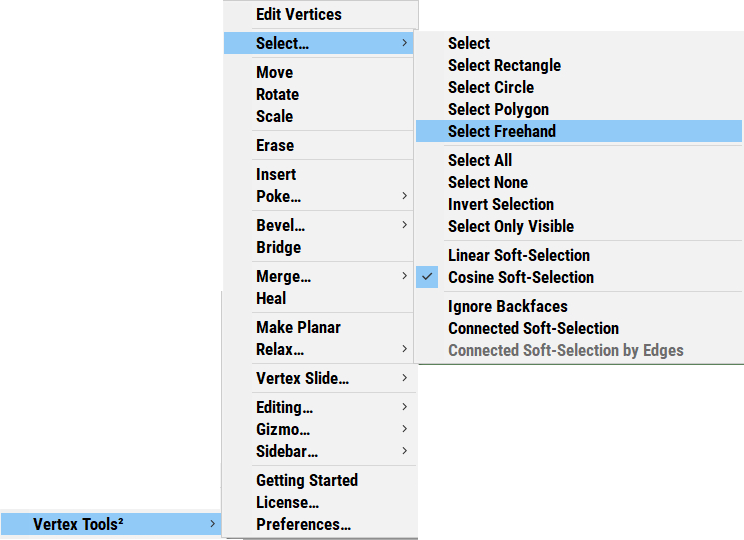
                                  when i choose the select tools from the menu, I only get the rectangle selection.

                                  works fine from the panel though

                                  (fantastic update btw)

                                  1 Reply Last reply
                                  Reply Quote 0
                                  • thomthomT
                                    thomthom
                                    last edited by

                                    @cadfather said:

                                    when i choose the select tools from the menu, I only get the rectangle selection.

                                    Menu or toolbar? Exactly what item do you select? Can you do a screenshot for me?

                                    Thomas Thomassen β€” SketchUp Monkey & Coding addict
                                    List of my plugins and link to the CookieWare fund

                                    1 Reply Last reply
                                    Reply Quote 0
                                    • CadFatherC
                                      CadFather
                                      last edited by

                                      Menu. same thing if i assign a shortcut to them (polygon, freehand, etc)
                                      scrmn.png

                                      1 Reply Last reply
                                      Reply Quote 0
                                      • thomthomT
                                        thomthom
                                        last edited by

                                        Ah! I see the same thing. That's a bug - thank you for reporting!

                                        Thomas Thomassen β€” SketchUp Monkey & Coding addict
                                        List of my plugins and link to the CookieWare fund

                                        1 Reply Last reply
                                        Reply Quote 0
                                        • cmeedC
                                          cmeed
                                          last edited by

                                          this has probably been asked before - can I move the gizmo and have it snap to a point? in 10 years of questions I think this has been asked.... 'negative' will be the answer.

                                          maybe i need to ask why cant it?

                                          cheers
                                          c

                                          1 Reply Last reply
                                          Reply Quote 0
                                          • Dave RD
                                            Dave R
                                            last edited by

                                            @cmeed said:

                                            'negative' will be the answer.

                                            Not so.

                                            Right click on the gizmo, choose the option and hold Shift while clicking to place it.

                                            vt.gif
                                            Click on the picture

                                            Etaoin Shrdlu

                                            %

                                            (THERE'S NO PLACE LIKE)

                                            G28 X0.0 Y0.0 Z0.0

                                            M30

                                            %

                                            1 Reply Last reply
                                            Reply Quote 0

                                            Hello! It looks like you're interested in this conversation, but you don't have an account yet.

                                            Getting fed up of having to scroll through the same posts each visit? When you register for an account, you'll always come back to exactly where you were before, and choose to be notified of new replies (either via email, or push notification). You'll also be able to save bookmarks and upvote posts to show your appreciation to other community members.

                                            With your input, this post could be even better πŸ’—

                                            Register Login
                                            • 1
                                            • 2
                                            • 29
                                            • 30
                                            • 31
                                            • 32
                                            • 33
                                            • 34
                                            • 31 / 34
                                            • First post
                                              Last post
                                            Buy SketchPlus
                                            Buy SUbD
                                            Buy WrapR
                                            Buy eBook
                                            Buy Modelur
                                            Buy Vertex Tools
                                            Buy SketchCuisine
                                            Buy FormFonts

                                            Advertisement