sketchucation logo sketchucation
    • 登入
    Oops, your profile's looking a bit empty! To help us tailor your experience, please fill in key details like your SketchUp version, skill level, operating system, and more. Update and save your info on your profile page today!
    🔌 Smart Spline | Fluid way to handle splines for furniture design and complex structures. Download

    [Plugin][$] Vertex Tools

    已排程 已置頂 已鎖定 已移動 Plugins
    667 貼文 92 Posters 434.1k 瀏覽 92 Watching
    正在載入更多貼文
    • 從舊到新
    • 從新到舊
    • 最多點贊
    回覆
    • 在新貼文中回覆
    登入後回覆
    此主題已被刪除。只有擁有主題管理權限的使用者可以查看。
    • thomthomT 離線
      thomthom
      最後由 編輯

      You know what, I'm a little unsure to be honest. I might be confusing it with the non-gizmo Move tool...

      Thomas Thomassen — SketchUp Monkey & Coding addict
      List of my plugins and link to the CookieWare fund

      1 條回覆 最後回覆 回覆 引用 0
      • HieruH 離線
        Hieru
        最後由 編輯

        I'm fairly certain it was a feature a while back, but was then lost in an update.

        I've mentioned it before and seem to recall you saying that it was on your to-do list for Version 2, but I could be wrong.

        www.davidhier.co.uk

        1 條回覆 最後回覆 回覆 引用 0
        • thomthomT 離線
          thomthom
          最後由 編輯

          Yea - that sounds familiar. The work on SUbD made me forget some of the details of existing Vertex Tools issues. Seeing how VT2 is taking longer to complete, I may have to do a bug patch to v1.2.

          Thomas Thomassen — SketchUp Monkey & Coding addict
          List of my plugins and link to the CookieWare fund

          1 條回覆 最後回覆 回覆 引用 0
          • N 離線
            numerobis
            最後由 編輯

            As i said earlier i would prefer a simple edge constraint toggle like in max instead of having to align the gizmo first every time i want to move a vertex along an edge...

            1 條回覆 最後回覆 回覆 引用 0
            • M 離線
              MichaelSiggers
              最後由 編輯

              Hi @thomthom

              This is a genius plugin!

              Purchased a couple of days ago and I love it.

              Only thing is, I second the comment about being able to type in a distance when moving a selection with the Gizmo.

              Brilliant work though. Thankyou.

              Kind regards

              Mike

              1 條回覆 最後回覆 回覆 引用 0
              • thomthomT 離線
                thomthom
                最後由 編輯

                Version 1.2.11

                Improvements

                • Added Serbian translations.
                • Added Albanian translations.
                • Updated Spanish translations.

                Fixes

                • Fixed Gizmo VCB adjustments not working.

                Thomas Thomassen — SketchUp Monkey & Coding addict
                List of my plugins and link to the CookieWare fund

                1 條回覆 最後回覆 回覆 引用 0
                • M 離線
                  MichaelSiggers
                  最後由 編輯

                  Thank you Thomas 😄 😄 😄 😄 😄 😄

                  Mike

                  1 條回覆 最後回覆 回覆 引用 0
                  • O 離線
                    optimaforever
                    最後由 編輯

                    Great!
                    To be sure:

                    1. select vertices
                    2. use VT's select mode (gizmo) and begin moving the vertices along red, green or blue axis.
                    3. WHILE keeping left mouse button down, type desired value in VCB. type enter.
                    4. the vertices gets moved along axis
                    5. RELEASE left mouse button.

                    Once you release the LMB, VCB awaits for soft select radius value, so it doesn't work like the move tool of Sketchup, where you can change your mind afterwards and tweak the move value.

                    Is it correct?

                    PS I realized that this behaviour works also for scale and rotate. Type value in VCB while keeping LMB pressed down. Once you press enter, the vertices gets modified according to the value.
                    It's just tricky for cases where I need to press Shift with my left hand while keeping the LMB pressed down. I noticed that you can release Shift after you began the scale movement and type a value in the VCB but you can't move the mouse otherwise the Shift indication gets lost.

                    1 條回覆 最後回覆 回覆 引用 0
                    • thomthomT 離線
                      thomthom
                      最後由 編輯

                      @optimaforever said:

                      Once you release the LMB, VCB awaits for soft select radius value, so it doesn't work like the move tool of Sketchup, where you can change your mind afterwards and tweak the move value.

                      With 1.2.11 you should be able to adjust after releasing LMB.
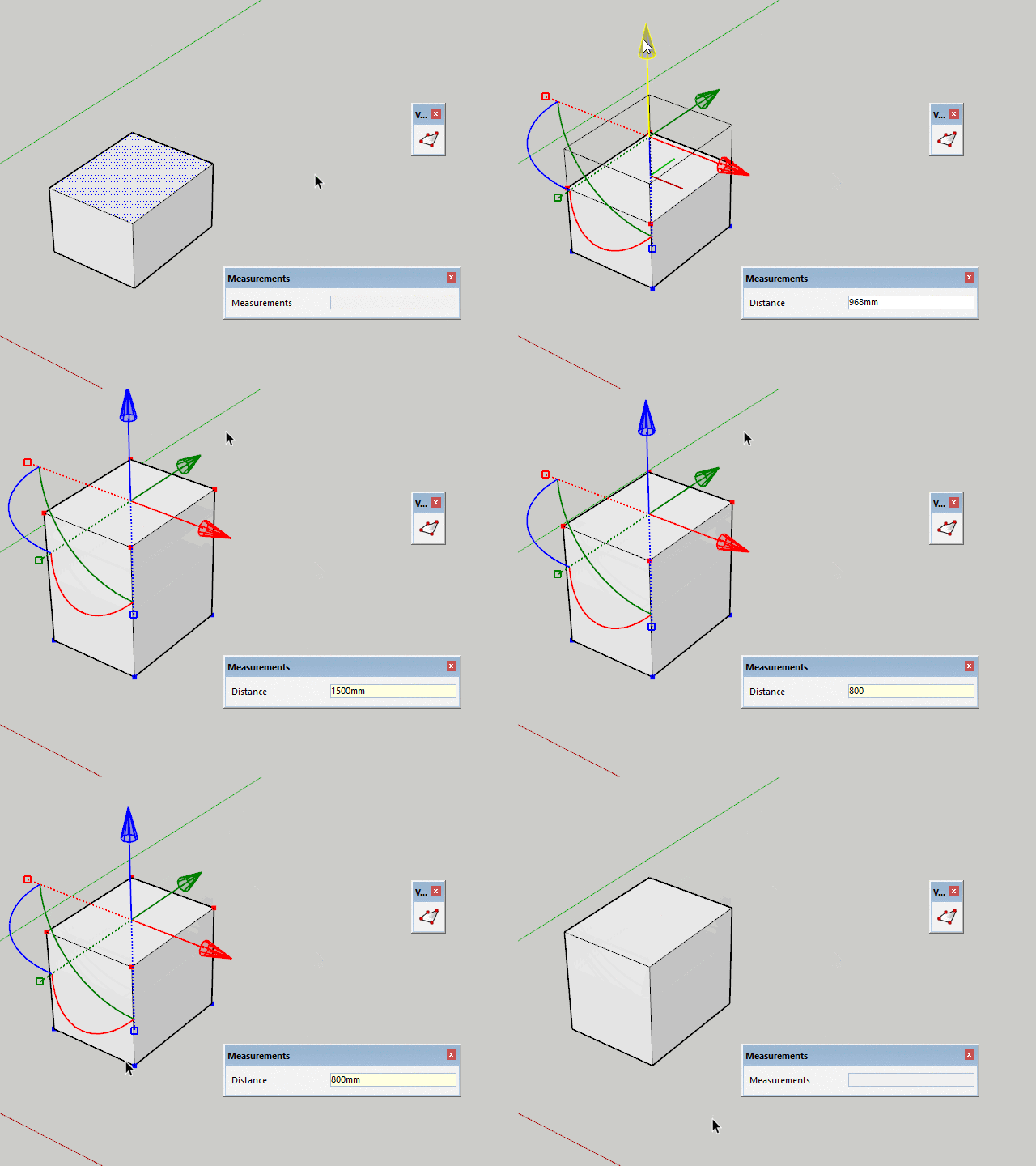
                      2018-02-04_10h42_19.gif

                      Thomas Thomassen — SketchUp Monkey & Coding addict
                      List of my plugins and link to the CookieWare fund

                      1 條回覆 最後回覆 回覆 引用 0
                      • O 離線
                        optimaforever
                        最後由 編輯

                        Thanks Thomas.
                        It works indeed as you said.
                        However I think I have a problem with the latest VT as it hangs SU at launch.
                        And second, when I try to Ctrl+move an edge AND type a value in the VCB afterwards, it bugs.

                        1 條回覆 最後回覆 回覆 引用 0
                        • Bob JamesB 離線
                          Bob James
                          最後由 編輯

                          Should I assume that "Make Planar to a custom plane" won't happen until V2?

                          i7-4930K 3.4Ghz, 2x GTX780 6GB, 32GB DDR3-1600 ECC, OCZ Vertex 4 500GB, WD Black 3TB, 32TB NAS, 4x 27" Monitors, SpaceMouse Pro, X-keys XK-60

                          1 條回覆 最後回覆 回覆 引用 0
                          • thomthomT 離線
                            thomthom
                            最後由 編輯

                            @optimaforever said:

                            However I think I have a problem with the latest VT as it hangs SU at launch.

                            SU freeze? Permanently? I see no reason for any change in startup. Minimal code was touched...

                            @optimaforever said:

                            And second, when I try to Ctrl+move an edge AND type a value in the VCB afterwards, it bugs.

                            Is this a new bug?

                            Thomas Thomassen — SketchUp Monkey & Coding addict
                            List of my plugins and link to the CookieWare fund

                            1 條回覆 最後回覆 回覆 引用 0
                            • O 離線
                              optimaforever
                              最後由 編輯

                              I don't know if this is a new bug but it happens right after typing the value in the VCB. Your bug window appears and I have already sent the bug message to you.

                              1 條回覆 最後回覆 回覆 引用 0
                              • thomthomT 離線
                                thomthom
                                最後由 編輯

                                I'm able to reproduce. I think I have a fix, but I need to test if it breaks other stuff.

                                Thomas Thomassen — SketchUp Monkey & Coding addict
                                List of my plugins and link to the CookieWare fund

                                1 條回覆 最後回覆 回覆 引用 0
                                • thomthomT 離線
                                  thomthom
                                  最後由 編輯

                                  Version 1.2.12

                                  Fixes

                                  • Fixes VCB adjustments for Gizmo Ctrl+Move.

                                  Thomas Thomassen — SketchUp Monkey & Coding addict
                                  List of my plugins and link to the CookieWare fund

                                  1 條回覆 最後回覆 回覆 引用 0
                                  • O 離線
                                    optimaforever
                                    最後由 編輯

                                    Cool. that was fast.

                                    1 條回覆 最後回覆 回覆 引用 0
                                    • O 離線
                                      optimaforever
                                      最後由 編輯

                                      About the hanging issue, it's very strange.
                                      It takes around 5-10 min after launching SU to be actually available (move in the viewport).
                                      Where can I check the launching log of SU?

                                      1 條回覆 最後回覆 回覆 引用 0
                                      • thomthomT 離線
                                        thomthom
                                        最後由 編輯

                                        @optimaforever said:

                                        Where can I check the launching log of SU?

                                        There is none...

                                        The lag goes away if you disable or remove VT?

                                        Thomas Thomassen — SketchUp Monkey & Coding addict
                                        List of my plugins and link to the CookieWare fund

                                        1 條回覆 最後回覆 回覆 引用 0
                                        • O 離線
                                          optimaforever
                                          最後由 編輯

                                          @thomthom said:

                                          The lag goes away if you disable or remove VT?

                                          I've tried this, but that doesn't change anything.
                                          I'm busy trying to reinstall SU 2017.

                                          1 條回覆 最後回覆 回覆 引用 0
                                          • thomthomT 離線
                                            thomthom
                                            最後由 編輯

                                            Have you tried removing all files related to Vertex Tools? After using uninstall from Extension Manager there might be files left. Could you check your Plugins folder?


                                            Thomas Thomassen — SketchUp Monkey & Coding addict
                                            List of my plugins and link to the CookieWare fund

                                            1 條回覆 最後回覆 回覆 引用 0
                                            • 1
                                            • 2
                                            • 8
                                            • 9
                                            • 10
                                            • 11
                                            • 12
                                            • 33
                                            • 34
                                            • 10 / 34
                                            • 第一個貼文
                                              最後的貼文
                                            Buy SketchPlus
                                            Buy SUbD
                                            Buy WrapR
                                            Buy eBook
                                            Buy Modelur
                                            Buy Vertex Tools
                                            Buy SketchCuisine
                                            Buy FormFonts

                                            Advertisement
